


⚡ Quick Reference
Keep the momentum going — everything you need on LearnXOps in one place:
- 🎓 Courses — Video courses & AI-built courses
- 📚 Ebooks — Community ebooks & your own
- 🧪 All Labs & Challenges — DevOps, Cloud, SRE & more
- ☸️ Kubernetes Labs & Playground — kind clusters, playground & challenges
- 🤖 AI Agent & Bot Labs — OpenClaw · Hermes · CrewAI · LangGraph · MCP
Hey — It's Sandip Das 👋
Ansible simplifies repetitive Docker tasks with consistent, idempotent automation.
It helps DevOps engineers manage containers at scale without manual intervention.
IN TODAY'S EDITION
💡 Learning points:
🔹 Use Ansible to declaratively manage Docker containers with modules like docker_container.
🔹 Ansible ensures idempotent container operations, preventing unnecessary changes.
🔹 Manage Docker images, networks, and volumes seamlessly using Ansible modules
🧠 Learn here:
Why Ansible for Docker?
Ansible lets you automate container management using simple YAML playbooks.
It matters because it brings consistency, repeatability, and efficiency to container operations across environments.
🧠 Use case:
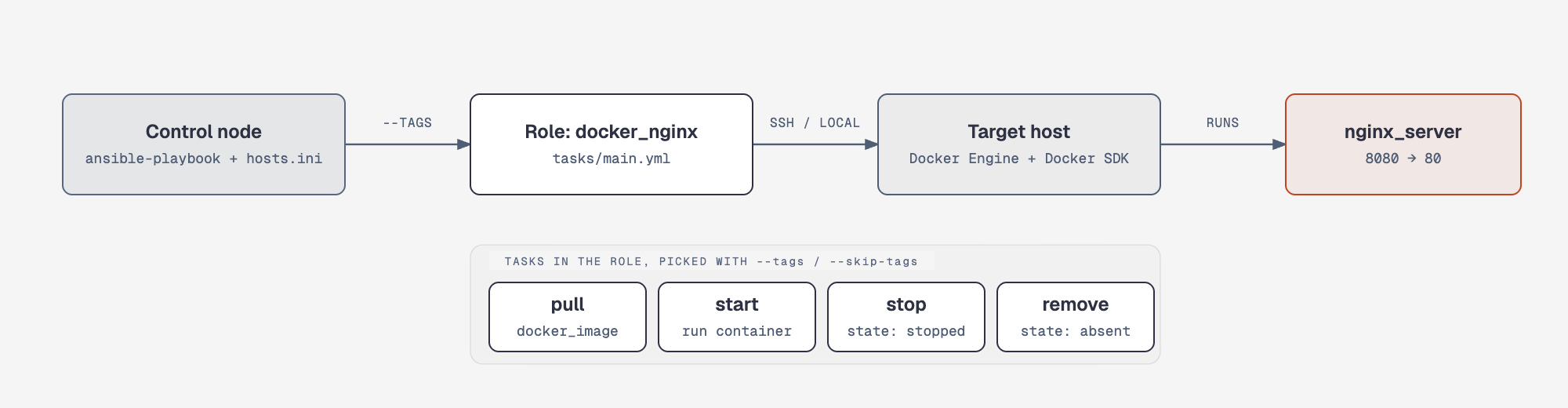
A DevOps team wants to automate deployment of NGINX containers across multiple servers.
Using Ansible, they write a playbook to pull the image, run containers, expose ports, and set restart policies.
This ensures consistent container setup across environments without manual Docker CLI commands.
🔧 Prerequisites
- Python's Docker SDK and other required modules & set-up virtual environment
# Create and activate a virtualenv
python3 -m venv venv
source venv/bin/activate

# Install required packages
pip install ansible docker requests
- Make sure that Docker is running in target machines
- Ansible Docker collection:
ansible-galaxy collection install community.docker
Steps we are going to perform:
- 📁 Set up project structure – Created folders for inventory, playbooks, and roles.
- ⚙️ Configured Ansible – Defined ansible.cfg with inventory and roles path.
- 🖥️ Created inventory file – Added localhost in hosts.ini for local testing.
- 📜Wrote playbook – Created docker-nginx.yml to include the Docker role.
- 🛠️ Added role tasks – Defined tasks in main.yml with tags like pull, start, stop, remove.
- 📥 Pulled Docker image – Used docker_image module to fetch the NGINX image.
- 🚀 Started container – Used docker_container to run NGINX with port mapping.
- ⏹️ Stopped container – Gracefully stopped the running container via tag.
- 🗑️ Removed container – Cleaned up the container when needed.
- 🏷️ Used tags for control – Ran specific tasks using --tags and --skip-tags.
- 🚫 Skipped selective tasks – Demonstrated running all except remove and stop.
Let’s have the Folder Structure like below:
📁 Folder Structure
ansible-docker-nginx/
├── inventory/
│   └── hosts.ini
├── playbooks/
│   └── docker-nginx.yml
├── roles/
│   └── docker_nginx/
│       ├── tasks/
│       │   └── main.yml
│       └── files/
├── ansible.cfg
└── README.md
📄 ansible.cfg
[defaults]
inventory = inventory/hosts.ini
roles_path = roles
📄 inventory/hosts.ini
[web]
# Use the venv's Python, which has the Docker SDK installed
localhost ansible_connection=local ansible_python_interpreter="{{ ansible_playbook_python }}"
📄 playbooks/docker-nginx.yml
---
- name: Manage Docker with Ansible (NGINX)
  hosts: web
  become: true
  roles:
    - docker_nginx
📄 roles/docker_nginx/tasks/main.yml
---
- name: Pull NGINX Docker image
  community.docker.docker_image:
    name: nginx
    source: pull
  tags: pull

- name: Start NGINX container
  community.docker.docker_container:
    name: nginx_server
    image: nginx
    state: started
    restart_policy: always
    published_ports:
      - "8080:80"
  tags: start

- name: Stop NGINX container
  community.docker.docker_container:
    name: nginx_server
    state: stopped
  tags: stop

- name: Remove NGINX container
  community.docker.docker_container:
    name: nginx_server
    state: absent
  tags: remove
💡 Usage Examples
Run specific tasks with tags:
# Pull image only
ansible-playbook playbooks/docker-nginx.yml --tags pull

# Start container
ansible-playbook playbooks/docker-nginx.yml --tags start

# Run everything except "remove" and "stop"
ansible-playbook playbooks/docker-nginx.yml --skip-tags "remove,stop"

# Stop container
ansible-playbook playbooks/docker-nginx.yml --tags stop

# Remove container
ansible-playbook playbooks/docker-nginx.yml --tags remove

# Add -K (--ask-become-pass) if sudo asks for a password
🧑💻 Feel free to get Source Codes from this GitHub Repo
📃 For more details & advanced use cases, check the official documentation here
👉 You may also like to read: Dynamic EC2 Inventory with Ansible
😇 Bonus: Installs Docker on the target machines via Ansible Playbook before running containers, assuming you are running Ubuntu. 👇
---
- name: Install Docker on Ubuntu
  hosts: web
  become: true
  tasks:
    - name: Install prerequisites
      ansible.builtin.apt:
        name: [ca-certificates, curl]
        state: present
        update_cache: true

    - name: Add Docker's GPG key
      ansible.builtin.get_url:
        url: https://download.docker.com/linux/ubuntu/gpg
        dest: /etc/apt/keyrings/docker.asc
        mode: "0644"

    - name: Add Docker's apt repository
      ansible.builtin.apt_repository:
        repo: "deb [arch={{ 'arm64' if ansible_architecture == 'aarch64' else 'amd64' }} signed-by=/etc/apt/keyrings/docker.asc] https://download.docker.com/linux/ubuntu {{ ansible_distribution_release }} stable"
        filename: docker
        state: present

    - name: Install Docker Engine
      ansible.builtin.apt:
        name: [docker-ce, docker-ce-cli, containerd.io, docker-buildx-plugin, docker-compose-plugin]
        state: present
        update_cache: true

    - name: Start and enable Docker
      ansible.builtin.service:
        name: docker
        state: started
        enabled: true
🕝 Explore past #60DaysOfDevOps challenges/solutions here:
Ansible Playbook - Deep Dive (60 Days DevOps Challenge Day 22)
Ansible Basics (60 Days DevOps Challenge Day 21)
Amazon DynamoDB: Serverless NoSQL DB at any scale (60 Days DevOps Challenge Day 20)
AWS RDS: Managed Relational Databases: (60 Days DevOps Challenge Day 19)
AWS ECS: Run and Scale Containerized Applications Effortlessly: (60 Days DevOps Challenge Day 18)
⚡ Quick Reference
Keep the momentum going — everything you need on LearnXOps in one place:
- 🎓 Courses — Video courses & AI-built courses
- 📚 Ebooks — Community ebooks & your own
- 🧪 All Labs & Challenges — DevOps, Cloud, SRE & more
- ☸️ Kubernetes Labs & Playground — kind clusters, playground & challenges
- 🤖 AI Agent & Bot Labs — OpenClaw · Hermes · CrewAI · LangGraph · MCP


Member discussion