


We should learn AWS DynamoDB to efficiently manage scalable, low-latency NoSQL databases for high-throughput applications.
⚡ Quick Reference
Keep the momentum going — everything you need on LearnXOps in one place:
- 🎓 Courses — Video courses & AI-built courses
- 📚 Ebooks — Community ebooks & your own
- 🧪 All Labs & Challenges — DevOps, Cloud, SRE & more
- ☸️ Kubernetes Labs & Playground — kind clusters, playground & challenges
- 🤖 AI Agent & Bot Labs — OpenClaw · Hermes · CrewAI · LangGraph · MCP
💡Learning points:
🔹 What is DynamoDB, and how does it differ from RDS (relational DB)
🔹 Core concepts: Tables, Items, Attributes, Primary Keys (Partition & Sort Keys)
🔹 Data model design for access patterns, not relationships
🔹 Provisioned vs On-Demand Capacity, Read/Write Capacity Units (RCUs/WCUs)
🔹 Global Secondary Indexes (GSI) and Local Secondary Indexes (LSI)
🔹 Streams for real-time change tracking
🔹 Integration with IAM, CloudWatch, and AWS SDKs (Boto3/Node.js)
🧠 Learn here:
Official Amazon DynamoDB Deep Dive Video
👉 More DynamoDB Learning Videos
Amazon DynamoDB :
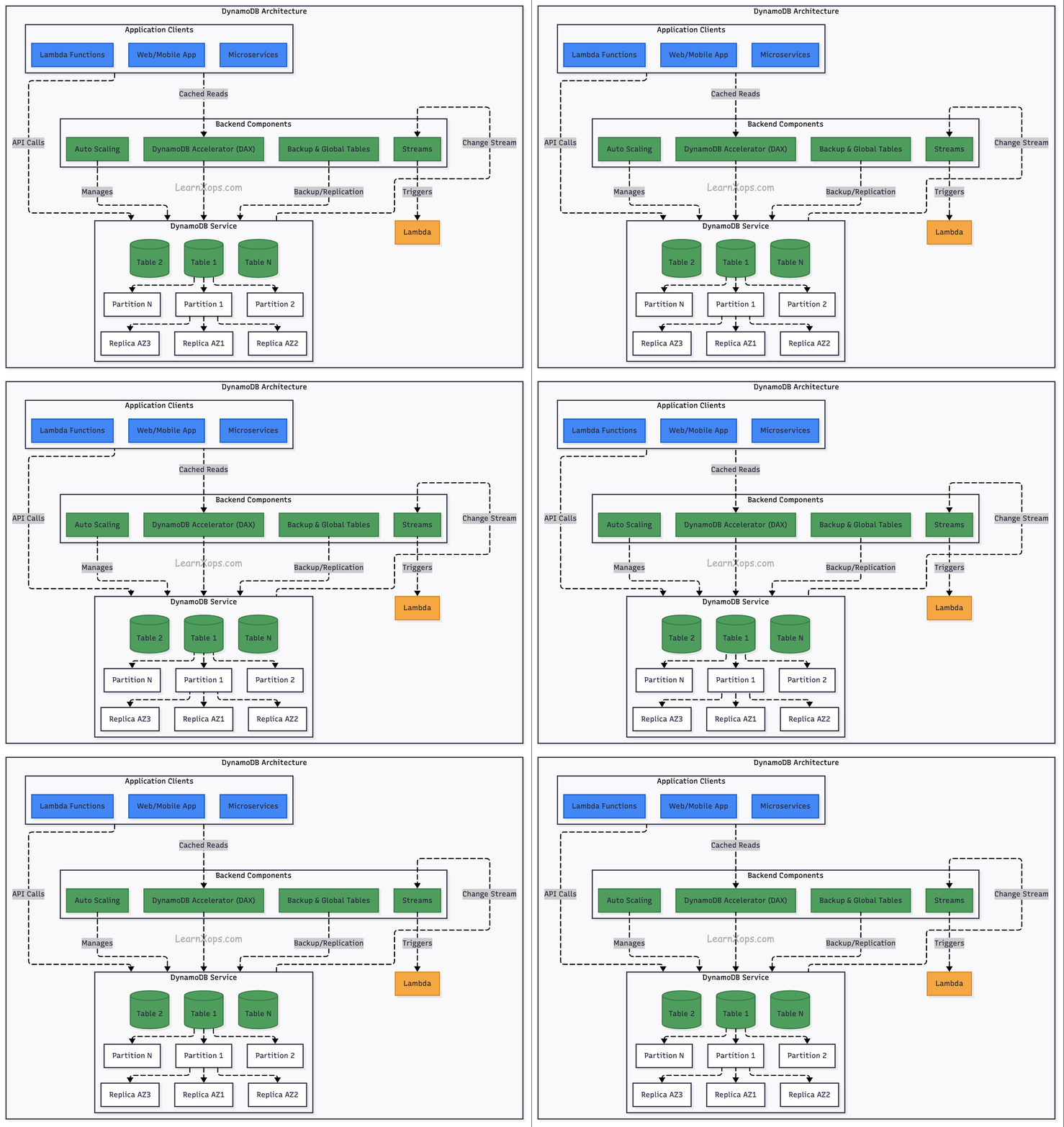
Amazon DynamoDB is a fully managed NoSQL database service provided by AWS.
- Type: NoSQL (key-value & document-based)
- Use Case: High-speed read/write, low-latency, scalable apps (e.g., gaming, IoT, serverless apps)
- Schema: Schema-less (each item can have different attributes)
- Performance: Single-digit millisecond latency, automatic scaling, optional in-memory cache with DAX (a separate service)
DynamoDB vs RDS
| Feature | DynamoDB | RDS |
|---|---|---|
| Database Type | NoSQL (key-value/document) | Relational (SQL-based) |
| Schema | Schema-less | Schema-enforced |
| Scaling | Auto-scaling (horizontal) | Vertical scaling or read replicas |
| Transactions | Limited (ACID support added) | Full ACID support |
| Joins/Relations | Not supported | Supported |
| Latency | Very low, single-digit ms | Moderate, depends on engine/load/capacity |
| Pricing | Pay-per-request or provisioned | Based on instance size/storage |
| Use Case Fit | Serverless, IoT, gaming, real-time | ERP, traditional apps, reporting |
Core concepts:
DynamoDB = Table with Items, each having Attributes, uniquely identified by a Primary Key (Partition + optional Sort Key). Let’s explore each:
1. Table
- A Table in DynamoDB is like a table in a traditional database.
- It holds a collection of Items (like rows).
- Each table must define a Primary Key.
🧠 Think of it as:
Users table, Orders table, Products table
2. Item
- An Item is a single record in a table.
- It is similar to a row in a relational DB.
- Each item must have a unique primary key.
- Items can have different sets of attributes (schema-less).
Example:
{ "UserID": "123", "Name": "Alice", "Age": 30, "Email": "[email protected]" }
3. Attribute
- An Attribute is a data field in an item (like a column in RDS).
- Can be strings, numbers, booleans, sets, lists, maps, etc.
🧠 Example attributes: "Name", "Age", "Email", "CreatedAt"
4. Primary Key
The Primary Key uniquely identifies each item in a table. There are two types:
a) Partition Key (Simple Primary Key)
- A single attribute used to uniquely identify an item.
- DynamoDB uses it to determine partition (location) to store the item.
🧠 Example: Primary Key: UserID = "123"
✅ b) Partition Key + Sort Key (Composite Primary Key)
- Combines two attributes:
- Partition Key: groups related items together.
- Sort Key: orders items within the same partition.
🧠 Example:
- Table: Orders
- Partition Key: CustomerID
- Sort Key: OrderDate
So a customer can have multiple orders, sorted by date.
{ "CustomerID": "C001", "OrderDate": "2024-10-10", "Amount": 500 }
Data model design:
DynamoDB data modeling is driven by access patterns, not entity relationships.
Design tables to optimize for specific queries using partition and sort keys, indexes, and denormalization.
Provisioned vs On-Demand Capacity
- Provisioned: You manually allocate RCUs & WCUs. Best for predictable workloads, cost-effective if tuned well.
- On-Demand: Auto-scales based on traffic. Ideal for unpredictable workloads, pay-per-request.
Read/Write Capacity Units (RCUs/WCUs):
- 1 RCU = 1 strongly consistent read/sec (4 KB) or 2 eventually consistent reads.
- 1 WCU = 1 write/sec for an item up to 1 KB in size.
Example: Writing a 2KB item = 2 WCUs, Reading an 8KB item = 2 RCUs (strongly consistent).
Global Secondary Indexes (GSI) & Local Secondary Indexes (LSI)
GSI lets you query using a different partition and sort key, created anytime with separate capacity.
LSI uses the same partition key but a different sort key, defined only at table creation and shares capacity.
Streams :
DynamoDB Streams capture real-time data changes in tables, enabling event-driven processing and integrations.
📚️ Additional Resources:
📌 What is Amazon DynamoDB? – AWS Docs
📌 Best Practices for DynamoDB
📌 DynamoDB Table Design
📌 Using DynamoDB with Boto3
📌 DynamoDB Streams + Lambda
📌 AWS DynamoDB CLI Reference
🔥 Challenges
🔹 Challenge 1: Create a DynamoDB table (Users) with user_id as the partition key + other attributes: name, email.
🔹 Challenge 2: Insert 5+ records manually using AWS Console
🔹 Challenge 3: Use AWS CLI to insert a record
🔹 Challenge 4: Query a record using GetItem with the partition key
🔹 Challenge 5: Update an existing item’s attribute using AWS CLI or SDK
🔹 Challenge 6: Create a Global Secondary Index (GSI) on a different attribute (e.g., email)
🔹 Challenge 7: Set up Time To Live (TTL) to auto-expire a record
🔹 Challenge 8: Configure a CloudWatch Alarm for high read/write throughput
🔹 Challenge 9: Use Python (Boto3) to script a CRUD operation workflow for the users table
🔹 Challenge 10: Attach IAM permissions/role to allow read/write access via an EC2 and run challenge 9 codes from there
✅ Solutions
🔹 Challenge 1: Create a DynamoDB table (Users)
Using AWS CLI:
aws dynamodb create-table \
  --table-name Users \
  --attribute-definitions AttributeName=user_id,AttributeType=S \
  --key-schema AttributeName=user_id,KeyType=HASH \
  --provisioned-throughput ReadCapacityUnits=5,WriteCapacityUnits=5
user_idis the partition key (HASH key)- Use
--billing-mode PAY_PER_REQUESTfor on-demand mode
Verify the Table:
aws dynamodb describe-table --table-name Users
Using Python + Boto3:
import boto3

dynamodb = boto3.client('dynamodb')

response = dynamodb.create_table(
    TableName='Users',
    KeySchema=[
        { 'AttributeName': 'user_id', 'KeyType': 'HASH' }
    ],
    AttributeDefinitions=[
        { 'AttributeName': 'user_id', 'AttributeType': 'S' }
    ],
    ProvisionedThroughput={
        'ReadCapacityUnits': 5,
        'WriteCapacityUnits': 5
    }
)
print("✅ Creating table... Status:", response['TableDescription']['TableStatus'])
🔹 Challenge 2: Insert 5+ records manually using AWS Console
- Go to 🔗 https://console.aws.amazon.com/dynamodb/
- Open "Users" table → Click "Explore table items" → Click "Create item"
- Add item in JSON view:
{ "user_id": "u001", "name": "Alice", "email": "[email protected]" }
- Add more:
{ "user_id": "u002", "name": "Bob", "email": "[email protected]" }
{ "user_id": "u003", "name": "Charlie", "email": "[email protected]" }
{ "user_id": "u004", "name": "Diana", "email": "[email protected]" }
{ "user_id": "u005", "name": "Eve", "email": "[email protected]" }
🔹 Challenge 3: Insert using AWS CLI
user-item.json:
{
  "user_id": { "S": "u006" },
  "name": { "S": "Frank" },
  "email": { "S": "[email protected]" }
}
CLI Command:
aws dynamodb put-item --table-name Users --item file://user-item.json
🔹 Challenge 4: Query using GetItem
CLI:
aws dynamodb get-item \
  --table-name Users \
  --key '{ "user_id": { "S": "u006" } }'
Using Python + Boto3:
import boto3
from botocore.exceptions import ClientError

dynamodb = boto3.resource('dynamodb')
table = dynamodb.Table('Users')

user_id = "u001"
try:
    response = table.get_item(Key={'user_id': user_id})
    item = response.get('Item')
    if item:
        print("✅ User found:", item)
    else:
        print("❌ No user found with user_id:", user_id)
except ClientError as e:
    print("❌ Error fetching item:", e.response['Error']['Message'])
🔹 Challenge 5: Update Item
AWS CLI:
aws dynamodb update-item \
  --table-name Users \
  --key '{"user_id": {"S": "u001"}}' \
  --update-expression "SET email = :e" \
  --expression-attribute-values '{":e": {"S": "[email protected]"}}'
Using Python + Boto3:
import boto3
from botocore.exceptions import ClientError

dynamodb = boto3.resource('dynamodb')
table = dynamodb.Table('Users')

user_id = "u001"
new_email = "[email protected]"

try:
    response = table.update_item(
        Key={'user_id': user_id},
        UpdateExpression="SET email = :e",
        ExpressionAttributeValues={':e': new_email},
        ReturnValues="ALL_NEW"
    )
    print("✅ Updated item:", response['Attributes'])
except ClientError as e:
    print("❌ Error updating item:", e.response['Error']['Message'])
Run:
python3 update_user.py
🔹 Challenge 6: Create GSI (Global Secondary Index)
AWS CLI:
aws dynamodb update-table \
  --table-name Users \
  --attribute-definitions AttributeName=email,AttributeType=S \
  --global-secondary-index-updates '[{"Create": {"IndexName": "EmailIndex", "KeySchema": [{"AttributeName": "email", "KeyType": "HASH"}], "Projection": {"ProjectionType": "ALL"}, "ProvisionedThroughput": {"ReadCapacityUnits": 5, "WriteCapacityUnits": 5}}}]'
Check GSI Status:
aws dynamodb describe-table \
  --table-name Users \
  --query "Table.GlobalSecondaryIndexes[*].{Index:IndexName, Status:IndexStatus}" \
  --output table
Python (Boto3):
import boto3
client = boto3.client('dynamodb')
response = client.update_table(
    TableName='Users',
    AttributeDefinitions=[{'AttributeName': 'email', 'AttributeType': 'S'}],
    GlobalSecondaryIndexUpdates=[{
        'Create': {
            'IndexName': 'EmailIndex',
            'KeySchema': [{'AttributeName': 'email', 'KeyType': 'HASH'}],
            'Projection': {'ProjectionType': 'ALL'},
            'ProvisionedThroughput': {'ReadCapacityUnits': 5, 'WriteCapacityUnits': 5}
        }
    }]
)
print("✅ GSI creation initiated. Check status in console.")
🔹 Challenge 7: Setup Time To Live (TTL)
Add TTL Attribute:
# TTL is a Unix timestamp in seconds; this item expires one hour from now (GNU date)
aws dynamodb put-item \
  --table-name Users \
  --item "{\"user_id\": {\"S\": \"u999\"}, \"name\": {\"S\": \"TempUser\"}, \"email\": {\"S\": \"[email protected]\"}, \"ttl\": {\"N\": \"$(date -d '+1 hour' +%s)\"}}"
# Expired items are deleted in the background, usually within a few days,
# so filter on ttl in queries if you must hide them right away.
Enable TTL:
aws dynamodb update-time-to-live \
  --table-name Users \
  --time-to-live-specification "Enabled=true, AttributeName=ttl"
Verify TTL:
aws dynamodb describe-time-to-live --table-name Users
🔹 Challenge 8: CloudWatch Alarm for Throughput
AWS CLI - Read:
aws cloudwatch put-metric-alarm \
  --alarm-name HighReadThroughput \
  --metric-name ConsumedReadCapacityUnits \
  --namespace AWS/DynamoDB \
  --statistic Sum \
  --period 60 \
  --threshold 240   # Sum per 60 s: 80% of 5 RCU/s x 60 \
  --comparison-operator GreaterThanOrEqualToThreshold \
  --evaluation-periods 2 \
  --alarm-actions arn:aws:sns:your-region:123456789012:YourSNSTopic \
  --dimensions Name=TableName,Value=Users
AWS CLI - Write:
aws cloudwatch put-metric-alarm \
  --alarm-name HighWriteThroughput \
  --metric-name ConsumedWriteCapacityUnits \
  --namespace AWS/DynamoDB \
  --statistic Sum \
  --period 60 \
  --threshold 240   # Sum per 60 s: 80% of 5 WCU/s x 60 \
  --comparison-operator GreaterThanOrEqualToThreshold \
  --evaluation-periods 2 \
  --alarm-actions arn:aws:sns:your-region:123456789012:YourSNSTopic \
  --dimensions Name=TableName,Value=Users
🔹 Challenge 9: Python CRUD API (Flask + Boto3)
from flask import Flask, request, jsonify
import boto3
from botocore.exceptions import ClientError

app = Flask(__name__)
dynamodb = boto3.resource('dynamodb', region_name='us-east-1')
table = dynamodb.Table('Users')

@app.route('/')
def index():
    return "🚀 DynamoDB Users CRUD API is live!"

@app.route('/user', methods=['POST'])
def create_user():
    data = request.json
    if not all(k in data for k in ('user_id', 'name', 'email')):
        return jsonify({'error': 'Missing fields'}), 400
    try:
        table.put_item(Item=data)
        return jsonify({'message': 'User created successfully'}), 201
    except ClientError as e:
        return jsonify({'error': str(e)}), 500

@app.route('/user/<user_id>', methods=['GET'])
def get_user(user_id):
    try:
        response = table.get_item(Key={'user_id': user_id})
        return jsonify(response.get('Item', {'error': 'User not found'})), 200
    except ClientError as e:
        return jsonify({'error': str(e)}), 500

@app.route('/user/<user_id>', methods=['PUT'])
def update_user(user_id):
    data = request.json
    update_expr = "SET "
    expr_vals = {}
    for key in ['name', 'email']:
        if key in data:
            update_expr += f"{key} = :{key}, "
            expr_vals[f":{key}"] = data[key]
    if not expr_vals:
        return jsonify({'error': 'Nothing to update'}), 400
    update_expr = update_expr.rstrip(', ')
    try:
        table.update_item(Key={'user_id': user_id},
                          UpdateExpression=update_expr,
                          ExpressionAttributeValues=expr_vals)
        return jsonify({'message': 'User updated'}), 200
    except ClientError as e:
        return jsonify({'error': str(e)}), 500

@app.route('/user/<user_id>', methods=['DELETE'])
def delete_user(user_id):
    try:
        table.delete_item(Key={'user_id': user_id})
        return jsonify({'message': 'User deleted'}), 200
    except ClientError as e:
        return jsonify({'error': str(e)}), 500

if __name__ == '__main__':
    app.run(host='0.0.0.0', port=5000)
🔹 Challenge 10: IAM Role for EC2 to Access DynamoDB
- IAM Console → Roles → Create Role → AWS service: EC2 → attach a least-privilege inline policy for just the Users table (avoid
AmazonDynamoDBFullAccess, which grants every table in the account): - Name Role:
EC2-DynamoDB-Access→ Create - Attach Role to EC2 Instance
- EC2 → Select Instance → Actions → Security → Modify IAM Role → Attach
EC2-DynamoDB-Access
- EC2 → Select Instance → Actions → Security → Modify IAM Role → Attach
- SSH into EC2
{
  "Version": "2012-10-17",
  "Statement": [{
    "Effect": "Allow",
    "Action": [
      "dynamodb:GetItem", "dynamodb:PutItem", "dynamodb:UpdateItem",
      "dynamodb:DeleteItem", "dynamodb:Query", "dynamodb:Scan"
    ],
    "Resource": [
      "arn:aws:dynamodb:us-east-1:123456789012:table/Users",
      "arn:aws:dynamodb:us-east-1:123456789012:table/Users/index/*"
    ]
  }]
}
ssh -i key.pem ec2-user@<EC2-IP>
sudo dnf update -y            # Amazon Linux 2023
sudo dnf install -y python3-pip git
pip3 install --user flask boto3
- Create
app.py, paste code, run it:
python3 app.py # no sudo: port 5000 needs no root, and --user packages are per-user
- Open port 5000 in EC2 Security Group
🤷🏻 How to Participate?
✅ Complete the tasks and challenges.
✅ Document your progress and key takeaways on GitHub ReadMe, Medium, or Hashnode.
✅ Share the above in a LinkedIn post tagging me (Sandip Das), and use #60DaysOfDevOps to engage with the community!
⚡ Quick Reference
Keep the momentum going — everything you need on LearnXOps in one place:
- 🎓 Courses — Video courses & AI-built courses
- 📚 Ebooks — Community ebooks & your own
- 🧪 All Labs & Challenges — DevOps, Cloud, SRE & more
- ☸️ Kubernetes Labs & Playground — kind clusters, playground & challenges
- 🤖 AI Agent & Bot Labs — OpenClaw · Hermes · CrewAI · LangGraph · MCP


Member discussion