

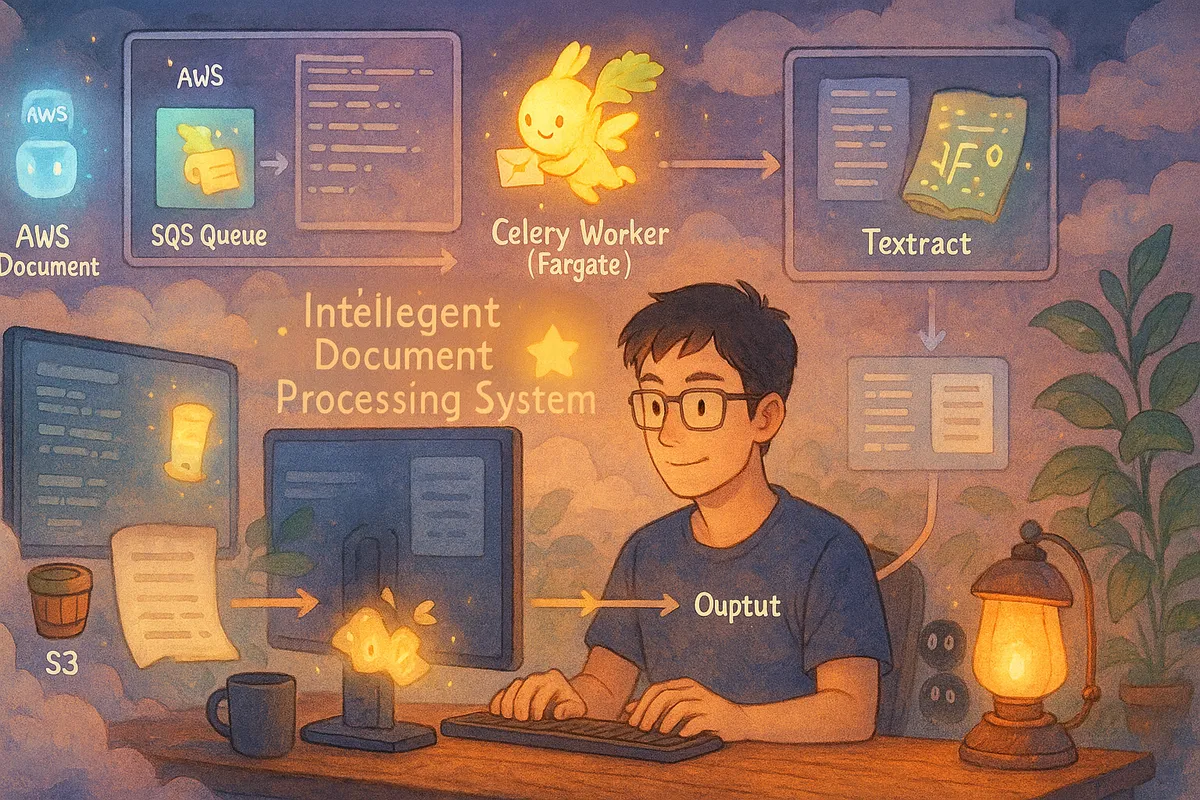
This project teaches how to design scalable, event-driven, and container-orchestrated workloads using Fargate, Celery, and SQS—exactly how real production systems handle high-volume document processing.
It also builds expertise in serverless OCR pipelines with Textract, giving hands-on experience with distributed workers, asynchronous task queues, and AWS-native automation patterns used in enterprise architectures.
⚡ Quick Reference
Keep the momentum going — everything you need on LearnXOps in one place:
- 🎓 Courses — Video courses & AI-built courses
- 📚 Ebooks — Community ebooks & your own
- 🧪 All Labs & Challenges — DevOps, Cloud, SRE & more
- ☸️ Kubernetes Labs & Playground — kind clusters, playground & challenges
- 🤖 AI Agent & Bot Labs — OpenClaw · Hermes · CrewAI · LangGraph · MCP
🧠 Learn here
About this project:
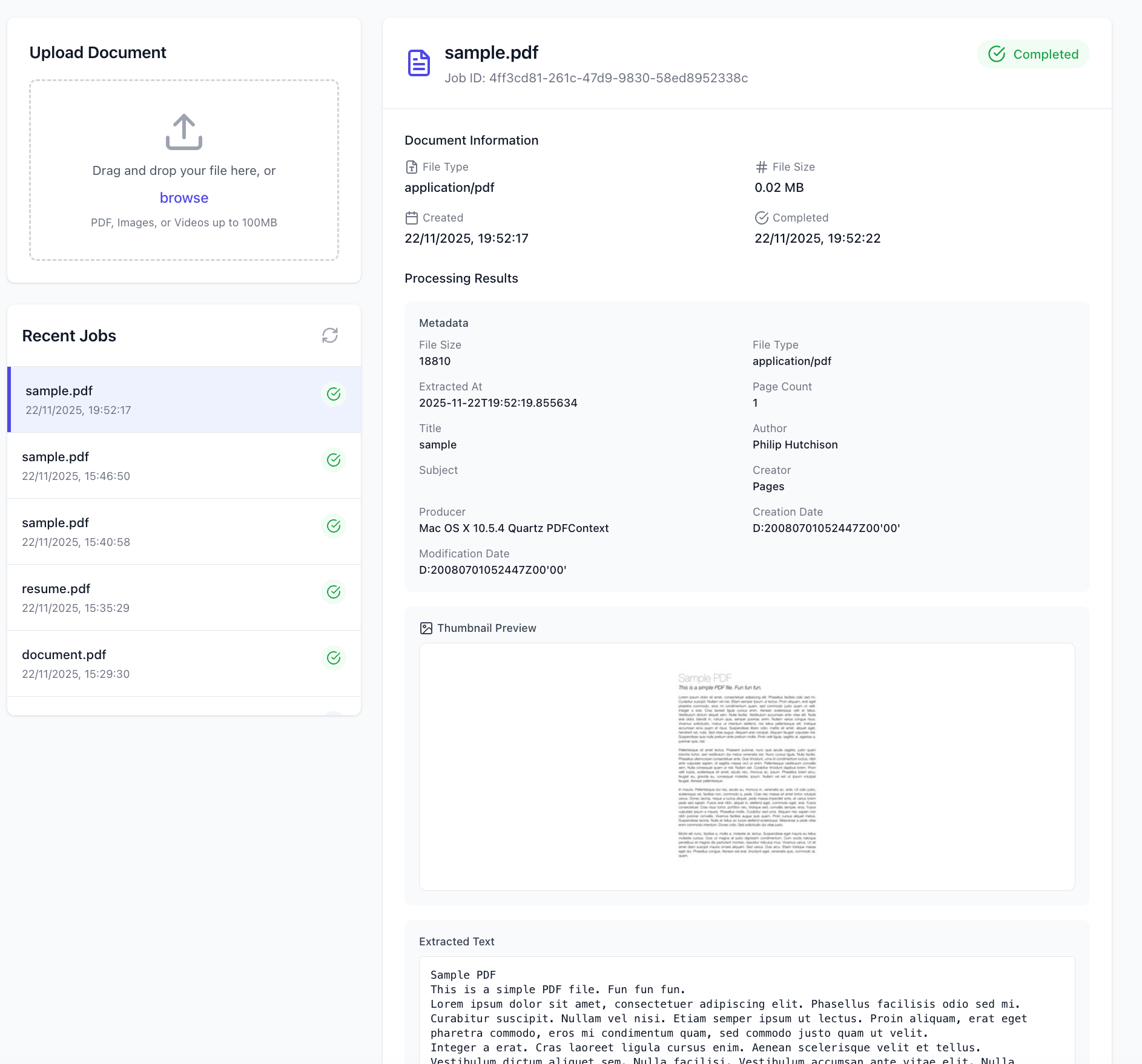
A scalable Web+API service for asynchronous document processing using AWS services.
This is a complete, production-ready document processing system with:
- ✅ Backend API - FastAPI with authentication
- ✅ Workers - Celery workers for async processing
- ✅ Frontend - React SPA with modern UI
- ✅ Infrastructure - All AWS resources via Terraform
- ✅ Single Command Deployment - Everything deploys with
./deploy.sh
Project Architecture
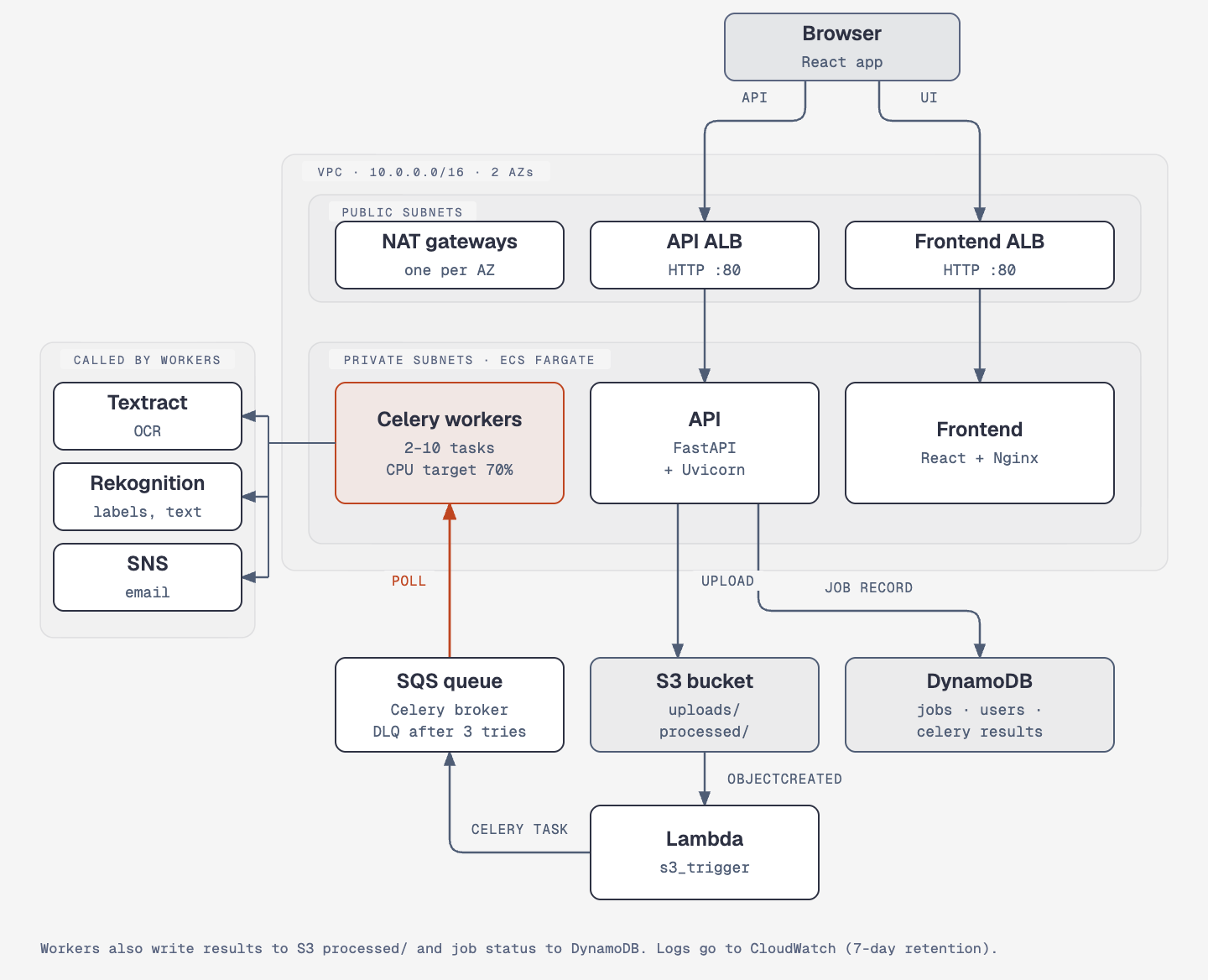
Components:
1. API Layer (FastAPI on ECS Fargate)
REST API for file uploads and job management
Endpoints:
POST /upload- Upload files for processingGET /status/{job_id}- Check processing statusGET /results/{job_id}- Retrieve processing resultsGET /health- Health checkDELETE /jobs/{job_id}- Delete job and files
Technology:
- FastAPI (Python)
- Uvicorn ASGI server
- ECS Fargate (serverless containers)
- Application Load Balancer
Scaling:
- Runs 1 task by default (
api_desired_count) - Stateless, so you can add an autoscaling policy and run more tasks
2. Storage Layer (Amazon S3)
Durable storage for uploaded and processed files
Structure:
s3://bucket-name/
├── uploads/
│   └── {job_id}/
│       └── {filename}
└── processed/
    └── {job_id}/
        ├── thumbnail.jpg
        └── results.json
Features:
- Server-side encryption (AES-256)
- Versioning enabled
- Lifecycle policies:
- Uploads deleted after 30 days
- Processed files → Standard-IA after 30 days, Glacier after 90 days
- Permanent deletion after 365 days
3. Event Processing (Lambda)
Trigger processing when files are uploaded
Flow:
- S3 emits ObjectCreated event
- Lambda receives event
- Lambda enqueues Celery task to SQS
- Returns immediately (async processing)
Configuration:
- Runtime: Python 3.11
- Memory: 256 MB
- Timeout: 60 seconds
- Trigger: S3 ObjectCreated events on
uploads/prefix
4. Task Queue (Amazon SQS)
Reliable message broker for Celery
Configuration:
- Visibility timeout: 3600s (1 hour)
- Message retention: 14 days
- Long polling: 20 seconds
- Dead Letter Queue for failed messages
Features:
- At-least-once delivery
- FIFO not required (idempotent workers)
- Failed messages become visible again after the visibility timeout; after 3 receives they move to the DLQ
5. Worker Layer (Celery on ECS Fargate)
Asynchronous document processing
Tasks:
process_document- Main orchestration taskextract_text_ocr- OCR via AWS Textractgenerate_thumbnail- Image/video thumbnailsextract_metadata- File metadata extractionanalyze_image- AWS Rekognition analysissend_notification- SNS email notifications
Processing Pipeline:
1. Download file from S3
2. Extract metadata (parallel)
3. Generate thumbnail (if applicable)
4. Run OCR (for documents/images)
5. Analyze image (for images)
6. Upload results to S3
7. Update DynamoDB status
8. Send SNS notification
9. Clean up temp files
Scaling:
- Auto-scales on average CPU (target 70%)
- Min: 2 workers
- Max: 10 workers
- Concurrency: 2 tasks per worker
6. AI/ML Services
AWS Textract
- Extract text from PDFs and images
- Table and form detection
- Multi-page document support
AWS Rekognition
- Object and scene detection
- Content moderation
- Text detection in images
- Face detection (optional)
7. Data Layer (DynamoDB)
Jobs Table
Track job status and metadata
Schema:
{
  "job_id": "uuid",
  "status": "pending|processing|completed|failed",
  "s3_key": "uploads/job_id/file.pdf",
  "file_name": "document.pdf",
  "file_size": 1024000,
  "file_type": "application/pdf",
  "notification_email": "[email protected]",
  "created_at": "2024-01-01T00:00:00Z",
  "updated_at": "2024-01-01T00:05:00Z",
  "completed_at": "2024-01-01T00:05:00Z",
  "results": "{...}",
  "error": "error message if failed"
}
Indexes:
- Primary:
job_id - GSI:
status+created_at(for querying by status)
Celery Results Table
Purpose: Store Celery task results
Configuration:
- TTL enabled (auto-delete old results)
- Pay-per-request billing
8. Notification Layer (Amazon SNS)
Email notifications on job completion
Flow:
- Worker completes processing
- Publishes message to SNS topic
- SNS delivers email to subscriber
- User receives notification with results
Message Format:
Subject: Document Processing Completed: {job_id}
Body:
  Job ID: abc-123-def
  Status: completed
  Results:
    - OCR Text: 1234 characters
    - Thumbnail: https://...
    - Labels: [document, text, business]
9. Monitoring (CloudWatch)
Logs:
/aws/ecs/doc-processor-api- API logs/aws/ecs/doc-processor-worker- Worker logs/aws/ecs/doc-processor-frontend- Frontend logs/aws/lambda/doc-processor-s3-trigger- Lambda logs
Metrics:
- ECS CPU/Memory utilization
- ALB request count and latency
- SQS queue depth and age
- Lambda invocations and errors
- DynamoDB read/write capacity
Alarms (recommended):
- API error rate > 5%
- Worker CPU > 80%
- SQS queue depth > 100
- Lambda errors > 10/min
Network Architecture
VPC Configuration
VPC: 10.0.0.0/16

Public Subnets (2 AZs):
├── 10.0.1.0/24 (us-east-1a)
└── 10.0.2.0/24 (us-east-1b)
    └── ALB, NAT Gateways

Private Subnets (2 AZs):
├── 10.0.10.0/24 (us-east-1a)
└── 10.0.11.0/24 (us-east-1b)
    └── ECS Tasks (API + Workers)
Security Groups:
- ALB SG: Allow 80/443 from internet
- ECS SG: Allow 8000 from ALB SG only
- Egress: Allow all (for AWS service access)
VPC Endpoints:
- S3 Gateway Endpoint (cost optimization)
- Optional: Interface endpoints for other services
Data Flow
Upload Flow
1. Client → ALB → API
2. API validates file
3. API uploads to S3 (uploads/{job_id}/file)
4. API creates DynamoDB record
5. API returns job_id to client
6. S3 → Lambda (event trigger)
7. Lambda → SQS (enqueue task)
8. Worker polls SQS
9. Worker processes file
10. Worker updates DynamoDB
11. Worker sends SNS notification
Processing Flow
Worker receives task from SQS
├─→ Download file from S3
├─→ Extract metadata
│   └─→ File size, type, dimensions
├─→ Generate thumbnail
│   ├─→ Images: PIL resize
│   ├─→ Videos: ffmpeg frame extract
│   └─→ PDFs: pdf2image + resize
├─→ Run OCR (if applicable)
│   └─→ AWS Textract DetectDocumentText
├─→ Analyze image (if applicable)
│   ├─→ AWS Rekognition DetectLabels
│   ├─→ AWS Rekognition DetectModerationLabels
│   └─→ AWS Rekognition DetectText
├─→ Upload results to S3
├─→ Update DynamoDB (status=completed)
└─→ Send SNS notification
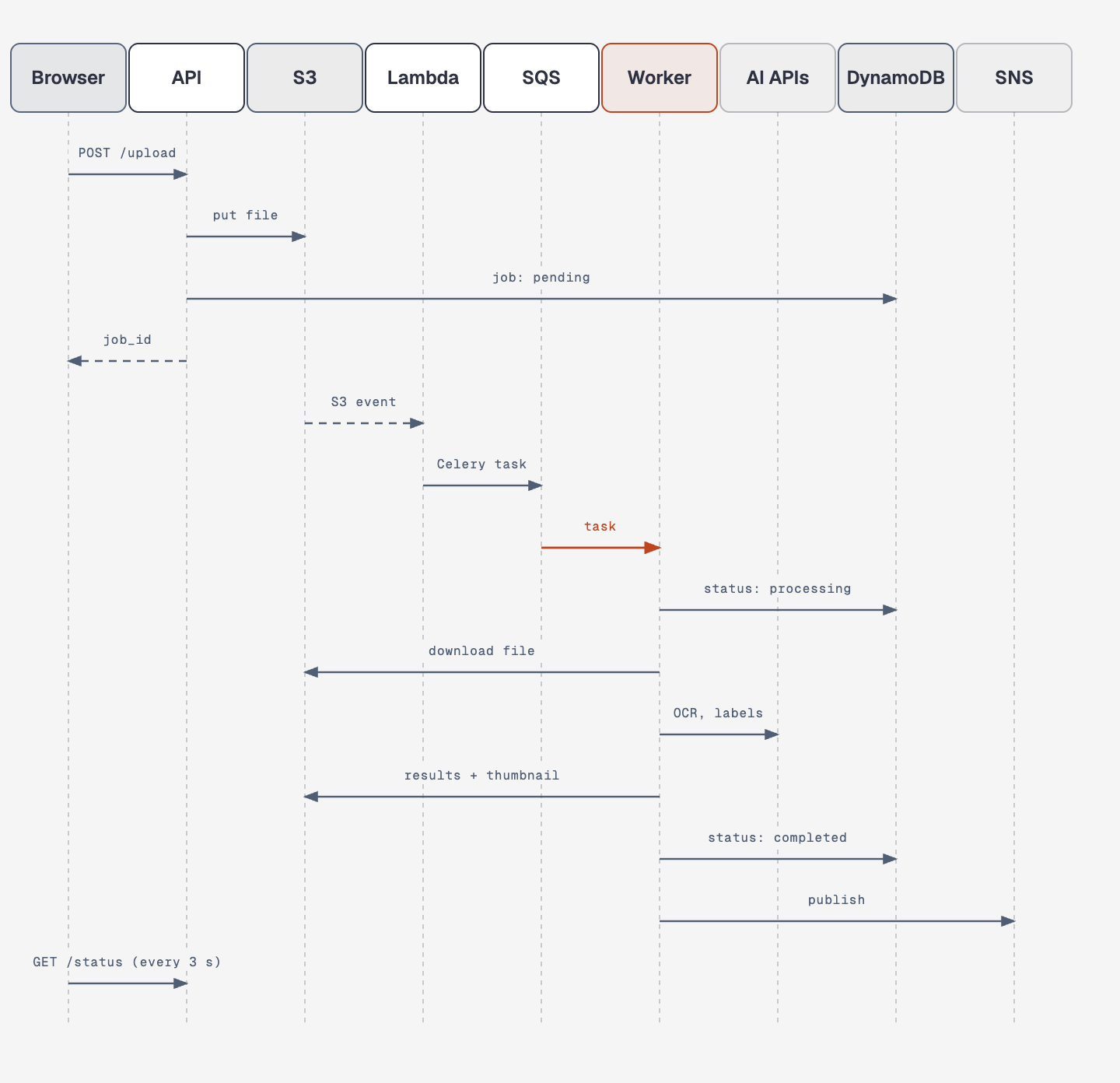
How Celery Document Processing Works
The system uses Celery for asynchronous document processing with the following workflow:
1. File Upload & Trigger
User uploads file → API stores in S3 → S3 event triggers Lambda → Lambda enqueues Celery task to SQS
2. Task Queue (SQS)
- Lambda sends task message to Amazon SQS queue
- SQS acts as the Celery broker for reliable message delivery
- Workers poll SQS for new tasks
3. Worker Processing Pipeline
# Main task: process_document(job_id, s3_key)
1. Download file from S3
2. Extract metadata (file size, type, dimensions)
3. Generate thumbnail (images/videos/PDFs)
4. Run OCR via AWS Textract (if applicable)
5. Analyze image via AWS Rekognition (if applicable)
6. Upload results to S3 (processed/{job_id}/)
7. Update DynamoDB job status to 'completed'
8. Send SNS email notification
9. Clean up temporary files
4. Task Execution
- Celery Workers: Run as ECS Fargate containers
- Concurrency: 2 tasks per worker (configurable)
- Auto-scaling: Workers scale on average CPU (target 70%)
- Retry Logic: If a task fails, SQS makes the message visible again after the 1-hour visibility timeout
- Dead Letter Queue: After 3 receives, the message moves to the DLQ
5. Result Storage
- Job Status: Stored in DynamoDB
doc-processor-jobstable - Task Results: Stored in DynamoDB
doc-processor-celery-resultstable - Processed Files: Stored in S3
processed/{job_id}/prefix - Thumbnails: Accessible via pre-signed URLs (1-hour expiry)
6. Status Tracking
pending → processing → completed/failed
- Users can check status via
/status/{job_id}endpoint - The job details view polls every 3 seconds while a job is processing
- Email notification sent on completion
Example Task Flow
1. User uploads "document.pdf"
2. API: Creates job record with status='pending'
3. S3: Triggers Lambda on ObjectCreated event
4. Lambda: Enqueues task {"job_id": "abc-123", "s3_key": "uploads/abc-123/document.pdf"}
5. Worker: Picks up task from SQS
6. Worker: Updates status to 'processing'
7. Worker: Extracts text using Textract
8. Worker: Generates thumbnail using pdf2image
9. Worker: Uploads thumbnail.jpg to S3
10. Worker: Updates job with results and status='completed'
11. Worker: Sends SNS notification
12. User: Receives email and views results in dashboard
IAM Roles
ECS Task Execution Role:
└─→ Pull ECR images
└─→ Write CloudWatch logs

API Task Role:
├─→ S3: Read/Write
├─→ DynamoDB: Read/Write (jobs table)
└─→ SQS: SendMessage

Worker Task Role:
├─→ S3: Read/Write
├─→ DynamoDB: Read/Write (both tables)
├─→ SQS: ReceiveMessage, DeleteMessage
├─→ Textract: DetectDocumentText, AnalyzeDocument
├─→ Rekognition: DetectLabels, DetectModerationLabels
└─→ SNS: Publish

Lambda Execution Role:
├─→ S3: GetObject
├─→ SQS: SendMessage
└─→ CloudWatch: Logs
Cost Optimization
Strategies
- Fargate Spot (not enabled in the repo): up to 70% off worker tasks
- S3 Lifecycle: Auto-archive old files
- DynamoDB On-Demand: Pay per request
- VPC Endpoints: Reduce NAT costs
- CloudWatch Retention: 7 days (configurable)
- ECR Lifecycle: Keep last 10 images
Estimated Monthly Cost
Assumptions: 10,000 documents/month, avg 5MB each; us-east-1 on-demand prices with the repo's default task counts
| Service | Cost |
|---|---|
| ECS Fargate (API, 1 × 0.5 vCPU / 1 GB) | $18 |
| ECS Fargate (Workers, 2 × 1 vCPU / 2 GB) | $72 |
| ECS Fargate (Frontend, 1 × 0.25 vCPU / 0.5 GB) | $9 |
| ALBs (API + frontend) | $33 |
| NAT Gateways (2) | $66 |
| Public IPv4 addresses (6) | $22 |
| S3 Storage (50GB) | $1.15 |
| S3 Requests | $0.50 |
| DynamoDB | $2.50 |
| SQS | Free tier |
| Lambda | Free tier |
| Textract (10K pages) | $15 |
| Rekognition (10K images × 3 APIs) | $30 |
| SNS (email) | <$1 |
| CloudWatch | $5 |
| Data Transfer | $5 |
| Total | ~$280/month |
The always-on pieces (Fargate tasks, two load balancers, NAT gateways) are most of the bill. Fargate Spot for workers, one NAT gateway for dev, or scaling workers to zero when the queue is empty cut it the most.
Let's deploy this project
Prerequisites
- AWS CLI configured with appropriate credentials
- Terraform >= 1.0
- Docker
- Python 3.11+
Project Structure
.
├── api/                    # FastAPI application
│   ├── main.py            # API endpoints & authentication
│   ├── models.py          # Pydantic models
│   └── config.py          # Configuration
├── frontend/               # React web application
│   ├── src/
│   │   ├── components/    # React components
│   │   │   ├── Auth/      # Login/Signup
│   │   │   ├── Dashboard/ # Job management
│   │   │   └── Upload/    # File upload
│   │   ├── services/      # API client
│   │   └── App.jsx        # Main app
│   ├── package.json
│   └── vite.config.js
├── worker/                 # Celery workers
│   ├── celery_app.py      # Celery configuration
│   ├── tasks.py           # Processing tasks
│   └── processors/        # Processing modules
│       ├── metadata_processor.py
│       ├── thumbnail_processor.py
│       ├── ocr_processor.py
│       └── image_processor.py
├── lambda/                 # Lambda functions
│   └── s3_trigger.py      # S3 event handler
├── terraform/              # Infrastructure as Code
│   ├── main.tf            # Main configuration
│   ├── variables.tf       # Input variables
│   ├── outputs.tf         # Output values
│   ├── vpc.tf             # VPC & networking
│   ├── ecs.tf             # ECS cluster & services
│   ├── frontend.tf        # Frontend ECS service
│   ├── s3.tf              # S3 buckets
│   ├── lambda.tf          # Lambda functions
│   ├── dynamodb.tf        # DynamoDB tables
│   ├── sns.tf             # SNS topics
│   ├── sqs.tf             # SQS queues
│   └── iam.tf             # IAM roles & policies
├── docker/                 # Docker configurations
│   ├── api.Dockerfile     # API container
│   ├── worker.Dockerfile  # Worker container
│   ├── frontend.Dockerfile # Frontend container
│   └── nginx.conf         # Nginx config for frontend
├── deploy.sh              # Deployment script
├── cleanup.sh             # Cleanup script
├── Makefile               # Build & deployment tasks
├── requirements.txt       # Python dependencies
├── .env.example           # Environment variables template
└── README.md              # Documentation
Deployment
Clone Repo:
git clone https://github.com/sd031/AWS-Python-Celery-Bases-Document-Processing-Service.git
cd AWS-Python-Celery-Bases-Document-Processing-Service
Run the deployment script:
chmod +x deploy.sh
./deploy.sh
That's it! The script will:
- ✅ Create the ECR repositories
- ✅ Build and push the API, worker and frontend images
- ✅ Deploy all AWS infrastructure (Terraform)
- ✅ Restart the ECS services on the new images
- ✅ Check the API health endpoint
- ✅ Output all URLs and endpoints
Time: 15-20 minutes
Deployment Output
After deployment, you'll see:
========================================
Deployment Summary
========================================
Backend API: http://doc-processor-alb-XXXXX.us-east-1.elb.amazonaws.com
Frontend URL: http://doc-processor-frontend-alb-XXXXX.us-east-1.elb.amazonaws.com


========================================
Next Steps:
========================================
1. Access Frontend

Visit the Frontend URL from the deployment output:

 http://doc-processor-frontend-alb-XXXXX.us-east-1.elb.amazonaws.com


2. Create Account

- Click "create a new account"
- Enter name, email, password
- Click "Sign up"

3. Upload Document

- Drag and drop a file (or click browse)
- Supported formats:
  - PDF documents
  - Images: PNG, JPG, GIF, WebP, TIFF, BMP
  - Videos: MP4, MOV, AVI
- Click "Upload and Process"

4. Watch Progress

- Job appears in "Recent Jobs" list
- Progress bar shows 0-100%
- Status updates every 3 seconds
- Stages:
  - 🟡 Pending
  - 🔵 Processing (20% → 40% → 70% → 100%)
  - 🟢 Completed
  - 🔴 Failed (if error)

5. View Results

Click on completed job to see:
- Document Info: Type, size, dates
- Metadata: Pages, author, creator, etc.
- OCR Text: Full extracted text
- Thumbnail: Preview image
- Labels: AI-detected objects (for images)
🚨 Cleanup
To destroy all resources:
./cleanup.sh
Challenges:
- Add HTTPS Support - Configure ACM certificates and enable HTTPS on both ALBs for secure communication
- Implement WebSocket Updates - Replace polling with WebSocket connections for real-time job status updates
- Add Batch Processing - Allow users to upload and process multiple files simultaneously in a single request
- Create Admin Dashboard - Build an admin panel to monitor all users, jobs, and system metrics across the platform
- Multi-Region Deployment - Extend the architecture to support multi-region deployment with cross-region replication for disaster recovery
🤷🏻 How to Participate?
✅ Complete the tasks and challenges.
✅ Document your progress and key takeaways on GitHub ReadMe, Medium, or Hashnode.
✅ Share the above in a LinkedIn post tagging me (Sandip Das), and use #90DaysOfCloud to engage with the community!
⚡ Quick Reference
Keep the momentum going — everything you need on LearnXOps in one place:
- 🎓 Courses — Video courses & AI-built courses
- 📚 Ebooks — Community ebooks & your own
- 🧪 All Labs & Challenges — DevOps, Cloud, SRE & more
- ☸️ Kubernetes Labs & Playground — kind clusters, playground & challenges
- 🤖 AI Agent & Bot Labs — OpenClaw · Hermes · CrewAI · LangGraph · MCP


Member discussion