


This project demonstrates how to build production-grade AI infrastructure by combining API gateways, load balancing, failover, caching, observability, and multi-cloud AI integrations into a single platform.
Learning this helps us understand real-world LLMOps patterns for scaling, reliability, cost optimization, and operating AI workloads in production environments.
⚡ Quick Reference
Keep the momentum going — everything you need on LearnXOps in one place:
- 🎓 Courses — Video courses & AI-built courses
- 📚 Ebooks — Community ebooks & your own
- 🧪 All Labs & Challenges — DevOps, Cloud, SRE & more
- ☸️ Kubernetes Labs & Playground — kind clusters, playground & challenges
- 🤖 AI Agent & Bot Labs — OpenClaw · Hermes · CrewAI · LangGraph · MCP
🧠 Learn here
This project is a production-grade unified API gateway that intelligently routes, caches, and rate-limits requests across multiple LLM providers — OpenAI, Anthropic, Cohere, Google Gemini, and Amazon Bedrock — behind a single OpenAI-compatible endpoint.
Features
- Unified endpoint — One
POST /v1/chat/completionsworks with every provider. Clients need zero provider-specific code. - Semantic response cache — Embeds prompts with
all-MiniLM-L6-v2and finds near-duplicate queries via cosine similarity in Redis. Configurable threshold (default 0.92). ReturnsX-Cache: HITon matches. - Per-tenant rate limiting — Sliding-window RPM counter and daily token quota enforced atomically in Redis. Returns
429withRetry-Afterheader. - Intelligent fallback routing — Define a priority chain (e.g.
openai → anthropic → gemini). Automatic retry with exponential backoff on 429s/5xxs/timeouts. - Circuit breaker — Per-provider Redis-backed state machine (CLOSED → OPEN → HALF_OPEN). Removes degraded providers from rotation automatically.
- Streaming — Full SSE pass-through for all providers, normalized to OpenAI chunk format.
proxy_buffering offin Nginx for real-time delivery. - Multi-tenant auth —
X-API-Key(SHA-256 hashed) orAuthorization: Bearer <JWT>on every request. - Observability — Prometheus metrics at
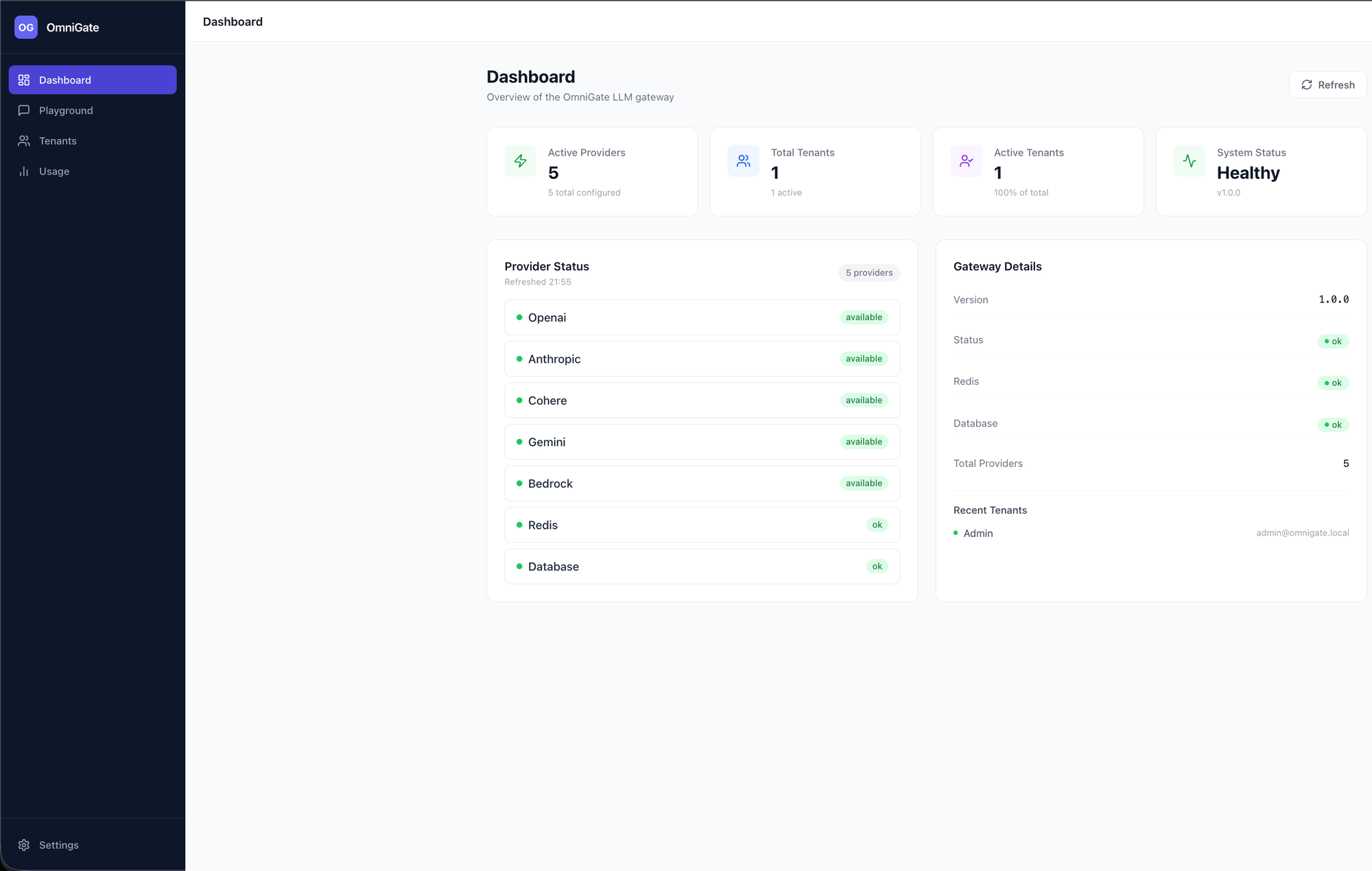
/metrics, pre-built Grafana dashboard, async PostgreSQL audit log with cost attribution per request. - Admin UI — React + TypeScript dashboard for tenant management, a live chat playground, and usage analytics.
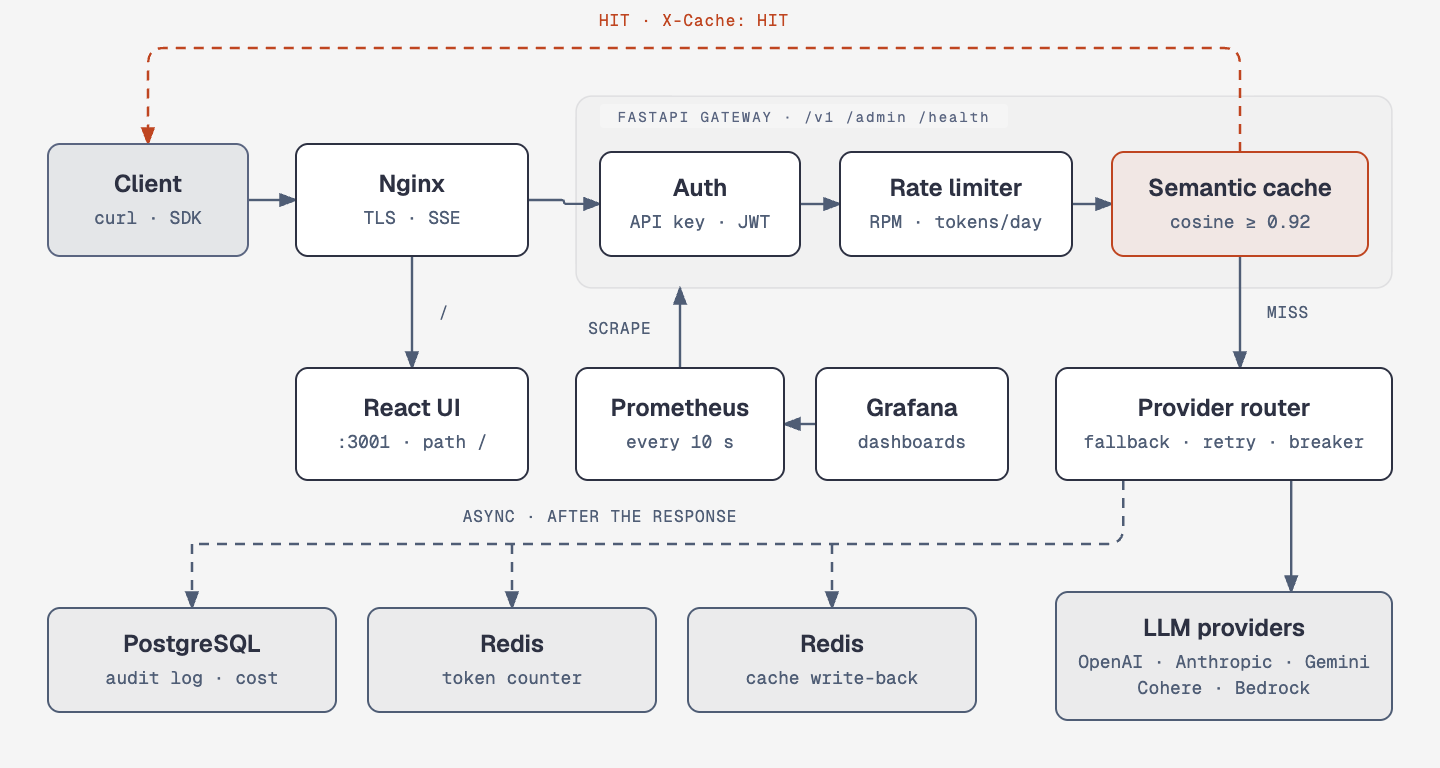
Architecture:
Components:
1. Client → Nginx
Every request first hits Nginx. It handles TLS termination, basic rate limiting, and turns off proxy buffering so SSE (streaming) works in real time.
2. Nginx → FastAPI or UI
Nginx splits traffic:
/v1,/admin,/health→ FastAPI (the backend)/→ React UI on port 3001
3. FastAPI Middleware (3 checks, in order)
Each request passes through three checks in order; auth comes first because rate limits and quotas are per tenant:
| Layer | What it does |
|---|---|
| Auth MW | Validates X-API-Key (SHA-256 hashed) or Authorization: Bearer JWT |
| Rate Limiter | Checks per-tenant RPM and daily token quota in Redis. Returns 429 if exceeded |
| Semantic Cache | Embeds the prompt and does a cosine similarity search in Redis. Returns cached response if similarity ≥ 0.92 (X-Cache: HIT) |
4. Provider Router
If the cache misses, the router picks a provider from the tenant's priority chain (e.g. openai → anthropic → gemini). It retries with exponential backoff on failures and uses a circuit breaker to skip degraded providers automatically.
5. LLM Providers
OpenAI, Anthropic, Cohere, Gemini (and Bedrock) — all normalized to OpenAI-compatible response format.
6. Async Background Tasks (dotted lines)
After the response is returned to the client, three things happen in the background without blocking:
- Audit log written to PostgreSQL
- Token count incremented in Redis
- Response written back to the semantic cache
7. Observability
- Prometheus scrapes
/metricsevery 10 seconds from FastAPI - Grafana reads Prometheus and shows dashboards (latency, cache hit rate, cost, etc.)
Tech Stack
| Layer | Technology |
|---|---|
| API Gateway | Python 3.12, FastAPI, Uvicorn |
| Cache | Redis 7 +sentence-transformers (all-MiniLM-L6-v2) |
| Database | PostgreSQL 16, SQLAlchemy async, asyncpg, Alembic |
| Auth | python-jose (JWT), SHA-256 API keys |
| Providers | openai, anthropic, cohere, google-generativeai SDKs |
| Observability | Prometheus, Grafana, structlog |
| Web UI | React 18, TypeScript, Vite, Tailwind CSS, Recharts |
| Infrastructure | Docker, Docker Compose, Nginx |
Let's get started:
Prerequisites
- Docker & Docker Compose
- At least one LLM provider API key
1. Clone and configure
git clone https://github.com/sd031/omnigate.git omnigate && cd omnigate
cp .env.example .env
Project Structure:
omnigate/
├── app/
│ ├── api/ # FastAPI route handlers (chat, admin, health)
│ ├── database/ # SQLAlchemy models + async engine
│ ├── middleware/ # JWT/API-key auth dependency
│ ├── models/ # Pydantic request/response schemas
│ ├── providers/ # OpenAI, Anthropic, Cohere, Gemini adapters
│ └── services/ # Cache, rate limiter, circuit breaker, router, audit
├── ui/ # React + TypeScript admin dashboard
├── alembic/ # Database migrations
├── nginx/ # Nginx config (TLS, SSE, rate limit)
├── prometheus/ # Scrape config
├── grafana/ # Dashboard + provisioning
├── scripts/ # seed_admin.py
├── tests/ # pytest-asyncio test suite
├── docker-compose.yml
├── Dockerfile
└── requirements.txt
Edit .env and set at minimum one provider key:
OPENAI_API_KEY=sk-...
# and/or
ANTHROPIC_API_KEY=sk-ant-...
GEMINI_API_KEY=...
COHERE_API_KEY=...

JWT_SECRET_KEY=your-long-random-secret
ADMIN_API_KEY=your-admin-key
2. Start the stack
make up
This starts: PostgreSQL, Redis, the FastAPI gateway, the React UI, Nginx, Prometheus, and Grafana.
3. Create your first tenant
make seed
Copy the printed API key — it's shown only once.
4. Send a request
curl -X POST http://localhost:8000/v1/chat/completions \
  -H "X-API-Key: omg-<your-key>" \
  -H "Content-Type: application/json" \
  -d '{
    "model": "gpt-4o",
    "messages": [{"role": "user", "content": "What is an LLM gateway?"}]
  }'
Services
| Service | URL | Description |
|---|---|---|
| API Gateway | http://localhost:8000 | FastAPI — direct access |
| Web UI | http://localhost:3001 | React admin dashboard |
| API Docs | http://localhost:8000/docs | Swagger UI |
| Grafana | http://localhost:3000 | Dashboards (admin / omnigate_grafana) |
| Prometheus | http://localhost:9090 | Metrics |
API Reference
Authentication
All /v1/* and /admin/* endpoints require auth.
X-API-Key: omg-<tenant-key>
# or
Authorization: Bearer <JWT>
Admin endpoints additionally require:
X-Admin-Key: <admin-key>
Chat Completions
POST /v1/chat/completions
Request (OpenAI-compatible, with OmniGate extensions):
{
  "model": "gpt-4o",
  "messages": [
    {"role": "system", "content": "You are a helpful assistant."},
    {"role": "user", "content": "Hello!"}
  ],
  "max_tokens": 1024,
  "temperature": 0.7,
  "stream": false,

  "provider": "anthropic",
  "fallback_chain": ["anthropic", "openai", "gemini"]
}
| Field | Type | Description |
|---|---|---|
model |
string | Any provider model name or generic alias |
provider |
string | Force a specific provider (optional) |
fallback_chain |
string[] | Override provider priority for this request |
Response headers:
| Header | Value |
|---|---|
X-Cache |
HIT or MISS |
X-Request-Id |
UUID for this request |
Retry-After |
Seconds to wait (only on 429) |
Bypass cache:
curl ... -H "X-Cache-Control: no-cache"
Streaming (SSE):
curl -X POST http://localhost:8000/v1/chat/completions \
  -H "X-API-Key: omg-..." \
  -H "Content-Type: application/json" \
  --no-buffer \
  -d '{"model": "gpt-4o", "messages": [...], "stream": true}'
Each SSE frame is data: <json>\n\n. The stream ends with data: [DONE]\n\n.
Model Aliases
| Alias | Routes to |
|---|---|
gpt-4o, gpt-4-turbo, gpt-3.5-turbo |
OpenAI |
claude-3-5-sonnet, claude-3-opus, claude-haiku |
Anthropic |
command-r-plus, command-r |
Cohere |
gemini-1.5-pro, gemini-1.5-flash |
Gemini |
bedrock-claude-3-5-sonnet |
Bedrock (Anthropic Claude 3.5 Sonnet) |
bedrock-claude-3-opus |
Bedrock (Anthropic Claude 3 Opus) |
llama3-70b, llama3-8b |
Bedrock (Meta Llama 3) |
titan-text, titan-text-lite |
Bedrock (Amazon Titan) |
mistral-large, mistral-7b |
Bedrock (Mistral AI) |
ℹ️ Model availability (Nov 2026): the left column is the gateway’s client-facing alias; point each alias at a model the provider still serves. OpenAI shut down gpt-4-turbo and gpt-3.5-turbo in Oct 2026 and shuts down gpt-4o on 14 Jan 2027 (replacements: gpt-6-luna, gpt-6.2-sol). Anthropic’s Claude 3 / 3.5 models and Google’s Gemini 1.5 models are retired; use the current Claude (Opus/Sonnet/Haiku 5.5) and Gemini model IDs, including on Bedrock.
Any unrecognised model is passed through as-is to the first available provider in the chain.
Health Check
GET /health
{
  "status": "ok",
  "version": "1.0.0",
  "providers": {
    "openai": "available",
    "anthropic": "not_configured",
    "gemini": "available",
    "cohere": "not_configured"
  },
  "redis": "ok",
  "database": "ok"
}
Admin Endpoints
All require X-Admin-Key header.
POST   /admin/tenants              Create tenant → returns API key (once only)
GET    /admin/tenants              List all tenants
GET    /admin/tenants/{id}         Get single tenant
DELETE /admin/tenants/{id}         Deactivate tenant (soft delete)
GET    /admin/usage/{id}           Usage report (?start=YYYY-MM-DD&end=YYYY-MM-DD)
POST   /admin/tenants/{id}/token   Issue JWT for tenant
Create tenant example:
curl -X POST http://localhost:8000/admin/tenants \
  -H "X-Admin-Key: your-admin-key" \
  -H "Content-Type: application/json" \
  -d '{
    "name": "Acme Corp",
    "email": "[email protected]",
    "rpm_limit": 120,
    "tpd_limit": 5000000,
    "monthly_budget_usd": 500,
    "provider_chain": ["openai", "anthropic"]
  }'
Usage report example:
curl "http://localhost:8000/admin/usage/<tenant-id>?start=2026-05-01&end=2026-05-19" \
  -H "X-Admin-Key: your-admin-key"
{
  "total_requests": 4821,
  "cache_hits": 1203,
  "cache_hit_rate": 0.2495,
  "total_tokens": 2847193,
  "total_cost_usd": 14.2359,
  "by_provider": {
    "openai": {"requests": 3100, "tokens": 1900000, "cost_usd": 9.50},
    "anthropic": {"requests": 1721, "tokens": 947193, "cost_usd": 4.73}
  },
  "by_model": { ... }
}
Web UI
Open http://localhost:3001 after make up.
- Click the gear icon ⚙ in the bottom-left sidebar
- Paste your Admin API Key — enables Tenants and Usage pages
- Paste a Tenant API Key — enables the Playground
Pages
- Dashboard — Provider health, system status, tenant summary
- Playground — Live streaming chat with model selector and response stats
- Tenants — Create/list/deactivate tenants; API key shown once on creation
- Usage — Per-tenant cost and token reports with bar charts
Dev mode (hot reload against a running API):
make ui-dev # http://localhost:5173
Configuration
All settings are read from environment variables (or .env). Key options:
| Variable | Default | Description |
|---|---|---|
DATABASE_URL |
postgresql+asyncpg://... |
PostgreSQL connection string |
REDIS_URL |
redis://localhost:6379/0 |
Redis connection string |
JWT_SECRET_KEY |
change-me |
Change in production |
ADMIN_API_KEY |
change-admin-key |
Change in production |
OPENAI_API_KEY |
— | Optional; enables OpenAI provider |
ANTHROPIC_API_KEY |
— | Optional; enables Anthropic provider |
GEMINI_API_KEY |
— | Optional; enables Gemini provider |
COHERE_API_KEY |
— | Optional; enables Cohere provider |
BEDROCK_API_KEY |
— | Bedrock Bearer token (long-term or short-term API key). Takes priority over IAM credentials. |
AWS_ACCESS_KEY_ID |
— | IAM credentials for Bedrock (used when BEDROCK_API_KEY is not set) |
AWS_SECRET_ACCESS_KEY |
— | IAM credentials for Bedrock |
AWS_REGION |
us-east-1 |
AWS region for Bedrock |
DEFAULT_PROVIDER_CHAIN |
openai,anthropic,gemini,cohere |
Comma-separated fallback order |
CACHE_SIMILARITY_THRESHOLD |
0.92 |
Cosine similarity cutoff for cache hits |
CACHE_TTL_SECONDS |
3600 |
Cache entry TTL |
DEFAULT_RPM_LIMIT |
60 |
Default requests/minute per tenant |
DEFAULT_TPD_LIMIT |
1000000 |
Default tokens/day per tenant |
CIRCUIT_BREAKER_FAILURE_THRESHOLD |
5 |
Failures before opening circuit |
CIRCUIT_BREAKER_RECOVERY_TIMEOUT |
60 |
Seconds before half-open probe |
REQUEST_TIMEOUT_SECONDS |
60 |
Per-provider request timeout |
WORKERS |
4 |
Uvicorn worker count |
Amazon Bedrock authentication
Bedrock supports two authentication modes — use whichever fits your setup:
Option A — Bedrock API key (recommended for non-AWS environments)
Long-term keys are tied to an IAM user and live until their expiration date:
# Generate via AWS CLI
aws iam create-service-specific-credential \
  --user-name bedrock-api-user \
  --service-name bedrock.amazonaws.com \
  --credential-age-days 90
# Copy ServiceApiKeyValue → set as BEDROCK_API_KEY
Short-term keys expire with your IAM session (max 12 hours) and are better for production:
pip install aws-bedrock-token-generator
python -c "from aws_bedrock_token_generator import provide_token; print(provide_token())"
# Copy the printed token → set as BEDROCK_API_KEY
Then in .env:
BEDROCK_API_KEY=<key-or-token>
AWS_REGION=us-east-1
Option B — IAM credentials (traditional, for AWS-hosted deployments)
AWS_ACCESS_KEY_ID=AKIA...
AWS_SECRET_ACCESS_KEY=...
AWS_REGION=us-east-1
Option C — IAM role (no credentials needed)
If OmniGate runs on an EC2 instance, ECS task, or Lambda with a Bedrock-enabled role, no env vars are required — boto3 picks up the role automatically.
Development
API
# Start dependencies only
docker compose up -d postgres redis

# Run API locally with hot reload
pip install -r requirements.txt
uvicorn app.main:app --reload

# Run migrations
alembic upgrade head

# Run tests
make test

# Lint
make lint
UI
make ui-install   # npm install
make ui-dev       # Vite dev server on :5173 (proxies /v1, /admin, /health to :8000)
make ui-build     # Production build → ui/dist/
Database migrations
# Create a new migration after editing db_models.py
alembic revision --autogenerate -m "description"

# Apply
alembic upgrade head

# Inside Docker
make migrate
Deployment
Docker Compose (recommended)
cp .env.example .env   # fill in secrets and API keys
make up                # builds and starts all services
make seed              # create first admin tenant
For HTTPS, place your TLS certificate at:
nginx/ssl/cert.pem
nginx/ssl/key.pem
The provided nginx/nginx.conf already handles the HTTP → HTTPS redirect and proxy_buffering off for SSE.
Scaling
The FastAPI app is stateless — scale horizontally by increasing WORKERS or running multiple containers behind the load balancer. Redis and PostgreSQL are the only shared state; both support multiple readers/writers.
# docker-compose.yml
deploy:
  replicas: 4
Observability
Prometheus
Metrics are scraped from /metrics every 10 seconds. Key metrics:
| Metric | Description |
|---|---|
http_requests_total |
Request count by method, path, status |
http_request_duration_seconds |
Latency histogram |
omnigate_cache_hits_total |
Semantic cache hit counter |
omnigate_tokens_total |
Token usage by provider |
Grafana
Pre-built dashboard at http://localhost:3000 (admin / omnigate_grafana) with panels for:
- P50/P95/P99 latency
- Request rate by provider
- Cache hit rate
- Provider error rate
- Token usage over time
- Cost burn rate
OmniGate LLM simplifies multi-provider AI infrastructure by bringing routing, caching, failover, and observability behind a single OpenAI-compatible endpoint. It enables teams to build resilient, scalable, and production-ready AI systems without being locked into a single LLM provider.
⚡ Quick Reference
Keep the momentum going — everything you need on LearnXOps in one place:
- 🎓 Courses — Video courses & AI-built courses
- 📚 Ebooks — Community ebooks & your own
- 🧪 All Labs & Challenges — DevOps, Cloud, SRE & more
- ☸️ Kubernetes Labs & Playground — kind clusters, playground & challenges
- 🤖 AI Agent & Bot Labs — OpenClaw · Hermes · CrewAI · LangGraph · MCP


Member discussion