

This project teaches how to design real-time, event-driven architectures without managing servers, giving hands-on experience with WebSocket connections, Lambda workflows, and DynamoDB patterns.
It also builds strong skills in scaling, monitoring, and optimizing modern serverless systems that power chat, notifications, IoT, and live collaboration apps.
⚡ Quick Reference
Keep the momentum going — everything you need on LearnXOps in one place:
- 🎓 Courses — Video courses & AI-built courses
- 📚 Ebooks — Community ebooks & your own
- 🧪 All Labs & Challenges — DevOps, Cloud, SRE & more
- ☸️ Kubernetes Labs & Playground — kind clusters, playground & challenges
- 🤖 AI Agent & Bot Labs — OpenClaw · Hermes · CrewAI · LangGraph · MCP
🧠 Learn here
About this project:
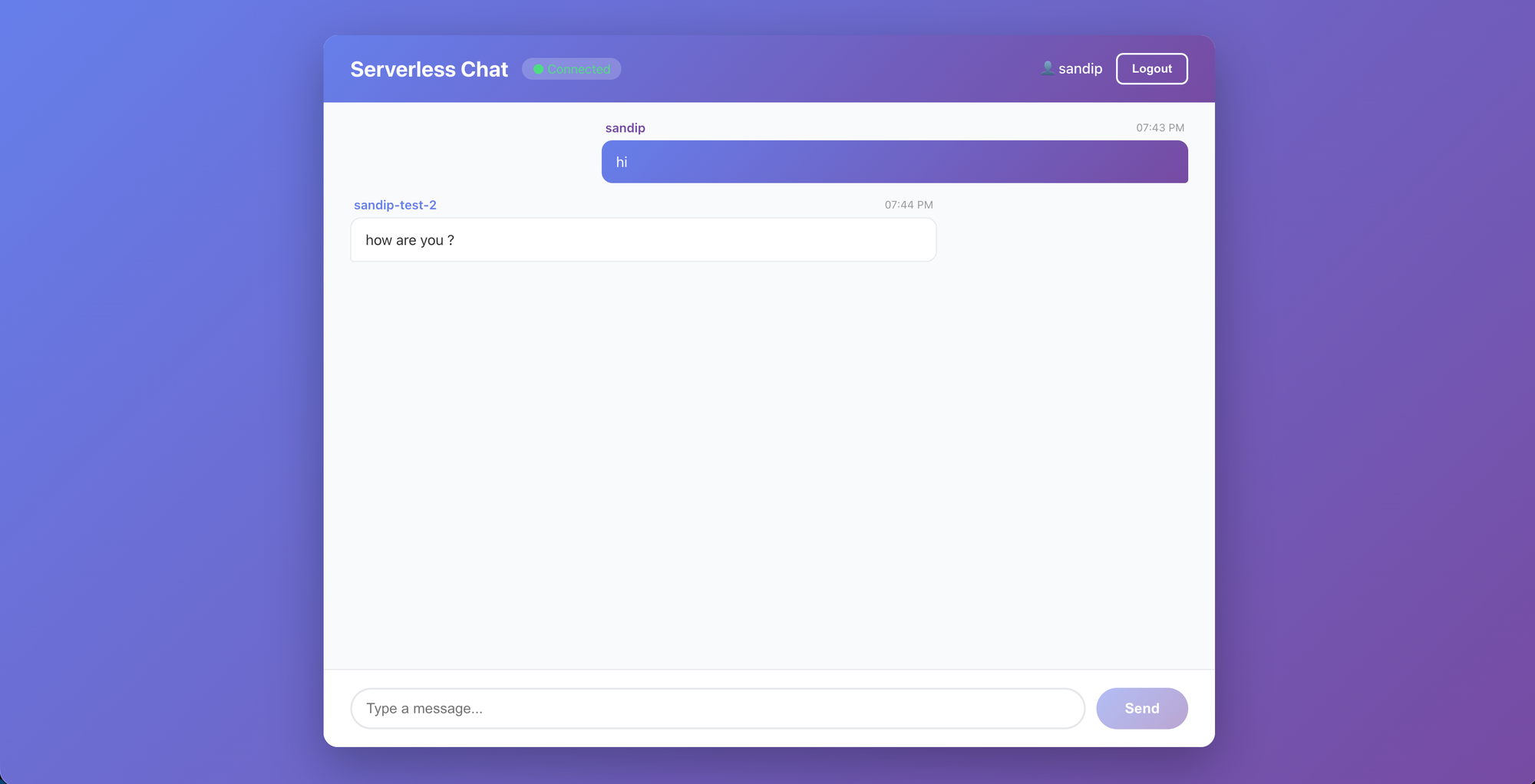
A real-time serverless chat application built with AWS API Gateway WebSocket APIs, Lambda, DynamoDB, and S3.
Features
- User signup and login
- Real-time chat messaging
- WebSocket-based communication
- Serverless architecture for scalability
- Complete infrastructure as code
Project Architecture
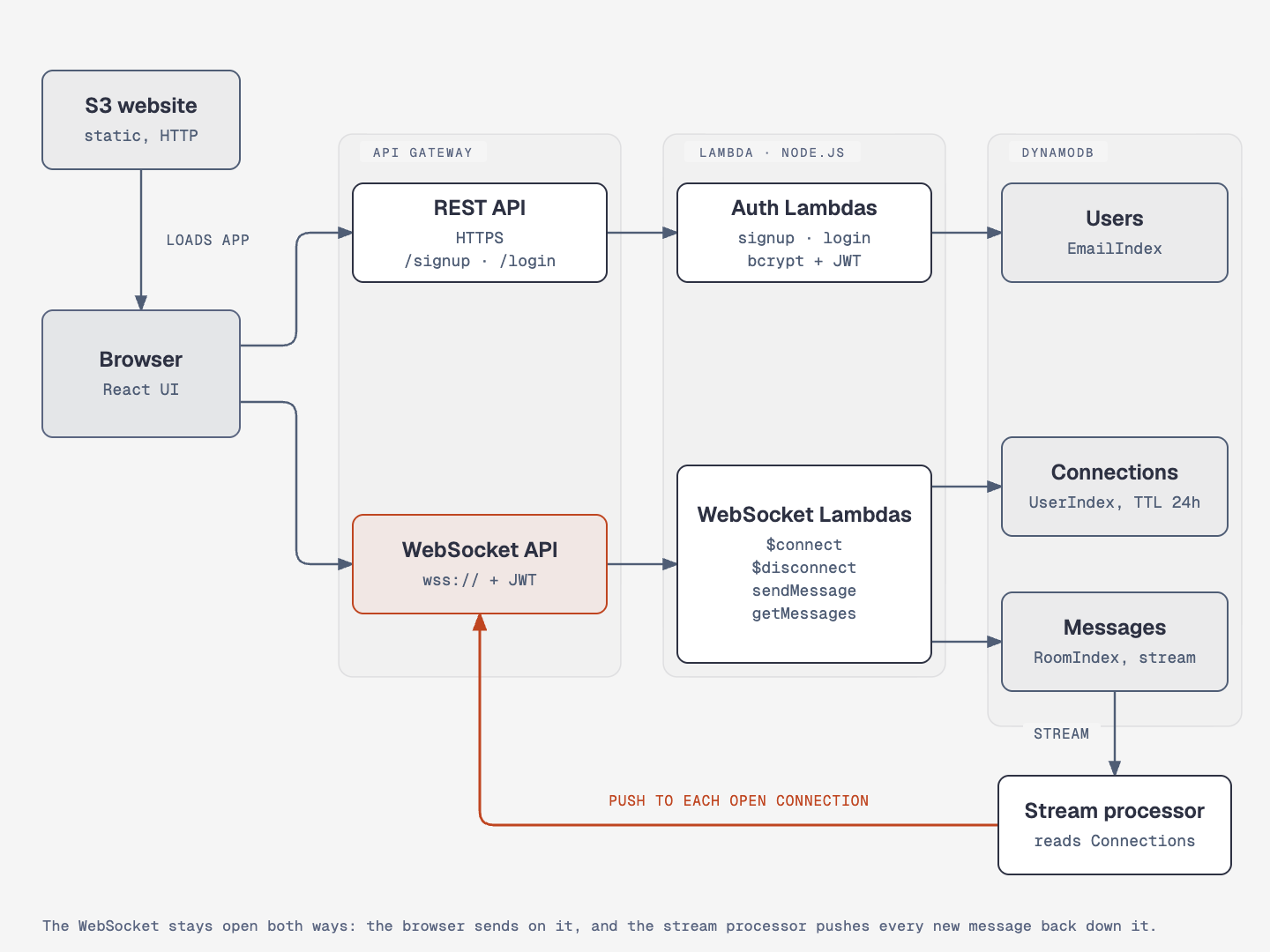
This serverless chat application uses AWS services to provide a scalable, real-time messaging platform.
Components
Frontend (React)
- Location: S3 Static Website
- Features:
- User authentication (signup/login)
- Real-time chat interface
- WebSocket connection management
- Message history display
- Technologies: React 18, WebSocket API
Authentication API (REST)
- Service: API Gateway REST API
- Endpoints:
POST /signup- User registrationPOST /login- User authentication
- Backend: Lambda functions with bcrypt for password hashing
- Token: JWT for session management
WebSocket API
- Service: API Gateway WebSocket API
- Routes:
$connect- Authenticate and store connection$disconnect- Clean up connectionsendMessage- Store message in DynamoDBgetMessages- Retrieve message history
- Authentication: JWT token via query parameter
Database (DynamoDB)
Users Table
- Primary Key: userId
- GSI: EmailIndex (email)
- Attributes: userId, email, username, password (hashed), createdAt, updatedAt
Messages Table
- Primary Key: messageId, timestamp
- GSI: RoomIndex (roomId, timestamp)
- Attributes: messageId, roomId, userId, username, message, timestamp
- Streams: Enabled (NEW_IMAGE)
Connections Table
- Primary Key: connectionId
- GSI: UserIndex (userId)
- Attributes: connectionId, userId, username, email, connectedAt, ttl
- TTL: Enabled (24 hours)
Stream Processor (Lambda)
- Trigger: DynamoDB Streams on Messages table
- Function: Broadcasts new messages to all active WebSocket connections
- Error Handling: Removes stale connections (410 status)
Data Flow
User Registration
- User submits signup form
- Frontend sends POST to
/signup - Lambda validates input
- Lambda checks for existing user via EmailIndex
- Lambda hashes password with bcrypt
- Lambda stores user in DynamoDB
- Success response returned
User Login
- User submits login form
- Frontend sends POST to
/login - Lambda queries user by email via EmailIndex
- Lambda verifies password with bcrypt
- Lambda generates JWT token
- Token and user data returned
- Frontend stores token in localStorage
WebSocket Connection
- Frontend connects to WebSocket URL with JWT token
- API Gateway triggers
$connectLambda - Lambda verifies JWT token
- Lambda stores connection in Connections table
- Connection established
- Frontend requests message history via
getMessages
Sending Messages
- User types and sends message
- Frontend sends via WebSocket with action
sendMessage - Lambda validates and stores message in Messages table
- DynamoDB Stream triggers Stream Processor Lambda
- Stream Processor queries all active connections
- Stream Processor broadcasts message to all connections
- All clients receive and display new message
Disconnection
- User closes browser or navigates away
- API Gateway triggers
$disconnectLambda - Lambda removes connection from Connections table
Cost Optimization
DynamoDB
- On-demand pricing for variable workload
- TTL automatically removes old connections
- GSI only on required attributes
Lambda
- Efficient code with minimal dependencies
- Appropriate memory allocation
- Short timeout values
S3
- Static website hosting (cheapest option)
- CloudFront can be added for HTTPS and global distribution (S3 website endpoints serve HTTP only)
API Gateway
- WebSocket APIs are billed per message and per connection-minute
- REST API billed per request
- No idle costs
Let's deploy it:
Project Structure
.
├── terraform/              # Terraform infrastructure code
│   ├── main.tf            # Main infrastructure
│   ├── variables.tf       # Input variables
│   ├── outputs.tf         # Output values
│   └── lambda.tf          # Lambda configurations
├── lambda/                # Lambda function code
│   ├── auth/              # Authentication handlers
│   ├── websocket/         # WebSocket handlers
│   └── streams/           # DynamoDB stream processor
├── frontend/              # React frontend
│   ├── public/
│   └── src/
├── deploy.sh              # Deployment script
└── cleanup.sh             # Cleanup script
Prerequisites
- AWS CLI configured with appropriate credentials
- Terraform >= 1.0
- Node.js >= 18.x
- Bash shell
Run these commands to verify you have everything installed:
# Check AWS CLI
aws --version
# Expected: aws-cli/2.x.x or higher

# Check Terraform
terraform version
# Expected: Terraform v1.x.x or higher

# Check Node.js
node --version
# Expected: v18.x.x or higher

# Check npm
npm --version
# Expected: 9.x.x or higher

# Check AWS credentials
aws sts get-caller-identity
# Should show your AWS account details
If any command fails, install the missing tool:
- AWS CLI: https://aws.amazon.com/cli/
- Terraform: https://www.terraform.io/downloads
- Node.js: https://nodejs.org/
Deploy in 3 Steps
Step 1: Clone Project
git clone https://github.com/sd031/Serverless-Chat-Application.git
cd Serverless-Chat-Application
Step 2: Run Deploy Script
./deploy.sh
Step 3: Confirm Deployment
When prompted, type yes and press Enter.
What Happens During Deployment?
✓ Checking prerequisites
✓ Building Lambda functions (7 functions)
✓ Deploying infrastructure (DynamoDB, Lambda, API Gateway, S3)
✓ Building React frontend
✓ Uploading to S3
✓ Done! Your URLs are displayed
Time: ~5-7 minutes
After deployment, you'll see:
=========================================
Deployment Complete!
=========================================

Website URL: http://serverless-chat-dev-frontend-xxxxx.s3-website-us-east-1.amazonaws.com
API Endpoints
REST API (Authentication)
POST /signup- User registrationPOST /login- User authentication
WebSocket API
$connect- Connection handler$disconnect- Disconnection handlersendMessage- Send chat messagegetMessages- Retrieve message history
Using the Application
1. Open the Website
Copy the Website URL from the deployment output and open it in your browser.
2. Create an Account
- Click "Sign Up" tab
- Enter username, email, and password
- Click "Sign Up" button
- Switch to "Login" tab
3. Login
- Enter your email and password
- Click "Login" button
4. Start Chatting
- Type a message in the input box
- Click "Send" or press Enter
- Your message appears in the chat!
5. Test Real-Time (Optional)
- Open another browser window (or incognito mode)
- Create a different account
- Login with the new account
- Send messages from both windows
- See messages appear in real-time! 🎉
Cleanup
When you're done testing:
./cleanup.sh
Type yes to confirm. This removes all AWS resources and stops any charges.
Challenges
- Multiple Chat Rooms: Add room creation and management
- Private Messages: Direct messaging between users
- File Uploads: S3 integration for media sharing
- User Presence: Online/offline status
- Message Reactions: Emoji reactions to messages
- Search: Full-text search with OpenSearch
- Notifications: SNS for push notifications
- Analytics: User engagement tracking
- CDN: CloudFront for global distribution
- Custom Domain: Route53 and ACM for HTTPS
🤷🏻 How to Participate?
✅ Complete the tasks and challenges.
✅ Document your progress and key takeaways on GitHub ReadMe, Medium, or Hashnode.
✅ Share the above in a LinkedIn post tagging me (Sandip Das), and use #90DaysOfCloud to engage with the community!
⚡ Quick Reference
Keep the momentum going — everything you need on LearnXOps in one place:
- 🎓 Courses — Video courses & AI-built courses
- 📚 Ebooks — Community ebooks & your own
- 🧪 All Labs & Challenges — DevOps, Cloud, SRE & more
- ☸️ Kubernetes Labs & Playground — kind clusters, playground & challenges
- 🤖 AI Agent & Bot Labs — OpenClaw · Hermes · CrewAI · LangGraph · MCP


Member discussion