


This project teaches how to design scalable, event-driven REST APIs using AWS SAM and DynamoDB — mastering serverless application architecture, CI/CD integration, and cost-efficient backend design without managing servers.
⚡ Quick Reference
Keep the momentum going — everything you need on LearnXOps in one place:
- 🎓 Courses — Video courses & AI-built courses
- 📚 Ebooks — Community ebooks & your own
- 🧪 All Labs & Challenges — DevOps, Cloud, SRE & more
- ☸️ Kubernetes Labs & Playground — kind clusters, playground & challenges
- 🤖 AI Agent & Bot Labs — OpenClaw · Hermes · CrewAI · LangGraph · MCP
🧠 Learn here
About this project:
A completely secured serverless CRUD API for user management built with AWS Lambda, API Gateway, and DynamoDB. Features API key authentication, rate limiting, and comprehensive security controls.
System Architecture
- API Gateway: REST API endpoint
- Lambda Functions: Serverless compute for CRUD operations
- DynamoDB: NoSQL database for user data storage
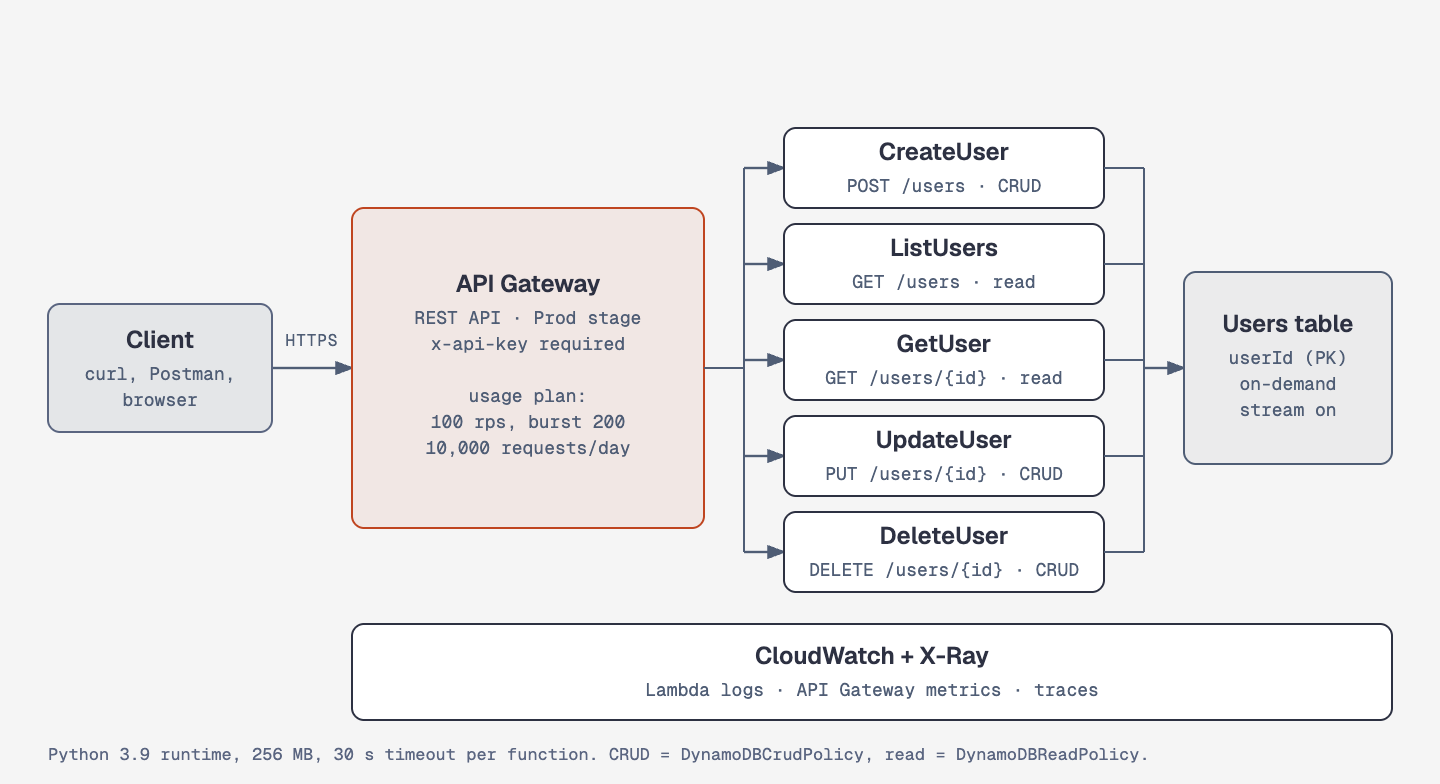
Component Details
1. API Gateway
Purpose: Provides a RESTful HTTP interface for the application
Features:
- REST API with resource-based routing
- CORS enabled for cross-origin requests
- Throttling and rate limiting
- API key required on every method, with a usage plan (100 requests/s, burst 200, 10,000 requests/day)
- Lambda proxy integration (input validation happens in the handlers)
- CloudWatch metrics and X-Ray tracing enabled
Endpoints:
| Method | Path | Lambda Function | Description |
|---|---|---|---|
| POST | /users | CreateUser | Create a new user |
| GET | /users | ListUsers | List all users |
| GET | /users/{userId} | GetUser | Get user by ID |
| PUT | /users/{userId} | UpdateUser | Update user |
| DELETE | /users/{userId} | DeleteUser | Delete user |
2. Lambda Functions
Purpose: Serverless compute for business logic
Common Configuration:
- Runtime: Python 3.9
- Memory: 256 MB
- Timeout: 30 seconds
- Environment Variables:
USERS_TABLE: DynamoDB table name
Function Details:
CreateUser
- Handler:
create_user.lambda_handler - Permissions: DynamoDB PutItem
- Validation: Name (required), Email (required), Age (optional)
- Response: 201 Created with user object
GetUser
- Handler:
get_user.lambda_handler - Permissions: DynamoDB GetItem
- Response: 200 OK with user object or 404 Not Found
ListUsers
- Handler:
list_users.lambda_handler - Permissions: DynamoDB Scan
- Features: Pagination support with limit parameter
- Response: 200 OK with users array and count
UpdateUser
- Handler:
update_user.lambda_handler - Permissions: DynamoDB UpdateItem, GetItem
- Validation: At least one field to update
- Response: 200 OK with updated user object
DeleteUser
- Handler:
delete_user.lambda_handler - Permissions: DynamoDB DeleteItem, GetItem
- Response: 200 OK with confirmation message
3. DynamoDB Table
Purpose: Persistent data storage for user records
Configuration:
- Table Name: Users
- Primary Key: userId (Partition Key, String)
- Billing Mode: Pay-per-request (On-Demand)
- Point-in-time Recovery: not enabled in the template (turn it on for production)
- Encryption at rest: on by default (AWS owned key)
- Streams: NEW_AND_OLD_IMAGES
Access Patterns:
- Create User: PutItem with generated UUID
- Get User: GetItem by userId
- List Users: Scan operation (consider Query with GSI for production)
- Update User: UpdateItem with conditional check
- Delete User: DeleteItem with existence check
Capacity Planning:
- On-demand pricing scales automatically
- No capacity planning required
- Suitable for unpredictable workloads
4. IAM Roles & Permissions
Lambda Execution Role:
Policies:
  - DynamoDBCrudPolicy (for Create, Update, Delete)
  - DynamoDBReadPolicy (for Get, List)
  - AWSLambdaBasicExecutionRole (added by SAM, for logs)
Principle of Least Privilege:
- Get and List get DynamoDBReadPolicy; Create, Update and Delete share DynamoDBCrudPolicy (you could narrow these to single actions)
- Read-only functions cannot write to DynamoDB
- No cross-service permissions unless required
Understand SAM before deployment:
AWS SAM (Serverless Application Model) is an open-source framework by AWS that helps you build, test, and deploy serverless applications faster.
It extends AWS CloudFormation with a simplified syntax for defining serverless resources like Lambda functions, API Gateway APIs, DynamoDB tables, and S3 buckets.
Key Points
- Simplified IaC: You define your app in a
template.yamlfile using SAM-specific resource types likeAWS::Serverless::Function. - Local Testing: You can run and debug Lambda functions locally using
sam local invokeorsam local start-api. - Easy Deployment:
sam buildandsam deploycommands package, upload, and deploy the app to AWS automatically. - CI/CD Friendly: Integrates well with CodePipeline, GitHub Actions, etc.
Example:
AWSTemplateFormatVersion: '2010-09-09'
Transform: AWS::Serverless-2016-10-31
Resources:
  MyFunction:
    Type: AWS::Serverless::Function
    Properties:
      Handler: app.lambda_handler
      Runtime: python3.13
      CodeUri: ./src/
      Events:
        ApiEvent:
          Type: Api
          Properties:
            Path: /hello
            Method: get
This small YAML defines a Lambda function and automatically creates an API Gateway endpoint to trigger it.
✅ In short: SAM makes it easier for Cloud & DevOps engineers to define, test, and deploy Lambda-based, serverless infrastructures with minimal boilerplate.
Now, let's deploy the application:
Prerequisites
- AWS CLI configured with appropriate credentials
- AWS SAM CLI installed
- Python 3.9 (
sam buildneeds the same version as the function runtime, or usesam build --use-containerwith Docker) - An AWS account
Project Structure
.
├── src/
│   ├── handlers/
│   │   ├── create_user.py       # POST /users
│   │   ├── get_user.py          # GET /users/{id}
│   │   ├── list_users.py        # GET /users
│   │   ├── update_user.py       # PUT /users/{id}
│   │   └── delete_user.py       # DELETE /users/{id}
│   └── utils/
│       ├── response.py          # HTTP response helpers
│       └── validation.py        # Input validation
├── template.yaml                # SAM template
├── requirements.txt             # Python dependencies
├── samconfig.toml.example       # Example SAM deploy config
├── deploy.sh                    # Build and deploy with SAM
├── get-api-key.sh               # Print the API key value
├── test-api.sh                  # End-to-end API test
├── postman_collection.json      # Postman requests
└── cleanup.sh                   # Delete the stack
Clone Repo:
git clone https://github.com/sd031/Serverless-REST-API-with-SAm-and-DynamoDB.git

cd Serverless-REST-API-with-SAm-and-DynamoDB
Run Deployment:
./deploy.shdeploy.sh
#!/bin/bash

# Deployment script for Serverless Users API
# This script builds and deploys the SAM application

set -e  # Exit on error

echo "🚀 Starting deployment of Serverless Users API..."

# Check if SAM CLI is installed
if ! command -v sam &> /dev/null; then
    echo "❌ Error: AWS SAM CLI is not installed"
    echo "Please install it: brew install aws-sam-cli"
    exit 1
fi

# Check if AWS CLI is configured
if ! aws sts get-caller-identity &> /dev/null; then
    echo "❌ Error: AWS CLI is not configured"
    echo "Please run: aws configure"
    exit 1
fi

# Set default values
STACK_NAME="${STACK_NAME:-serverless-users-api}"
REGION="${AWS_REGION:-us-west-2}"

echo "📦 Building SAM application..."
sam build

echo "🔍 Validating template..."
sam validate

echo "☁️  Deploying to AWS..."
echo "   Stack Name: $STACK_NAME"
echo "   Region: $REGION"

# Deploy with guided mode if first time, otherwise use saved config
if [ -f "samconfig.toml" ]; then
    echo "   Using existing configuration from samconfig.toml"
    sam deploy
else
    echo "   Running guided deployment (first time setup)"
    echo ""
    echo "⚠️  IMPORTANT: When prompted for 'SAM configuration file', just press ENTER (don't type 'y')"
    echo ""
    sam deploy --guided \
        --stack-name "$STACK_NAME" \
        --region "$REGION" \
        --capabilities CAPABILITY_IAM \
        --no-fail-on-empty-changeset
fi

echo ""
echo "✅ Deployment complete!"
echo ""
echo "📋 Stack Outputs:"
aws cloudformation describe-stacks \
    --stack-name "$STACK_NAME" \
    --region "$REGION" \
    --query 'Stacks[0].Outputs' \
    --output table

echo ""
echo "🎉 Your API is ready to use!"
This script deploys the infrastructure and code to AWS Lambda and makes the application ready.
Note the outputs from the deployment:
Outputs:
ApiEndpoint: https://xxxxxxxxxx.execute-api.us-west-2.amazonaws.com/Prod/
ApiKeyId: abcd1234efgh5678
Retrieve your API Key:
./get-api-key.sh
This will display your API key value that you'll need for all API requests.
API Usage
Authentication
All API endpoints require authentication via API key. Include the API key in the x-api-key header with every request.
Get Your API Key
After deployment, run:
./get-api-key.sh
Or manually:
API_KEY_ID=$(aws cloudformation describe-stacks \
    --stack-name serverless-users-api \
    --query 'Stacks[0].Outputs[?OutputKey==`ApiKeyId`].OutputValue' \
    --output text)

aws apigateway get-api-key \
    --api-key "$API_KEY_ID" \
    --include-value \
    --query 'value' \
    --output text
Base URL
https://YOUR_API_ID.execute-api.REGION.amazonaws.com/Prod
1. Create User
curl -X POST https://YOUR_API_ENDPOINT/users \
  -H "Content-Type: application/json" \
  -H "x-api-key: YOUR_API_KEY" \
  -d '{
    "name": "John Doe",
    "email": "[email protected]",
    "age": 30
  }'
Response:
{
  "userId": "123e4567-e89b-12d3-a456-426614174000",
  "name": "John Doe",
  "email": "[email protected]",
  "age": 30,
  "createdAt": "2024-01-01T12:00:00.000Z",
  "updatedAt": "2024-01-01T12:00:00.000Z"
}
2. Get User by ID
curl https://YOUR_API_ENDPOINT/users/123e4567-e89b-12d3-a456-426614174000 \
  -H "x-api-key: YOUR_API_KEY"
3. List All Users
curl https://YOUR_API_ENDPOINT/users \
  -H "x-api-key: YOUR_API_KEY"
Response:
{
  "users": [
    {
      "userId": "123e4567-e89b-12d3-a456-426614174000",
      "name": "John Doe",
      "email": "[email protected]",
      "age": 30
    }
  ],
  "count": 1
}
4. Update User
curl -X PUT https://YOUR_API_ENDPOINT/users/123e4567-e89b-12d3-a456-426614174000 \
  -H "Content-Type: application/json" \
  -H "x-api-key: YOUR_API_KEY" \
  -d '{
    "name": "John Smith",
    "age": 31
  }'
5. Delete User
curl -X DELETE https://YOUR_API_ENDPOINT/users/123e4567-e89b-12d3-a456-426614174000 \
  -H "x-api-key: YOUR_API_KEY"
Testing
Automated Testing Script
Use the provided test script to test all endpoints:
# Get your API endpoint and key first
API_ENDPOINT=$(aws cloudformation describe-stacks \
    --stack-name serverless-users-api \
    --query 'Stacks[0].Outputs[?OutputKey==`ApiEndpoint`].OutputValue' \
    --output text)

API_KEY=$(./get-api-key.sh | grep "API Key Value:" | cut -d' ' -f4)

# Run the test script
./test-api.sh $API_ENDPOINT $API_KEY
The test script will:
- ✅ Create a new user
- ✅ Retrieve the user by ID
- ✅ List all users
- ✅ Update the user
- ✅ Delete the user
- ✅ Verify deletion
Clean-up:
./cleanup.shThis will clean up the resources created in above steps
Challenges
- Add user authentication (AWS Cognito)
- Implement pagination for list operations
- Add data validation schemas (JSON Schema)
- Set up CI/CD pipeline (GitHub Actions/CodePipeline)
- Add comprehensive unit and integration tests
- Implement caching with ElastiCache or DynamoDB DAX
- Add request/response logging
- Implement API versioning
🤷🏻 How to Participate?
✅ Complete the tasks and challenges.
✅ Document your progress and key takeaways on GitHub ReadMe, Medium, or Hashnode.
✅ Share the above in a LinkedIn post tagging me (Sandip Das), and use #90DaysOfCloud to engage with the community!
⚡ Quick Reference
Keep the momentum going — everything you need on LearnXOps in one place:
- 🎓 Courses — Video courses & AI-built courses
- 📚 Ebooks — Community ebooks & your own
- 🧪 All Labs & Challenges — DevOps, Cloud, SRE & more
- ☸️ Kubernetes Labs & Playground — kind clusters, playground & challenges
- 🤖 AI Agent & Bot Labs — OpenClaw · Hermes · CrewAI · LangGraph · MCP


Member discussion