

This project helps us master the fundamentals of hosting, versioning, and securing static assets on AWS while automating deployments with S3, Route 53, and CloudFront.
It’s a must-try to understand how scalable, cost-efficient static hosting works in production-grade architectures.
⚡ Quick Reference
Keep the momentum going — everything you need on LearnXOps in one place:
- 🎓 Courses — Video courses & AI-built courses
- 📚 Ebooks — Community ebooks & your own
- 🧪 All Labs & Challenges — DevOps, Cloud, SRE & more
- ☸️ Kubernetes Labs & Playground — kind clusters, playground & challenges
- 🤖 AI Agent & Bot Labs — OpenClaw · Hermes · CrewAI · LangGraph · MCP
🧠 Learn here
About this project:
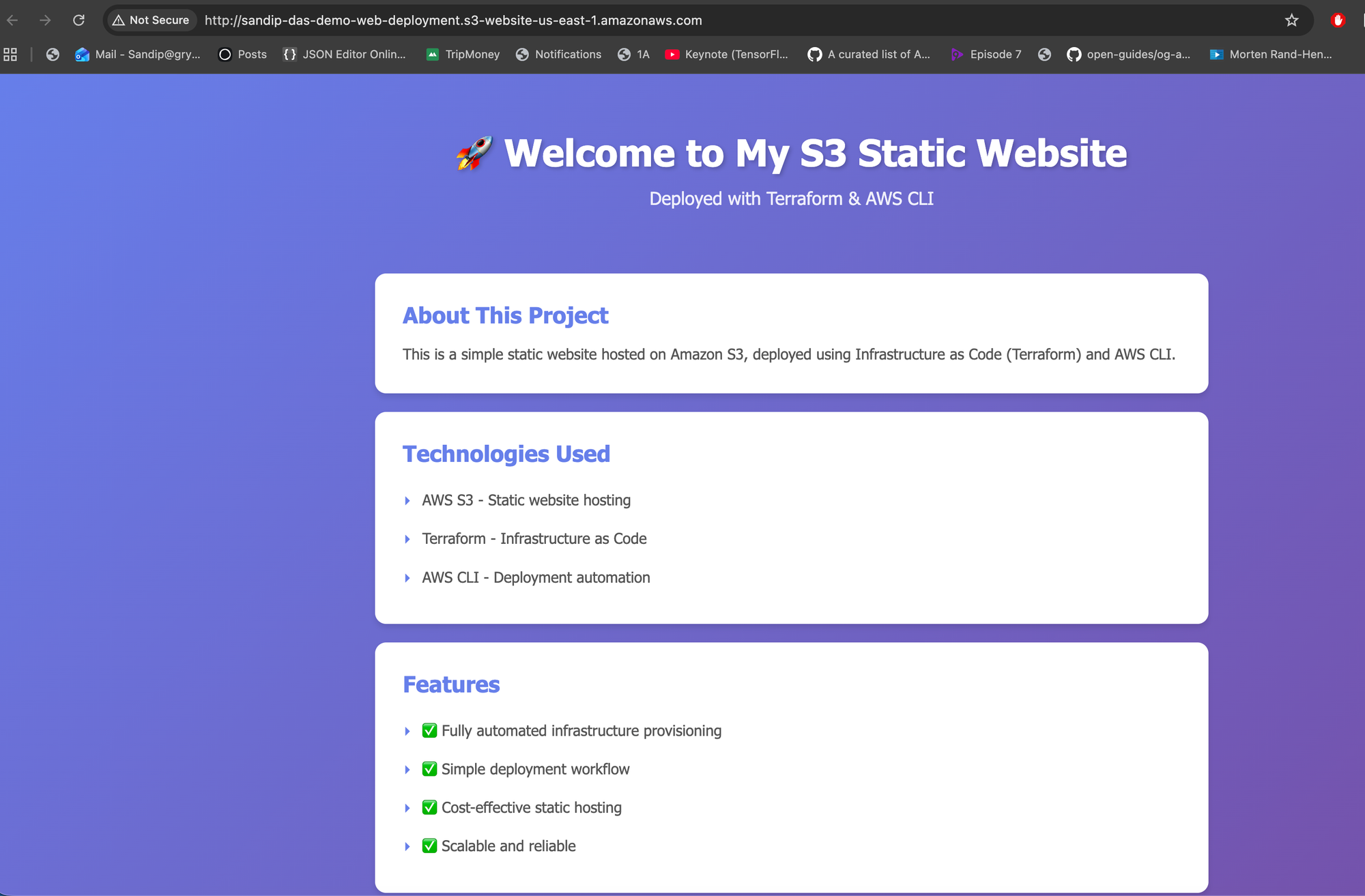
A simple project demonstrating how to host a static website on AWS S3 using Infrastructure as Code (Terraform) and AWS CLI for deployment.
🎯 Project Goal
Host a static website in S3 using infrastructure as code and deploy it from the command line.
📚 Concepts Covered
- AWS S3: Static website hosting
- Terraform: Infrastructure as Code
- AWS CLI: Command-line deployment automation
📁 Project Structure
.
├── website/              # Static website files
│   ├── index.html       # Homepage
│   ├── error.html       # 404 error page
│   └── styles.css       # Stylesheet
├── terraform/           # Terraform configuration
│   ├── main.tf         # Main infrastructure definition
│   ├── variables.tf    # Input variables
│   ├── outputs.tf      # Output values
│   └── terraform.tfvars.example
├── deploy.sh           # Deployment script using AWS CLI
├── cleanup.sh          # Cleanup script to destroy all resources
└── README.md           # This file
🚀 Prerequisites
- AWS Account: You need an active AWS account
- AWS CLI: Install from aws.amazon.com/cli
- Terraform: Install from developer.hashicorp.com/terraform/install
- AWS Credentials: Configure with
aws configure(oraws configure ssoif you sign in through IAM Identity Center)
📝 Let's Deploy this!
Step 1: Configure AWS Credentials
aws configure
Enter your:
- AWS Access Key ID
- AWS Secret Access Key
- Default region (e.g.,
us-east-1) - Default output format (e.g.,
json)
Step 2: Deploy Everything
git clone https://github.com/sd031/AWS-S3-Static-Website-Deployment.git
cd AWS-S3-Static-Website-Deployment
chmod +x deploy.sh
./deploy.sh my-static-website-unique-name-12345
Replace my-static-website-unique-name-12345 with a globally unique bucket name.
Note: S3 bucket names must be globally unique across all AWS accounts.
That's it! The script will:
- ✅ Create
terraform.tfvarsautomatically (if not exists) - ✅ Initialize Terraform
- ✅ Deploy infrastructure (S3 bucket + configuration)
- ✅ Upload website files
- ✅ Display your website URL
Open the URL in your browser to see your deployed website! 🎉
Note: The bucket is made public through a bucket policy, so this fails if S3 Block Public Access is turned on for your whole account or organization. The S3 website endpoint is also HTTP only. The CloudFront challenge below fixes both: a private bucket behind CloudFront with Origin Access Control and HTTPS.
deploy.sh
#!/bin/bash

# Complete deployment script: Terraform infrastructure + website files
# This script handles both infrastructure provisioning and content deployment

set -e

# Colors for output
GREEN='\033[0;32m'
BLUE='\033[0;34m'
RED='\033[0;31m'
YELLOW='\033[1;33m'
NC='\033[0m' # No Color

echo -e "${BLUE}=== S3 Static Website Complete Deployment ===${NC}"

# Check if bucket name is provided
if [ -z "$1" ]; then
    echo -e "${RED}Error: Bucket name not provided${NC}"
    echo "Usage: ./deploy.sh <bucket-name>"
    exit 1
fi

BUCKET_NAME=$1
WEBSITE_DIR="./website"
TERRAFORM_DIR="./terraform"

# Check if website directory exists
if [ ! -d "$WEBSITE_DIR" ]; then
    echo -e "${RED}Error: Website directory not found at $WEBSITE_DIR${NC}"
    exit 1
fi

# Check if terraform directory exists
if [ ! -d "$TERRAFORM_DIR" ]; then
    echo -e "${RED}Error: Terraform directory not found at $TERRAFORM_DIR${NC}"
    exit 1
fi

# Check if AWS CLI is installed
if ! command -v aws &> /dev/null; then
    echo -e "${RED}Error: AWS CLI is not installed${NC}"
    echo "Install it from: https://aws.amazon.com/cli/"
    exit 1
fi

# Check if Terraform is installed
if ! command -v terraform &> /dev/null; then
    echo -e "${RED}Error: Terraform is not installed${NC}"
    echo "Install it from: https://developer.hashicorp.com/terraform/install"
    exit 1
fi

# Step 1: Deploy Terraform Infrastructure
echo ""
echo -e "${BLUE}=== Step 1: Deploying Infrastructure with Terraform ===${NC}"
cd "$TERRAFORM_DIR"

# Check if terraform.tfvars exists
if [ ! -f "terraform.tfvars" ]; then
    echo -e "${YELLOW}Warning: terraform.tfvars not found${NC}"
    echo "Creating terraform.tfvars with provided bucket name..."
    echo "aws_region  = \"us-east-1\"" > terraform.tfvars
    echo "bucket_name = \"$BUCKET_NAME\"" >> terraform.tfvars
    echo -e "${GREEN}✓ Created terraform.tfvars${NC}"
fi

# Initialize Terraform if needed
if [ ! -d ".terraform" ]; then
    echo -e "${BLUE}Initializing Terraform...${NC}"
    terraform init
fi

# Plan and Apply
echo -e "${BLUE}Planning infrastructure changes...${NC}"
terraform plan -out=tfplan

echo -e "${YELLOW}Applying infrastructure changes...${NC}"
terraform apply tfplan
rm -f tfplan

echo -e "${GREEN}✓ Infrastructure deployed successfully${NC}"

# Get bucket name from Terraform output
DEPLOYED_BUCKET=$(terraform output -raw bucket_name)
cd ..

# Verify bucket name matches
if [ "$DEPLOYED_BUCKET" != "$BUCKET_NAME" ]; then
    echo -e "${YELLOW}Warning: Deployed bucket name ($DEPLOYED_BUCKET) differs from provided name ($BUCKET_NAME)${NC}"
    BUCKET_NAME=$DEPLOYED_BUCKET
fi

# Step 2: Check if bucket exists and is accessible
echo ""
echo -e "${BLUE}=== Step 2: Verifying Bucket Access ===${NC}"
if ! aws s3 ls "s3://$BUCKET_NAME" > /dev/null 2>&1; then
    echo -e "${RED}Error: Bucket $BUCKET_NAME is not accessible${NC}"
    echo "Please check your AWS credentials and permissions"
    exit 1
fi
echo -e "${GREEN}✓ Bucket is accessible${NC}"

# Step 3: Deploy Website Files
echo ""
echo -e "${BLUE}=== Step 3: Deploying Website Files ===${NC}"

# Sync website files to S3
echo -e "${BLUE}Uploading website files to S3...${NC}"
aws s3 sync "$WEBSITE_DIR" "s3://$BUCKET_NAME" \
    --delete \
    --cache-control "max-age=3600" \
    --exclude ".DS_Store"

# Set content types explicitly
echo -e "${BLUE}Setting content types...${NC}"
aws s3 cp "s3://$BUCKET_NAME/index.html" "s3://$BUCKET_NAME/index.html" \
    --content-type "text/html" \
    --metadata-directive REPLACE \
    --cache-control "max-age=3600"

aws s3 cp "s3://$BUCKET_NAME/error.html" "s3://$BUCKET_NAME/error.html" \
    --content-type "text/html" \
    --metadata-directive REPLACE \
    --cache-control "max-age=3600"

aws s3 cp "s3://$BUCKET_NAME/styles.css" "s3://$BUCKET_NAME/styles.css" \
    --content-type "text/css" \
    --metadata-directive REPLACE \
    --cache-control "max-age=86400"

echo -e "${GREEN}✓ Website files uploaded successfully${NC}"

# Step 4: Display Results
echo ""
echo -e "${GREEN}=== Deployment Complete! ===${NC}"
echo ""

# Get website URL from Terraform
cd "$TERRAFORM_DIR"
WEBSITE_URL=$(terraform output -raw website_url)
cd ..

echo -e "${GREEN}✓ Infrastructure: Deployed${NC}"
echo -e "${GREEN}✓ Website Files: Uploaded${NC}"
echo ""
echo -e "${BLUE}Your website is live at:${NC}"
echo -e "${GREEN}$WEBSITE_URL${NC}"
echo ""
echo "Bucket name: $BUCKET_NAME"
echo ""
echo "To update your website, modify files in ./website/ and run:"
echo "  ./deploy.sh $BUCKET_NAME"
🔄 Updating the Website
To update your website content:
- Modify files in the
website/directory - Run the deployment script:
./deploy.sh <your-bucket-name>
The script will sync your changes to S3.
🧹 Cleanup
To avoid ongoing AWS charges, destroy the infrastructure when done.
Using the Cleanup Script (Recommended)
./cleanup.sh
That's it! The script will automatically:
- ✅ Retrieve bucket name from Terraform state
- ✅ Empty the S3 bucket (remove all files)
- ✅ Destroy all Terraform infrastructure
- ✅ Prompt for confirmation before proceeding
🛠️ Useful Commands
Terraform Commands
terraform init          # Initialize Terraform
terraform plan          # Preview changes
terraform apply         # Apply changes
terraform destroy       # Destroy infrastructure
terraform output        # Show outputs
AWS CLI Commands
# List bucket contents
aws s3 ls s3://<bucket-name>

# Sync files manually
aws s3 sync ./website s3://<bucket-name>

# Remove all files
aws s3 rm s3://<bucket-name> --recursive

# Check bucket website configuration
aws s3api get-bucket-website --bucket <bucket-name>
Challenges
- Add CloudFront: Enable HTTPS and CDN caching with a private bucket and Origin Access Control (S3 website endpoints are HTTP only)
- Custom Domain: Use Route 53 for a custom domain name
- CI/CD Pipeline: Automate deployment with GitHub Actions
- Monitoring: Add CloudWatch metrics and alarms
- Versioning: Enable S3 versioning for backup
🤷🏻 How to Participate?
✅ Complete the tasks and challenges.
✅ Document your progress and key takeaways on GitHub ReadMe, Medium, or Hashnode.
✅ Share the above in a LinkedIn post tagging me (Sandip Das), and use #90DaysOfCloud to engage with the community!
⚡ Quick Reference
Keep the momentum going — everything you need on LearnXOps in one place:
- 🎓 Courses — Video courses & AI-built courses
- 📚 Ebooks — Community ebooks & your own
- 🧪 All Labs & Challenges — DevOps, Cloud, SRE & more
- ☸️ Kubernetes Labs & Playground — kind clusters, playground & challenges
- 🤖 AI Agent & Bot Labs — OpenClaw · Hermes · CrewAI · LangGraph · MCP


Member discussion