

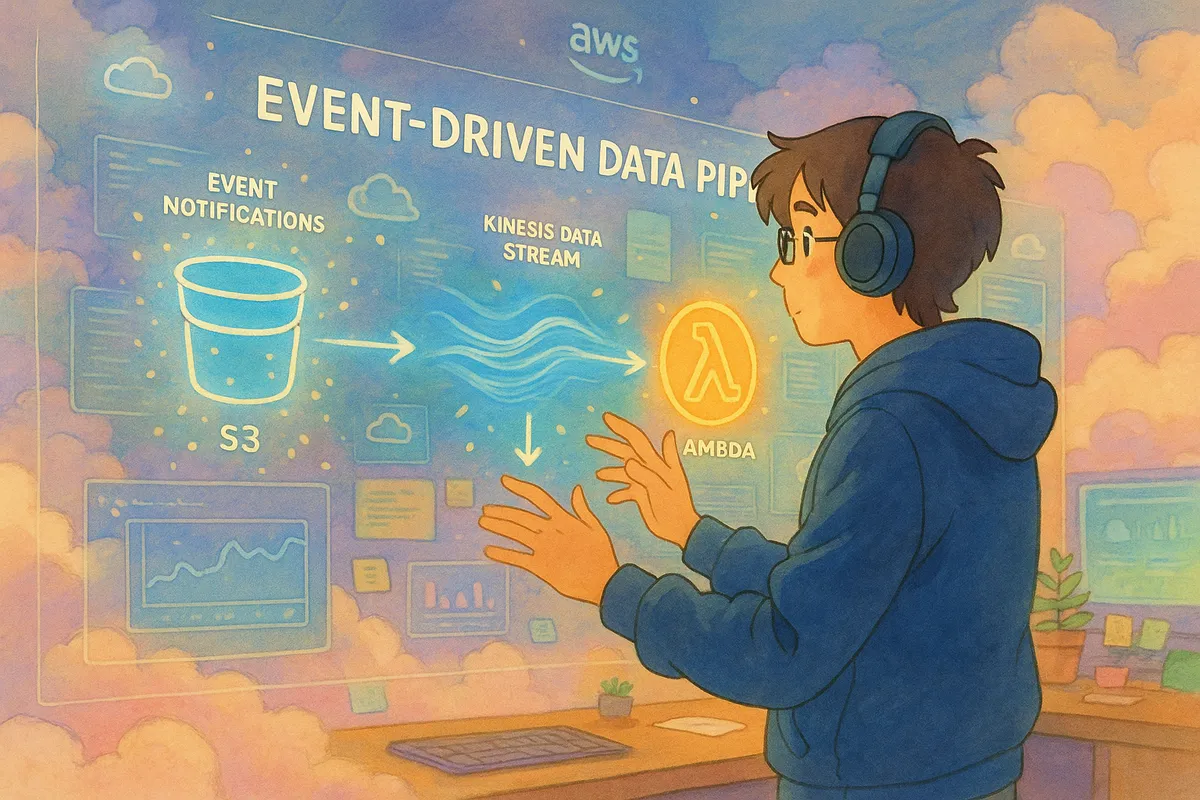
We should learn Event-Driven Data Pipelines with S3, Lambda & Kinesis. Event-driven architectures are the backbone of scalable, cost-efficient, real-time systems.
Mastering this helps you build automated, serverless, and highly responsive data flows that power modern applications, analytics, and operational intelligence.
⚡ Quick Reference
Keep the momentum going — everything you need on LearnXOps in one place:
- 🎓 Courses — Video courses & AI-built courses
- 📚 Ebooks — Community ebooks & your own
- 🧪 All Labs & Challenges — DevOps, Cloud, SRE & more
- ☸️ Kubernetes Labs & Playground — kind clusters, playground & challenges
- 🤖 AI Agent & Bot Labs — OpenClaw · Hermes · CrewAI · LangGraph · MCP
🧠 Learn here
About this project:
It's a production-ready, real-time data processing pipeline that demonstrates event-driven architecture using AWS services. This project ingests streaming data via Amazon Kinesis Data Streams, processes it with AWS Lambda functions, and stores transformed data in Amazon S3.
Features
- Real-time Stream Processing: Ingest and process data streams using Kinesis
- Event-Driven Architecture: Automatic Lambda triggers from Kinesis and S3
- Data Transformation: Multi-stage processing pipeline with validation
- Error Handling: Dead Letter Queues (DLQ) and retry mechanisms
- Monitoring: CloudWatch metrics, logs, and alarms
- Infrastructure as Code: Complete Terraform configuration
- Scalability: Lambda concurrency follows the shard count; add shards (or switch the stream to on-demand mode) for more throughput
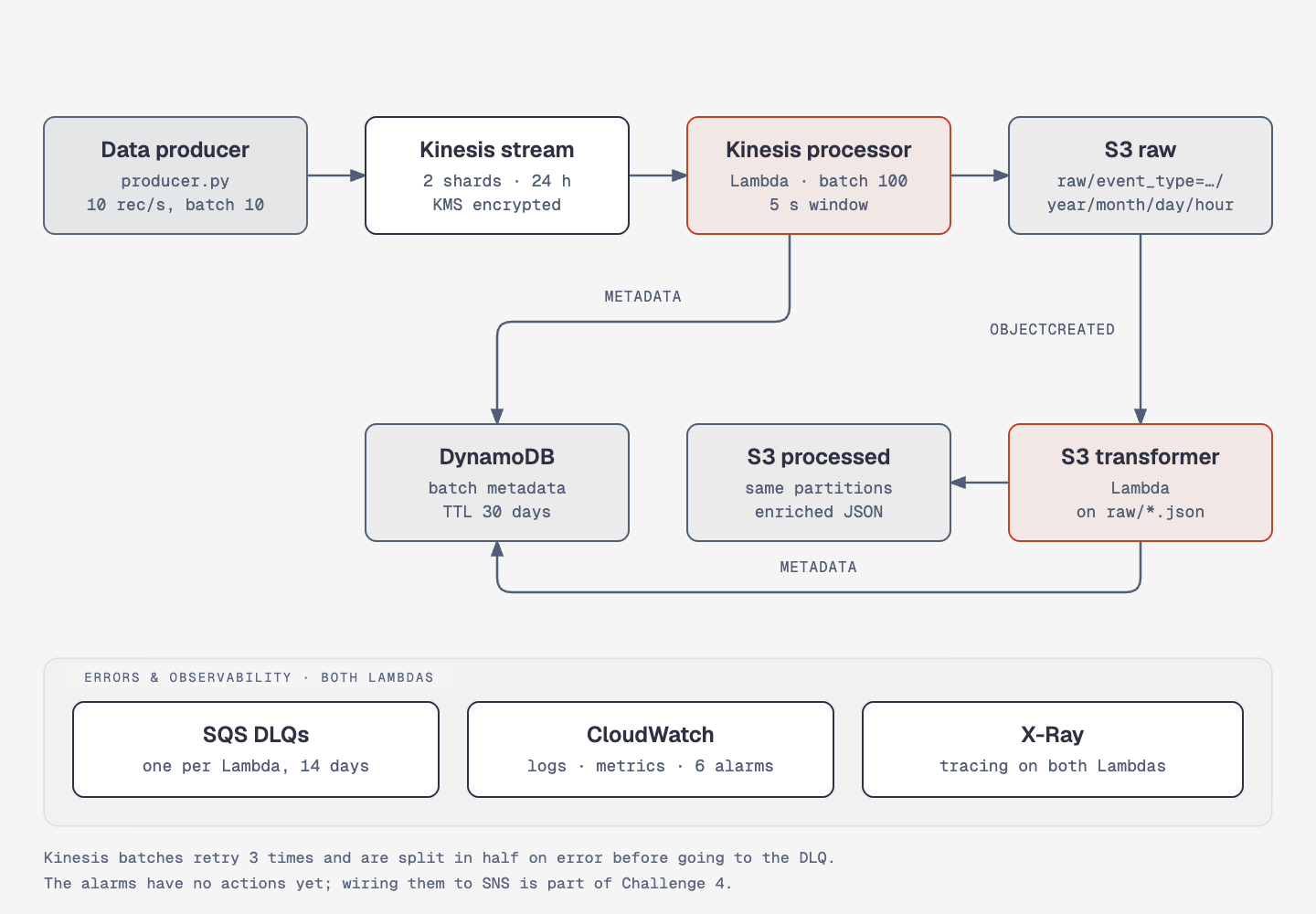
Project Architecture
Components
1. Data Producer
Generates and sends sample events to Kinesis
Runtime: Python 3.9+
Key Features:
- Configurable event generation rate
- Multiple event types (user_action, transaction, metric, system_event)
- Batch sending for efficiency
- Statistics tracking
Configuration:
producer:
  rate: 10              # Records per second
  duration: 60          # Duration in seconds
  batch_size: 10        # Records per batch
2. Amazon Kinesis Data Stream
Real-time data ingestion and buffering
Configuration:
- Shard Count: 2 (1 MB/s write, 2 MB/s read per shard)
- Retention: 24 hours
- Encryption: KMS encryption at rest
- Monitoring: Shard-level metrics enabled
Scaling:
- Each shard: 1,000 records/sec or 1 MB/sec
- 2 shards = 2,000 records/sec capacity
- Can scale to hundreds of shards
Cost: ~$0.015/shard-hour = ~$22/month for 2 shards
3. Lambda: Kinesis Stream Processor
Process streaming data from Kinesis
Runtime: Python 3.9
Configuration:
- Memory: 512 MB (configurable)
- Timeout: 60 seconds
- Concurrency: Auto-scaling
- Batch Size: 100 records
- Batching Window: 5 seconds
Processing Logic:
- Decode base64-encoded Kinesis records
- Parse JSON payload
- Validate required fields and data types
- Add Kinesis metadata (sequence number, partition key)
- Partition data by event_type and timestamp
- Write to S3 in JSON Lines format
- Track metadata in DynamoDB
Error Handling:
- Retry failed records up to 3 times
- Bisect batch on function error
- Send failed records to DLQ
- Log all errors to CloudWatch
IAM Permissions:
- Read from Kinesis stream
- Write to S3 raw bucket
- Write to DynamoDB table
- Decrypt KMS keys
- Write CloudWatch logs
- Send to SQS DLQ
4. Amazon S3 - Raw Data Bucket
Store raw, unprocessed data
Partitioning Strategy:
s3://bucket/raw/
  event_type=user_action/
    year=2024/
      month=01/
        day=15/
          hour=10/
            data_20240115_103045_123456.json
Benefits:
- Efficient querying with Athena/Glue
- Easy data lifecycle management
- Organized data structure
Features:
- Versioning enabled
- Server-side encryption (AES-256)
- Lifecycle policy: Glacier after 90 days
- Public access blocked
- Event notifications enabled
Data Format: JSON Lines (newline-delimited JSON)
{"timestamp":"2024-01-15T10:30:00Z","event_type":"user_action",...}
{"timestamp":"2024-01-15T10:30:01Z","event_type":"transaction",...}
5. Lambda: S3 Data Transformer
Transform and enrich raw data
Runtime: Python 3.9
Configuration:
- Memory: 512 MB
- Timeout: 60 seconds
- Trigger: S3 ObjectCreated events on raw/*.json
Transformation Logic:
For Transactions:
- Add transaction_date
- Categorize amount (micro/small/medium/large)
- Flag high-value transactions (>$1000)
For User Actions:
- Add action_date
- Categorize session duration (short/medium/long)
For Metrics:
- Add metric_date
- Categorize value range (negative/low/normal/high)
- Detect anomalies (values outside normal range)
Enrichment:
- Generate unique record_id (SHA-256 hash)
- Add processing timestamp
- Add metadata (source, version, stage)
- Preserve original data
Output Format:
{
  "original_data": {...},
  "enriched_data": {...},
  "record_id": "abc123...",
  "processed_timestamp": "2024-01-15T10:31:00Z",
  "metadata": {
    "source": "kinesis-stream",
    "processing_stage": "transformed",
    "version": "1.0"
  }
}
6. Amazon S3 - Processed Data Bucket
Store transformed, analytics-ready data
Partitioning: Same as raw bucket
Use Cases:
- Analytics with Athena
- ML model training
- Business intelligence dashboards
- Data exports
7. Amazon DynamoDB
Track processing metadata and state
Table Schema:
Primary Key: batch_id (String)
Sort Key: processed_at (String)

Attributes:
- shard_id (String)
- total_records (Number)
- success_records (Number)
- failed_records (Number)
- partitions_count (Number)
- ttl (Number) - 30 days
Indexes:
- ShardIndex (GSI): Query by shard_id
Billing: On-demand (pay per request)
Use Cases:
- Audit trail
- Processing statistics
- Debugging and troubleshooting
- Data lineage tracking
8. Amazon CloudWatch
Monitoring, logging, and alerting
Log Groups:
/aws/lambda/event-driven-pipeline-kinesis-processor-dev/aws/lambda/event-driven-pipeline-s3-transformer-dev
Metrics:
- Lambda: Invocations, Errors, Duration, Throttles
- Kinesis: IncomingRecords, IteratorAge, Throughput
- DynamoDB: UserErrors, ConsumedCapacity
Alarms:
- High Lambda error rate (>5 errors in 2 minutes)
- Lambda throttling
- High Kinesis iterator age (>60 seconds)
- DynamoDB throttling
X-Ray Tracing:
- End-to-end request tracing
- Performance bottleneck identification
- Service map visualization
9. Amazon SQS (Dead Letter Queues)
Capture failed Lambda invocations
Configuration:
- Retention: 14 days
- Visibility Timeout: 30 seconds
DLQs:
kinesis-processor-dlq: Failed Kinesis processings3-transformer-dlq: Failed S3 transformations
Monitoring:
- CloudWatch alarm on message count
- Manual inspection for debugging
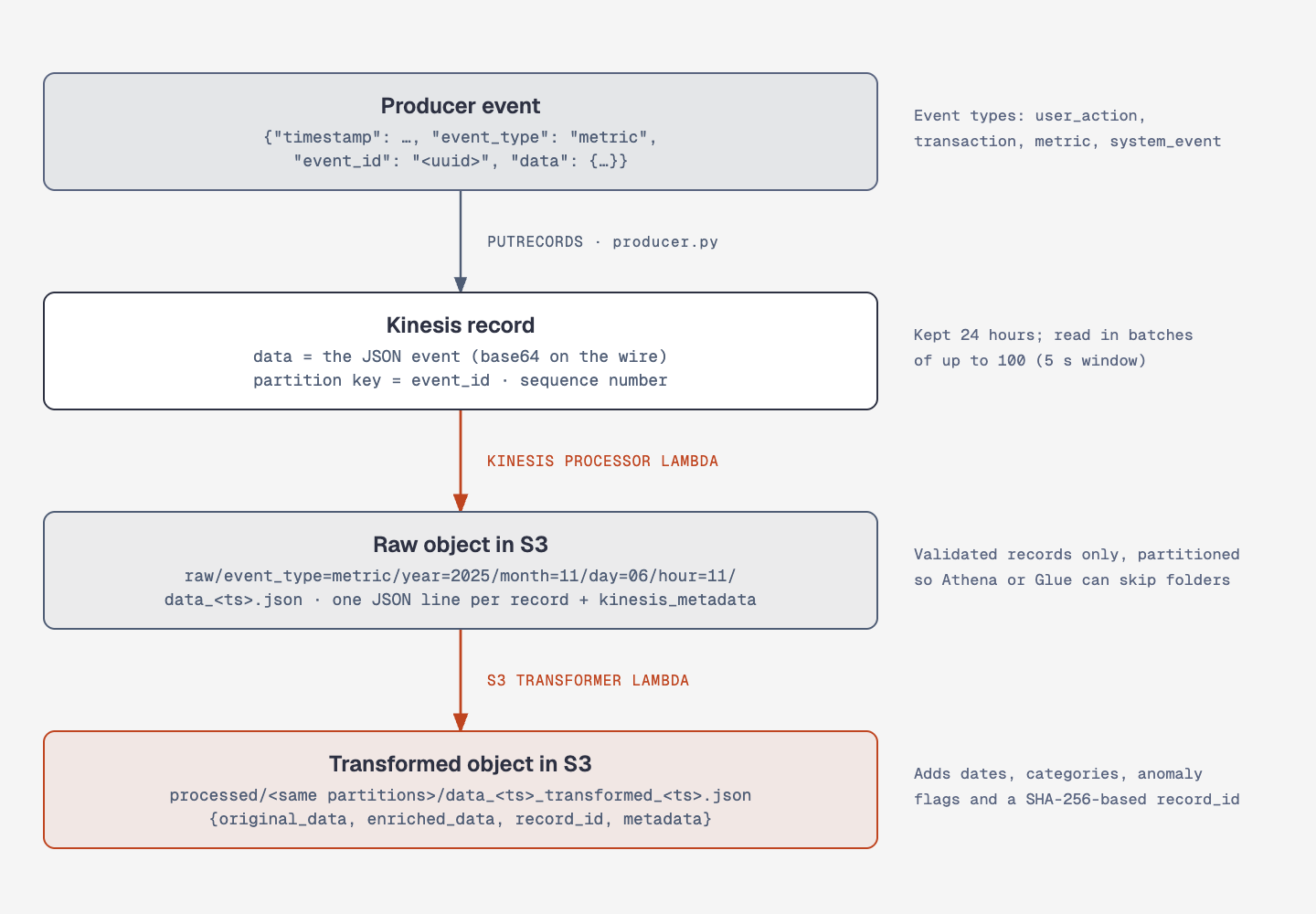
Data Flow
- Data Ingestion: Producer sends JSON events to Kinesis Data Stream
- Stream Processing: Lambda function processes Kinesis records in batches
- Raw Storage: Processed data stored in S3 raw bucket with partitioning
- Metadata Tracking: Event metadata stored in DynamoDB
- S3 Event Trigger: S3 PUT event triggers transformer Lambda
- Data Transformation: Lambda enriches and transforms data
- Final Storage: Transformed data stored in S3 processed bucket
Cost Breakdown (Monthly)
Development/Testing (Low Traffic):
- Kinesis: $22 (2 shards)
- Lambda: $5 (1M invocations)
- S3: $5 (100 GB)
- DynamoDB: $2 (on-demand)
- CloudWatch: $2 (logs and metrics)
- Total: ~$36/month
Production (Medium Traffic):
- Kinesis: $88 (8 shards)
- Lambda: $20 (10M invocations)
- S3: $25 (1 TB)
- DynamoDB: $10 (on-demand)
- CloudWatch: $10 (logs and metrics)
- Total: ~$153/month
Now, let's get started with the deployment
Prerequisites
- AWS Account with appropriate permissions
- AWS CLI configured (
aws configure) - Terraform >= 1.0
- Python 3.9+
Tech Stack
- AWS Kinesis Data Streams: Real-time data ingestion
- AWS Lambda: Serverless compute for data processing
- Amazon S3: Data lake storage
- Amazon DynamoDB: Metadata and state management
- Amazon CloudWatch: Monitoring and alerting
- AWS IAM: Security and access control
- Terraform: Infrastructure as Code
📁 Project Structure
.
│
├── data-producer/                  # Data generation and streaming component
│   ├── config.yaml                 # Configuration for producer (stream name, region, rate)
│   ├── producer.py                 # Python script to generate and send events to Kinesis
│   ├── requirements.txt            # Python dependencies (boto3, PyYAML)
│   └── sample_data.json           # Sample data templates for testing
│
├── infrastructure/                 # Infrastructure as Code (IaC)
│   └── terraform/                  # Terraform configuration files
│       ├── main.tf                 # Main Terraform configuration (providers, locals)
│       ├── variables.tf            # Input variables definition
│       ├── outputs.tf              # Output values (ARNs, names, endpoints)
│       ├── outputs.json           # Generated output values in JSON format
│       ├── terraform.tfvars.example # Example variables file
│       │
│       ├── kinesis.tf             # Kinesis Data Stream configuration
│       ├── s3.tf                  # S3 buckets (raw & processed) with versioning
│       ├── lambda.tf              # Lambda functions, event mappings, permissions
│       ├── iam.tf                 # IAM roles and policies for Lambda functions
│       ├── dynamodb.tf            # DynamoDB table for metadata tracking
│       │
│       ├── .terraform/            # Terraform plugins and modules
│       ├── .terraform.lock.hcl    # Terraform provider version lock file
│       ├── terraform.tfstate      # Current infrastructure state (DO NOT COMMIT)
│       ├── terraform.tfstate.backup # Backup of previous state
│       └── tfplan                 # Saved Terraform execution plan
│
├── lambda/                         # Lambda function code and dependencies
│   ├── kinesis-processor/         # Kinesis stream processor function
│   │   ├── handler.py             # Main Lambda handler (validates, partitions, writes to S3)
│   │   ├── config.py              # Configuration constants
│   │   ├── requirements.txt       # Python dependencies
│   │   ├── tests/                 # Unit tests
│   │   └── [dependencies]/        # Packaged Python libraries (boto3, botocore, etc.)
│   ├── kinesis-processor.zip      # Deployment package for Lambda
│   │
│   ├── s3-transformer/            # S3 event transformer function
│   │   ├── handler.py             # Main Lambda handler (transforms, enriches data)
│   │   ├── config.py              # Configuration constants
│   │   ├── requirements.txt       # Python dependencies
│   │   ├── tests/                 # Unit tests
│   │   └── [dependencies]/        # Packaged Python libraries (boto3, botocore, etc.)
│   └── s3-transformer.zip         # Deployment package for Lambda
│
├── scripts/                        # Automation and utility scripts
│   ├── deploy.sh                  # Complete deployment script (Terraform + Lambda packaging)
│   ├── cleanup.sh                 # Resource cleanup script (destroys infrastructure)
│   ├── test-pipeline.sh           # End-to-end pipeline testing script
│   └── monitor.sh                 # Monitoring script (CloudWatch metrics, logs)
│
├── setup_python_env.sh            # Python environment setup script
├── .gitignore                     # Git ignore rules (state files, zips, venv, etc.)
└── venv/                          # Python virtual environment
1. Clone and Setup
git clone https://github.com/sd031/event-Driven-Data-Pipeline-with-S3-Lambda-Kinesis.git
cd event-Driven-Data-Pipeline-with-S3-Lambda-Kinesis
chmod +x setup_python_env.sh
./setup_python_env.sh
source venv/bin/activate
2. Configure AWS Credentials
aws configure
# Enter your AWS Access Key ID, Secret Access Key, and Region
3. Deploy Infrastructure & Lambda Functions
cd ./scripts
./deploy.sh
4. Test the Pipeline
# Start the data producer test script
./test-pipeline.sh

# Monitor the pipeline (you are already in scripts/)
./monitor.sh
Expected output:
./test-pipeline.sh
========================================
Pipeline End-to-End Test
========================================

Testing with resources:
  Region: us-east-1
  Kinesis Stream: event-driven-pipeline-stream-dev
  Raw Bucket: event-driven-pipeline-raw-dev-211125312702
  Processed Bucket: event-driven-pipeline-processed-dev-211125312702

Test 1: Sending test data to Kinesis...
2025-11-14 22:14:45,793 - __main__ - INFO - Starting producer for stream: event-driven-pipeline-stream-dev
2025-11-14 22:14:45,793 - __main__ - INFO - Rate: 10 records/sec, Duration: 5 sec, Batch size: 10
2025-11-14 22:14:45,805 - botocore.credentials - INFO - Found credentials in shared credentials file: ~/.aws/credentials
2025-11-14 22:14:48,035 - __main__ - INFO - Batch sent: 10 success, 0 failed
2025-11-14 22:14:49,316 - __main__ - INFO - Batch sent: 10 success, 0 failed
2025-11-14 22:14:50,596 - __main__ - INFO - Batch sent: 10 success, 0 failed
2025-11-14 22:14:51,149 - __main__ - INFO - Batch sent: 2 success, 0 failed
2025-11-14 22:14:51,149 - __main__ - INFO - ==================================================
2025-11-14 22:14:51,149 - __main__ - INFO - Producer Statistics:
2025-11-14 22:14:51,149 - __main__ - INFO -   Records sent: 32
2025-11-14 22:14:51,149 - __main__ - INFO -   Records failed: 0
2025-11-14 22:14:51,149 - __main__ - INFO -   Total bytes: 8,890
2025-11-14 22:14:51,149 - __main__ - INFO -   Success rate: 100.00%
2025-11-14 22:14:51,149 - __main__ - INFO - ==================================================
✓ Test data sent

Test 2: Waiting for Lambda processing (30 seconds)...
✓ Wait complete

Test 3: Checking raw data in S3...
  Raw files found:     3954
✓ Raw data found in S3


Sample raw file: raw/event_type=metric/year=2025/month=11/day=06/hour=11/data_20251106_110614_063577.json
{"timestamp": "2025-11-06T11:06:05.912589Z", "event_type": "metric", "event_id": "ecfa0190-7b55-496d-bc4d-52d773a1f205", "data": {"metric_name": "disk_io", "value": 27.28, "unit": "ms", "host": "host-37", "region": "eu-west-1"}, "kinesis_metadata": {"sequence_number": "49668705721828834096875788934406440519195094397879320578", "partition_key": "ecfa0190-7b55-496d-bc4d-52d773a1f205", "approximate_arrival_timestamp": 1762427168.673}}
{"timestamp": "2025-11-06T11:06:06.122614Z", "event_type": "metric", "event_id": "fafc3af4-317f-480f-815b-e99b7bc7d8cd", "data": {"metric_name": "cpu_usage", "value": 59.38, "unit": "count", "host": "host-15", "region": "eu-west-1"}, "kinesis_metadata": {"sequence_number": "49668705721828834096875788934408858370834323656228732930", "partition_key": "fafc3af4-317f-480f-815b-e99b7bc7d8cd", "approximate_arrival_timestamp": 1762427168.673}}
{"timestamp": "2025-11-06T11:06:09.382566Z", "event_type": "metric", "event_id": "77cf4953-dc0e-48fe-a4c3-9503aa082045", "data": {"metric_name": "network_latency", "value": 52.45, "unit": "count", "host": "host-44", "region": "us-west-2"}, "kinesis_metadata": {"sequence_number": "49668705721828834096875788934418529777391240758345859074", "partition_key": "77cf4953-dc0e-48fe-a4c3-9503aa082045", "approximate_arrival_timestamp": 1762427170.156}}
Test 4: Waiting for S3 transformer (30 seconds)...
✓ Wait complete

Test 5: Checking processed data in S3...
  Processed files found:     3954
✓ Processed data found in S3


Sample processed file: processed/event_type=metric/year=2025/month=11/day=06/hour=11/data_20251106_110614_063577_transformed_20251106_110616_577835.json
{"original_data": {"metric_name": "disk_io", "value": 27.28, "unit": "ms", "host": "host-37", "region": "eu-west-1"}, "event_type": "metric", "original_timestamp": "2025-11-06T11:06:05.912589Z", "processed_timestamp": "2025-11-06T11:06:16.577696", "record_id": "a7d490638570d0b2", "metadata": {"source": "kinesis-stream", "processing_stage": "transformed", "version": "1.0"}, "enriched_data": {"metric_name": "disk_io", "value": 27.28, "unit": "ms", "host": "host-37", "region": "eu-west-1", "metric_date": "2025-11-06", "value_range": "low", "is_anomaly": false}, "kinesis_metadata": {"sequence_number": "49668705721828834096875788934406440519195094397879320578", "partition_key": "ecfa0190-7b55-496d-bc4d-52d773a1f205", "approximate_arrival_timestamp": 1762427168.673}}
{"original_data": {"metric_name": "cpu_usage", "value": 59.38, "unit": "count", "host": "host-15", "region": "eu-west-1"}, "event_type": "metric", "original_timestamp": "2025-11-06T11:06:06.122614Z", "processed_timestamp": "2025-11-06T11:06:16.577781", "record_id": "dad200fcf312aeca", "metadata": {"source": "kinesis-stream", "processing_stage": "transformed", "version": "1.0"}, "enriched_data": {"metric_name": "cpu_usage", "value": 59.38, "unit": "count", "host": "host-15", "region": "eu-west-1", "metric_date": "2025-11-06", "value_range": "normal", "is_anomaly": false}, "kinesis_metadata": {"sequence_number": "49668705721828834096875788934408858370834323656228732930", "partition_key": "fafc3af4-317f-480f-815b-e99b7bc7d8cd", "approximate_arrival_timestamp": 1762427168.673}}
{"original_data": {"metric_name": "network_latency", "value": 52.45, "unit": "count", "host": "host-44", "region": "us-west-2"}, "event_type": "metric", "original_timestamp": "2025-11-06T11:06:09.382566Z", "processed_timestamp": "2025-11-06T11:06:16.577808", "record_id": "338fc5133c0b2859", "metadata": {"source": "kinesis-stream", "processing_stage": "transformed", "version": "1.0"}, "enriched_data": {"metric_name": "network_latency", "value": 52.45, "unit": "count", "host": "host-44", "region": "us-west-2", "metric_date": "2025-11-06", "value_range": "normal", "is_anomaly": false}, "kinesis_metadata": {"sequence_number": "49668705721828834096875788934418529777391240758345859074", "partition_key": "77cf4953-dc0e-48fe-a4c3-9503aa082045", "approximate_arrival_timestamp": 1762427170.156}}
Test 6: Checking DynamoDB metadata...
  Metadata records: 118
✓ Metadata found in DynamoDB

Sample metadata record:
{
  "processing_stage": {
    "S": "s3_transformation"
  },
  "shard_id": {
    "S": "event-driven-pipeline-raw-dev-211125312702"
  },
  "transformation_type": {
    "S": "enrich_and_transform"
  },
  "destination_key": {
    "S": "event-driven-pipeline-processed-dev-211125312702/processed/event_type=metric/year=2025/month=11/day=13/hour=11/data_20251113_115658_592073_transformed_20251113_115659_909332.json"
  },
  "processed_at": {
    "S": "2025-11-13T11:57:00.008536"
  },
  "record_count": {
    "N": "2"
  },
  "source_key": {
    "S": "event-driven-pipeline-raw-dev-211125312702/raw/event_type=metric/year=2025/month=11/day=13/hour=11/data_20251113_115658_592073.json"
  },
  "ttl": {
    "N": "1765627020"
  },
  "batch_id": {
    "S": "c7859eb7-e5bf-4808-a592-babc92cedb14"
  }
}

Test 7: Checking Lambda execution logs...
Kinesis Processor recent logs:
2025-11-14T16:44:49 [INFO]      2025-11-14T16:44:49.800Z        448abee7-e6dc-468a-a5d7-dc313735ff7e    Kinesis Processor: Processing batch with 4 records
2025-11-14T16:44:49 [INFO]      2025-11-14T16:44:49.800Z        a0860cca-6af2-4f36-af56-4da3026f3ba6    Kinesis Processor: Processing batch with 6 records
2025-11-14T16:44:50 [INFO]      2025-11-14T16:44:50.003Z        448abee7-e6dc-468a-a5d7-dc313735ff7e    Processing success: Written 2 records to s3://event-driven-pipeline-raw-dev-211125312702/raw/event_type=system_event/year=2025/month=11/day=14/hour=16/data_20251114_164449_800679.json
2025-11-14T16:44:50 [INFO]      2025-11-14T16:44:50.023Z        a0860cca-6af2-4f36-af56-4da3026f3ba6    Processing success: Written 4 records to s3://event-driven-pipeline-raw-dev-211125312702/raw/event_type=metric/year=2025/month=11/day=14/hour=16/data_20251114_164449_801187.json
2025-11-14T16:44:50 [INFO]      2025-11-14T16:44:50.031Z        448abee7-e6dc-468a-a5d7-dc313735ff7e    Processing success: Written 1 records to s3://event-driven-pipeline-raw-dev-211125312702/raw/event_type=transaction/year=2025/month=11/day=14/hour=16/data_20251114_164450_003963.json

S3 Transformer recent logs:
2025-11-14T16:44:52 [INFO]      2025-11-14T16:44:52.165Z        5442f75d-25c6-4b9e-b50b-c0e59358a818    S3 Transformer: Processing 1 S3 event records
2025-11-14T16:44:52 [INFO]      2025-11-14T16:44:52.218Z        d810e42b-3968-4806-8aef-4024eabf745f    S3 Transformer: Processing 1 S3 event records
2025-11-14T16:44:52 [INFO]      2025-11-14T16:44:52.219Z        871d4004-2bf1-4783-86ef-65c86b0b44d9    S3 Transformer: Processing 1 S3 event records
2025-11-14T16:44:52 [INFO]      2025-11-14T16:44:52.221Z        f9ee6a47-080e-4c19-ac9a-d7bd7ce479e0    S3 Transformer: Processing 1 S3 event records
2025-11-14T16:44:52 [INFO]      2025-11-14T16:44:52.238Z        99de3fe7-5d57-4a80-a9f1-2ee600a45a59    S3 Transformer: Processing 1 S3 event records

========================================
Test Summary
========================================

Tests Passed: 3 / 3

✓ All tests passed! Pipeline is working correctly.
Troubleshooting
Common Issues
Lambda timeout errors
# Set in infrastructure/terraform/terraform.tfvars, then re-run ./deploy.sh
lambda_timeout = 120
Kinesis iterator age increasing
# Add shards in terraform.tfvars (or raise the event source mapping parallelization factor)
kinesis_shard_count = 4
S3 permission errors
# Verify IAM role permissions
aws iam get-role-policy \
  --role-name event-driven-pipeline-s3-transformer-dev-role \
  --policy-name event-driven-pipeline-s3-transformer-dev-policy
Challenges
-
Real-time Analytics:
- Add Amazon Managed Service for Apache Flink (formerly Kinesis Data Analytics)
- Real-time aggregations
- Streaming SQL with Flink SQL
-
Data Quality:
- Add AWS Glue Data Quality
- Schema validation
- Data profiling
-
Machine Learning:
- Anomaly detection with SageMaker
- Predictive analytics
- Real-time scoring
-
Advanced Monitoring:
- Custom CloudWatch dashboards
- SNS notifications
- PagerDuty integration
-
Data Catalog:
- AWS Glue Crawler
- Athena queries
- QuickSight dashboards
-
Multi-Region:
- Cross-region replication
- Global table for DynamoDB
- Route 53 failover
🤷🏻 How to Participate?
✅ Complete the tasks and challenges.
✅ Document your progress and key takeaways on GitHub ReadMe, Medium, or Hashnode.
✅ Share the above in a LinkedIn post tagging me (Sandip Das), and use #90DaysOfCloud to engage with the community!
⚡ Quick Reference
Keep the momentum going — everything you need on LearnXOps in one place:
- 🎓 Courses — Video courses & AI-built courses
- 📚 Ebooks — Community ebooks & your own
- 🧪 All Labs & Challenges — DevOps, Cloud, SRE & more
- ☸️ Kubernetes Labs & Playground — kind clusters, playground & challenges
- 🤖 AI Agent & Bot Labs — OpenClaw · Hermes · CrewAI · LangGraph · MCP


Member discussion