


We should learn Amazon SNS to build event-driven, real-time communication systems that decouple microservices and enable seamless message delivery across distributed applications.
It’s essential for automating workflows, scaling notifications, and integrating AWS services efficiently.
⚡ Quick Reference
Keep the momentum going — everything you need on LearnXOps in one place:
- 🎓 Courses — Video courses & AI-built courses
- 📚 Ebooks — Community ebooks & your own
- 🧪 All Labs & Challenges — DevOps, Cloud, SRE & more
- ☸️ Kubernetes Labs & Playground — kind clusters, playground & challenges
- 🤖 AI Agent & Bot Labs — OpenClaw · Hermes · CrewAI · LangGraph · MCP
📚 Key Learnings
- Understand what Amazon Simple Notification Service (SNS) is and how it enables pub/sub messaging and push notifications.
- Learn the difference between topic-based and direct messaging models.
- Explore protocols supported by SNS – HTTP/S, Email, Lambda, SQS, SMS, and mobile push.
- Understand fan-out architecture using SNS + SQS.
- Learn how to secure topics using IAM policies and encryption.
🧠 Learn here
Amazon Simple Notification Service (SNS)
Amazon Simple Notification Service (SNS) is a fully managed, serverless messaging service that enables publish/subscribe (pub/sub) communication between distributed systems, microservices, and event-driven applications. It allows you to send messages or notifications to multiple subscribers—such as AWS Lambda functions, HTTP/S endpoints, Amazon SQS queues, email addresses, or even mobile push notifications—instantly and reliably.
Core Concepts
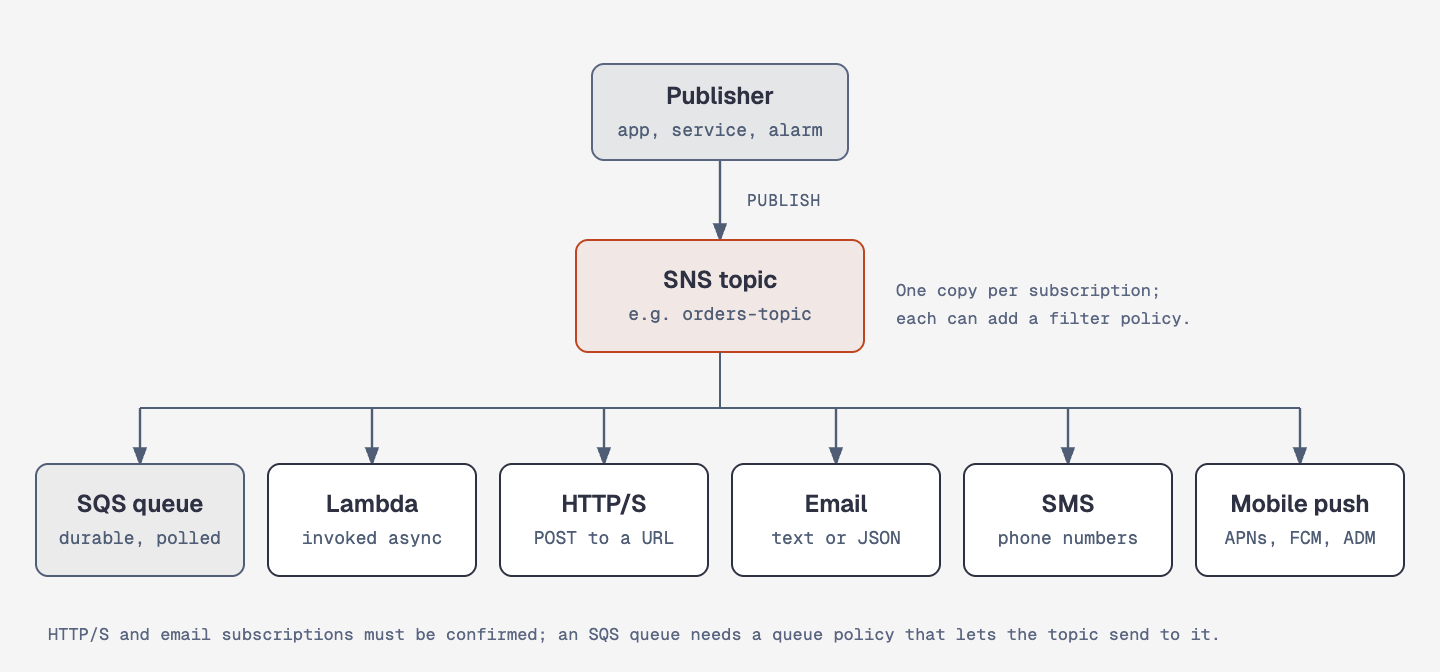
| Concept | Description |
|---|---|
| Topic | A logical access point for sending messages. Publishers send messages to topics. |
| Publisher | The entity (app/service) that sends a message to an SNS topic. |
| Subscriber | The endpoint (e.g., Lambda, SQS, HTTP, Email, SMS) that receives messages from a topic. |
| Message | The actual content sent by the publisher. |
| Subscription | The connection between a topic and an endpoint. |
| Delivery Protocol | The communication method (HTTP/S, SQS, Lambda, SMS, Email, etc.) used to deliver messages. |
AWS SNS message format
Basic SNS Message Structure
When you publish a message to an SNS topic, the payload (delivered to subscribers) usually looks like this JSON:
{
  "Type": "Notification",
  "MessageId": "95df01b4-ee98-5cb9-9903-4c221d41eb5e",
  "TopicArn": "arn:aws:sns:us-east-1:123456789012:MyTopic",
  "Subject": "Test Subject",
  "Message": "Hello from SNS!",
  "Timestamp": "2025-10-26T15:05:45.123Z",
  "SignatureVersion": "1",
  "Signature": "EXAMPLEpH+..+AbCdE==",
  "SigningCertURL": "https://sns.us-east-1.amazonaws.com/SimpleNotificationService-12345.pem",
  "UnsubscribeURL": "https://sns.us-east-1.amazonaws.com/?Action=Unsubscribe&SubscriptionArn=...",
  "MessageAttributes": {
    "EventType": {"Type": "String", "Value": "OrderPlaced"},
    "UserID": {"Type": "Number", "Value": "42"}
  }
}
Key Fields:
| Field | Description |
|---|---|
| Type | Always Notification for published messages. |
| MessageId | Unique UUID for the message. |
| TopicArn | ARN of the SNS topic. |
| Subject | Optional subject line. |
| Message | The main message body (string). |
| MessageAttributes | Custom metadata key-value pairs. |
| Timestamp | ISO8601 UTC timestamp. |
| UnsubscribeURL | Link for HTTP/S subscribers to unsubscribe |
Protocols and Message Formats
1) HTTP / HTTPS
Sends JSON-formatted messages to a web server via an HTTP or HTTPS POST request.
Use Case
- Real-time event notifications to web applications or backend APIs.
- Integrate with webhooks or third-party systems.
Example Flow
- Subscriber provides an HTTP/S endpoint.
- SNS sends a subscription confirmation request (
SubscribeURL). - Endpoint confirms the subscription by visiting the URL.
- SNS sends notifications as POST requests to that endpoint.
Sample Notification Payload
{
  "Type": "Notification",
  "MessageId": "abcd-1234",
  "TopicArn": "arn:aws:sns:us-east-1:111122223333:MyTopic",
  "Subject": "New Order Created",
  "Message": "{ \"orderId\": 9876, \"status\": \"CONFIRMED\" }",
  "Timestamp": "2025-10-26T14:10:00Z"
}
2. Email / Email-JSON
SNS can send notifications to an email address in plain text or JSON format.
Use Case
- Human-readable notifications to administrators or end users.
- Automated system alerts to DevOps teams.
Types
| Type | Description |
|---|---|
| Sends a plain-text message. | |
| Email-JSON | Sends the same message in JSON format. |
Example
- Notification: “Your EC2 instance is under high CPU load.”
- Recipient:
[email protected]
3. AWS Lambda
Invokes an AWS Lambda function directly when a message is published to the topic.
Use Case
- Serverless event processing and automation.
- Event-driven microservices without needing message polling.
Example
import json

def lambda_handler(event, context):
    for record in event['Records']:
        message = json.loads(record['Sns']['Message'])
        print("Received SNS message:", message)
Advantages
- Fully managed & serverless.
- Automatic retries for failed executions.
- Supports parallel execution.
4. Amazon SQS
SNS can deliver messages to an Amazon SQS queue, providing durable and reliable message storage.
Use Case
- Fan-out pattern (one-to-many delivery).
- Reliable async message handling.
Advantages
- Durable: messages wait in the queue until a consumer deletes them.
- Decouples publishers from consumers.
- Supports message filtering and DLQs.
If an Amazon SQS queue is subscribed to the topic (without raw message delivery), each message looks like:
{
  "Type": "Notification",
  "MessageId": "6a8e9f1e-9adf-5c22-bc9f-d3b8c7f6a8f2",
  "TopicArn": "arn:aws:sns:us-east-1:123456789012:MyTopic",
  "Subject": "Order Notification",
  "Message": "Order #12345 has been placed successfully.",
  "Timestamp": "2025-10-26T15:05:45.123Z",
  "MessageAttributes": {
    "EventType": {"Type": "String", "Value": "OrderPlaced"},
    "UserID": {"Type": "Number", "Value": "42"}
  }
}
If Raw Message Delivery is enabled, SQS will receive only:
"Order #12345 has been placed successfully."
5. SMS (Text Messaging)
SNS can send text messages (SMS) directly to mobile numbers in over 200 countries. New accounts start in the SMS sandbox (verified destination numbers only), and sending to US numbers needs a registered origination identity such as a toll-free number or 10DLC.
Use Case
- Alerts and notifications for users.
- 2FA, OTP, and transactional updates.
Example
import boto3

sns = boto3.client('sns', region_name='us-east-1')
response = sns.publish(
    PhoneNumber='+14155550123',
    Message='Your OTP is 482193 — valid for 10 minutes.'
)
print(response)
Advantages
- Global reach.
- Fast and simple setup.
- Useful for urgent alerts.
6. Mobile Push Notifications
SNS integrates with mobile push platforms such as:
- Apple Push Notification Service (APNs)
- Firebase Cloud Messaging (FCM)
- Amazon Device Messaging (ADM)
Use Case
- Send app notifications (e.g., order updates, new messages, promotions).
Example Code
sns.publish(
  TargetArn='arn:aws:sns:us-east-1:111122223333:endpoint/APNS/myapp/abcd1234',
  Message='Your package has shipped!',
  Subject='Order Update'
)
Example: Creating and Publishing to an SNS Topic
Prerequisites :
- Python 3.9+
boto3installed:pip install boto3- AWS credentials configured (
aws configure) with permission to create and publish to SNS topics and to create, configure and read SQS queues (includingsqs:SetQueueAttributes). - Optionally set
AWS_REGION,TOPIC_NAMEandQUEUE_NAME(defaults: us-east-1, orders-topic, orders-queue); both scripts read them.
Python (Boto3)
import boto3

# Create SNS client
sns = boto3.client('sns')

# Create a topic
response = sns.create_topic(Name='MyTopic')
topic_arn = response['TopicArn']
print(f"Created topic: {topic_arn}")

# Publish a message
sns.publish(
    TopicArn=topic_arn,
    Message='Hello from SNS!',
    Subject='SNS Notification'
)
Node.js (AWS SDK v3)
import { SNSClient, CreateTopicCommand, PublishCommand } from "@aws-sdk/client-sns";

const snsClient = new SNSClient({ region: "us-east-1" });

(async () => {
  // Create topic
  const topicData = await snsClient.send(new CreateTopicCommand({ Name: "MyTopic" }));
  console.log("Topic ARN:", topicData.TopicArn);

  // Publish message
  await snsClient.send(new PublishCommand({
    TopicArn: topicData.TopicArn,
    Message: "Hello from Amazon SNS!",
    Subject: "SNS Notification",
  }));
})();
Common Use Cases
- Microservices Communication: Decouple producers and consumers for scalability.
- Fan-out Messaging: Deliver the same message to multiple endpoints (e.g., multiple SQS queues or Lambda functions).
- Alerting & Monitoring: Trigger alerts from AWS CloudWatch alarms or CI/CD pipelines.
- Mobile Push Notifications: Send notifications to iOS/Android via Firebase or APNs.
- Email/SMS Alerts: Notify users directly about critical events or system updates.
Monitoring & Metrics
SNS integrates tightly with Amazon CloudWatch, allowing you to monitor key metrics:
| Metric | Description |
|---|---|
NumberOfMessagesPublished |
Total messages published to a topic. |
NumberOfNotificationsDelivered |
Successfully delivered messages. |
NumberOfNotificationsFailed |
Failed deliveries to subscribed endpoints. |
PublishSize |
Size of published messages in bytes. |
Use these metrics to trigger alarms or automate remediation actions.
How SNS Enables Pub/Sub Messaging
In the Pub/Sub model, a publisher sends a message to an SNS topic rather than directly to individual subscribers. SNS then fans out the message to all the subscribers that are registered to that topic.
Workflow:
- Create a Topic:
- A topic acts as a logical channel for messages.
- Example:
order-updates,alerts, orpayment-events.
- Publish a Message:
- Publishers (e.g., microservices, Lambda functions, or applications) send messages to the topic.
- SNS ensures the message is immediately available for subscribers.
- Subscribers Receive Notifications:
- Subscribers can be Amazon SQS queues, Lambda functions, HTTP/S endpoints, emails, or SMS numbers.
- SNS automatically pushes the message to all subscribers.
- Fan-Out Pattern:
- One message → Multiple destinations.
- Perfect for decoupled, scalable systems.
Example Use Case: Event-Driven Microservices
When a new order is placed in an e-commerce app:
- The Order Service publishes an event (
OrderCreated) to an SNS topic. - Inventory Service, Notification Service, and Billing Service are all subscribers.
- SNS automatically pushes the event to all three services simultaneously — no service depends on another directly.
This decoupling improves fault tolerance, scalability, and flexibility.
1) setup_and_publish.py — Create Topic, Queue, Subscription, and Publish
import json
import os
import time

import boto3
from botocore.exceptions import ClientError

REGION = os.environ.get("AWS_REGION", "us-east-1")
TOPIC_NAME = os.environ.get("TOPIC_NAME", "orders-topic")
QUEUE_NAME = os.environ.get("QUEUE_NAME", "orders-queue")

sns = boto3.client("sns", region_name=REGION)
sqs = boto3.client("sqs", region_name=REGION)


def ensure_topic(name: str) -> str:
    # create_topic is idempotent: it returns the existing topic's ARN
    return sns.create_topic(Name=name)["TopicArn"]


def ensure_queue(name: str) -> tuple[str, str]:
    queue_url = sqs.create_queue(QueueName=name)["QueueUrl"]
    attrs = sqs.get_queue_attributes(QueueUrl=queue_url, AttributeNames=["QueueArn"])
    return queue_url, attrs["Attributes"]["QueueArn"]


def allow_sns_to_sqs(queue_url: str, queue_arn: str, topic_arn: str) -> None:
    policy = {
        "Version": "2012-10-17",
        "Statement": [
            {
                "Sid": "AllowSnsTopicToSend",
                "Effect": "Allow",
                "Principal": {"Service": "sns.amazonaws.com"},
                "Action": "SQS:SendMessage",
                "Resource": queue_arn,
                "Condition": {"ArnEquals": {"aws:SourceArn": topic_arn}},
            }
        ],
    }
    sqs.set_queue_attributes(
        QueueUrl=queue_url,
        Attributes={"Policy": json.dumps(policy)},
    )


def subscribe_queue_to_topic(topic_arn: str, queue_arn: str) -> str:
    resp = sns.subscribe(TopicArn=topic_arn, Protocol="sqs", Endpoint=queue_arn, ReturnSubscriptionArn=True)
    return resp["SubscriptionArn"]


def publish_sample_message(topic_arn: str) -> None:
    payload = {
        "event": "OrderCreated",
        "orderId": 12345,
        "items": [
            {"sku": "ABC-123", "qty": 2},
            {"sku": "XYZ-999", "qty": 1},
        ],
        "total": 149.95,
        "currency": "USD",
    }
    try:
        resp = sns.publish(
            TopicArn=topic_arn,
            Message=json.dumps(payload),
            Subject="New Order Event",
            MessageAttributes={
                "eventType": {"DataType": "String", "StringValue": "OrderCreated"},
                "priority": {"DataType": "String", "StringValue": "high"},
            },
        )
        print("Published message id:", resp["MessageId"])
    except ClientError as e:
        print("Publish failed:", e)


if __name__ == "__main__":
    topic_arn = ensure_topic(TOPIC_NAME)
    print("Topic:", topic_arn)

    queue_url, queue_arn = ensure_queue(QUEUE_NAME)
    print("Queue URL:", queue_url)
    print("Queue ARN:", queue_arn)

    allow_sns_to_sqs(queue_url, queue_arn, topic_arn)
    sub_arn = subscribe_queue_to_topic(topic_arn, queue_arn)
    print("Subscription:", sub_arn)

    # Give AWS a moment to propagate the policy & subscription
    time.sleep(3)

    publish_sample_message(topic_arn)
What this script does
- Creates/gets an SNS topic and SQS queue
- Applies an SQS resource policy allowing the SNS topic to send messages
- Creates the subscription (SNS → SQS)
- Publishes a JSON payload with message attributes
2) subscriber_sqs_consumer.py — Poll and Process Messages
import json
import os
import time

import boto3
from botocore.exceptions import ClientError

REGION = os.environ.get("AWS_REGION", "us-east-1")
QUEUE_NAME = os.environ.get("QUEUE_NAME", "orders-queue")

sqs = boto3.client("sqs", region_name=REGION)


def get_queue_url(queue_name: str) -> str:
    return sqs.get_queue_url(QueueName=queue_name)["QueueUrl"]


def process_sns_envelope(body: str) -> None:
    """
    SNS → SQS messages arrive wrapped in an SNS envelope. The SQS message body
    is a JSON string with fields like: Message, MessageAttributes, Subject, etc.
    """
    envelope = json.loads(body)

    subject = envelope.get("Subject")
    raw = envelope.get("Message")
    attrs = envelope.get("MessageAttributes", {})

    # Parse your actual business payload (we published JSON as a string)
    try:
        payload = json.loads(raw)
    except json.JSONDecodeError:
        payload = {"raw": raw}

    print("— New SNS Event —")
    print("Subject:", subject)
    print("Attributes:", {k: v.get("Value") for k, v in attrs.items()})
    print("Payload:", json.dumps(payload, indent=2))

    # TODO: place your business logic here
    if payload.get("event") == "OrderCreated":
        print(f"Process order #{payload.get('orderId')} with total {payload.get('total')} {payload.get('currency')}")


def consume(queue_url: str) -> None:
    print("Polling SQS (Ctrl+C to stop)…")
    while True:
        try:
            resp = sqs.receive_message(
                QueueUrl=queue_url,
                MaxNumberOfMessages=10,
                WaitTimeSeconds=20,  # long polling
                MessageAttributeNames=["All"],
            )
            messages = resp.get("Messages", [])
            if not messages:
                continue

            entries_to_delete = []
            for m in messages:
                process_sns_envelope(m["Body"])
                entries_to_delete.append({"Id": m["MessageId"], "ReceiptHandle": m["ReceiptHandle"]})

            # Batch delete after successful processing
            if entries_to_delete:
                sqs.delete_message_batch(QueueUrl=queue_url, Entries=entries_to_delete)
        except ClientError as e:
            print("Error receiving/processing messages:", e)
            time.sleep(2)
        except KeyboardInterrupt:
            print("\nStopping consumer…")
            break


if __name__ == "__main__":
    consume(get_queue_url(QUEUE_NAME))
What this script does
- Long-polls the SQS queue for messages sent by SNS
- Unwraps the SNS envelope, parses your JSON payload, and prints key fields
- Deletes messages after successful processing (at-least-once semantics)
Running this:
- Run the publisher first:
python setup_and_publish.py - In a second terminal, start the subscriber/worker:
python subscriber_sqs_consumer.py - Re-run the publisher (or publish from elsewhere) to see messages flow through.
📱How SNS Enables Push Notifications
SNS also acts as a unified platform to send push notifications directly to mobile devices or users through SMS, Email, or Mobile Push (APNs, FCM, ADM).
Push Notification Workflow:
- Create a Platform Application (e.g., for iOS or Android) in SNS.
- Register Devices to get Platform Endpoints (unique identifiers for each device).
- Publish Notifications to these endpoints or to a topic with multiple endpoints.
- SNS delivers notifications instantly and handles retries for undelivered messages.
Example:
sns.publish(
    TargetArn='arn:aws:sns:us-east-1:123456789012:endpoint/APNS/myapp/abcd1234',
    Message='Your order has been shipped!',
)
Topic-Based vs Direct Messaging Models
| Feature | Topic-Based (Publish/Subscribe) | Direct Messaging (Point-to-Point) |
|---|---|---|
| Communication Type | One-to-many (fan-out) | One-to-one (targeted) |
| Routing Logic | Based on topics — subscribers register interest in topics | Messages sent directly to a specific queue or endpoint |
| Coupling | Loosely coupled — publisher unaware of subscribers | Tightly coupled — producer must know destination |
| Message Delivery | Every subscriber receives a copy of the message | Each message is consumed by only one receiver |
| Delivery Guarantee | Multiple deliveries possible (one per subscriber) | Each message is processed by one consumer (standard queues are at-least-once, so handle duplicates) |
| Scalability | High — can broadcast to many subscribers | Moderate — scaling tied to queue consumers |
| Reliability | Depends on subscriber configuration | Reliable message persistence in queue |
| Common AWS Service | Amazon SNS | Amazon SQS |
| Ideal Use Cases | Notifications, event broadcasting, fan-out systems | Task queues, job processing, worker coordination |
Fan‑Out Architecture with Amazon SNS + SQS
Design event‑driven systems where a single event is delivered to many independent consumers. With Amazon SNS (topic) and Amazon SQS (queues), you publish once and let SNS fan out the message to N queues, each consumed by its own service.
Concept:
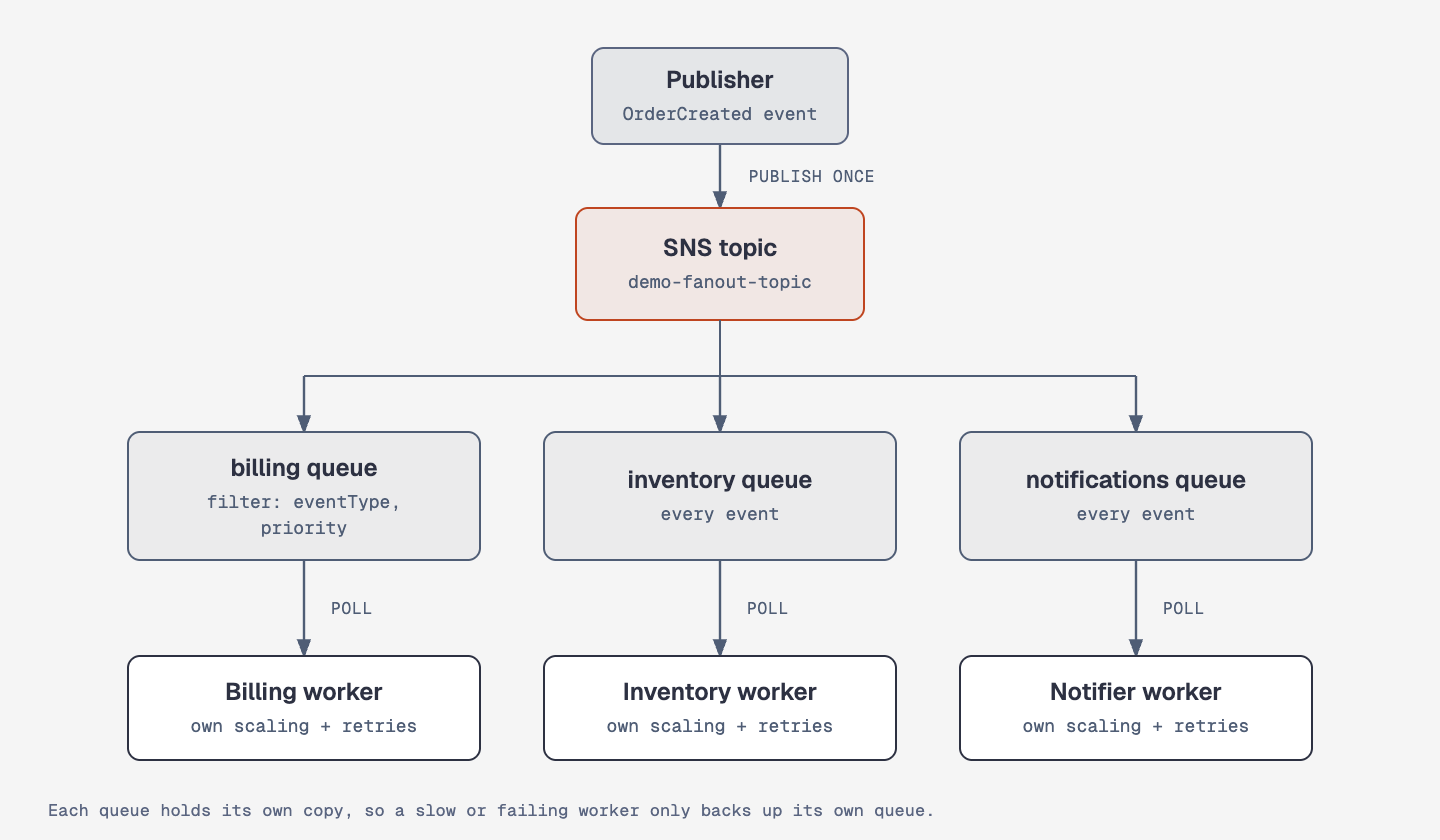
- Publisher → SNS Topic → N SQS Queues → Workers
- Each queue receives its own copy of the message (decoupling, isolation, per‑consumer retry/backoff, and independent scaling).
Why Use Fan‑Out ?
- Loose coupling: Producers don’t know consumers.
- Independent failure domains: One slow consumer doesn’t block others.
- Selective processing: Add/remove subscribers without touching publishers.
- Scale per consumer: Each queue scales via its own worker fleet.
- Reliability: SQS stores messages durably until processed.
When not to use: If you need strict single‑consumer processing, use direct SQS without SNS; if you need synchronous RPC, consider APIs or event reply channels.
Via AWS CLI:
# 1) Create topic and queues
aws sns create-topic --name demo-fanout-topic
aws sqs create-queue --queue-name demo-billing-queue
aws sqs create-queue --queue-name demo-inventory-queue

# 2) Get ARNs/URLs
TOPIC_ARN=$(aws sns list-topics --query "Topics[?contains(TopicArn, 'demo-fanout-topic')].TopicArn" --output text)
BILLING_URL=$(aws sqs get-queue-url --queue-name demo-billing-queue --query QueueUrl --output text)
INVENTORY_URL=$(aws sqs get-queue-url --queue-name demo-inventory-queue --query QueueUrl --output text)
BILLING_ARN=$(aws sqs get-queue-attributes --queue-url $BILLING_URL --attribute-names QueueArn --query Attributes.QueueArn --output text)
INVENTORY_ARN=$(aws sqs get-queue-attributes --queue-url $INVENTORY_URL --attribute-names QueueArn --query Attributes.QueueArn --output text)

# 3) Allow SNS topic to send to each queue (attach queue policy)
cat > /tmp/policy.json <<EOF
{
  "Version": "2012-10-17",
  "Statement": [
    {
      "Sid": "Allow-SNS-SendMessage",
      "Effect": "Allow",
      "Principal": {"Service": "sns.amazonaws.com"},
      "Action": "SQS:SendMessage",
      "Resource": "${BILLING_ARN}",
      "Condition": {"ArnEquals": {"aws:SourceArn": "${TOPIC_ARN}"}}
    }
  ]
}
EOF
aws sqs set-queue-attributes --queue-url $BILLING_URL --attributes Policy="$(cat /tmp/policy.json)"
# Repeat for inventory (or generate a combined policy with both ARNs)

# 4) Subscribe queues
aws sns subscribe --topic-arn $TOPIC_ARN --protocol sqs --notification-endpoint $BILLING_ARN
aws sns subscribe --topic-arn $TOPIC_ARN --protocol sqs --notification-endpoint $INVENTORY_ARN

# 5) Publish a test event
aws sns publish --topic-arn $TOPIC_ARN \
  --message '{"event":"OrderCreated","orderId":1001,"total":49.99}' \
  --subject 'Order Event' \
  --message-attributes '{"eventType":{"DataType":"String","StringValue":"OrderCreated"}}'
Via SDK (Boto3)
Publisher (SNS)
import json, boto3
sns = boto3.client("sns", region_name="us-east-1")
TOPIC_ARN = "arn:aws:sns:us-east-1:111122223333:demo-fanout-topic"

payload = {"event":"OrderCreated","orderId":1234,"total":149.95}
sns.publish(
    TopicArn=TOPIC_ARN,
    Message=json.dumps(payload),
    Subject="Order Event",
    MessageAttributes={
        "eventType": {"DataType": "String", "StringValue": "OrderCreated"}
    },
)
Consumer (SQS)
import json, boto3
sqs = boto3.client("sqs", region_name="us-east-1")
QUEUE_URL = "https://sqs.us-east-1.amazonaws.com/111122223333/demo-billing-queue"

print("Polling… (Ctrl+C to stop)")
while True:
    resp = sqs.receive_message(
        QueueUrl=QUEUE_URL,
        MaxNumberOfMessages=10,
        WaitTimeSeconds=20,
        MessageAttributeNames=["All"],
    )
    for m in resp.get("Messages", []):
        envelope = json.loads(m["Body"])    # SNS envelope
        message = json.loads(envelope["Message"])  # Your payload
        print("Order:", message.get("orderId"), "total:", message.get("total"))
        sqs.delete_message(QueueUrl=QUEUE_URL, ReceiptHandle=m["ReceiptHandle"])
Note: SNS→SQS messages arrive wrapped in an SNS envelope. ParseBody→ JSON →Message.
Selective Fan‑Out with Filter Policies
Deliver only relevant events to each queue by adding a filter policy on the subscription.
aws sns set-subscription-attributes \
  --subscription-arn <SUB_ARN_FOR_BILLING> \
  --attribute-name FilterPolicy \
  --attribute-value '{"eventType":["OrderCreated","PaymentCaptured"],"priority":["high"]}'
FIFO Variant (Ordering & Exactly‑Once)
- Use FIFO topics/queues with names ending in
.fifo. - Publish with
MessageGroupId(ordering) andMessageDeduplicationId(or content‑based dedup enabled). - Throughput is limited by group parallelism; create multiple groups for higher concurrency.
aws sns create-topic --name demo-fanout.fifo --attributes FifoTopic=true,ContentBasedDeduplication=true
aws sqs create-queue --queue-name billing.fifo --attributes FifoQueue=true,ContentBasedDeduplication=true
Securing Amazon SNS Topics
Core Principles:
- Least privilege: allow only required
sns:Publish,sns:Subscribe,sns:ListSubscriptionsByTopic,sns:GetTopicAttributes. - Resource‑based topic policies: restrict who can publish/subscribe at the topic level.
- Encryption in transit & at rest: HTTPS for transport; SSE‑KMS for topic data at rest.
Access Control
1) Identity Policies (IAM users/roles)
Grant minimal actions on specific Topic ARN(s).
{
  "Version": "2012-10-17",
  "Statement": [
    {
      "Effect": "Allow",
      "Action": ["sns:Publish"],
      "Resource": "arn:aws:sns:us-east-1:111122223333:orders-topic"
    }
  ]
}
2) Topic Policy (Resource Policy)
Restrict publishers/subscribers to trusted principals and (optionally) source services.
{
  "Version": "2012-10-17",
  "Statement": [
    {
      "Sid": "AllowSpecificRoleToPublish",
      "Effect": "Allow",
      "Principal": {"AWS": "arn:aws:iam::111122223333:role/app-publisher"},
      "Action": "sns:Publish",
      "Resource": "arn:aws:sns:us-east-1:111122223333:orders-topic"
    },
    {
      "Sid": "AllowS3EventToPublish",
      "Effect": "Allow",
      "Principal": {"Service": "s3.amazonaws.com"},
      "Action": "sns:Publish",
      "Resource": "arn:aws:sns:us-east-1:111122223333:orders-topic",
      "Condition": {
        "ArnLike": {"aws:SourceArn": "arn:aws:s3:::my-audit-bucket"},
        "StringEquals": {"aws:SourceAccount": "111122223333"}
      }
    }
  ]
}
Use conditions likeaws:SourceArn,aws:PrincipalArn, VPC endpoint conditions, oraws:SourceVpce(for PrivateLink) to further lock down access.
Encryption (SSE‑KMS)
Enable KMS on the topic and control who can use the key.
# Enable SSE‑KMS on an SNS topic
aws sns set-topic-attributes \
  --topic-arn arn:aws:sns:us-east-1:111122223333:orders-topic \
  --attribute-name KmsMasterKeyId \
  --attribute-value arn:aws:kms:us-east-1:111122223333:key/1234abcd-12ab-34cd-56ef-1234567890ab

# (Optional) Apply a topic policy, e.g. one that denies sns:Publish
# when aws:SecureTransport is false (forces publishers onto HTTPS)
aws sns set-topic-attributes \
  --topic-arn arn:aws:sns:us-east-1:111122223333:orders-topic \
  --attribute-name Policy \
  --attribute-value file://topic-policy.json
KMS Key Policy (Essential Snippet)
Keep a statement that gives your account admin access (without it you can lock yourself out of the key), then let SNS and your publishers use the customer managed key.
{
  "Version": "2012-10-17",
  "Statement": [
    {
      "Sid": "EnableAccountAdmin",
      "Effect": "Allow",
      "Principal": {"AWS": "arn:aws:iam::111122223333:root"},
      "Action": "kms:*",
      "Resource": "*"
    },
    {
      "Sid": "AllowSNSUseOfKey",
      "Effect": "Allow",
      "Principal": {"Service": "sns.amazonaws.com"},
      "Action": ["kms:GenerateDataKey*", "kms:Decrypt"],
      "Resource": "*"
    },
    {
      "Sid": "AllowAppRoleUseOfKey",
      "Effect": "Allow",
      "Principal": {"AWS": "arn:aws:iam::111122223333:role/app-publisher"},
      "Action": ["kms:Encrypt","kms:Decrypt","kms:GenerateDataKey*"],
      "Resource": "*"
    }
  ]
}
Challenges
- Create an SNS topic and subscribe via email and SMS.
- Publish messages from CLI or SDK and confirm delivery.
- Create a Lambda subscriber that logs message payloads.
- Implement an SNS → SQS fan-out pattern for message distribution.
- Encrypt SNS topic with AWS KMS and restrict publishing to specific IAM roles.
- Configure message filtering using SNS attributes to route selective events.
- Set up delivery status logs and analyze failed deliveries in CloudWatch.
🤷🏻 How to Participate?
✅ Complete the tasks and challenges.
✅ Document your progress and key takeaways on GitHub ReadMe, Medium, or Hashnode.
✅ Share the above in a LinkedIn post tagging me (Sandip Das), and use #90DaysOfCloud to engage with the community!
⚡ Quick Reference
Keep the momentum going — everything you need on LearnXOps in one place:
- 🎓 Courses — Video courses & AI-built courses
- 📚 Ebooks — Community ebooks & your own
- 🧪 All Labs & Challenges — DevOps, Cloud, SRE & more
- ☸️ Kubernetes Labs & Playground — kind clusters, playground & challenges
- 🤖 AI Agent & Bot Labs — OpenClaw · Hermes · CrewAI · LangGraph · MCP

Member discussion