


This Project demonstrates how to build scalable, event-driven architectures without managing servers, leveraging AWS Lambda, S3, and automating real-time image processing.
It’s a great hands-on way to master serverless design patterns, cost optimization, and operational efficiency in modern cloud environments.
⚡ Quick Reference
Keep the momentum going — everything you need on LearnXOps in one place:
- 🎓 Courses — Video courses & AI-built courses
- 📚 Ebooks — Community ebooks & your own
- 🧪 All Labs & Challenges — DevOps, Cloud, SRE & more
- ☸️ Kubernetes Labs & Playground — kind clusters, playground & challenges
- 🤖 AI Agent & Bot Labs — OpenClaw · Hermes · CrewAI · LangGraph · MCP
🧠 Learn here
A simple serverless application that automatically resizes images uploaded to S3 using AWS Lambda, with SNS notifications and CloudWatch monitoring.
Concepts Covered:
- S3: Source and destination buckets for image storage
- Lambda: Python function for image processing
- SNS: Email notifications for processing status
- CloudWatch: Logs and alarms for monitoring
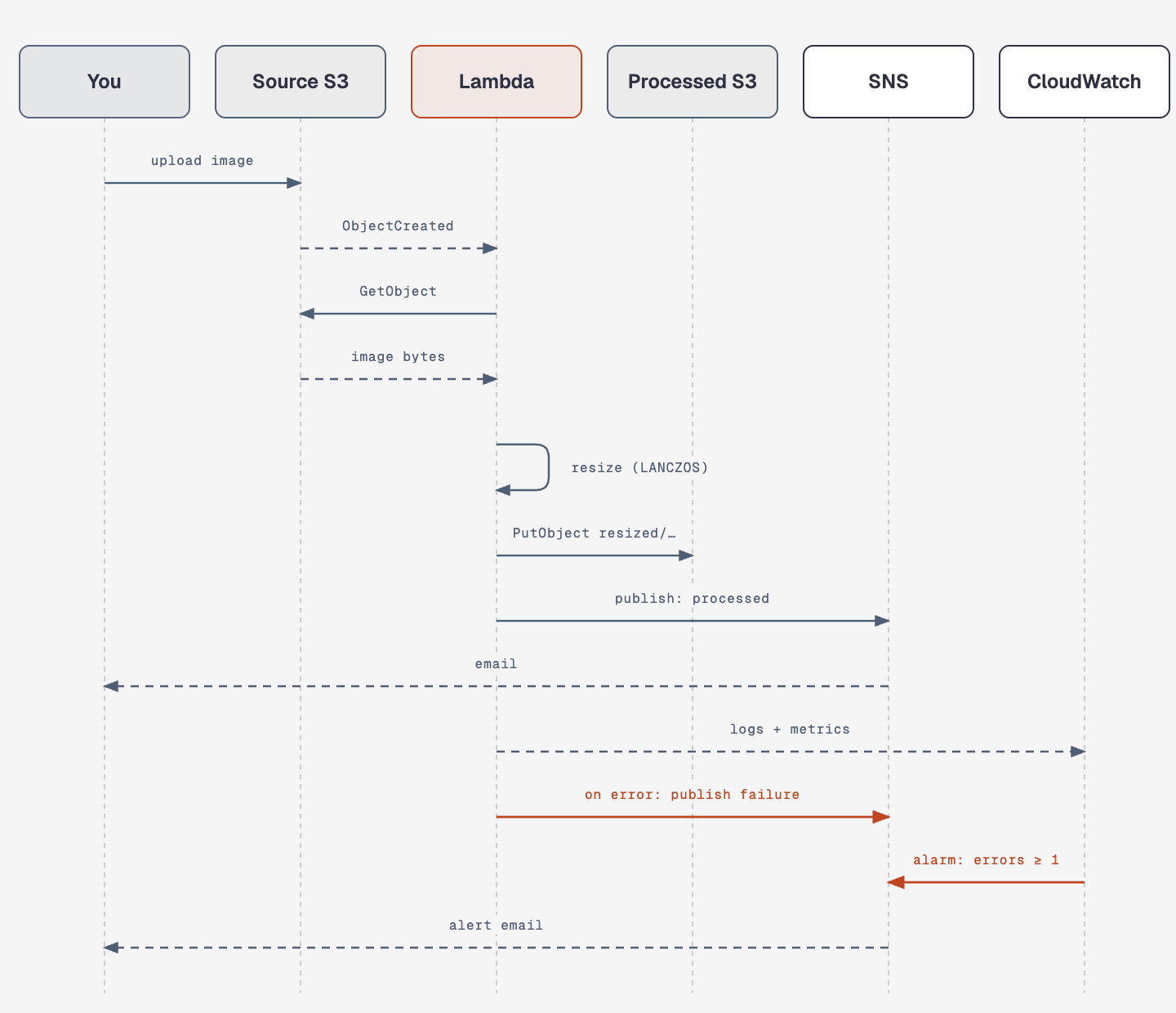
System Architecture
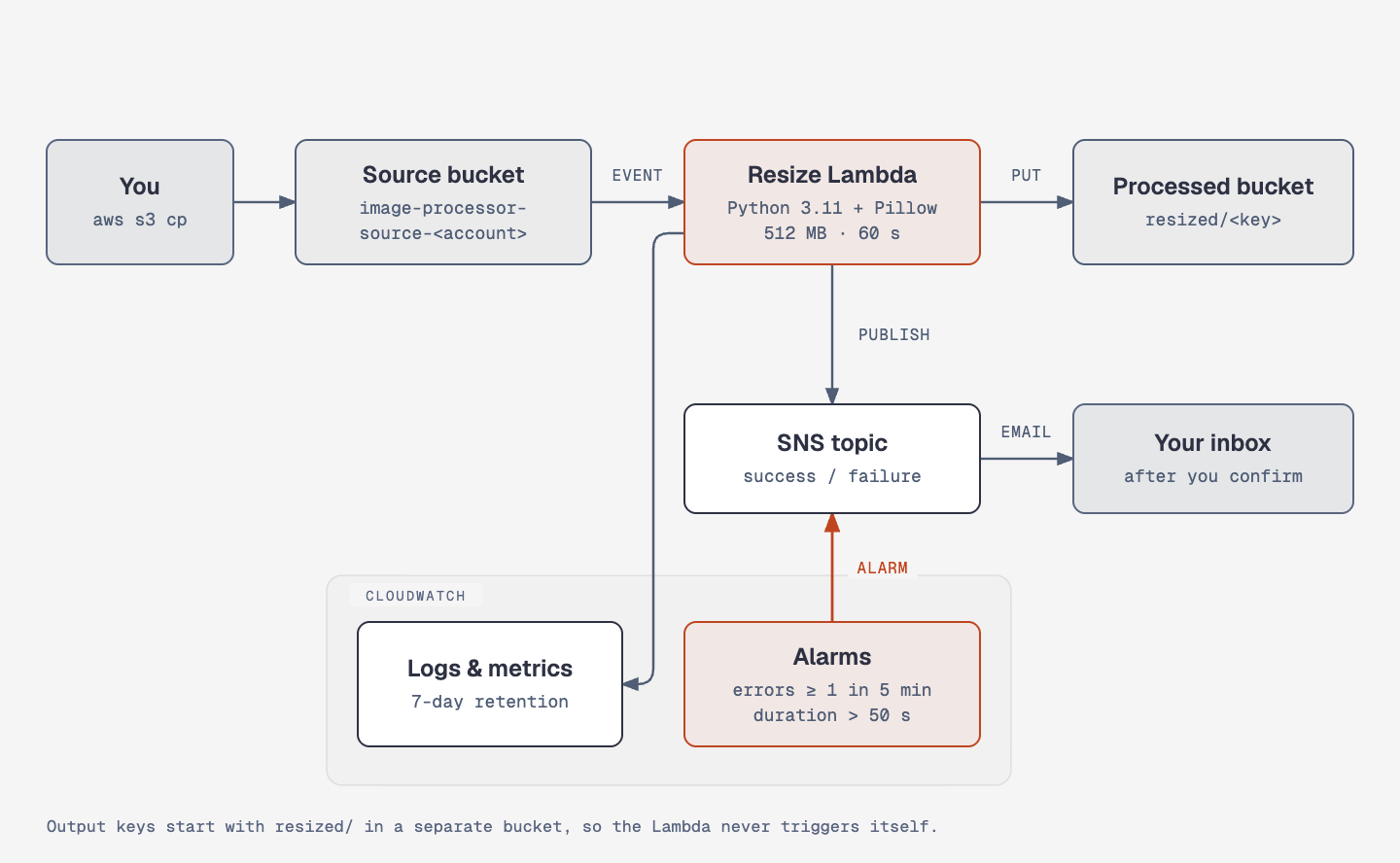
Component Details
1. Source S3 Bucket
- Purpose: Store original uploaded images
- Trigger: Configured to trigger Lambda on ObjectCreated events
- Naming:
image-processor-source-{ACCOUNT_ID}
2. Lambda Function
- Runtime: Python 3.11
- Memory: 512 MB
- Timeout: 60 seconds
- Dependencies: Pillow (PIL), boto3
- Environment Variables:
DESTINATION_BUCKET: Target bucket for processed imagesSNS_TOPIC_ARN: Topic for notificationsRESIZE_WIDTH: 800px (default)RESIZE_HEIGHT: 600px (default)
3. Destination S3 Bucket
- Purpose: Store resized/processed images
- Structure: Images stored with
resized/prefix - Naming:
image-processor-processed-{ACCOUNT_ID}
4. SNS Topic
- Purpose: Send email notifications
- Subscriptions: User email (configured during deployment)
- Messages:
- Success: Image details, dimensions, paths
- Failure: Error information
5. CloudWatch
- Logs: All Lambda execution logs (7-day retention)
- Alarms:
- Error alarm: 1 or more errors in 5 minutes
- Duration alarm: average above 50 seconds for two 5-minute periods
- Both alarms notify the SNS topic
- Metrics: Invocations, errors, duration, throttles
6. IAM Role
- Purpose: Lambda execution permissions
- Policies:
- Read from source bucket
- Write to destination bucket
- Publish to SNS topic
- Write to CloudWatch logs
Data Flow
- Upload: User uploads image to source S3 bucket
- Trigger: S3 sends event notification to Lambda
- Process:
- Lambda downloads image from source bucket
- Validates image format
- Resizes image maintaining aspect ratio
- Converts RGBA to RGB if needed
- Store: Lambda uploads processed image to destination bucket
- Notify: Lambda publishes success/failure message to SNS
- Alert: User receives email notification
- Monitor: CloudWatch keeps the logs; its alarms notify the same SNS topic on errors or slow runs
Security
- S3 Buckets: Public access blocked
- Lambda: Runs with least privilege IAM role
- SNS: Email subscription requires confirmation
- CloudWatch: Audit trail of all operations
Scalability
- Automatic: Lambda scales automatically based on load
- Concurrent Executions: Default AWS account limits apply
- S3: Unlimited storage capacity
- Cost-Effective: Pay only for what you use
Supported Image Formats
- JPEG (.jpg, .jpeg)
- PNG (.png)
- GIF (.gif)
- BMP (.bmp)
- TIFF (.tiff)
- WebP (.webp)
Processing Logic
1. Receive S3 event
2. Extract bucket and object key
3. Validate file extension
4. Download image from S3
5. Open image with PIL
6. Convert RGBA → RGB if needed
7. Calculate new dimensions (maintain aspect ratio)
8. Resize using LANCZOS algorithm
9. Save to buffer
10. Upload to destination bucket
11. Send SNS notification
12. Log to CloudWatch
📁 Project Structure
serverless-image-processing/
├── lambda_function.py    → Main Lambda function (Python)
├── requirements.txt      → Python dependencies
├── cloudformation.yaml   → Infrastructure template
├── deploy.sh             → Automated deployment
├── cleanup.sh            → Resource cleanup
├── test_upload.sh        → Easy image upload
├── test_local.py         → Local function testing
├── test-image.jpg        → Sample image
├── COMMANDS.md           → Handy CLI commands
└── .gitignore
Deploying on AWS
📋 Prerequisites
- AWS Account with appropriate permissions
- AWS CLI installed and configured
- Python 3.11 or higher
- pip (Python package manager)
- Bash shell (for deployment scripts)
Clone the Repo:
git clone https://github.com/sd031/serverless-image-processing.git
cd serverless-image-processing
Deployment Steps:
1. Configure AWS CLI
aws configure
Enter your AWS credentials:
- AWS Access Key ID
- AWS Secret Access Key
- Default region (e.g., us-east-1)
- Default output format (json)
2. Deploy the System
chmod +x deploy.sh
./deploy.sh
The script will:
- Prompt for your email address (for SNS notifications)
- Ask for AWS region (default: us-west-2)
- Create Lambda deployment package with dependencies
- Deploy CloudFormation stack with all resources
- Update Lambda function code
Important: Check your email and confirm the SNS subscription!
#!/bin/bash

# Serverless Image Processing System Deployment Script

set -e

# Colors for output
RED='\033[0;31m'
GREEN='\033[0;32m'
YELLOW='\033[1;33m'
NC='\033[0m' # No Color

# Configuration
PROJECT_NAME="image-processor"
STACK_NAME="${PROJECT_NAME}-stack"
REGION="us-west-2"

echo -e "${GREEN}========================================${NC}"
echo -e "${GREEN}Serverless Image Processing Deployment${NC}"
echo -e "${GREEN}========================================${NC}"
echo ""

# Check if AWS CLI is installed
if ! command -v aws &> /dev/null; then
    echo -e "${RED}Error: AWS CLI is not installed${NC}"
    echo "Please install AWS CLI: https://aws.amazon.com/cli/"
    exit 1
fi

# Check AWS credentials
echo -e "${YELLOW}Checking AWS credentials...${NC}"
if ! aws sts get-caller-identity &> /dev/null; then
    echo -e "${RED}Error: AWS credentials not configured${NC}"
    echo "Please run: aws configure"
    exit 1
fi
echo -e "${GREEN}✓ AWS credentials configured${NC}"
echo ""

# Get email address for SNS notifications
read -p "Enter email address for notifications: " EMAIL_ADDRESS

if [[ ! "$EMAIL_ADDRESS" =~ ^[a-zA-Z0-9._%+-]+@[a-zA-Z0-9.-]+\.[a-zA-Z]{2,}$ ]]; then
    echo -e "${RED}Error: Invalid email address${NC}"
    exit 1
fi

# Get AWS region
read -p "Enter AWS region (default: us-west-2): " INPUT_REGION
REGION=${INPUT_REGION:-$REGION}

echo ""
echo -e "${YELLOW}Creating Lambda deployment package...${NC}"

# Create a temporary directory for the Lambda package
TEMP_DIR=$(mktemp -d)
PACKAGE_DIR="${TEMP_DIR}/package"
mkdir -p "$PACKAGE_DIR"

# Install Python dependencies for Linux (Lambda runtime)
echo "Installing dependencies for Lambda (Linux x86_64)..."
pip install -r requirements.txt -t "$PACKAGE_DIR" \
    --platform manylinux2014_x86_64 \
    --only-binary=:all: \
    --python-version 3.11 \
    --implementation cp \
    --quiet 2>&1 | grep -v "dependency conflicts" || true

# Copy Lambda function
cp lambda_function.py "$PACKAGE_DIR/"

# Create ZIP file
cd "$PACKAGE_DIR"
zip -r ../lambda_package.zip . > /dev/null
cd - > /dev/null

echo -e "${GREEN}✓ Lambda package created${NC}"
echo ""

# Get AWS Account ID
ACCOUNT_ID=$(aws sts get-caller-identity --query Account --output text)

# Deploy CloudFormation stack
echo -e "${YELLOW}Deploying CloudFormation stack...${NC}"
aws cloudformation deploy \
    --template-file cloudformation.yaml \
    --stack-name "$STACK_NAME" \
    --parameter-overrides \
        ProjectName="$PROJECT_NAME" \
        EmailAddress="$EMAIL_ADDRESS" \
    --capabilities CAPABILITY_NAMED_IAM \
    --region "$REGION"

echo -e "${GREEN}✓ CloudFormation stack deployed${NC}"
echo ""

# Get Lambda function name from stack outputs
LAMBDA_FUNCTION_NAME=$(aws cloudformation describe-stacks \
    --stack-name "$STACK_NAME" \
    --query "Stacks[0].Outputs[?OutputKey=='LambdaFunctionName'].OutputValue" \
    --output text \
    --region "$REGION")

# Update Lambda function code
echo -e "${YELLOW}Updating Lambda function code...${NC}"
aws lambda update-function-code \
    --function-name "$LAMBDA_FUNCTION_NAME" \
    --zip-file "fileb://${TEMP_DIR}/lambda_package.zip" \
    --region "$REGION" > /dev/null

echo -e "${GREEN}✓ Lambda function code updated${NC}"
echo ""

# Get Lambda ARN
LAMBDA_ARN=$(aws cloudformation describe-stacks \
    --stack-name "$STACK_NAME" \
    --query "Stacks[0].Outputs[?OutputKey=='LambdaFunctionArn'].OutputValue" \
    --output text \
    --region "$REGION")

# Get source bucket name
SOURCE_BUCKET=$(aws cloudformation describe-stacks \
    --stack-name "$STACK_NAME" \
    --query "Stacks[0].Outputs[?OutputKey=='SourceBucketName'].OutputValue" \
    --output text \
    --region "$REGION")

# Configure S3 bucket notification
echo -e "${YELLOW}Configuring S3 bucket notification...${NC}"
aws s3api put-bucket-notification-configuration \
    --bucket "$SOURCE_BUCKET" \
    --notification-configuration "{
        \"LambdaFunctionConfigurations\": [
            {
                \"LambdaFunctionArn\": \"$LAMBDA_ARN\",
                \"Events\": [\"s3:ObjectCreated:*\"]
            }
        ]
    }" \
    --region "$REGION"

echo -e "${GREEN}✓ S3 notification configured${NC}"
echo ""

# Clean up
rm -rf "$TEMP_DIR"

# Get destination bucket name
DESTINATION_BUCKET=$(aws cloudformation describe-stacks \
    --stack-name "$STACK_NAME" \
    --query "Stacks[0].Outputs[?OutputKey=='DestinationBucketName'].OutputValue" \
    --output text \
    --region "$REGION")

# Get stack outputs
echo -e "${GREEN}========================================${NC}"
echo -e "${GREEN}Deployment Complete!${NC}"
echo -e "${GREEN}========================================${NC}"
echo ""

echo "Stack Name: $STACK_NAME"
echo "Region: $REGION"
echo "Source Bucket: $SOURCE_BUCKET"
echo "Destination Bucket: $DESTINATION_BUCKET"
echo "Lambda Function: $LAMBDA_FUNCTION_NAME"
echo ""
echo -e "${YELLOW}Important:${NC} Check your email ($EMAIL_ADDRESS) and confirm the SNS subscription!"
echo ""
echo -e "${GREEN}To test the system:${NC}"
echo "  aws s3 cp test-image.jpg s3://$SOURCE_BUCKET/ --region $REGION"
echo ""
echo -e "${GREEN}To view logs:${NC}"
echo "  aws logs tail /aws/lambda/$LAMBDA_FUNCTION_NAME --follow --region $REGION"
echo ""
echo -e "${GREEN}To delete the stack:${NC}"
echo "  ./cleanup.sh"
echo ""
3. Test the System
Upload an image to the source bucket:
# test-image.jpg ships with the repo; use the bucket name from the deployment output
aws s3 cp test-image.jpg s3://image-processor-source-{ACCOUNT_ID}/
You should receive an email notification with processing details!
Customizing the configurations
The Lambda function uses these environment variables (set automatically):
DESTINATION_BUCKET: S3 bucket for processed imagesSNS_TOPIC_ARN: SNS topic for notificationsRESIZE_WIDTH: Target width (default: 800px)RESIZE_HEIGHT: Target height (default: 600px)
To modify resize dimensions, edit the CloudFormation template before deployment.
📊 Monitoring
View Lambda Logs
aws logs tail /aws/lambda/image-processor-function --follow --region us-west-2 # your deploy region
How It Works?
Resources Creation
The CloudFormation stack creates:
- 2 S3 Buckets: Source and destination
- 1 Lambda Function: Image processor (Python 3.11)
- 1 SNS Topic: Email notifications
- 1 IAM Role: Lambda execution role with S3 and SNS permissions
- 1 CloudWatch Log Group: Lambda logs (7-day retention)
- 2 CloudWatch Alarms: Error and duration monitoring
Lambda Function
- Image Format Support: JPG, JPEG, PNG, GIF, BMP, TIFF, WEBP
- Smart Resizing: Maintains aspect ratio
- RGBA Handling: Converts RGBA to RGB automatically
- Error Handling: Sends failure notifications via SNS
- Detailed Logging: CloudWatch logs for debugging
Processing Steps
- Lambda receives S3 event notification
- Validates file is an image
- Downloads image from source bucket
- Resizes while maintaining aspect ratio
- Uploads to destination bucket with
resized/prefix - Sends success notification with details:
- Source and destination paths
- Original and resized dimensions
- Processing status
Cost Considerations
This is a simple project with minimal costs:
- S3: Pay for storage and requests (minimal for testing)
- Lambda: Free tier includes 1M requests/month
- SNS: Free tier includes 1,000 email notifications/month
- CloudWatch: Free tier includes 5GB logs/month
Estimated cost for testing: < $1/month
🧹 Cleanup
To delete all resources and avoid charges:
chmod +x cleanup.sh
./cleanup.sh
This will:
- Empty both S3 buckets
- Delete the CloudFormation stack
- Remove all associated resources
Challenges
- Support for batch processing
- Multiple resize dimensions (thumbnails)
- Image format conversion
- Watermarking
- Content-aware resizing
- DynamoDB for processing history
- API Gateway REST API for uploads
🤷🏻 How to Participate?
✅ Complete the tasks and challenges.
✅ Document your progress and key takeaways on GitHub ReadMe, Medium, or Hashnode.
✅ Share the above in a LinkedIn post tagging me (Sandip Das), and use #90DaysOfCloud to engage with the community!
⚡ Quick Reference
Keep the momentum going — everything you need on LearnXOps in one place:
- 🎓 Courses — Video courses & AI-built courses
- 📚 Ebooks — Community ebooks & your own
- 🧪 All Labs & Challenges — DevOps, Cloud, SRE & more
- ☸️ Kubernetes Labs & Playground — kind clusters, playground & challenges
- 🤖 AI Agent & Bot Labs — OpenClaw · Hermes · CrewAI · LangGraph · MCP


Member discussion