


VMware remains the backbone of thousands of enterprise data centers, making virtualization fundamentals essential for modern cloud migrations and hybrid architectures.
Mastering VMware enables you to bridge legacy workloads with cloud-native platforms, automate infrastructure at scale, and design resilient, production-grade environments that many organizations still rely on today.
⚡ Quick Reference
Keep the momentum going — everything you need on LearnXOps in one place:
- 🎓 Courses — Video courses & AI-built courses
- 📚 Ebooks — Community ebooks & your own
- 🧪 All Labs & Challenges — DevOps, Cloud, SRE & more
- ☸️ Kubernetes Labs & Playground — kind clusters, playground & challenges
- 🤖 AI Agent & Bot Labs — OpenClaw · Hermes · CrewAI · LangGraph · MCP
What is VMware?
VMware (part of Broadcom since November 2023) is a leading virtualization and private cloud platform that allows organizations to run multiple virtual machines on a single physical server. It abstracts compute, storage, and network resources to create a flexible, scalable, and highly available IT infrastructure.
Why Use VMware?
- Server Consolidation: Reduces hardware footprint by running many VMs on fewer physical servers.
- Cost Efficiency: Saves capex/opex through optimized resource utilization.
- High Availability: Built‑in features like vMotion, HA, and DRS ensure minimal downtime.
- Scalability: Easily scale workloads across clusters and data centers.
- Security & Isolation: Strong workload isolation between VMs.
- Automation: VCF Automation and VCF Operations (formerly vRealize, then Aria) provide self-service provisioning, orchestration and monitoring.
VMware Architecture
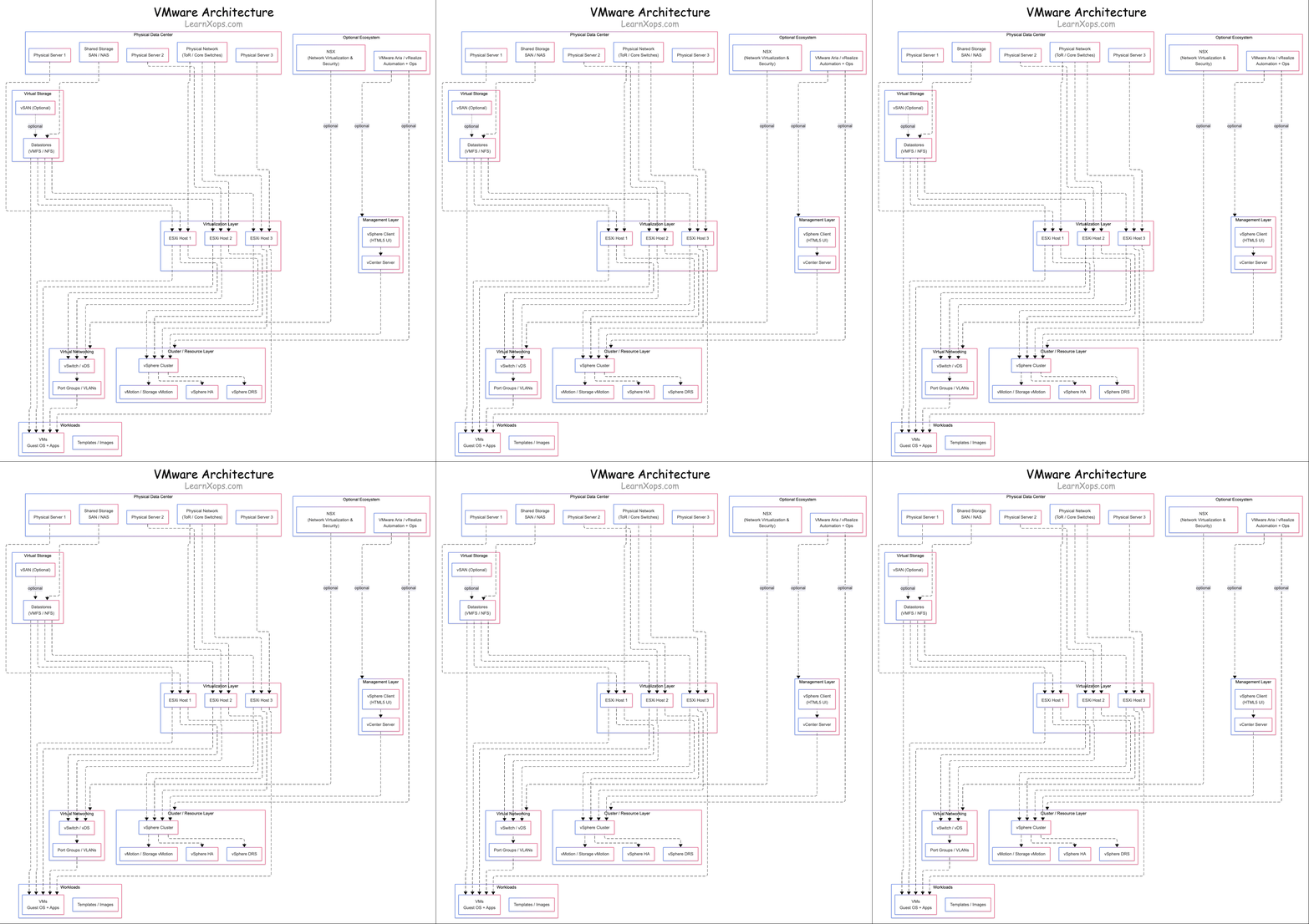
A typical VMware virtualization architecture includes:
1. Physical Layer (Hardware Layer)
- Servers
- Storage (SAN/NAS)
- Networking equipment
2. Virtualization Layer
- ESXi Hypervisor: The bare‑metal hypervisor running directly on physical hosts.
- Virtual Machines: Guest OS + applications.
3. Management Layer
- vCenter Server: Centralized management of ESXi hosts and VMs.
- vSphere Client: UI for administering virtual infrastructure.
4. Resource & Control Layer
- vSphere HA: Automatically restarts VMs on host failure.
- vSphere DRS: Balances workloads across hosts.
- vMotion & Storage vMotion: Live migration of VMs and storage.
- vSAN: Hyper‑converged storage solution.
5. Ecosystem Layer
- VCF Automation (formerly vRealize/Aria Automation): Infrastructure as code & cloud automation.
- VCF Operations (formerly vRealize/Aria Operations): Monitoring & analytics.
- NSX: Network virtualization & security.
- VMware Cloud Foundation (VCF): The full private cloud bundle (vSphere, vSAN, NSX, operations and automation). It replaced vCloud Suite, which Broadcom discontinued.
VMware vSphere
What is VMware vSphere?
VMware vSphere is a suite of virtualization software that turns physical servers into a pool of compute, storage, and network resources. It allows you to deploy and run multiple VMs on the same physical host using a hypervisor (ESXi).
In short vSphere = ESXi (hypervisor) + vCenter (management) + enterprise features for running VMs reliably in production.
Core Components of VMware vSphere
ESXi Host
Bare‑metal hypervisor that runs VMs.
vCenter Server
Central management and control plane.
vSphere Client (HTML5 UI)
Admin interface to manage vCenter and ESXi.
vSphere HA
Provides high availability.
vSphere DRS (Distributed Resource Scheduler)
Automatically balances workload across hosts.
VMware vMotion
Live migration of running VMs.
VMware vSAN
Distributed software‑defined storage for clusters.
VMware NSX
Software‑defined networking (optional in DC virtualization).
Additional details you need to be aware of
1. Security Features
- Role-Based Access Control (RBAC): Granular permission controls to ensure users access only what they need.
- VM Encryption: Protects sensitive VM data at rest and in motion.
- vTPM & Secure Boot: Ensures trusted OS boot and enhances VM security posture.
2. Backup & Recovery
- Snapshots & replication: vSphere snapshots for short change windows and vSphere Replication for copies to another site. VMware's own backup appliance (vSphere Data Protection) was retired in 2017, so full backups come from third-party tools.
- Integration with Enterprise Tools: Seamless compatibility with solutions like Veeam, Commvault, and other enterprise backup platforms.
3. Hybrid & Multi‑Cloud Capabilities
- VMware Cloud on AWS: Extend on‑prem workloads to AWS with fast migration and elastic scaling. Since 2024 it is sold by Broadcom directly; AWS no longer resells it.
- Multi‑Cloud Operations via VCF Operations (formerly Aria): Unified management, monitoring, and governance across AWS, Azure, GCP, and on‑prem environments.
4. Licensing Models
- Per‑Core Subscription: Since Broadcom's acquisition, perpetual and per-CPU licences are gone. Everything is a per-core subscription with at least 16 cores counted per CPU, and minimum purchase sizes have changed more than once, so check the current terms.
- Bundles: New purchases are VMware Cloud Foundation (VCF) or vSphere Foundation (VVF), and vCenter is included in both.
- Add‑On Licenses: Extra vSAN capacity and add-ons such as vDefend (NSX security), Avi Load Balancer and VMware Live Recovery, on top of the VCF or VVF bundle.
How VMware Works
- Install ESXi on servers.
- Connect ESXi hosts to vCenter.
- Create clusters for HA & DRS.
- Attach shared storage (SAN/NAS/vSAN).
- Deploy virtual networks using vSwitch/vDS.
- Create and manage virtual machines.
- Use automation & monitoring (VCF Automation and VCF Operations, formerly vRealize/Aria) for operations.
Where VMware Is Used: Typical Use Cases by Industry
These are the patterns you will meet most often in VMware environments.
Hyperconverged infrastructure (example: Dell VxRail)
- Use Case: Enterprise virtualization, hyperconverged infrastructure (VxRail), private cloud deployment using VMware vSphere, vSAN.
Retail
- Use Case: Running large-scale retail applications on VMware ESXi clusters for scalability, high availability, and inventory management systems.
Software companies
- Use Case: Using VMware to build a scalable, virtualized backend environment that supports rapid deployment for engineering teams.
Research and government
- Use Case: High-performance computing workloads, test environments, and secure virtualization using VMware vSphere.
Banking and financial services
- Use Case: Secure virtualized infrastructure for banking applications, VDI for employees, and multi-site disaster recovery.
Manufacturing
- Use Case: VMware virtualization for SAP workloads, improving reliability and reducing downtime in manufacturing systems.
Media and gaming
- Use Case: VMware for hosting enterprise applications, game development environments, and media processing pipelines.
Engineering organizations
- Use Case: Using VMware to support internal engineering environments, CI/CD pipelines, and production-grade backend services.
Telecom
- Use Case: Telecom-grade NFV (Network Function Virtualization) using VMware NSX, network automation, and multi-cloud orchestration.
Here’s an end‑to‑end sample deployment flow in a VMware (vSphere/ESXi) environment
1) Plan & prep
- Define workload requirements: CPU/RAM, storage size/IOPS, network zones, OS, app stack, HA/DR needs.
- Select target cluster: based on capacity, affinity/anti‑affinity rules, and SLAs.
- Confirm prerequisites:
- vCenter reachable
- Datastore(s) available (vSAN/NFS/iSCSI/VMFS)
- Port groups / VLANs ready
- Resource pools / folders defined
2) Build a golden template (once, then reused)
- Install OS on a VM (e.g., Ubuntu/RHEL/Windows).
- Patch to baseline.
- Install VMware Tools.
- Add base hardening (CIS or org standards).
- Bake in common agents (SSM, monitoring, EDR, logs).
- Convert VM → Template.
Optional: store also in Content Library for multi‑vCenter reuse.
3) Provision VM(s) from template
Provisioning can be manual via UI or automated.
- Trigger via CI/CD or ticket approval.
- Clone from template using:
- vSphere UI wizard, or
- Terraform provider for vSphere, or
- Ansible community.vmware, or
- VCF Automation (formerly vRealize/Aria Automation).
- Placement decisions
- Cluster / resource pool
- Datastore / storage policy (e.g., vSAN FTT=1/2)
- Host/VM affinity rules
- Attach networking
- Port group(s) + VLAN
- Optional: NSX segment (NSX‑T was renamed NSX in version 4)
- Customize guest OS
- Hostname, IP, DNS, domain join
- Cloud‑init / Sysprep
- Power on VM.
4) Post‑provision configuration (Day‑0)
- Bootstrap config (Ansible / cloud‑init / SCCM):
- Create users/SSH keys
- OS sysctl/kernel tuning
- Mount extra disks
- Configure firewall rules
- Register with infra services:
- Monitoring (Prometheus node exporter/Telegraf)
- Logging (Fluent Bit/Splunk/ELK)
- Security/EDR (CrowdStrike/Defender)
5) Application deployment (Day‑1)
- Deploy app via your normal pipeline:
- VM‑based: systemd services, Docker, or binaries
- Orchestrated: Kubernetes on VMs (vSphere Kubernetes Service, formerly Tanzu, or your own cluster) if applicable
- Run smoke tests.
- Publish service endpoints / DNS.
6) Enable HA/DR & scaling
- vSphere HA enabled at cluster level.
- DRS for load balancing.
- Snapshots only for short‑term change windows.
- Backups (Veeam, Commvault, Cohesity and similar):
- Policy‑based, app‑consistent
- Scale out by cloning more VMs from the same template and joining to LB/cluster.
7) Observe & operate (Day‑2)
- Dashboards for VM health + app SLOs.
- Alerts for CPU ready, memory ballooning, datastore latency, network drops.
- Regular patching cycle for templates + live VMs.
8) Update / rollback flow
- Pipeline deploys a new version.
- If issue:
- Rollback app (preferred), or
- Revert snapshot (only if within approved window), or
- Redeploy VM from last known‑good template.
9) Decommission
- Drain traffic.
- Backup final state if needed.
- Power off → delete VM.
- Remove from DNS/CMDB/monitoring.
- Reclaim datastore space.
Final Thoughts
VMware remains one of the most powerful and mature platforms for data center virtualization.
It provides high availability, scalability, improved performance, and a rich ecosystem of tools for automation and cloud integration.
VMware continues to be the foundation for modern enterprise private and hybrid cloud environments.
Since the Broadcom acquisition, the subscription-only, per-core model has pushed some organizations to evaluate alternatives such as Nutanix AHV, Proxmox VE, Microsoft Hyper-V or OpenShift Virtualization (KubeVirt). The concepts in this case study (hosts, clusters, HA, live migration, shared storage, templates) carry over, which also makes them useful when planning such a migration.
⚡ Quick Reference
Keep the momentum going — everything you need on LearnXOps in one place:
- 🎓 Courses — Video courses & AI-built courses
- 📚 Ebooks — Community ebooks & your own
- 🧪 All Labs & Challenges — DevOps, Cloud, SRE & more
- ☸️ Kubernetes Labs & Playground — kind clusters, playground & challenges
- 🤖 AI Agent & Bot Labs — OpenClaw · Hermes · CrewAI · LangGraph · MCP
Member discussion