


DevOps engineers should learn Ansible to automate configuration management and streamline infrastructure provisioning.
⚡ Quick Reference
Keep the momentum going — everything you need on LearnXOps in one place:
- 🎓 Courses — Video courses & AI-built courses
- 📚 Ebooks — Community ebooks & your own
- 🧪 All Labs & Challenges — DevOps, Cloud, SRE & more
- ☸️ Kubernetes Labs & Playground — kind clusters, playground & challenges
- 🤖 AI Agent & Bot Labs — OpenClaw · Hermes · CrewAI · LangGraph · MCP
💡Learning points:
🔹 What Ansible is and why it’s used in DevOps workflows
🔹 Understand agentless architecture (SSH-based)
🔹 Inventory files – how Ansible knows which machines to connect to
🔹 Ad-hoc commands – quick one-liner tasks across multiple servers
🔹 Modules – reusable components (e.g., ping, copy, yum, user, service)
🔹 Playbooks – YAML-based files to define multi-step automation
🔹 Idempotency – running the same playbook multiple times without causing changes
🔹 Directory structure
🧠 Learn here:
Ansible:
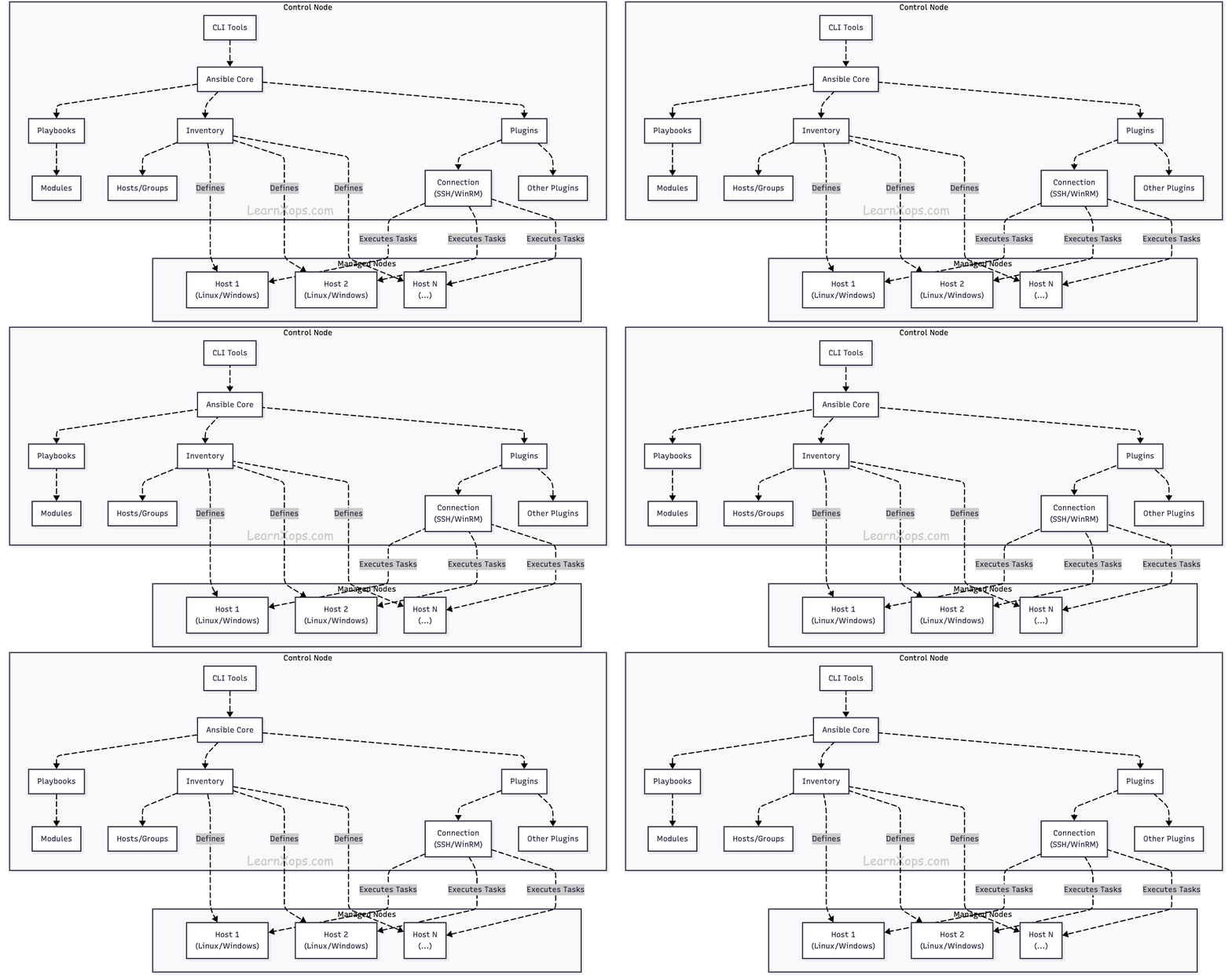
Ansible is an open-source automation tool used for configuration management, application deployment, and task automation. It is especially popular in DevOps workflows for its simplicity, human-readable YAML syntax, and agentless architecture.
Key Benefits:
- Simple and easy to learn
- Agentless (uses SSH)
- Idempotent and repeatable
- Scales from small to large environments
- Integrates well with CI/CD pipelines
Understand Agentless Architecture (SSH-based)
Ansible does not require any agent to be installed on the target machines. It connects to nodes over SSH (or WinRM for Windows), executes tasks remotely, and returns the output.
Default connection method:
$ ansible all -m ping -i inventory.ini
Ansible connects using the user and SSH key specified in the inventory or command line.
Inventory Files – How Ansible Knows Which Machines to Connect To
An inventory file lists all the target machines and groupings. You can use INI, YAML, or dynamic inventories.
Example (inventory.ini):
[web]
web1.example.com
web2.example.com

[db]
db1.example.com ansible_user=ubuntu ansible_port=22
Usage:
ansible -i inventory.ini web -m ping
Ad-hoc Commands – Quick One-liner Tasks Across Multiple Servers
Ad-hoc commands let you execute a single task without writing a playbook.
Examples:
ansible all -i inventory.ini -m ping
ansible web -i inventory.ini -m shell -a 'df -h'
ansible db -i inventory.ini -b -m package -a 'name=apache2 state=present'   # -b = become root; Apache is apache2 on Ubuntu, httpd on RHEL
Modules – Reusable Components
Modules are the core of Ansible. Each module is a standalone script that can execute tasks like file manipulation, package installation, user management, etc.
Common modules:
ping: Check connectivitycopy: Copy filesyum/apt: Manage packagesuser: Manage user accountsservice: Start, stop, or restart services
Example:
ansible all -i inventory.ini -b -m user -a 'name=devops state=present'
Playbooks – YAML-based Files to Define Multi-step Automation
Playbooks are YAML files that define a series of tasks to execute on specified hosts.
Example (webserver.yml):
- name: Setup Web Server
  hosts: web
  become: true
  tasks:
    - name: Install Apache
      yum:
        name: httpd
        state: present

    - name: Start Apache service
      service:
        name: httpd
        state: started
        enabled: true
Run the playbook:
ansible-playbook -i inventory.ini webserver.yml
Idempotency – Safe Repeated Executions
Ansible playbooks are idempotent, meaning running the same playbook multiple times won’t cause unintended changes.
Example:
- A user that already exists won't be re-created.
- A package that's already installed won't be re-installed.
This ensures reliability and consistency in environments, a key requirement in DevOps practices.
🛠 Initial Tasks
✅ Install Ansible
# Recommended: the latest Ansible from PyPI (distro packages are often older)
pipx install --include-deps ansible

# Or use your distro package
sudo apt install ansible        # Debian/Ubuntu
sudo dnf install ansible-core   # RHEL/Rocky/Alma (the full "ansible" package is in EPEL)

ansible --version
For more detailed Ansible installation instructions based on your OS, check here
🔥 Challenges
🔹 Challenge 1: Create an inventory file with one host (localhost or a VM)
🔹 Challenge 2: Run ansible all -m ping and verify connectivity
🔹 Challenge 3: Use the copy module to transfer a file to the target node
🔹 Challenge 4: Use package module to install Nginx or Apache
🔹 Challenge 5: Write a playbook to:
- Update the package cache
- Install Nginx
- Ensure it is running
🔹 Challenge 6: Create a variable file and use it in your playbook (vars: or vars_files:)
🔹 Challenge 7: Add a handler to restart a service only when a config file changes
🔹 Challenge 8: Use ansible.builtin.user to create a new system user
🔹 Challenge 9: Tag tasks (tags: install) and run only tagged tasks
🔹 Challenge 10: Use ansible-playbook with --check mode to simulate changes
Challenge 11: Build a Web Server Provisioning Playbook
📌 Create a complete playbook that:
- Installs Nginx or Apache
- Copies an HTML file to /var/www/html/
- Ensures the service is enabled and started
- Creates a system user for deployments
- Sends a Slack or webhook notification (bonus)
📌 Run it on your localhost, VM, or AWS EC2 instance
📌 Document and share on GitHub
✅ Solutions:
✅ Challenge 1: Create an Inventory File
Create a file named hosts.ini:
[webservers]
localhost ansible_connection=local
✅ Challenge 2: Verify Connectivity with Ping Module
Run the following command:
ansible all -i hosts.ini -m ping
Expected Output:
localhost | SUCCESS => {
    "changed": false,
    "ping": "pong"
}
✅ Challenge 3: Use copy Module to Transfer a File
Create a file named index.html with sample content:
<h1>Hello from Ansible</h1>
Run the command:
ansible all -i hosts.ini -m copy -a "src=index.html dest=/tmp/index.html"
✅ Challenge 4: Use package Module to Install Nginx
Run this command:
ansible all -i hosts.ini -b -m package -a "name=nginx state=present" # installing needs root
Alternative: Use httpd instead of nginx for Apache on RHEL/CentOS.
✅ Challenge 5: Write a Playbook to Update Cache, Install Nginx & Start It
Create a file nginx_setup.yml:
- name: Ensure Nginx is installed and running
  hosts: all
  become: yes
  tasks:
    - name: Update package cache
      ansible.builtin.apt:
        update_cache: yes
      when: ansible_os_family == 'Debian'

    - name: Install Nginx
      ansible.builtin.package:
        name: nginx
        state: present

    - name: Ensure Nginx is running
      ansible.builtin.service:
        name: nginx
        state: started
        enabled: yes
Run the playbook:
ansible-playbook -i hosts.ini nginx_setup.yml
Expected Result: Nginx should be installed, running, and enabled on startup.
✅ Challenge 6: Create a Variable File and Use It in Your Playbook
Create a file vars.yml:
nginx_package: nginx
Update your playbook:
- name: Use variable file to install package
  hosts: all
  become: yes
  vars_files:
    - vars.yml
  tasks:
    - name: Install Nginx using variable
      ansible.builtin.package:
        name: "{{ nginx_package }}"
        state: present
✅ Challenge 7: Add a Handler to Restart a Service When Config Changes
Add this task to your playbook:
- name: Copy custom Nginx config
  ansible.builtin.copy:
    src: nginx.conf
    dest: /etc/nginx/nginx.conf
  notify: Restart Nginx
Add this handler section:
handlers:
  - name: Restart Nginx
    ansible.builtin.service:
      name: nginx
      state: restarted
✅ Challenge 8: Use ansible.builtin.user to Create a New System User
- name: Create system user
  hosts: all
  become: yes
  tasks:
    - name: Create devops user
      ansible.builtin.user:
        name: devops
        state: present
        shell: /bin/bash
✅ Challenge 9: Tag Tasks and Run Only Tagged Tasks
- name: Install Nginx (Tagged)
  ansible.builtin.package:
    name: nginx
    state: present
  tags: install
Run the playbook with the tag:
ansible-playbook -i hosts.ini nginx_setup.yml --tags install
✅ Challenge 10: Use --check Mode to Simulate Changes
Run this to perform a dry run:
ansible-playbook -i hosts.ini nginx_setup.yml --check
✅ Expected: Ansible shows the actions it would take, without making changes.
✅ Challenge 11: Build a Web Server Provisioning Playbook
---
- name: Provision a Web Server with Nginx
  hosts: all
  become: true
  vars:
    web_user: deployer
    html_source: files/index.html
    html_dest: /var/www/html/index.html
    slack_webhook_url: "{{ lookup('ansible.builtin.env', 'SLACK_WEBHOOK_URL') }}"   # keep the webhook secret out of the playbook

  tasks:

    - name: Install Nginx
      ansible.builtin.package:
        name: nginx
        state: present

    - name: Copy HTML file to web root
      ansible.builtin.copy:
        src: "{{ html_source }}"
        dest: "{{ html_dest }}"
        owner: root
        group: root
        mode: '0644'

    - name: Ensure Nginx is started and enabled
      ansible.builtin.service:
        name: nginx
        state: started
        enabled: true

    - name: Create a system user for deployments
      ansible.builtin.user:
        name: "{{ web_user }}"
        state: present
        shell: /bin/bash

    - name: Send Slack notification (Bonus)
      when: slack_webhook_url | length > 0   # skip if the variable isn't set
      ansible.builtin.uri:
        url: "{{ slack_webhook_url }}"
        method: POST
        headers:
          Content-Type: "application/json"
        body: |
          {
            "text": "✅ Web Server provisioned successfully on {{ inventory_hostname }}."
          }
        status_code: 200
        body_format: json
Run This Playbook
ansible-playbook -i localhost, -c local web_server_playbook.yml
Output
PLAY [Provision a Web Server with Nginx] ******************************************

TASK [Gathering Facts] ************************************************************
ok: [localhost]

TASK [Install Nginx] **************************************************************
ok: [localhost]

TASK [Copy HTML file to web root] *************************************************
changed: [localhost]

TASK [Ensure Nginx is started and enabled] *****************************************
ok: [localhost]

TASK [Create a system user for deployments] ****************************************
changed: [localhost]

TASK [Send Slack notification (Bonus)] *********************************************
ok: [localhost]

PLAY RECAP ************************************************************************
localhost                  : ok=6    changed=2    unreachable=0    failed=0    skipped=0    rescued=0    ignored=0
🤷🏻 How to Participate?
✅ Complete the tasks and challenges.
✅ Document your progress and key takeaways on GitHub ReadMe, Medium, or Hashnode.
✅ Share the above in a LinkedIn post tagging me (Sandip Das), and use #60DaysOfDevOps to engage with the community!
⚡ Quick Reference
Keep the momentum going — everything you need on LearnXOps in one place:
- 🎓 Courses — Video courses & AI-built courses
- 📚 Ebooks — Community ebooks & your own
- 🧪 All Labs & Challenges — DevOps, Cloud, SRE & more
- ☸️ Kubernetes Labs & Playground — kind clusters, playground & challenges
- 🤖 AI Agent & Bot Labs — OpenClaw · Hermes · CrewAI · LangGraph · MCP


Member discussion