


⚡ Quick Reference
Keep the momentum going — everything you need on LearnXOps in one place:
- 🎓 Courses — Video courses & AI-built courses
- 📚 Ebooks — Community ebooks & your own
- 🧪 All Labs & Challenges — DevOps, Cloud, SRE & more
- ☸️ Kubernetes Labs & Playground — kind clusters, playground & challenges
- 🤖 AI Agent & Bot Labs — OpenClaw · Hermes · CrewAI · LangGraph · MCP
Hey — It's Sandip Das 👋
Today, we will learn how to make Dynamic EC2 inventory using Ansible and how to use it.
IN TODAY'S EDITION
💡 Learning points:
🔹 What is EC2 dynamic inventory
🔹 Prerequisites
🔹 Dynamic Inventory File Definition
🔹 How to use it?
🔹 Sample Use Case
🧠 Learn here:
EC2 dynamic inventory
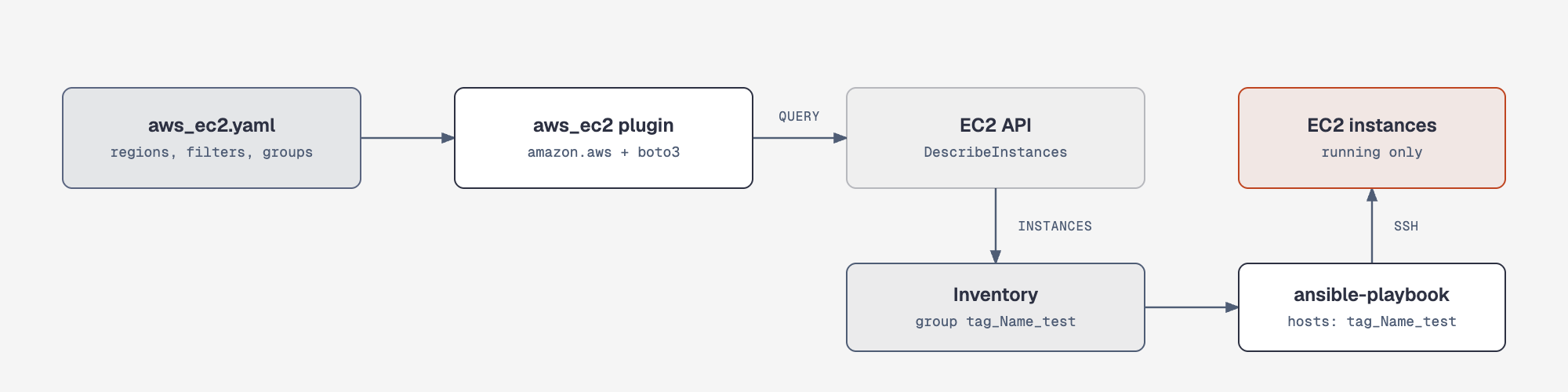
An EC2 dynamic inventory is used to automatically pull the list of EC2 instances from AWS and use it in Ansible for automation. This avoids hardcoding IPs or manually maintaining inventory files.
Prerequisites
- Python & PIP are Installed.
- AWS CLI configured with credentials.
- Boto3 library (Python AWS SDK).
- Ansible installed.
- Install AWS Collection from Ansible Galaxy
Step 1: Install Python & PIP
You can install Python from here
To install pip
curl -sSL https://bootstrap.pypa.io/get-pip.py -o get-pip.py
python3 get-pip.py --user
Step 2: Install AWS CLI
Step 3: Install Boto3
# amazon.aws needs boto3 and botocore (the old boto 2 library isn't used any more)
pip install boto3 botocore
Step 4: Install Ansible
You can install Ansible by following the detailed instructions here
or by simply using pip:
python3 -m pip install --user ansible
Verify Ansible installation by running:
ansible --version
It will give output like (varied based on OS):
ansible [core 2.18.3]
  config file = None
  configured module search path = ['/Users/sandipdas/.ansible/plugins/modules', '/usr/share/ansible/plugins/modules']
  ansible python module location = /opt/homebrew/Cellar/ansible/11.3.0_1/libexec/lib/python3.13/site-packages/ansible
  ansible collection location = /Users/sandipdas/.ansible/collections:/usr/share/ansible/collections
  executable location = /opt/homebrew/bin/ansible
  python version = 3.13.2 (main, Feb 4 2025, 14:51:09) [Clang 16.0.0 (clang-1600.0.26.6)] (/opt/homebrew/Cellar/ansible/11.3.0_1/libexec/bin/python)
  jinja version = 3.1.6
  libyaml = True
Step 5: Install Ansible AWS Collection/plugin from Ansible Galaxy
ansible-galaxy collection install amazon.aws
Dynamic Inventory File Definition
Create a dynamic inventory file (e.g. aws_ec2.yaml)
plugin: amazon.aws.aws_ec2
regions:
  - us-west-2
filters:
  instance-state-name: running
hostnames:
  - ip-address            # public IPv4 (an EC2 DescribeInstances filter name)
keyed_groups:
  - key: tags.Name
    prefix: tag_Name       # group = prefix + "_" + tag value, e.g. tag_Name_test
compose:
  ansible_host: public_ip_address
Explanation:
- plugin: amazon.aws.aws_ec2 – Uses the AWS EC2 dynamic inventory plugin from the amazon.aws collection.
- regions: – Limits instance discovery to specific AWS regions.
- - us-west-2 – Only fetch instances from the us-west-2 region.
- filters: – Applies filters to select specific EC2 instances.
- instance-state-name: running – Only include EC2 instances that are currently running.
- hostnames: – Specifies which EC2 attribute to use as the hostname.
- - ip-address – Uses the instance's public IPv4 address as its inventory hostname.
- keyed_groups: – Groups instances dynamically based on tag values.
- - key: tags.Name – Groups instances by their Name tag.
- prefix: tag_Name – Group names become prefix + "_" + tag value, e.g. tag_Name_test.
- compose: – Sets custom variables using instance attributes.
- ansible_host: public_ip_address – Sets the host’s IP for Ansible SSH to its public IP address.
Confirm the plugin is working
Run this command to list the inventory:
ansible-inventory -i aws_ec2.yaml --list
ansible-inventory -i aws_ec2.yaml --graph   # shows the groups, e.g. @tag_Name_test
Run a Playbook Using Dynamic Inventory
Create a Simple Playbook: uptime.yml
Note: I tagged my EC2 instance with Name = "test", so its group is tag_Name_test.
- name: Check uptime on EC2 instances
  hosts: tag_Name_test
  remote_user: ec2-user
  tasks:
    - name: Run uptime command
      ansible.builtin.command: uptime
      register: result

    - name: Show uptime
      ansible.builtin.debug:
        var: result.stdout
Run the Playbook Using EC2 Dynamic Inventory
ansible-playbook -i aws_ec2.yaml uptime.yml --private-key ~/key/path/file.pem
Expected output:
TASK [Gathering Facts] *********************************************
ok: [public-ip-address]

TASK [Run uptime command] ******************************************
changed: [public-ip-address]

TASK [Show uptime] *************************************************
ok: [public-ip-address] => {
    "result.stdout": " 13:56:03 up 17 min,  1 user,  load average: 0.00, 0.00, 0.00"
}

PLAY RECAP *********************************************************
public-ip-address : ok=3 changed=1 unreachable=0 failed=0 skipped=0 rescued=0 ignored=0
Want to explore more? check here
💡 Tips:
- You can filter by tags, instance types, VPC IDs, etc.
🕝 Explore past #60DaysOfDevOps challenges/solutions here:
Ansible Playbook - Deep Dive (60 Days DevOps Challenge Day 22)
Ansible Basics (60 Days DevOps Challenge Day 21)
Amazon DynamoDB: Serverless NoSQL DB at any scale (60 Days DevOps Challenge Day 20)
AWS RDS: Managed Relational Databases: (60 Days DevOps Challenge Day 19)
AWS ECS: Run and Scale Containerized Applications Effortlessly: (60 Days DevOps Challenge Day 18)
⚡ Quick Reference
Keep the momentum going — everything you need on LearnXOps in one place:
- 🎓 Courses — Video courses & AI-built courses
- 📚 Ebooks — Community ebooks & your own
- 🧪 All Labs & Challenges — DevOps, Cloud, SRE & more
- ☸️ Kubernetes Labs & Playground — kind clusters, playground & challenges
- 🤖 AI Agent & Bot Labs — OpenClaw · Hermes · CrewAI · LangGraph · MCP


Member discussion