


⚡ Quick Reference
Keep the momentum going — everything you need on LearnXOps in one place:
- 🎓 Courses — Video courses & AI-built courses
- 📚 Ebooks — Community ebooks & your own
- 🧪 All Labs & Challenges — DevOps, Cloud, SRE & more
- ☸️ Kubernetes Labs & Playground — kind clusters, playground & challenges
- 🤖 AI Agent & Bot Labs — OpenClaw · Hermes · CrewAI · LangGraph · MCP
Kubernetes is NOT ALWAYS THE ANSWER for running a containerized workload!
Sometimes we don’t even need such complexities to begin with, simple solutions like AWS ECS are more efficient in such cases 👍
We should learn AWS ECS to automate the deployment, scaling, and management of containerized applications. It simplifies running containers in production.
🧠 Learning points:
🔹 What is Amazon ECS and how does it compare to EKS & Kubernetes
🔹 ECS Launch Types: Fargate (serverless) vs EC2-backed clusters
🔹 ECS Core Concepts:
- Clusters
- Tasks and Task Definitions
- Services
- Containers
🔹 Running containerized applications
🔹 Load balancing and Auto Scaling in ECS
🔹 Integration with IAM, ECR (Elastic Container Registry), and CloudWatch Logs
🔹 Security: Task-level roles, Security Groups, and Private Subnets
🧠 Learn here:
Getting Started with AWS ECS + Dynamic Port Mapping
Checkout full AWS ECS Playlist on Youtube (FREE)
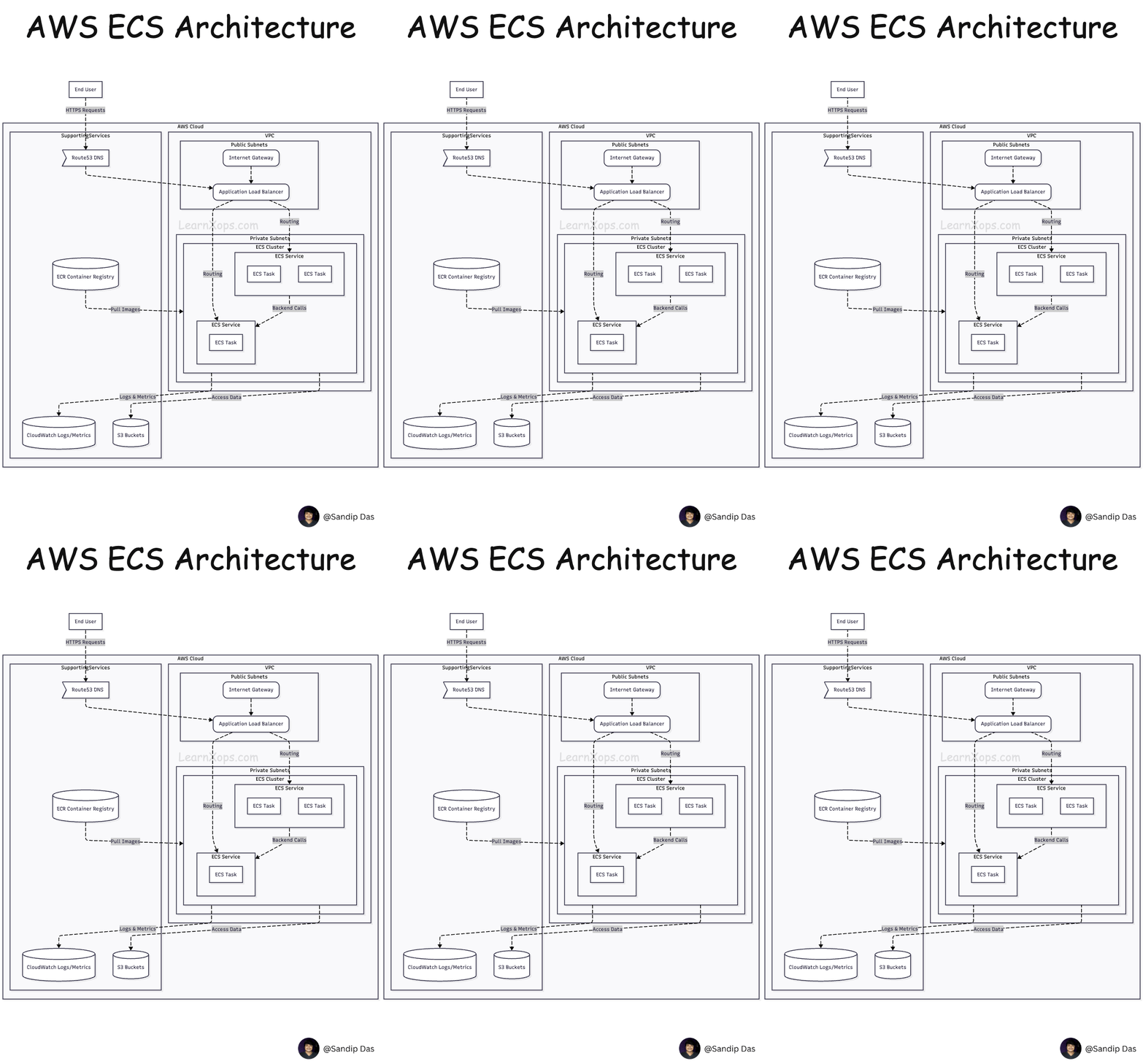
What is Amazon ECS?
Amazon ECS (Elastic Container Service) is a fully managed container orchestration service by AWS that lets you run and scale Docker containers without managing your own container orchestration platform.
ECS vs EKS vs Kubernetes: Comparison Table
| Feature | Amazon ECS (AWS Proprietary) | Amazon EKS (Managed Kubernetes) | Kubernetes (Self-managed) |
|---|---|---|---|
| Orchestrator | ECS | Kubernetes (CNCF) | Kubernetes (self-installed) |
| Ease of Use | Easiest to set up on AWS | More complex than ECS | Most complex |
| Control Plane | Managed by AWS | Managed by AWS | You manage everything |
| Compute Options | EC2, Fargate | EC2, Fargate | Any VM/Bare Metal |
| Extensibility | Limited (tight AWS coupling) | Very extensible (huge ecosystem) | Fully customizable |
| Vendor Lock-in | High (AWS-specific) | Medium (Kubernetes portable) | None |
| Community & Ecosystem | Smaller (AWS-only) | Large, CNCF-supported | Very large |
| Ideal For | AWS-focused workloads | Hybrid/multi-cloud setups | Full control/custom infra |
ECS Launch Types: Fargate vs EC2-backed Clusters
| Feature | Fargate (Serverless) | EC2-backed ECS Cluster |
|---|---|---|
| Infra Management | None (AWS-managed) | You manage EC2 instances |
| Cost Model | Pay per task (vCPU + memory) | Pay for EC2 instances (even if idle) |
| Scalability | Auto-scales easily | Manual or ASG-based |
| Custom OS/Daemon Ctrl | ❌ Not possible | ✅ Full control |
| Best For | Spiky/small workloads | Stable/large workloads |
| Start Time | ~1 minute | Depends on instance availability |
Since September 2025 there is a third option, ECS Managed Instances: AWS provisions, patches and scales the EC2 instances for you, while you can still pick instance attributes such as GPUs or more memory. You pay for the instances plus a management fee.
ECS Core Concepts
Clusters
- Logical grouping of ECS tasks and services.
- Types:
- EC2-backed (user-managed compute)
- Fargate (serverless compute)
- ECS auto-places tasks based on availability/constraints.
Tasks and Task Definitions
- Task Definition: JSON blueprint for app configuration.
{
  "family": "web",
  "containerDefinitions": [
    {
      "name": "web",
      "image": "nginx",
      "memory": 256,
      "cpu": 128
    }
  ]
}
- Task: A running instance of the definition.
- Run one-off tasks or manage via Services.
Services
- Ensure tasks are always running.
- Features:
- Auto Scaling
- Load Balancing
- Self-healing (task replacement)
Containers
- Run Docker containers as defined.
- Task can include multiple containers.
- Resource isolation per task/container.
ECS: Deep Integrations
Running Apps
- Stateless, microservices, or batch apps.
- Multi-container support (e.g., sidecars).
Load Balancing & Auto Scaling
- Integrated with ALB/NLB + Target Groups.
- Auto Scaling via CPU, memory, CloudWatch metrics.
- Scaling possible at task or EC2 ASG level.
Integrations
- IAM: Task Roles, Execution Roles.
- ECR: Secure image pulls.
- CloudWatch Logs: Stdout/stderr streaming.
Security in ECS
🔐 Task-level IAM Roles
- Each task definition can have its own task role, which the containers use for AWS API calls (separate from the execution role that pulls images and writes logs).
- Enables fine-grained permissions.
🔐 Security Groups
- Control traffic at ENI level.
- With
awsvpcmode, each task gets its own ENI + security group.
🔐 Private Subnets
- ECS tasks can run in private subnets (no public IP).
- Use NAT Gateway or VPC Endpoints for outbound access.
📚️ Additional Resources:
📌 What is Amazon ECS? – AWS Docs
📌 ECS Fargate vs EC2 – Comparison
📌 Push Docker Images to ECR – AWS Tutorial
📌 ECS Auto Scaling Guide
📌 CloudWatch Logs Integration with ECS
Initial Tasks:
✅ Task 1: Make sure to install AWS CLI and configure IAM credentials, make sure it has ECR image push access
🔥 Challenges
🔹 Challenge 1: Create an ECR repository, tag your local image, and push it using the AWS CLI
🔹 Challenge 2: Create an ECS Cluster (Fargate and/or EC2-based) and run a basic task using your container
🔹 Challenge 3: Define a Task Definition for a web app and run it with port 80 Exposed
🔹 Challenge 4: Make your ECS service highly available by running it in multiple subnets/AZs
🔹 Challenge 5: Enable CloudWatch Logs for your task and validate real-time log streaming
🔹 Challenge 6: Deploy an ECS Service with an Application Load Balancer (ALB)
🔹 Challenge 7: Set up Auto Scaling: Scale ECS service tasks when CPU > 60%
🔹 Challenge 8: Restrict ECS Task access using Task Role with limited IAM permissions
🔹 Challenge 9: Deploy a multi-container Task (e.g., web + sidecar logger)
🔹 Challenge 10: Use AWS CLI to deploy an ECS cluster and service
Final Task:
🔹 Challenge 11: Deploy Project NO 1 from Docker Mini Projects to AWS ECS cluster and make it scaleable.
✅ Solutions
✅ Challenge 1: Push Docker Image to Amazon ECR
Steps:
- Create ECR Repository:
aws ecr create-repository --repository-name my-app --region us-east-1
- Login to ECR:
aws ecr get-login-password --region us-east-1 | \
  docker login --username AWS --password-stdin <aws_account_id>.dkr.ecr.us-east-1.amazonaws.com
- Tag Local Docker Image:
docker tag my-app:latest <aws_account_id>.dkr.ecr.us-east-1.amazonaws.com/my-app:latest
- Push Docker Image to ECR:
docker push <aws_account_id>.dkr.ecr.us-east-1.amazonaws.com/my-app:latest
✅ Challenge 2: Create ECS Cluster (Fargate/EC2) and Run Task
ECS with Fargate
- Create cluster → Infrastructure: AWS Fargate (serverless) → Name:
fargate-cluster - Create Task Definition → FARGATE, container:
my-container, image from ECR, port 80 - Run Task: Select VPC/Subnet, enable public IP
ECS with EC2
- Create cluster → Infrastructure: Amazon EC2 instances (the console creates an Auto Scaling group and capacity provider: pick instance type, key pair, VPC)
- Instances from that Auto Scaling group register with the cluster automatically (ECS-optimized AMI)
- Use EC2 Task Definition and run task in EC2 launch mode
✅ Challenge 3: Task Definition with Port 80 Exposed
- Launch Type: FARGATE
- Task Name:
webapp-task - Container:
webapp-container, Image: nginx or ECR image - Port: 80, Log Group:
/ecs/webapp - Run task and access via ENI public IP
✅ Challenge 4: Highly Available ECS Service
- Use subnets in at least 2 AZs: public subnets for the ALB, private subnets for the tasks
- Create ALB:
ecs-albwith listener on port 80 - Create Target Group:
ecs-target-group - Create ECS Fargate Service with 2+ tasks and ALB target group
✅ Challenge 5: Enable CloudWatch Logs
- Add
awslogslog configuration in task definition - IAM Role
ecsTaskExecutionRolemust have CloudWatch log permissions - View logs via CloudWatch Console or:
# Follow live logs (AWS CLI v2)
aws logs tail /ecs/webapp --follow

# Or search the last 10 minutes
aws logs filter-log-events \
  --log-group-name /ecs/webapp \
  --start-time $(date -d '10 minutes ago' +%s000)
✅ Challenge 6: ECS Service with ALB
- Create ALB and Target Group
- Add ALB Listener Rule forwarding to Target Group
- Create ECS Service with ALB integration
- Access via ALB DNS:
http://<alb-dns-name>
✅ Challenge 7: ECS Auto Scaling
- Enable auto scaling from ECS service UI
- Min: 1, Max: 5, Target CPU: 60%
- Uses CloudWatch metric
ECSServiceAverageCPUUtilization
✅ Challenge 8: IAM Task Role with Restricted Access
- Create IAM Role with minimal S3 permissions
- Attach to Task Definition
- Validate inside container using AWS CLI
aws sts get-caller-identity
aws s3 ls s3://my-reports-bucket
✅ Challenge 9: Multi-Container Task (Web + Sidecar Logger)
- Task Definition includes:
- web container (e.g., nginx)
- logger container (e.g., busybox printing logs)
- Both use
awslogsfor streaming - Run task and validate via public IP and CloudWatch
✅ Challenge 10: ECS Fargate Deployment via AWS CLI
- Create Cluster:
aws ecs create-cluster --cluster-name my-fargate-cluster
- Create Task Definition (task-def.json):
{
  "family": "nginx-task",
  "networkMode": "awsvpc",
  "requiresCompatibilities": ["FARGATE"],
  "cpu": "256",
  "memory": "512",
  "executionRoleArn": "arn:aws:iam::<your_account_id>:role/ecsTaskExecutionRole",
  "containerDefinitions": [
    {
      "name": "nginx",
      "image": "public.ecr.aws/nginx/nginx:latest",
      "portMappings": [ { "containerPort": 80 } ],
      "essential": true
    }
  ]
}
- Register Task:
aws ecs register-task-definition --cli-input-json file://task-def.json
- Create ECS Service:
aws ecs create-service \
  --cluster my-fargate-cluster \
  --service-name nginx-service \
  --task-definition nginx-task \
  --launch-type FARGATE \
  --desired-count 1 \
  --network-configuration "awsvpcConfiguration={subnets=[subnet-xxxx,subnet-yyyy],securityGroups=[sg-zzzz],assignPublicIp=ENABLED}"
- Check Task & Get Public IP:
aws ecs list-tasks --cluster my-fargate-cluster
aws ecs describe-tasks --cluster my-fargate-cluster --tasks <task-arn>
aws ec2 describe-network-interfaces --network-interface-ids <eni-id>
Open in browser: http://<public-ip>
How to Participate?
✅ Complete the tasks and challenges.
✅ Document your progress and key takeaways on GitHub ReadMe, Medium, or Hashnode.
✅ Share the above in a LinkedIn post tagging me (Sandip Das) and use #60DaysOfDevOps to engage with the community!
⚡ Quick Reference
Keep the momentum going — everything you need on LearnXOps in one place:
- 🎓 Courses — Video courses & AI-built courses
- 📚 Ebooks — Community ebooks & your own
- 🧪 All Labs & Challenges — DevOps, Cloud, SRE & more
- ☸️ Kubernetes Labs & Playground — kind clusters, playground & challenges
- 🤖 AI Agent & Bot Labs — OpenClaw · Hermes · CrewAI · LangGraph · MCP
Member discussion