


Managing secrets (like API keys, passwords, tokens) securely is critical in DevOps.
⚡ Quick Reference
Keep the momentum going — everything you need on LearnXOps in one place:
- 🎓 Courses — Video courses & AI-built courses
- 📚 Ebooks — Community ebooks & your own
- 🧪 All Labs & Challenges — DevOps, Cloud, SRE & more
- ☸️ Kubernetes Labs & Playground — kind clusters, playground & challenges
- 🤖 AI Agent & Bot Labs — OpenClaw · Hermes · CrewAI · LangGraph · MCP
💡Learning points:
🔹 Why secrets management is important in DevOps workflows
🔹 Introduction to Ansible Vault – encrypting and decrypting files
🔹 Encrypting sensitive data like passwords, tokens, and SSH keys
🔹 Using vault-encrypted variables inside playbooks and roles
🔹 Editing and viewing vault files securely
🔹 Managing multiple vault passwords using vault IDs
🔹 Best practices for secure automation: separating secrets, using .gitignore, and key rotation
🧠 Learn here:
Why secrets management is important in DevOps workflows
Secrets like API tokens, database credentials, SSH keys, and cloud access keys are critical to infrastructure and application security. Hardcoding them or exposing them in repositories can lead to breaches and unauthorized access. A secrets management solution ensures encryption at rest, controlled access, and auditability.
# Never do this!
vars:
  aws_access_key: AKIA...EXPOSED
  aws_secret_key: abc123...EXPOSED
What is Ansible Vault
In most Ansible projects, you use YAML files (like group_vars, host_vars, or playbooks). But storing plaintext secrets there can be risky. Vault helps you avoid committing secrets to version control or exposing them in shared environments.
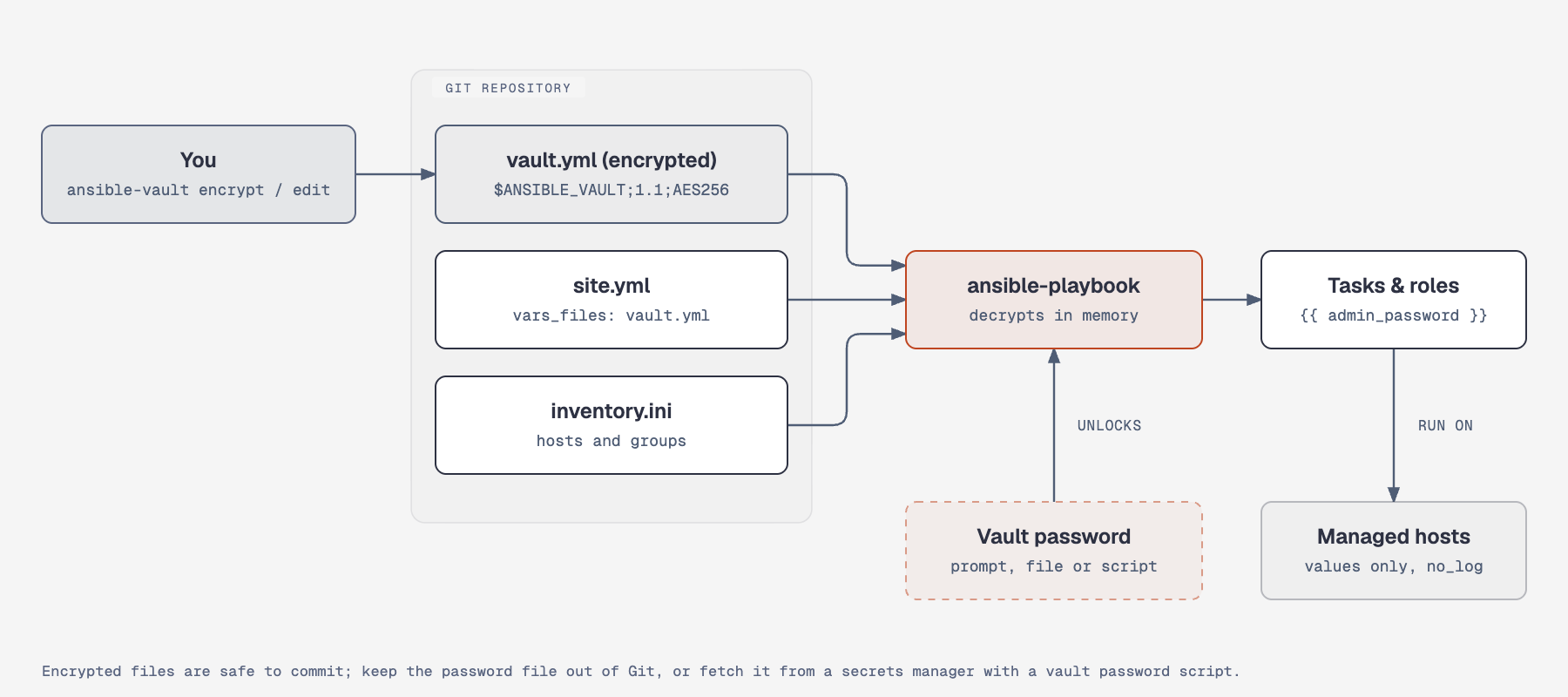
Ansible Vault is a feature of Ansible that allows you to securely store sensitive data such as passwords, API keys, SSH keys, or any confidential variables by encrypting them.
# Encrypt a file
ansible-vault encrypt secrets.yml

# Decrypt a file
ansible-vault decrypt secrets.yml

# Edit an encrypted file
ansible-vault edit secrets.yml
Key Features:
| Feature | Description |
|---|---|
| 🔒 Encrypt YAML files | Encrypt entire files like secrets.yml or group_vars/prod.yml |
| 🔐 Encrypt variables | Encrypt individual variables inline |
| 🧾 Version control safe | Encrypted content is safe to store in Git |
| 🔄 Re-keying | Change encryption keys |
| 🔑 Supports vault IDs | Use multiple vault passwords for different files |
Encrypting sensitive data like passwords, tokens, and SSH keys
Store secrets like passwords and SSH keys in YAML files and encrypt them with Ansible Vault to prevent accidental exposure.
# secrets.yml (before encryption)
admin_password: SuperSecret123
slack_token: xoxb-1234-xyz
ssh_private_key: |
  -----BEGIN OPENSSH PRIVATE KEY-----
  ...
  -----END OPENSSH PRIVATE KEY-----
ansible-vault encrypt secrets.yml
To encrypt a single value instead of a whole file, use encrypt_string and paste the output into any vars file:
ansible-vault encrypt_string 'SuperSecret123' --name 'admin_password'
# admin_password: !vault |
#   $ANSIBLE_VAULT;1.1;AES256
#   6231...
Using vault-encrypted variables inside playbooks and roles
You can reference encrypted variables from your playbooks like any other variable, once the vault is unlocked.
# site.yml
---
- hosts: all
  become: true
  vars_files:
    - secrets.yml
  tasks:
    - name: Create a new user
      ansible.builtin.user:
        name: admin
        # the user module expects a hash, not the plain password
        password: "{{ admin_password | password_hash('sha512') }}"
        update_password: on_create
Editing and viewing vault files securely
You can view or edit encrypted vault files without decrypting them manually.
# View contents without decrypting permanently
ansible-vault view secrets.yml

# Securely edit the encrypted file
ansible-vault edit secrets.yml
Managing multiple vault passwords using vault IDs
Vault IDs let you define multiple vaults for different environments (dev, prod) and manage them using labels.
# Encrypt with vault ID label
ansible-vault encrypt --vault-id dev@prompt dev_secrets.yml
ansible-vault encrypt --vault-id prod@prompt prod_secrets.yml

# Run playbook using both vaults
ansible-playbook site.yml --vault-id dev@prompt --vault-id prod@prompt
Best practices for secure automation: separating secrets, using .gitignore, and key rotation
- Store secrets in separate encrypted files.
- Commit the encrypted files, but add the vault password file and any decrypted copies to
.gitignore. - Rotate vault passwords regularly with
ansible-vault rekey, and rotate the secrets themselves if a password leaks.
# .gitignore
# commit the encrypted vault files; ignore what unlocks them
.vault_pass*
*.decrypted.yml
Here's a Typical Flow:
👤 User runs ansible-vault create/edit/encrypt/decrypt command via AnsibleCLI.
🔐 AnsibleCLI prompts the user for a vault password.
🔑 User provides password (manually or via --vault-password-file).
🔁 AnsibleVault either encrypts or decrypts based on the command.
🛡️ [Encryption] Sensitive data (vars/files) is encrypted using AES256.
📁 Encrypted content is stored securely in EncryptedFile.
🔓 [Decryption] On decryption request, data is decrypted using the password.
📤 Plaintext is returned back to the CLI.
▶️ User runs playbook with --ask-vault-pass.
🔍 Playbook execution needs access to secrets.
✅ AnsibleVault provides decrypted secrets during runtime.
🚀 Playbook executes successfully with the required secrets.
🔥 Challenges
💡 Challenge 1: Create a secrets.yml file with an encrypted variable like admin_password
💡 Challenge 2: Use that variable in a playbook to create a new user with the password
💡 Challenge 3: Run the playbook using --ask-vault-pass and verify the user is created
💡 Challenge 4: Try viewing the vault file using ansible-vault view secrets.yml
💡 Challenge 5: Add the vault password file to .gitignore (the encrypted vault file itself is safe to commit)
💡 Challenge 6: Encrypt an existing vars.yml file using ansible-vault encrypt
💡 Challenge 7: Use vault_password_file to run playbooks without prompt
💡 Challenge 8: Create a multi-environment secrets setup (e.g., dev_secrets.yml, prod_secrets.yml)
💡 Challenge 9: Use vault ID labels to manage different password files for different environments
💡 Challenge 10: Store secrets encrypted with Vault inside a role's defaults/ or vars/ directory and use them securely
✅ Solutions:
💡 Challenge 1: Create a secrets.yml file with an encrypted variable like admin_password
# Run this command to create an encrypted secrets file
ansible-vault create secrets.yml
# Inside the file (you’ll be prompted to enter a password), add:
admin_password: mysecurepassword
💡 Challenge 2: Use that variable in a playbook to create a new user with the password
# playbook.yml
---
- name: Create a user with vault password
  hosts: all
  become: yes
  vars_files:
    - secrets.yml
  tasks:
    - name: Create user with encrypted password
      ansible.builtin.user:
        name: adminuser
        password: "{{ admin_password | password_hash('sha512') }}"
        update_password: on_create   # otherwise a new salt changes the hash on every run
💡 Challenge 3: Run the playbook using --ask-vault-pass and verify the user is created
# Run this command to execute the playbook with a vault password prompt
ansible-playbook -i inventory.ini playbook.yml --ask-vault-pass
# Then SSH into the host and check if the user is created
ssh user@host
getent passwd adminuser
💡 Challenge 4: Try viewing the vault file using ansible-vault view secrets.yml
# Run the following command and enter the vault password to view contents
ansible-vault view secrets.yml
💡 Challenge 5: Keep the vault password file out of Git (the encrypted vault file is safe to commit)
# The encrypted secrets.yml is meant to be committed;
# what must never reach Git is the password that unlocks it
echo '.vault_pass.txt' >> .gitignore
💡 Challenge 6: Encrypt an existing vars.yml file using ansible-vault encrypt
ansible-vault encrypt vars.yml
💡 Challenge 7: Use vault_password_file to run playbooks without prompt
# Create a file containing your vault password (e.g., .vault_pass.txt)
echo 'mysecurepassword' > .vault_pass.txt
chmod 600 .vault_pass.txt

# Run the playbook using the password file
ansible-playbook -i inventory.ini playbook.yml --vault-password-file .vault_pass.txt
💡 Challenge 8: Create a multi-environment secrets setup (e.g., dev_secrets.yml, prod_secrets.yml)
# Encrypt environment-specific secrets
ansible-vault create dev_secrets.yml
ansible-vault create prod_secrets.yml

# In playbooks use conditionally:
vars_files:
  - "{{ env }}_secrets.yml"
💡 Challenge 9: Use vault ID labels to manage different password files for different environments
# Encrypt with vault ID
ansible-vault encrypt --vault-id dev@prompt dev_secrets.yml
ansible-vault encrypt --vault-id prod@prompt prod_secrets.yml

# Keep one password file per environment, outside the repo
ansible-playbook playbook.yml \
  --vault-id dev@~/.vault/dev_pass.txt \
  --vault-id prod@~/.vault/prod_pass.txt
💡 Challenge 10: Store secrets encrypted with Vault inside a role's defaults/ or vars/ directory and use them securely
# Encrypt the file in the role
ansible-vault encrypt roles/myrole/vars/main.yml

# Reference as usual in the role’s tasks
# Ansible will automatically decrypt if vault password is provided
🤷🏻 How to Participate?
✅ Complete the tasks and challenges.
✅ Document your progress and key takeaways on GitHub ReadMe, Medium, or Hashnode.
✅ Share the above in a LinkedIn post tagging me (Sandip Das), and use #60DaysOfDevOps to engage with the community!
⚡ Quick Reference
Keep the momentum going — everything you need on LearnXOps in one place:
- 🎓 Courses — Video courses & AI-built courses
- 📚 Ebooks — Community ebooks & your own
- 🧪 All Labs & Challenges — DevOps, Cloud, SRE & more
- ☸️ Kubernetes Labs & Playground — kind clusters, playground & challenges
- 🤖 AI Agent & Bot Labs — OpenClaw · Hermes · CrewAI · LangGraph · MCP


Member discussion