


We should learn Serverless with AWS Lambda to simplify application deployment by removing server management overhead, and enable cost-efficient, event-driven architectures that scale automatically with demand.
⚡ Quick Reference
Keep the momentum going — everything you need on LearnXOps in one place:
- 🎓 Courses — Video courses & AI-built courses
- 📚 Ebooks — Community ebooks & your own
- 🧪 All Labs & Challenges — DevOps, Cloud, SRE & more
- ☸️ Kubernetes Labs & Playground — kind clusters, playground & challenges
- 🤖 AI Agent & Bot Labs — OpenClaw · Hermes · CrewAI · LangGraph · MCP
📚 Key Learnings
- Understand the concept of serverless computing and why AWS Lambda is central to it.
- Explore use cases: API backends, file processing, event triggers, real-time data pipelines.
- Learn Lambda execution model: handler, runtime, memory, timeout.
- Explore triggers and integrations (S3, DynamoDB Streams, API Gateway, CloudWatch).
- Understand pricing model
- Learn best practices
🧠 Learn here
What is Serverless Computing?
Serverless computing is a cloud-native execution model where you don’t need to manage servers directly. Instead, the cloud provider dynamically provisions and manages the infrastructure required to run your application.
In traditional infrastructure, developers need to provision, scale, and maintain servers or virtual machines. With serverless, developers focus on writing code while the provider handles scaling, availability, and maintenance.
Key characteristics of serverless computing:
- No Server Management: Developers don’t need to configure or maintain servers; infrastructure is abstracted away.
- Automatic Scaling: Applications scale automatically in response to demand, from a few requests per day to thousands per second.
- Pay-as-You-Go: Billing is based on actual usage (e.g., number of requests and execution time), not on pre-allocated server capacity.
- Event-Driven Execution: Functions are triggered by events such as HTTP requests, file uploads, database updates, or scheduled tasks.
- Built-in High Availability: Cloud providers manage fault tolerance, redundancy, and availability across Availability Zones within a Region.
What is AWS Lambda ?
AWS Lambda is the leading serverless compute service provided by Amazon Web Services. It allows developers to run code without provisioning or managing servers.
Key Features of AWS Lambda:
- Fully Managed Execution: AWS handles all aspects of running your code, including capacity provisioning, patching, and monitoring.
- Event Integration: Lambda integrates with over 200 AWS services and SaaS applications, making it central to event-driven architectures.
- Granular Scaling: Each function execution is independent, scaling automatically with demand.
- Flexible Runtime Support: Supports multiple languages (Python, Node.js, Java, Go, C#, Ruby, etc.) with the option to bring your own runtime.
- Cost Efficiency: You pay only for the compute time consumed (measured in milliseconds) and the number of requests.
Why Lambda is Central to Serverless?
- Pioneer of FaaS (Function-as-a-Service): Lambda popularized the function execution model in the cloud.
- Foundation for Modern Architectures: Central to building microservices, event-driven systems, and real-time applications.
- Enables Agility: Developers can focus purely on business logic without managing infrastructure.
- Integration Hub: Acts as a glue between services, enabling automation, orchestration, and serverless workflows.
Serverless Computing Use Cases
Serverless computing opens up a wide range of practical applications because it abstracts server management and offers event-driven, scalable execution. Below are some of the most common use cases.
1. API Backends
Serverless is ideal for building RESTful and GraphQL APIs without managing servers.
- How it works: Each API request triggers a Lambda function.
- Integration: Combined with Amazon API Gateway for routing, authentication, and throttling.
- Benefits: Automatic scaling, reduced cost for low-traffic apps, and faster development.
Example: Building a serverless backend for a mobile app where each endpoint (login, fetch data, post comments) maps to a Lambda function.
2. File Processing
Serverless functions excel at automating workflows that involve files or data streams.
- How it works: A file uploaded to Amazon S3 triggers a Lambda function.
- Tasks: Image resizing, video transcoding, PDF generation, or metadata extraction.
- Benefits: Cost efficiency (only pay when files are uploaded) and simplified automation.
Example: A photo-sharing app automatically generates thumbnail images when a user uploads a picture.
3. Event Triggers
Serverless works seamlessly with event-driven architectures.
- How it works: AWS services (like DynamoDB, SQS, Kinesis, or CloudWatch) trigger Lambda functions on specific events.
- Tasks: Sending notifications, updating secondary databases, cleaning up resources.
- Benefits: Eliminates the need for polling, ensuring real-time and reactive responses.
Example: When a new record is added to DynamoDB, a Lambda function processes it and sends a notification to an SNS topic.
4. Real-Time Data Pipelines
Serverless functions are effective for stream processing and real-time analytics.
- How it works: Data streams from sources like Amazon Kinesis or Kafka trigger Lambda functions for processing.
- Tasks: Filtering, transforming, aggregating, or enriching data before storage or visualization.
- Benefits: Real-time processing without maintaining stream-processing clusters.
Example: Processing IoT sensor data in real-time, aggregating readings, and pushing results into an OpenSearch index for immediate querying.
AWS Lambda Execution Model
Understanding how AWS Lambda executes your code is key to designing efficient and reliable serverless applications. The execution model defines how functions are invoked, run, and managed.
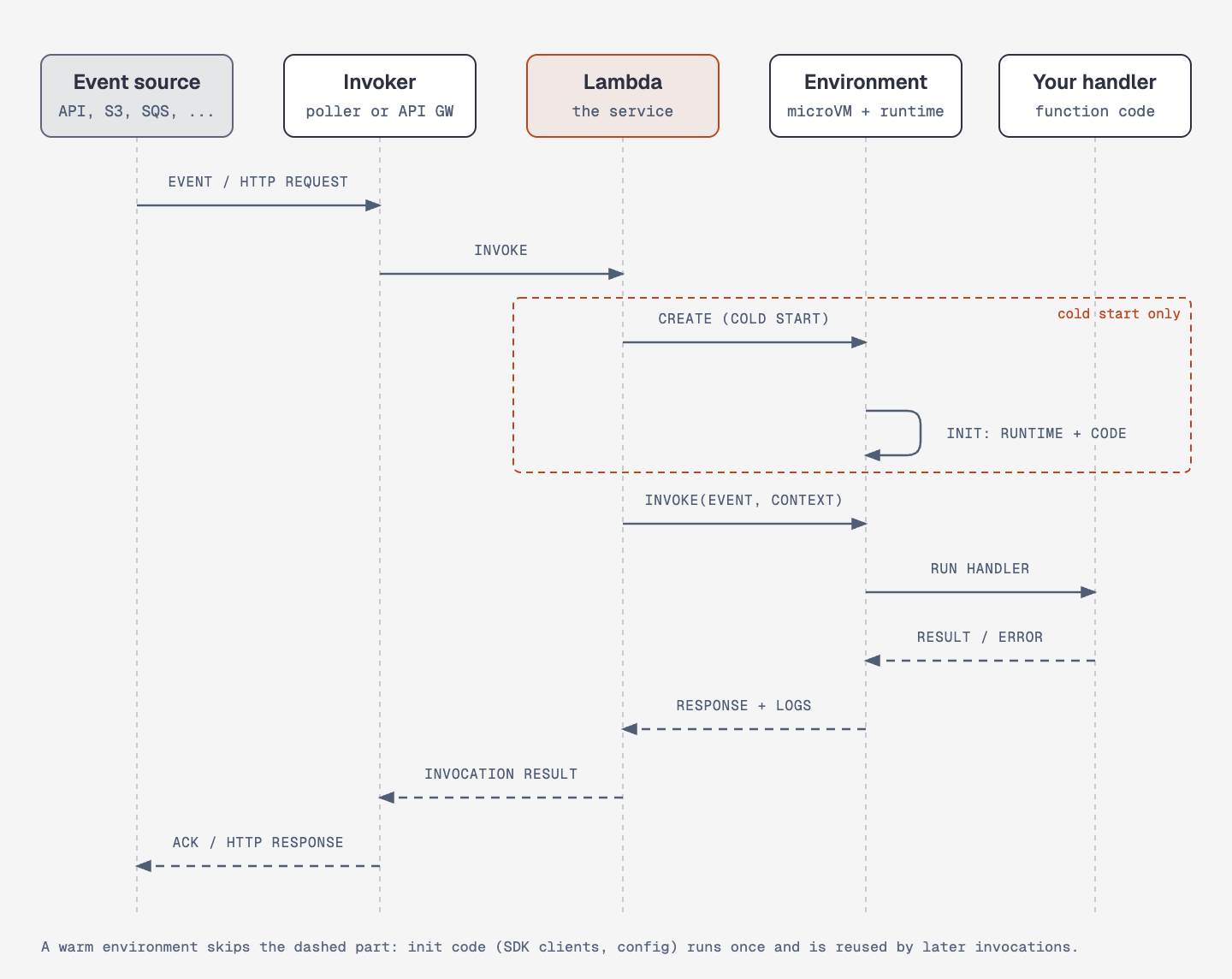
1. Handler
The handler is the entry point of your Lambda function. It specifies the method that AWS Lambda calls to start execution.
- Format: Typically defined as
fileName.methodName(e.g.,index.handler). - Responsibility: Processes the input event, executes business logic, and returns a response.
Example (Node.js):
exports.handler = async (event) => {
  console.log("Event Received:", event);
  return { statusCode: 200, body: "Hello from Lambda!" };
};
2. Runtime
The runtime provides the language-specific environment in which your function code runs.
- Supported Languages: Node.js, Python, Java, Ruby and .NET managed runtimes, plus OS-only runtimes (provided.al2023) for Go, Rust and custom runtimes built on the Lambda Runtime API.
- Purpose: Ensures the function executes in a compatible environment with libraries, package managers, and SDKs.
Example: Choosing Python 3.13 as runtime ensures your handler runs inside a managed Python environment.
3. Memory Allocation
- Definition: Lambda functions allow configurable memory from 128 MB to 10,240 MB.
- Impact: CPU power, network bandwidth, and disk throughput scale proportionally with memory.
- Trade-off: More memory = faster execution but higher cost per millisecond.
Best Practice: Profile your function with different memory sizes to balance performance and cost.
4. Timeout
- Definition: The maximum execution time a Lambda function is allowed before being terminated.
- Configurable: Between 1 second and 15 minutes.
- Use Cases: Short-running tasks (like API calls) may use low timeouts, while batch processing may require longer timeouts.
- Failure Handling: If execution exceeds the timeout, Lambda terminates the function and returns an error.
Example: Setting a timeout of 30 seconds for an API function ensures it won’t hang indefinitely.
AWS Lambda Triggers & Integrations
Serverless apps are driven by events. AWS Lambda integrates natively with many AWS services to invoke your code in response to state changes, requests, or schedules.
Here are the most popular integrations: Amazon S3, DynamoDB Streams, Amazon API Gateway, and Amazon CloudWatch (Events/Logs/Metrics).
Use cases:
| Integration | Typical Use Cases | Invocation Type | Ordering | Retries | Common Gotchas |
|---|---|---|---|---|---|
| S3 | File ingestion, image/video processing, ETL | Async (push) | No ordering guarantee | Yes (managed) | Duplicate events, large objects (multipart), loops if the function writes back to the same bucket |
| DynamoDB Streams | CDC, materialized views, projections, audit | Stream (poll by Lambda) | Per-shard order | Yes (with DLQ) | Hot partitions, batch size/tuning, idempotency |
| API Gateway | REST/HTTP APIs, webhooks, mobile backends | Sync (request/response) | N/A | Client-driven; integration errors surface to client | Cold starts, timeouts (30 s for HTTP APIs; 29 s default for REST APIs, raisable for Regional and private APIs), request/response mapping |
| CloudWatch (Events / EventBridge) | Schedules (cron/rate), app-level events | Async (push) | No ordering guarantee | Yes (configurable) | Duplicate deliveries, event schema evolution |
1) Amazon S3 → Lambda
S3 publishes an event (e.g., ObjectCreated:*) to Lambda when an object changes in a bucket.
Common patterns
- Image thumbnailing, video transcoding, PDF text extraction
- Validate/normalize CSV/JSON before loading to a data lake
- Trigger downstream pipelines (SQS, EventBridge, Step Functions)
Event shape (snippet)
{
  "Records": [
    {
      "eventSource": "aws:s3",
      "eventName": "ObjectCreated:Put",
      "s3": {
        "bucket": { "name": "my-bucket" },
        "object": { "key": "uploads/photo.jpg", "size": 123456 }
      }
    }
  ]
}
Setup (high level)
- Create/choose S3 bucket
- Configure bucket notification → Lambda trigger (event types & prefix/suffix filters)
- Grant Lambda IAM perms to read objects and write outputs
Best practices
- Filters (prefix/suffix) to avoid noisy triggers
- Assume duplicate events; check-in storage before reprocessing (e.g., DynamoDB conditional put)
- For large objects, stream them in chunks, buffer bursts through SQS, and hand work that can exceed 15 minutes to Step Functions or ECS
2) DynamoDB Streams → Lambda
DynamoDB Streams capture item-level changes. Lambda polls the stream shards and invokes your function with batches in per-shard order.
Common patterns
- Change Data Capture (CDC) to search index, cache, or analytics store
- Projecting source-of-truth table into materialized views
- Auditing and outbox/event-sourcing patterns
Event shape (snippet)
{
  "Records": [
    {
      "eventSource": "aws:dynamodb",
      "eventName": "INSERT",
      "dynamodb": {
        "Keys": { "pk": {"S": "user#123"}},
        "NewImage": { "status": {"S": "ACTIVE"} },
        "StreamViewType": "NEW_AND_OLD_IMAGES"
      }
    }
  ]
}
Setup (high level)
- Enable Stream on the table (choose view type)
- Add Lambda trigger with batch size, parallelization factor
- IAM: Allow Lambda to read stream & write to targets
Best practices
- Tune batch size, max batching window, and parallelization factor
- Implement DLQ (SQS) or on-failure destination for poison messages
- Maintain idempotency when writing to downstream systems
3) API Gateway → Lambda (REST/HTTP APIs)
API Gateway accepts HTTP requests and invokes Lambda synchronously. Responses must fit API Gateway limits and latency budgets.
Common patterns
- RESTful microservices, GraphQL resolvers (via AppSync), webhook receivers
- AuthN/Z via Cognito/JWT or Lambda authorizers
Event shape (HTTP API, condensed)
{
  "routeKey": "POST /items",
  "rawPath": "/items",
  "headers": { "authorization": "Bearer ..." },
  "requestContext": { "http": { "method": "POST" } },
  "body": "{\"name\":\"Book\"}"
}
Lambda response (payload)
{
  "statusCode": 201,
  "headers": { "content-type": "application/json" },
  "body": "{\"id\":\"123\"}"
}
Setup (high level)
- Create HTTP/REST API, define routes/methods
- Integrate route → Lambda (proxy integration recommended)
- Configure CORS, auth, throttling, and stage variables
Best practices
- Keep functions fast (CPU/memory tuning) to minimize tail latency
- Consider Lambda Function URLs for simple, auth-light endpoints
- For high-throughput or long-running ops, offload to SQS + Lambda and return 202/Location
4) CloudWatch → Lambda (Events/Schedules/Logs)
CloudWatch integrates with Lambda in three main ways:
a) Schedules via CloudWatch Events / EventBridge
- Use cases: Cron jobs, periodic sync, housekeeping
- Setup: Use EventBridge Scheduler (recommended for new schedules) or a rule with
rate()orcron(); target = Lambda - Event shape (generic):
{ "source": "aws.events", "detail-type": "Scheduled Event" }(for rules; Scheduler sends the input you configure)
b) Log subscriptions (CloudWatch Logs → Lambda)
- Use cases: Real-time log processing, alert enrichment, shipping to Elasticsearch/OpenSearch
- Setup: Create subscription filter for a log group → Lambda
- Note: Payloads are base64 and gzip-compressed; decode first
c) Metric/Alarm actions
- Alarms can invoke a Lambda function directly as an alarm action (since December 2023), or route via EventBridge or SNS to trigger Lambda for remediation
Best practices
- Use dead-letter queues or on-failure destinations for async rules
- Keep schedule jitter in mind; do idempotent housekeeping
- Control costs with consolidated cron functions vs many small ones
Reliability & Performance
- Retries & DLQs: Configure for async invocations (S3/EventBridge)
- Backpressure: For streams, adjust parallelization and batching; consider SQS buffers
- Cold starts: Use provisioned concurrency for latency-sensitive APIs
- Observability: Enable AWS X-Ray, structured logs, and CloudWatch dashboards
Sample Handler (Node.js, multi-source aware)
exports.handler = async (event, context) => {
  if (event.Records && event.Records[0]?.eventSource === 'aws:s3') {
    // Handle S3 event
  } else if (event.Records && event.Records[0]?.eventSource === 'aws:dynamodb') {
    // Handle DynamoDB Streams batch
  } else if (event.requestContext?.http) {
    // Handle API Gateway HTTP API
  } else if (event['detail-type'] === 'Scheduled Event') {
    // Handle CloudWatch scheduled event
  }
  return { statusCode: 200, body: JSON.stringify({ ok: true }) };
};
AWS Lambda Pricing Model
AWS Lambda follows a pay-per-use model, which makes it highly cost-efficient for many workloads. Unlike traditional servers or even managed instances, there are no upfront costs or idle-time charges. You pay only for what you use.
1. Requests Pricing
Every time a Lambda function is invoked, it counts as a request.
- Free Tier: 1 million requests per month are free.
- Charges: After the free tier, you pay per million requests (e.g., $0.20 per 1M requests).
Example: If your function is invoked 3 million times in a month, 2 million are billable, costing about $0.40.
2. Compute Time Pricing
You pay for the execution duration of your function, measured in GB-seconds.
- How it’s calculated:
- Memory size you allocate (128 MB to 10,240 MB)
- Execution time (rounded up to the nearest millisecond)
- Formula:
Memory (GB) × Execution time (seconds)
- Free Tier: 400,000 GB-seconds per month are free.
- Charges: Beyond the free tier, pricing depends on memory configuration.
Example:
- A function with 512 MB (0.5 GB) of memory running for 2 seconds costs:
0.5 GB × 2 seconds = 1 GB-secondper invocation.
- 1 million such invocations = 1M GB-seconds.
- Billed at the rate for GB-seconds (e.g., $0.0000166667 per GB-second).
3. Additional Charges
- Provisioned Concurrency: Extra cost when you reserve Lambda capacity to avoid cold starts.
- Init Phase: Since August 1, 2025, the init (cold-start) phase is billed as duration for all functions, including ZIP-packaged ones on managed runtimes.
- Ephemeral Storage: /tmp above the free 512 MB is billed per GB-second.
- Data Transfer: Standard AWS data transfer rates apply if your function sends/receives data across regions or to the internet.
- Other Services: If your Lambda interacts with S3, DynamoDB, API Gateway, etc., their costs are billed separately.
Cost Optimization Tips
- Right-size memory: Balance memory allocation with execution speed to minimize total cost.
- Use async for retries: Avoid client-side retries that add unnecessary request charges.
- Filter events: Avoid invoking Lambda for unneeded events (e.g., S3 prefix/suffix filters).
- Monitor with AWS Cost Explorer: Track Lambda usage to optimize configurations.
AWS Lambda Best Practices
Here's a practical checklist for building secure, reliable, observable, and cost‑efficient serverless functions.
1) Function Design (Small, Single‑Purpose)
- Single responsibility: Each function should handle one job (e.g., validate → transform → store as separate steps).
- Stateless: No assumptions about execution environment reuse; persist state externally (DynamoDB/S3).
- Slim dependencies: Avoid heavy SDKs, unused packages; use Lambda Layers for shared libs.
- Cold‑start hygiene: Prefer newer runtimes, smaller bundles, lazy‑init clients outside the handler.
- Configuration: Use env variables for non‑secret config; secrets via Secrets Manager or SSM Parameter Store.
- Concurrency control: Set reserved/provisioned concurrency for critical, latency‑sensitive paths.
- Performance tuning: Right‑size memory (CPU scales with memory), adjust timeout, and consider ephemeral storage if needed.
2) IAM: Least Privilege (Granular & Auditable)
- One role per function (or per bounded context). Avoid broad, shared roles across many functions.
- Resource‑level permissions: Grant access only to specific ARNs (tables, buckets, prefixes, queues).
- Conditional guards: Use
Conditionkeys (e.g.,s3:prefix,s3:ExistingObjectTag,kms:ViaService). - Deny lists for safety: Add explicit
Denywhere appropriate (e.g., prevent destructive ops in prod). - Scoped KMS usage: Limit to needed keys with constrained contexts.
- Rotation & review: Periodically audit IAM policies; enforce code reviews on policy changes.
Example: Minimal S3 Read (Prefix‑scoped)
{
  "Version": "2012-10-17",
  "Statement": [
    {
      "Effect": "Allow",
      "Action": ["s3:GetObject"],
      "Resource": "arn:aws:s3:::my-bucket/imports/*"
    },
    {
      "Effect": "Allow",
      "Action": ["s3:ListBucket"],
      "Resource": "arn:aws:s3:::my-bucket",
      "Condition": {"StringLike": {"s3:prefix": ["imports/*"]}}
    }
  ]
}
3) Logging & Observability with CloudWatch
Structured Logging (JSON)
- Prefer JSON logs with consistent keys; avoid free‑form strings.
- Include:
requestId,functionName,version,tenantId/userId(if applicable), and domain context. - Log at INFO for business events; DEBUG for dev; ERROR for failures. Avoid secrets in logs.
Node.js example
const log = (level, msg, extra={}) =>
  console.log(JSON.stringify({ level, msg, ...extra }));

exports.handler = async (event, context) => {
  log('info', 'start', { requestId: context.awsRequestId, route: event.rawPath });
  try {
    // ... business logic
    log('info', 'ok');
    return { statusCode: 200, body: 'ok' };
  } catch (err) {
    log('error', 'fail', { err: err.message, stack: err.stack });
    throw err;
  }
};
Metrics & Alarms
- Emit custom metrics using Embedded Metric Format (EMF) for latency, success rate, and downstream calls.
- Create alarms on errors, throttles, DLQ depth, and p95/p99 latency.
Tracing
- Enable AWS X‑Ray for end‑to‑end traces; annotate with domain keys (e.g.,
orderId). - Correlate logs to traces by including the trace ID in logs or using EMF dimensions.
Log Retention & Cost
- Set finite log retention (e.g., 14–30 days) per log group.
- Use subscription filters (Lambda/Firehose) to ship selective logs to analytics stores.
4) Reliability & Failure Handling
- Idempotency: Use deterministic keys (e.g.,
PutItemwith conditionals) to prevent duplicates. - Retries & Destinations: For async invokes (S3/EventBridge), configure max retries and on‑failure destinations or DLQs.
- Backpressure: For streams (Kinesis/DynamoDB), tune batch size, parallelization, and max batching window.
- Timeout discipline: Set timeouts slightly above p99 latency; fail fast and surface actionable errors.
5) Security Extras
- Secrets: Fetch from Secrets Manager/SSM, cache securely in memory; never log secrets.
- Network: Attach to a VPC only when you need private resources; then reach AWS APIs through VPC endpoints or a NAT gateway (Lambda uses shared Hyperplane ENIs, so you no longer size ENIs per invocation).
- Code Signing: Enable Lambda code signing for critical paths; pin to trusted publishers.
6) Deployment & Operations
- IaC: Define functions, roles, policies, alarms via CloudFormation/SAM/CDK.
- Versions & Aliases: Use aliases (e.g.,
prod,beta) and gradual rollouts (canary/linear) with traffic shifting. - Provisioned Concurrency: Use for latency‑sensitive endpoints to avoid cold starts.
- Runbooks: Document remediation for common alarms (throttles, DLQ growth, timeout spikes).
Challenges
- Create a Lambda that logs
"Hello Serverless"when invoked. - Trigger Lambda via S3 event and verify execution in logs.
- Deploy an API Gateway + Lambda REST API and test via curl/Postman.
- Secure Lambda with a minimal IAM execution role.
- Package Lambda in a Docker container image and deploy.
- Use Lambda Layers to add external libraries (e.g., NumPy).
- Measure cold start vs warm start times and analyze impact.
🤷🏻 How to Participate?
✅ Complete the tasks and challenges.
✅ Document your progress and key takeaways on GitHub ReadMe, Medium, or Hashnode.
✅ Share the above in a LinkedIn post tagging me (Sandip Das), and use #90DaysOfCloud to engage with the community!
⚡ Quick Reference
Keep the momentum going — everything you need on LearnXOps in one place:
- 🎓 Courses — Video courses & AI-built courses
- 📚 Ebooks — Community ebooks & your own
- 🧪 All Labs & Challenges — DevOps, Cloud, SRE & more
- ☸️ Kubernetes Labs & Playground — kind clusters, playground & challenges
- 🤖 AI Agent & Bot Labs — OpenClaw · Hermes · CrewAI · LangGraph · MCP


Member discussion