


Learning AWS CloudFormation and Infrastructure as Code (IaC) helps us automate resource provisioning, ensuring consistency, scalability, and faster deployments.
It also reduces manual errors, improves collaboration through version-controlled templates, and strengthens overall cloud infrastructure reliability.
⚡ Quick Reference
Keep the momentum going — everything you need on LearnXOps in one place:
- 🎓 Courses — Video courses & AI-built courses
- 📚 Ebooks — Community ebooks & your own
- 🧪 All Labs & Challenges — DevOps, Cloud, SRE & more
- ☸️ Kubernetes Labs & Playground — kind clusters, playground & challenges
- 🤖 AI Agent & Bot Labs — OpenClaw · Hermes · CrewAI · LangGraph · MCP
📚 Key Learnings
- Understand what Infrastructure as Code (IaC) is and why it’s important.
- Learn how CloudFormation provisions AWS resources using templates.
- Explore CloudFormation templates (YAML/JSON) structure: Parameters, Resources, Outputs.
- Understand stacks and stack updates.
- Compare CloudFormation with other IaC tools (Terraform, Pulumi).
🧠 Learn here
What is Infrastructure as Code (IaC)?
Infrastructure as Code (IaC) is the practice of managing and provisioning computing infrastructure—such as servers, networks, databases, and load balancers—through machine-readable configuration files instead of manual processes. Rather than using graphical interfaces or command-line tools to configure systems manually, IaC allows engineers to define infrastructure in declarative or imperative code.
With IaC, infrastructure setup becomes automated, consistent, and version-controlled, just like application code. Tools such as Terraform, AWS CloudFormation, Ansible, and Pulumi are widely used to implement IaC.
Why is IaC Important?
- Consistency and Reliability
IaC eliminates manual errors by ensuring that environments are provisioned the same way every time. This reduces "configuration drift" and ensures reproducibility across development, staging, and production environments. - Scalability and Speed
Infrastructure can be provisioned and scaled quickly using predefined templates. This accelerates deployment and enables organizations to handle dynamic workloads efficiently. - Version Control and Collaboration
Since infrastructure definitions are written as code, they can be stored in version control systems (like Git). Teams can track changes, review configurations, and roll back if needed. - Automation and Efficiency
IaC automates repetitive infrastructure tasks, freeing engineers from manual configuration and reducing operational overhead. - Cost Optimization
Automated provisioning allows for quick teardown of resources when not needed, preventing unnecessary costs. - Improved Security and Compliance
Policies and standards can be enforced programmatically, ensuring infrastructure meets compliance requirements without relying on manual checks.
Types of IaC
- Declarative (What): Defines the desired state of infrastructure (e.g., Terraform, CloudFormation). The tool figures out how to reach that state.
- Imperative (How): Provides step-by-step instructions to reach the desired infrastructure state (e.g., Ansible, Chef).
Example
A simple Terraform snippet to create an AWS EC2 instance:
# Look up the latest Amazon Linux 2023 AMI instead of hard-coding an ID
data "aws_ami" "al2023" {
  most_recent = true
  owners      = ["amazon"]

  filter {
    name   = "name"
    values = ["al2023-ami-2023.*-x86_64"]
  }
}

resource "aws_instance" "example" {
  ami           = data.aws_ami.al2023.id
  instance_type = "t3.micro"
}
This small code block looks up the latest Amazon Linux 2023 AMI and defines an EC2 instance from it. Terraform takes care of creating the resource reliably and repeatedly.
AWS CloudFormation and Templates
What is AWS CloudFormation?
AWS CloudFormation is a service that allows you to define and provision AWS infrastructure as code. Instead of manually creating resources via the AWS Management Console, you can use CloudFormation templates—written in JSON or YAML—to describe the desired infrastructure and let AWS automatically handle the provisioning and configuration.
CloudFormation ensures that your infrastructure is consistent, repeatable, and version-controlled.
How CloudFormation Works?
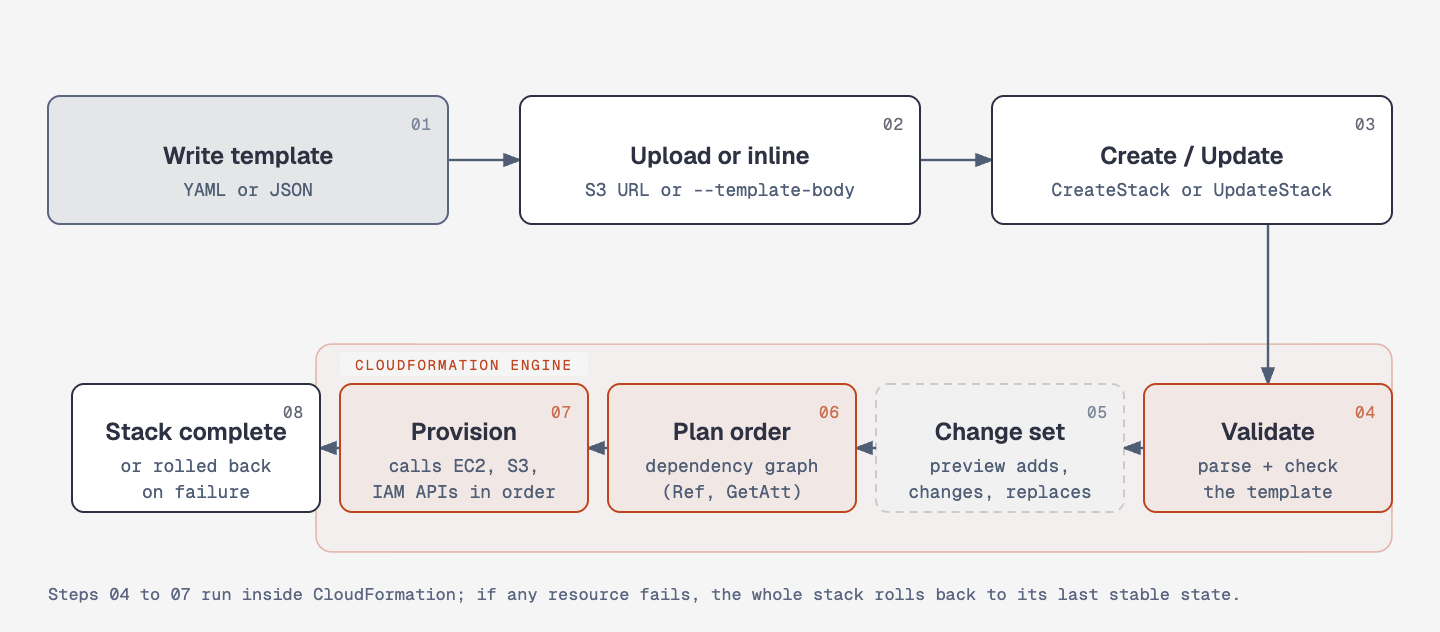
- Define a Template
- Templates are JSON or YAML files that specify the resources you want (e.g., EC2 instances, VPCs, S3 buckets).
- The template describes both the infrastructure components and their configurations.
- Create a Stack
- A stack is a collection of AWS resources defined by a CloudFormation template.
- When you deploy a template, CloudFormation provisions all resources as a stack.
- Provision Resources
- CloudFormation automatically creates, updates, or deletes resources as specified in the template.
- It handles dependencies (e.g., creating a VPC before launching EC2 instances inside it).
- Manage Lifecycle
- You can update a stack by modifying the template.
- Rollback features ensure recovery in case of errors.
Benefits of Using CloudFormation
- Infrastructure as Code: Write templates, store them in version control, and manage infrastructure like software.
- Automation: Reduce manual effort by automatically provisioning resources.
- Consistency: Ensure the same infrastructure setup across multiple environments.
- Dependency Management: CloudFormation knows the order of creation and deletion of resources.
- Rollback and Drift Detection: Automatically rolls back on failure and detects configuration drift.
Example CloudFormation Template (YAML)
AWSTemplateFormatVersion: '2010-09-09'
Description: Simple EC2 Instance Example

Resources:
  MyEC2Instance:
    Type: AWS::EC2::Instance
    Properties:
      InstanceType: t2.micro
      ImageId: '{{resolve:ssm:/aws/service/ami-amazon-linux-latest/al2023-ami-kernel-default-x86_64}}'   # latest Amazon Linux 2023 AMI for the Region
      Tags:
        - Key: Name
          Value: ExampleInstance
This template provisions a single t2.micro EC2 instance from the latest Amazon Linux 2023 AMI, looked up through a public SSM parameter so the template works in any Region.
AWS CloudFormation Template Structure
CloudFormation templates are written in YAML or JSON and follow a defined structure. The key sections include Parameters, Resources, and Outputs.
1. Parameters
Parameters allow you to pass values into the template at runtime, making templates more dynamic and reusable.
Features:
- Define input values (e.g., instance type, environment name).
- Provide constraints and default values.
- Enable reuse across environments.
Example:
Parameters:
  InstanceTypeParameter:
    Type: String
    Default: t2.micro
    AllowedValues:
      - t2.micro
      - t2.small
      - t2.medium
    Description: Enter instance type.
2. Resources
Resources are the core of a CloudFormation template. They define the actual AWS infrastructure components to be created.
Features:
- Each resource has a logical name, type, and properties.
- Dependencies are automatically managed (e.g., creating a security group before launching an EC2 instance).
- Supports almost all AWS services.
Example:
Resources:
  MyEC2Instance:
    Type: AWS::EC2::Instance
    Properties:
      InstanceType: !Ref InstanceTypeParameter
      ImageId: '{{resolve:ssm:/aws/service/ami-amazon-linux-latest/al2023-ami-kernel-default-x86_64}}'   # latest Amazon Linux 2023 AMI for the Region
      Tags:
        - Key: Name
          Value: ExampleInstance
3. Outputs
Outputs return values from the stack after resource creation. These are useful for referencing important information.
Features:
- Provide information such as resource IDs, endpoints, or IP addresses.
- Can be exported for use across stacks.
- Helpful in automation pipelines.
Example:
Outputs:
  InstanceId:
    Description: The Instance ID
    Value: !Ref MyEC2Instance

  PublicIP:
    Description: Public IP of the EC2 instance
    Value: !GetAtt MyEC2Instance.PublicIp
Template Flow Example (YAML)
AWSTemplateFormatVersion: '2010-09-09'
Description: Example template with Parameters, Resources, and Outputs

Parameters:
  InstanceTypeParameter:
    Type: String
    Default: t2.micro

Resources:
  MyEC2Instance:
    Type: AWS::EC2::Instance
    Properties:
      InstanceType: !Ref InstanceTypeParameter
      ImageId: '{{resolve:ssm:/aws/service/ami-amazon-linux-latest/al2023-ami-kernel-default-x86_64}}'   # latest Amazon Linux 2023 AMI for the Region

Outputs:
  InstanceId:
    Value: !Ref MyEC2Instance
AWS CloudFormation Stacks and Stack Updates
What is a Stack?
A stack in AWS CloudFormation is a collection of AWS resources that you can manage as a single unit. All resources defined in a CloudFormation template are created, updated, or deleted together as part of the stack.
Key Points:
- A stack is created when you deploy a CloudFormation template.
- You can have multiple stacks for different environments (e.g., dev, staging, production).
- Deleting a stack removes all associated resources.
Creating a Stack
- Choose Template – Provide a JSON or YAML template (local file or S3 bucket).
- Specify Parameters – Input parameter values if the template has parameters.
- Configure Options – Define tags, permissions, and advanced options.
- Review and Create – CloudFormation provisions all resources as defined.
Stack Updates
Stacks are not static; you can update them to reflect changes in your infrastructure needs.
Ways to Update a Stack:
- Direct Update – Modify the template and apply changes directly.
- Change Sets – Preview changes before applying them. This allows you to review what resources will be added, modified, or deleted.
Update Behaviors
- Replacement vs. In-place Update
Some resource updates require replacement (e.g., changing an EC2 instance type may create a new instance), while others can be updated in place. - Rollback on Failure
If an update fails, CloudFormation automatically rolls back to the last known stable state.
Example Workflow
- Deploy a template to create a stack with an EC2 instance and an S3 bucket.
- Later, modify the template to add a security group.
- Update the stack:
- CloudFormation compares the new template with the current stack.
- It provisions the new security group while leaving the existing resources untouched.
Benefits of Stacks and Updates
- Consistency: Manage all related resources together.
- Automation: Updates are handled automatically.
- Safety: Rollback ensures stability in case of errors.
- Flexibility: Use Change Sets to preview and control modifications.
AWS CloudFormation CLI Commands
AWS CloudFormation can be managed directly using the AWS Command Line Interface (CLI). Below are the most commonly used commands to create, update, delete, and manage stacks.
1. Create a Stack
aws cloudformation create-stack \
  --stack-name MyStack \
  --template-body file://template.yaml \
  --parameters ParameterKey=InstanceTypeParameter,ParameterValue=t2.micro \
  --region us-east-1
- --stack-name: Name of the stack.
- --template-body: Path to the CloudFormation template.
- --parameters: (Optional) Pass values for template parameters.
2. Update a Stack
aws cloudformation update-stack \
  --stack-name MyStack \
  --template-body file://updated-template.yaml \
  --parameters ParameterKey=InstanceTypeParameter,ParameterValue=t2.small
- Updates resources defined in the modified template.
- If changes require replacement, CloudFormation handles it.
3. Delete a Stack
aws cloudformation delete-stack \
  --stack-name MyStack
- Removes all resources created by the stack.
4. Describe a Stack
aws cloudformation describe-stacks \
  --stack-name MyStack
- Displays details about the stack, including status and outputs.
5. List Stacks
aws cloudformation list-stacks \
  --stack-status-filter CREATE_COMPLETE UPDATE_COMPLETE
- Shows all stacks filtered by status.
6. Validate a Template
aws cloudformation validate-template \
  --template-body file://template.yaml
- Ensures that the template is syntactically correct before deployment.
7. Create a Change Set
aws cloudformation create-change-set \
  --stack-name MyStack \
  --change-set-name MyChangeSet \
  --template-body file://updated-template.yaml
- Previews the impact of updates before applying them.
To execute the change set:
aws cloudformation execute-change-set \
  --stack-name MyStack \
  --change-set-name MyChangeSet
8. Get Template from an Existing Stack
aws cloudformation get-template \
  --stack-name MyStack
- Retrieves the original template used to create or update the stack.
CloudFormation vs Terraform vs Pulumi
| Feature / Tool | AWS CloudFormation | Terraform | Pulumi |
|---|---|---|---|
| Primary Language | YAML / JSON | HashiCorp Configuration Language (HCL) & JSON | General-purpose languages (TypeScript, Python, Go, C#, etc.) |
| Cloud Provider Support | AWS only | Multi-cloud (AWS, Azure, GCP, etc.) | Multi-cloud (AWS, Azure, GCP, Kubernetes, etc.) |
| State Management | Managed by AWS | Local or remote (Terraform Cloud, S3, etc.) | Local or remote (Pulumi Service, self-managed backends) |
| Modularity / Reuse | Nested Stacks, Macros | Modules and reusable providers | Reusable packages and components |
| Learning Curve | Moderate (YAML/JSON) | Moderate (HCL syntax is unique) | Steeper (requires programming knowledge) |
| Ecosystem & Community | Strong AWS integration but limited beyond AWS | Large open-source community with many providers | Growing community, flexible with modern dev workflows |
| Policy & Compliance | CloudFormation Hooks, CloudFormation Guard, AWS Config, Service Catalog | Sentinel or OPA (in HCP Terraform / Terraform Enterprise) | Pulumi CrossGuard for policy as code |
| Drift Detection | Yes (built-in) | Yes (terraform plan) | Yes (pulumi preview + refresh) |
| Change Previews | Change Sets | terraform plan |
pulumi preview |
| Best Use Case | AWS-only infrastructure with deep AWS integration | Multi-cloud infrastructure, large-scale deployments | Teams that prefer using real programming languages for IaC |
🧠 Pro Tips
- CloudFormation: Best suited for AWS-centric projects where deep AWS service integration is required.
- Terraform: Ideal for organizations managing resources across multiple cloud providers.
- Pulumi: Great choice for developers who prefer writing IaC in familiar programming languages and integrating directly into app development workflows.
Challenges
- Write a CloudFormation template to deploy an EC2 instance in a custom VPC.
- Add Parameters (e.g., instance type, key pair name) to make your template reusable.
- Use Outputs to print the EC2 public IP after stack creation.
- Implement Change Sets to preview stack updates.
- Create a nested stack with separate templates for networking and compute.
- Enable stack drift detection and see if manual changes are detected.
🤷🏻 How to Participate?
✅ Complete the tasks and challenges.
✅ Document your progress and key takeaways on GitHub ReadMe, Medium, or Hashnode.
✅ Share the above in a LinkedIn post tagging me (Sandip Das), and use #90DaysOfCloud to engage with the community!
⚡ Quick Reference
Keep the momentum going — everything you need on LearnXOps in one place:
- 🎓 Courses — Video courses & AI-built courses
- 📚 Ebooks — Community ebooks & your own
- 🧪 All Labs & Challenges — DevOps, Cloud, SRE & more
- ☸️ Kubernetes Labs & Playground — kind clusters, playground & challenges
- 🤖 AI Agent & Bot Labs — OpenClaw · Hermes · CrewAI · LangGraph · MCP
Member discussion