


Learning load balancing and auto scaling in AWS helps us build resilient, cost-efficient systems that handle traffic spikes smoothly while keeping applications highly available.
It’s a core skill for designing scalable architectures that adapt to real-world demand without manual intervention.
⚡ Quick Reference
Keep the momentum going — everything you need on LearnXOps in one place:
- 🎓 Courses — Video courses & AI-built courses
- 📚 Ebooks — Community ebooks & your own
- 🧪 All Labs & Challenges — DevOps, Cloud, SRE & more
- ☸️ Kubernetes Labs & Playground — kind clusters, playground & challenges
- 🤖 AI Agent & Bot Labs — OpenClaw · Hermes · CrewAI · LangGraph · MCP
📚 Key Learnings
- Understand the need for load balancing in cloud applications.
- Learn about different types of Elastic Load Balancers (ELB):Application Load Balancer (ALB)Network Load Balancer (NLB)Gateway Load Balancer (GWLB)
- Learn how Auto Scaling Groups (ASG) maintain application availability and scale automatically.
- Explore health checks, scaling policies, and target groups.
- Understand cost optimization with auto scaling (scale out during traffic spikes, scale in during idle times).
🧠 Learn here
What is Load Balancing?
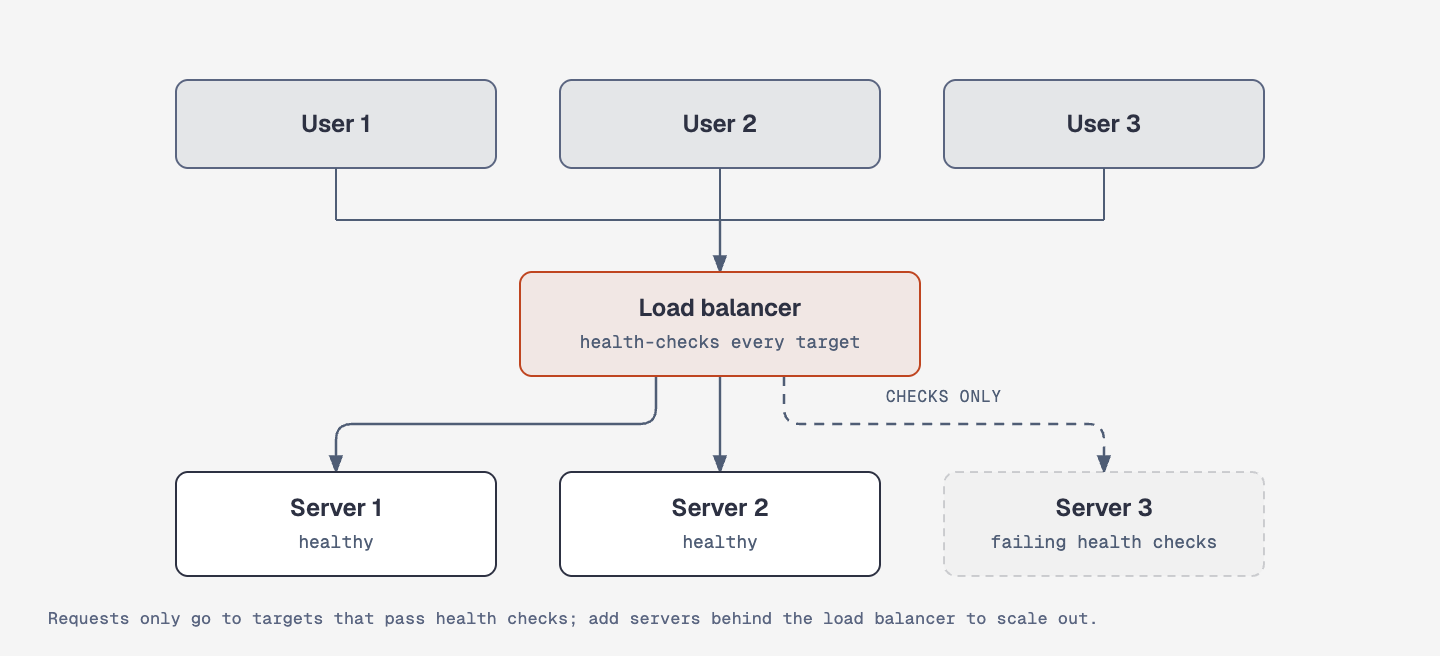
Load balancing is the process of distributing incoming network traffic across multiple servers (or instances) to ensure that no single server becomes a bottleneck. It improves the scalability, fault tolerance, and efficiency of cloud applications.
Why is Load Balancing Needed?
- High Availability & Reliability
- Ensures uptime by routing traffic away from unhealthy servers.
- Minimizes single points of failure.
- Scalability
- Supports horizontal scaling (adding more servers to handle increased demand).
- Dynamically adapts to traffic spikes (auto-scaling in cloud environments).
- Performance Optimization
- Reduces latency by routing users to the nearest or least-loaded server.
- Improves response times for global users.
- Efficient Resource Utilization
- Balances workload evenly to avoid overloading one server while others sit idle.
- Optimizes cost by maximizing server usage.
- Security & Flexibility
- Shields backend servers by acting as an entry point.
- Supports SSL termination, authentication, and DDoS protection.
Types of Load Balancing
- DNS Load Balancing – Distributes requests at the domain level.
- Layer 4 (Transport Layer) – Balances traffic based on IP and TCP/UDP ports.
- Layer 7 (Application Layer) – Balances based on application data (HTTP headers, cookies, paths).
- Global Load Balancing – Directs traffic across multiple regions/data centers.
Load Balancing in Cloud Environments
- AWS Elastic Load Balancer (ELB) – Application, Network & Gateway Load Balancers.
- GCP Cloud Load Balancing – Global and regional load balancers.
- Azure Load Balancer & Application Gateway – Provides L4 and L7 load balancing.
Example Scenario:
Imagine an e-commerce website hosting a Black Friday sale:
- Without load balancing → One server receives most requests, crashes, and customers face downtime.
- With load balancing → Traffic is distributed across multiple servers, ensuring smooth checkout and user experience.
Types of AWS Elastic Load Balancers (ELB)
AWS Elastic Load Balancing (ELB) automatically distributes incoming traffic across multiple targets, such as Amazon EC2 instances, containers, and IP addresses. It ensures fault tolerance, scalability, and high availability of applications.
AWS offers three main types of load balancers: Application Load Balancer (ALB), Network Load Balancer (NLB), and Gateway Load Balancer (GWLB).
Application Load Balancer (ALB)
- Operates at Layer 7 (Application Layer).
- Best suited for HTTP/HTTPS traffic.
- Provides advanced routing features.
Key Features
- Content-based Routing: Routes requests based on URL path, host headers, query strings, and HTTP headers.
- Microservices & Containers Support: Works seamlessly with ECS, EKS, and Fargate.
- SSL Termination: Offloads SSL/TLS decryption.
- WebSocket & HTTP/2 Support.
- Sticky Sessions: Keeps user sessions consistent on the same backend target.
Use Cases
- Modern web applications.
- Microservices architectures.
- Routing requests to multiple applications behind one load balancer.
Network Load Balancer (NLB)
- Operates at Layer 4 (Transport Layer).
- Designed for ultra-high performance and low latency.
- Can handle millions of requests per second.
Key Features
- Static IP Support: Assigns a fixed IP per Availability Zone.
- TLS Offloading: Supports TLS termination.
- Zonal Isolation: Each AZ is independent for higher resilience.
- Target Health Checks: Ensures only healthy targets serve traffic.
- Preserves Source IP: Useful for firewall/security use cases.
Use Cases
- Real-time applications (gaming, IoT, financial trading).
- High-throughput, low-latency workloads.
- Applications requiring static IP addresses.
Gateway Load Balancer (GWLB)
- Operates at Layer 3 (Network Layer).
- Designed for integrating third-party virtual appliances such as firewalls, intrusion detection/prevention systems, and deep packet inspection tools.
Key Features
- Bump-in-the-wire Architecture: Transparently inserts appliances into traffic flow.
- Scale and Manage Appliances: Distributes traffic across multiple security appliances.
- VPC Service Chaining: Allows chaining of multiple virtual appliances.
- High Availability & Elasticity: Auto scales appliances as traffic increases.
Use Cases
- Security inspection with firewalls or IDS/IPS systems.
- Deep packet inspection.
- Centralized traffic filtering.
ALB vs NLB vs GWLB
| Feature | ALB (Layer 7) | NLB (Layer 4) | GWLB (Layer 3) |
|---|---|---|---|
| Best For | Web apps, microservices | High-performance TCP/UDP | Security & network appliances |
| Protocols Supported | HTTP, HTTPS, HTTP/2, gRPC, WebSocket | TCP, UDP, TLS | All IP traffic (via GENEVE) |
| Routing Type | Content-based (host/path) | Connection-based | Appliance-based |
| Latency | Low | Ultra-low | Low (appliance dependent) |
| Source IP Preservation | Via X-Forwarded-For header | Yes | Yes |
| TLS Termination | Yes | Yes | No |
Load Balancing Algorithms in AWS
The way traffic is distributed depends on the load balancing algorithm used by the load balancer.
1. Round Robin (Application Load Balancer - ALB)
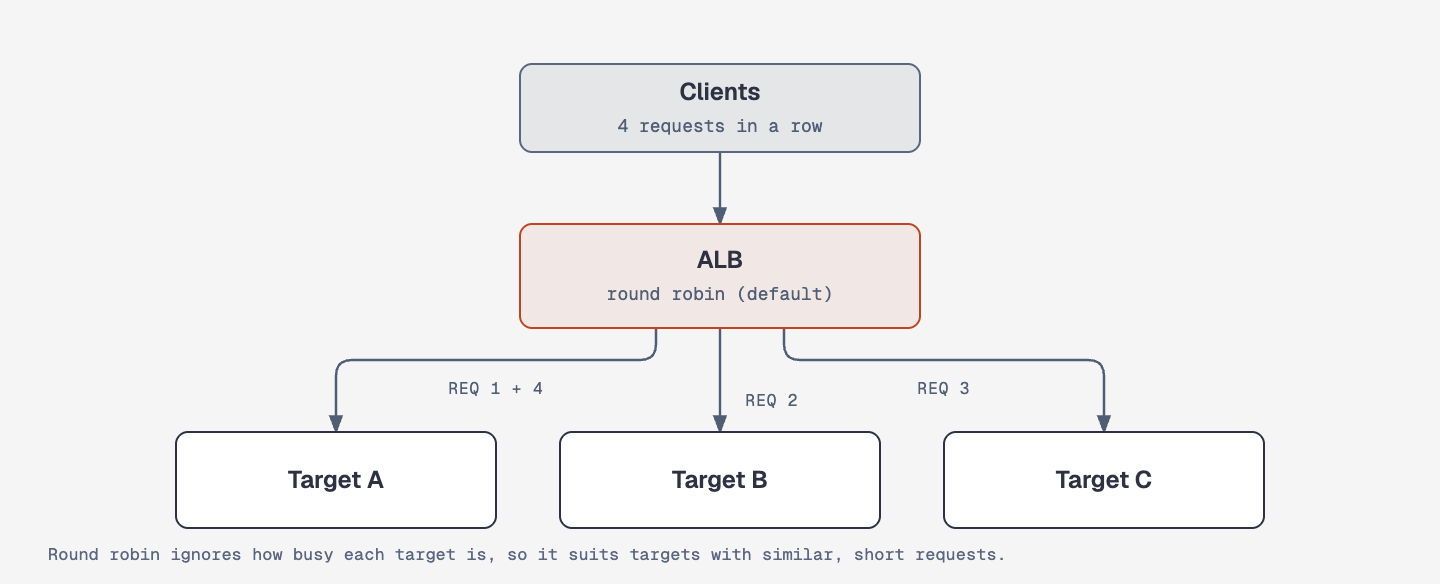
- Distributes requests sequentially to each target in turn.
- Suitable for applications with relatively equal workloads across targets.
- Example: First request → Target A, Second request → Target B, Third request → Target C, and so on.
- ALB also offers weighted random, optionally with automatic target weights that steer traffic away from targets showing anomalies.
2. Least Outstanding Requests (ALB)
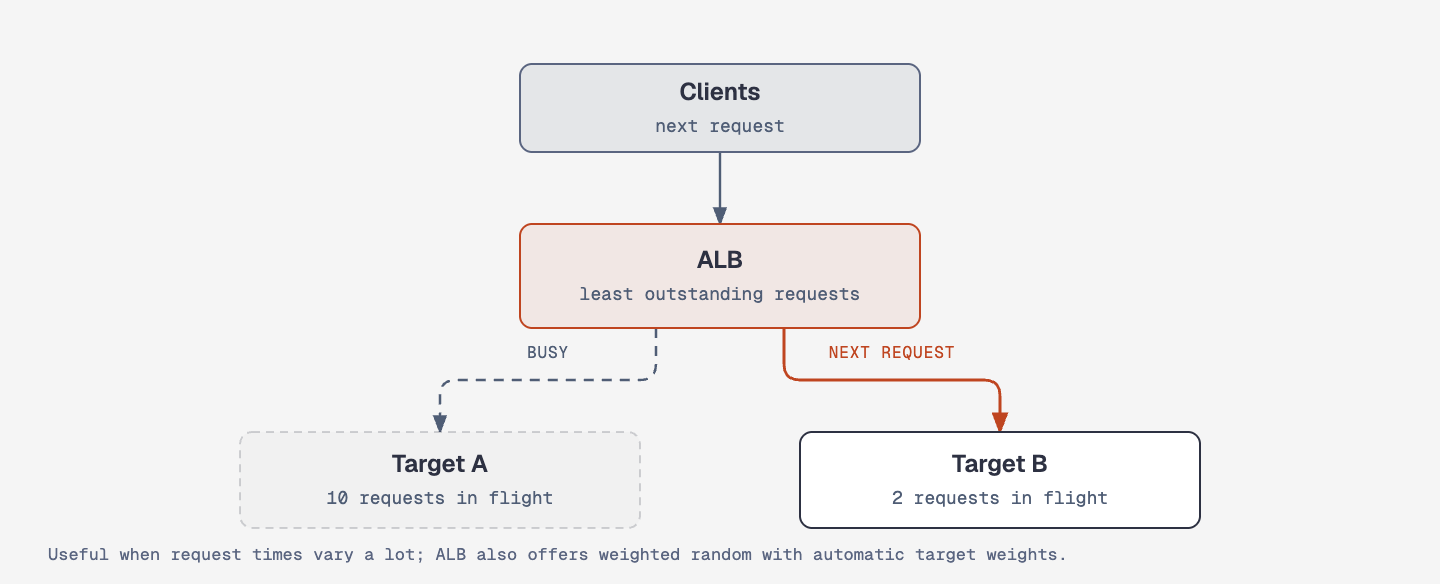
- Routes each request to the target with the fewest active requests.
- Ensures faster response times when workloads are uneven.
- Example: If Target A has 10 pending requests and Target B has 2, the next request goes to Target B.
3. Flow Hash Algorithm (Network Load Balancer - NLB)
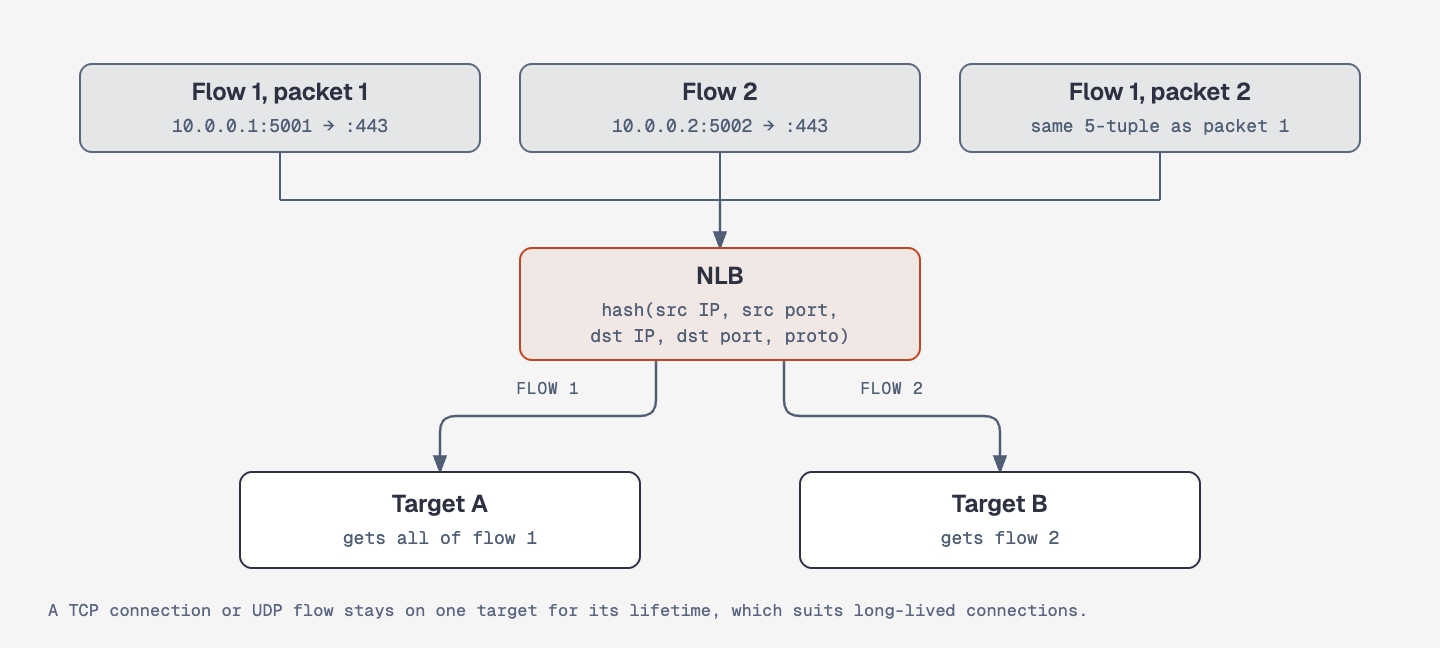
- Uses a hash based on 5-tuple (Source IP, Source Port, Destination IP, Destination Port, Protocol).
- Ensures that requests from the same client connection are consistently routed to the same target.
- Useful for long-lived TCP/UDP connections (e.g., gaming, VoIP).
4. Flow Hash with GENEVE Encapsulation (Gateway Load Balancer - GWLB)
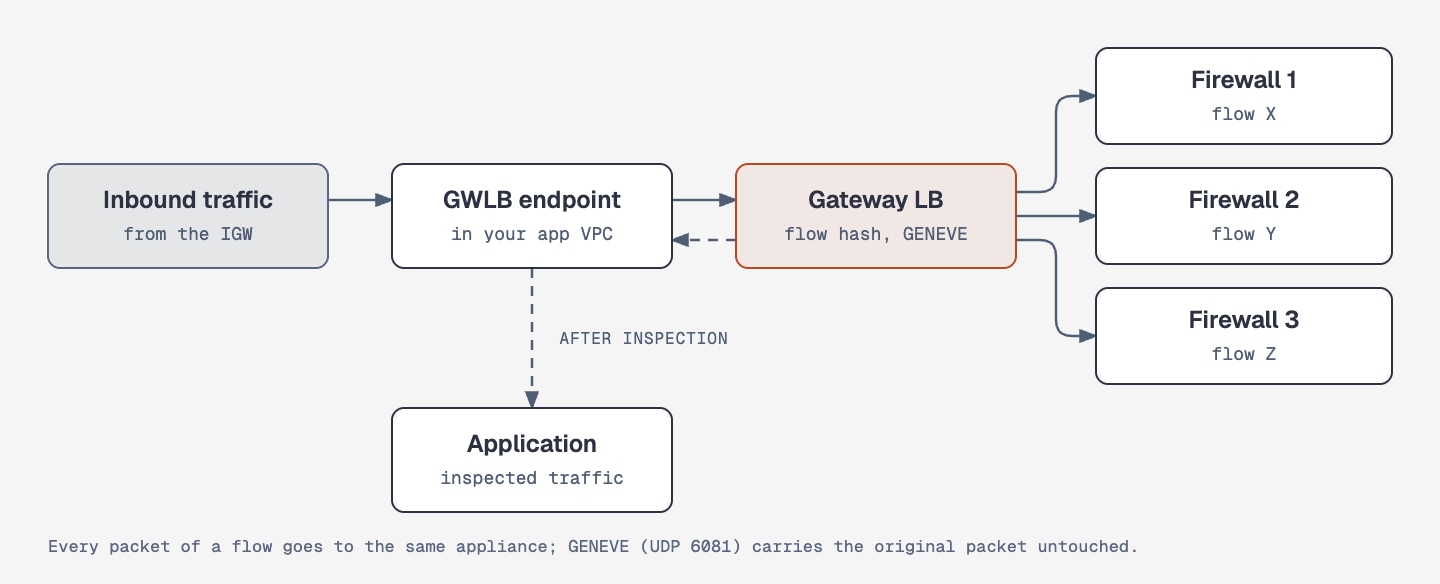
- Uses a flow hash algorithm for distributing traffic to virtual appliances.
- Ensures packets belonging to the same flow always go to the same appliance.
- Ideal for deep packet inspection, firewalls, and intrusion detection systems.
5. Classic Load Balancer (Legacy): Round Robin / Least Outstanding
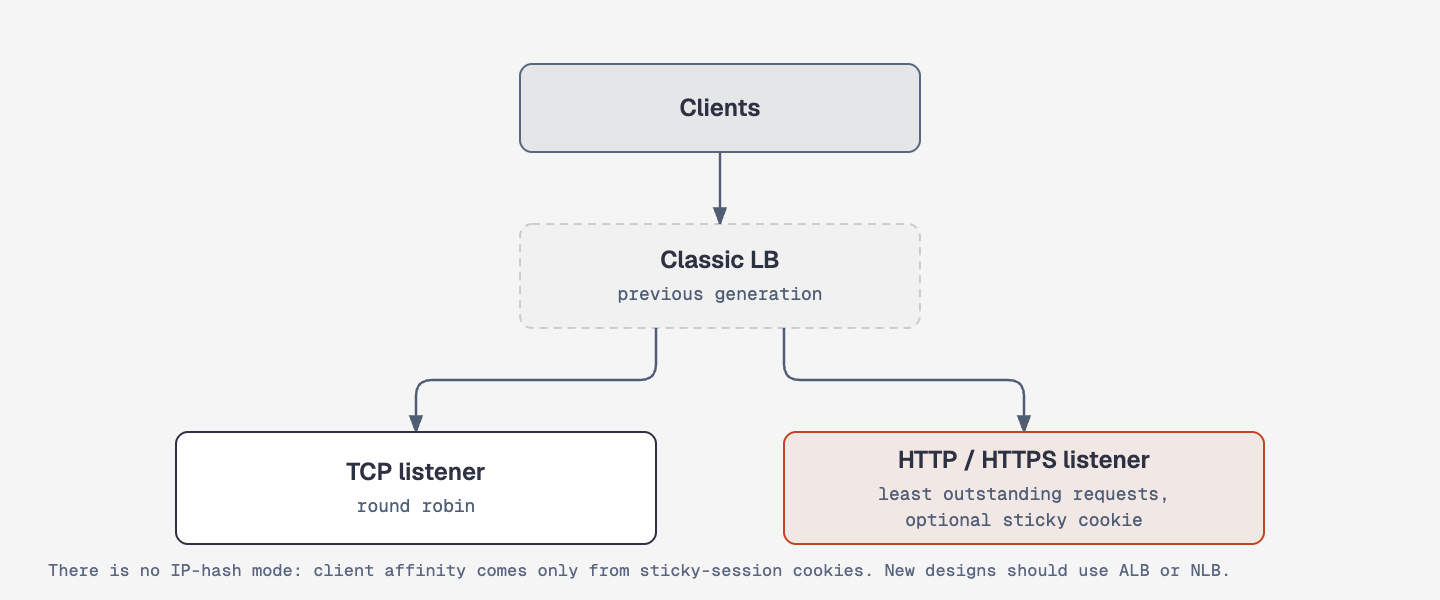
- TCP listeners: round robin across registered instances.
- HTTP/HTTPS listeners: least outstanding requests; client affinity only comes from sticky-session cookies (CLB has no IP-hash mode).
- A previous-generation load balancer; AWS recommends migrating to ALB or NLB.
Auto Scaling Groups (ASG) in AWS
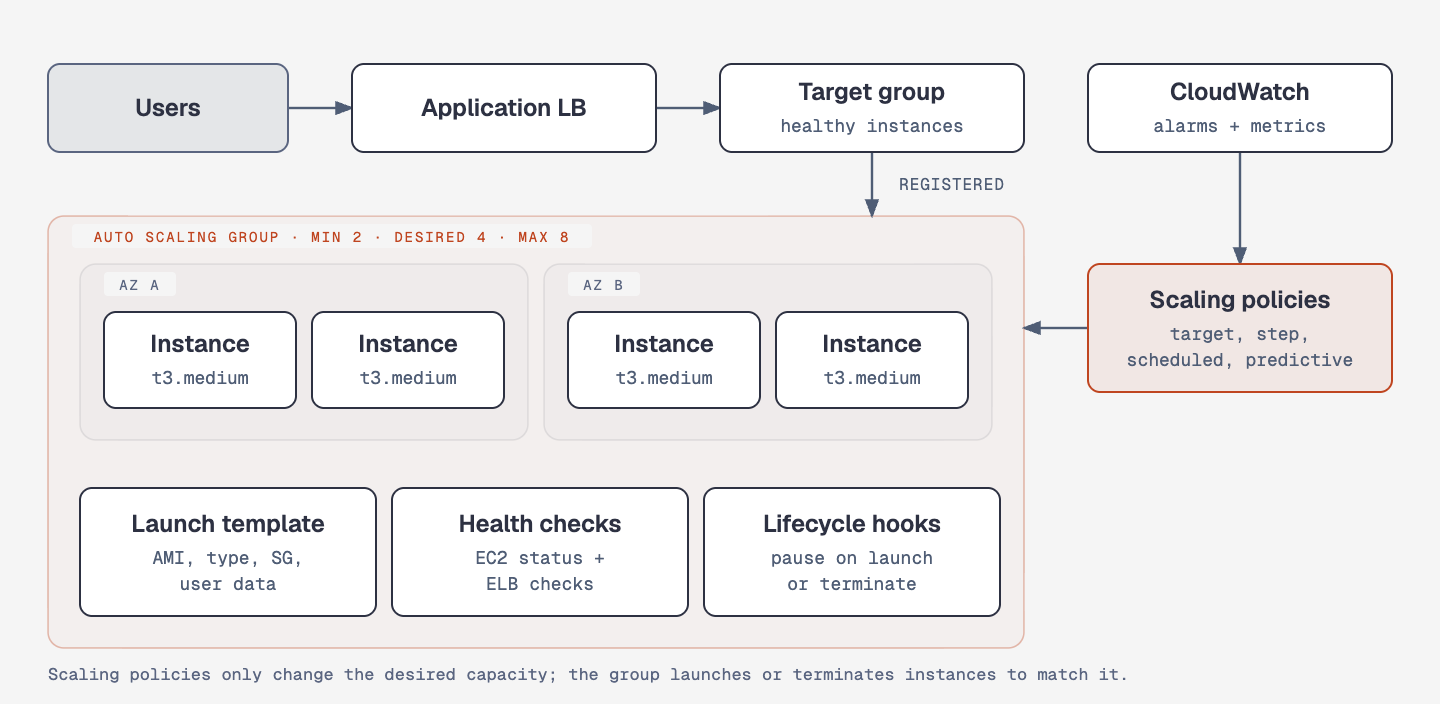
What is an Auto Scaling Group (ASG)?
An Auto Scaling Group is a collection of EC2 instances managed together for scaling and availability. ASGs work with launch templates (launch configurations are deprecated, and accounts created since October 2024 can’t create them) to define instance types, AMIs, security groups, and key pairs.
How ASGs Maintain Application Availability
- Health Checks & Self-Healing
- Monitors the health of each instance (via EC2 status checks or Elastic Load Balancers).
- Automatically replaces unhealthy instances with new ones.
- Multi-AZ Deployment
- Distributes instances across multiple Availability Zones (AZs).
- Ensures high availability even if one AZ experiences issues.
- Integration with Load Balancers
- Works seamlessly with Elastic Load Balancers (ALB/NLB).
- Routes traffic only to healthy instances.
How ASGs Scale Applications Automatically
- Dynamic Scaling
- Scales in/out based on predefined metrics (CPU utilization, memory, request counts, etc.).
- Example: Add instances when CPU > 70% for 5 minutes.
- Predictive Scaling
- Uses machine learning to forecast demand.
- Adjusts capacity proactively before spikes.
- Scheduled Scaling
- Scale based on known traffic patterns (e.g., business hours vs nights).
- Example: Scale up at 8 AM, scale down at 8 PM.
- Target Tracking Policies
- Maintains a target metric value (e.g., keep CPU at 50%).
- Adjusts instance count dynamically to meet the target.
Benefits of Using ASGs
- High Availability: Automatically replaces unhealthy instances.
- Scalability: Adapts to traffic spikes and reduces costs during low usage.
- Resilience: Handles failures at the instance or AZ level.
- Cost Optimization: Ensures you only pay for what you use.
Example Scenario:
An e-commerce site during a flash sale:
- Without ASG → Fixed number of servers crash under heavy load.
- With ASG → Automatically adds instances to handle increased traffic, then scales down once demand drops.
Common ASG Configurations:
- Minimum Capacity: The least number of instances always running.
- Maximum Capacity: The upper limit to control cost.
- Desired Capacity: The target number of instances (can adjust automatically).
Health Checks, Scaling Policies, and Target Groups in AWS Auto Scaling
When using AWS Auto Scaling Groups (ASGs), three important components—Health Checks, Scaling Policies, and Target Groups—determine how effectively your applications stay resilient, scalable, and highly available.
❤️ Health Checks
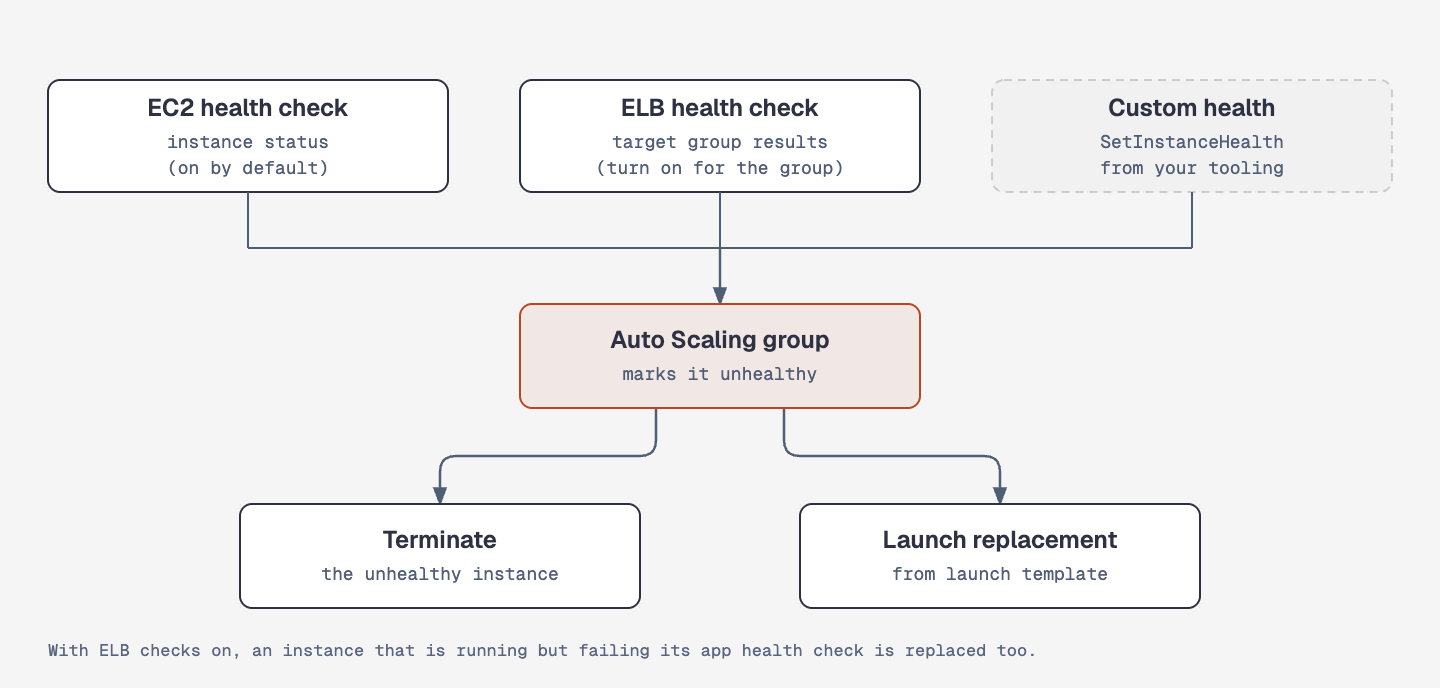
Health checks monitor the status of EC2 instances within an Auto Scaling Group to ensure only healthy instances serve traffic.
Types of Health Checks
- EC2 Health Checks
- Monitors the underlying EC2 instance state.
- If the instance is impaired, ASG terminates and replaces it.
- ELB Health Checks
- Uses the target group’s health checks (ALB/NLB); turn them on for the group, which otherwise uses only EC2 status checks.
- Instances are replaced if they fail ELB health checks.
- Custom Health Checks
- Applications can mark an instance as unhealthy using APIs.
- Useful when app-level failures occur (not detected at OS level).
Benefits
- Automatic healing of failed instances.
- Increases reliability and uptime.
- Ensures traffic only reaches functional instances.
Scaling Policies
Scaling policies define how and when ASG adjusts the number of running instances.
Types of Scaling Policies
- Target Tracking Scaling Policy
- Keeps a chosen metric (e.g., CPU utilization at 50%).
- Auto adjusts capacity to maintain target performance.
- Step Scaling Policy
- Scales incrementally based on thresholds.
- Example: Add 2 instances if CPU > 70% for 5 mins.
- Simple Scaling Policy
- Legacy method, scales based on a single alarm.
- Example: Add 1 instance if request count > 1000.
- Scheduled Scaling Policy
- Predefined actions at specific times.
- Example: Scale up at 9 AM, scale down at 6 PM.
- Predictive Scaling
- Uses machine learning to forecast demand.
- Automatically provisions instances before spikes.
Benefits
- Provides elasticity by matching resources to workload.
- Prevents over-provisioning and reduces costs.
- Ensures consistent performance.
Target Groups
Target Groups define the set of resources (EC2 instances, containers, IPs, or Lambda functions) that receive traffic from a load balancer; an Auto Scaling group can register its instances in them automatically.
Types of Target Groups
- Instance Target Groups – Routes traffic to EC2 instances.
- IP Target Groups – Routes traffic to specific IP addresses.
- Lambda Target Groups – Invokes AWS Lambda functions.
- ALB Target Groups – Let an NLB forward traffic to an ALB. (ECS/EKS tasks register as IP targets in awsvpc mode, or as instance targets with dynamic ports.)
Benefits
- Provides flexibility in routing traffic.
- Works with Application Load Balancers (ALB) and Network Load Balancers (NLB).
- Supports path-based and host-based routing (ALB only).
Cost Optimization with Auto Scaling
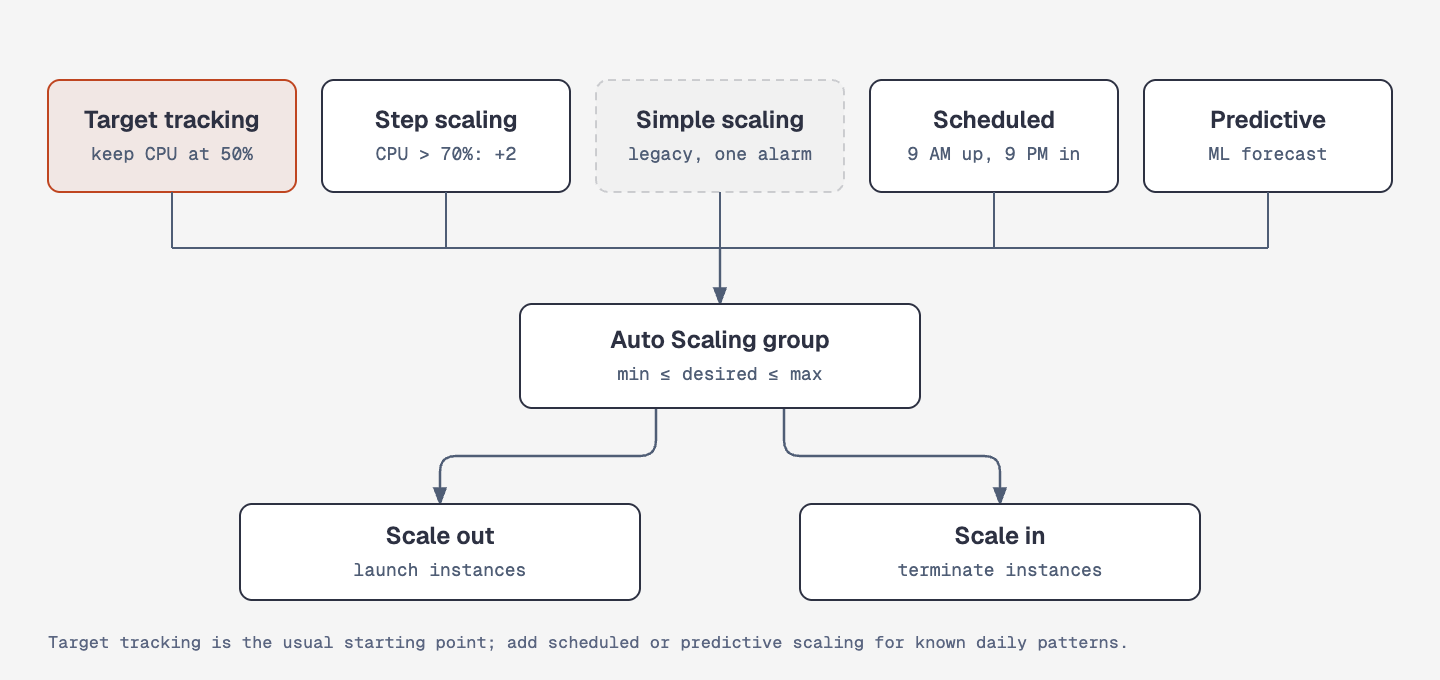
Cloud resources are billed based on usage, which means running more resources than required can lead to unnecessary costs. AWS Auto Scaling Groups (ASGs) help optimize costs by dynamically adjusting compute capacity. They scale out during traffic spikes to maintain performance and scale in during idle times to save money.
How Auto Scaling Optimizes Costs:
1. Scale Out During Traffic Spikes
- Dynamic Scaling Policies ensure additional instances are launched when traffic or CPU utilization increases.
- This prevents performance degradation and downtime.
- Example: An e-commerce app adds more servers during Black Friday sales.
2. Scale In During Idle Times
- When demand drops, ASG terminates unnecessary instances.
- Reduces costs by preventing idle resources from running.
- Example: Scaling down at night when user activity is low.
3. Pay-as-You-Go Efficiency
- ASG aligns compute usage with real demand.
- You only pay for what you actually use.
- Reduces waste compared to always-on provisioning.
Strategies for Cost Optimization
- Use Target Tracking Scaling Policies
- Maintain a balance between performance and cost by keeping metrics (e.g., CPU at 50%).
- Leverage Scheduled Scaling
- Scale down during predictable low-traffic hours.
- Example: Scale in after office hours.
- Combine with Spot Instances
- Run non-critical workloads on EC2 Spot Instances for up to 90% savings.
- ASG can automatically replace interrupted Spot Instances.
- Right-Size Instances
- Choose appropriate instance types (CPU, memory, storage) for workload requirements.
- Multi-AZ Deployment
- Spread instances across multiple AZs for reliability without over-provisioning.
- Optimizes both performance and cost.
- Lifecycle Hooks for Graceful Termination
- Save state/logs before scale-in to avoid data loss and ensure cost efficiency.
Example Scenario:
- Without Auto Scaling: An app runs 10 instances 24/7, even though demand is high only for 4 hours/day → wasted cost.
- With Auto Scaling: ASG runs 10 instances only during traffic spikes, then scales back to 3 instances at night → significant cost savings.
Challenges
- Create an ALB distributing requests between 2 EC2 instances.
- Set up an Auto Scaling Group that scales up when CPU > 70%.
- Test scaling by stressing the instance with load (
stressorabtool). - Observe traffic distribution with
curlor browser requests. - Configure path-based routing (e.g.,
/api→ API server,/app→ web server). - Implement scheduled scaling (e.g., scale out at 9 AM, scale in at 9 PM).
- Deploy NLB for a TCP service (e.g., custom app or DB proxy).
🤷🏻 How to Participate?
✅ Complete the tasks and challenges.
✅ Document your progress and key takeaways on GitHub ReadMe, Medium, or Hashnode.
✅ Share the above in a LinkedIn post tagging me (Sandip Das), and use #90DaysOfCloud to engage with the community!
⚡ Quick Reference
Keep the momentum going — everything you need on LearnXOps in one place:
- 🎓 Courses — Video courses & AI-built courses
- 📚 Ebooks — Community ebooks & your own
- 🧪 All Labs & Challenges — DevOps, Cloud, SRE & more
- ☸️ Kubernetes Labs & Playground — kind clusters, playground & challenges
- 🤖 AI Agent & Bot Labs — OpenClaw · Hermes · CrewAI · LangGraph · MCP
Member discussion