

Today’s focus is on production-grade Terraform: reusability through modules, managing environments via workspaces, securing and sharing state with remote backends, and organizing infrastructure with best practices for large-scale automation.
⚡ Quick Reference
Keep the momentum going — everything you need on LearnXOps in one place:
- 🎓 Courses — Video courses & AI-built courses
- 📚 Ebooks — Community ebooks & your own
- 🧪 All Labs & Challenges — DevOps, Cloud, SRE & more
- ☸️ Kubernetes Labs & Playground — kind clusters, playground & challenges
- 🤖 AI Agent & Bot Labs — OpenClaw · Hermes · CrewAI · LangGraph · MCP
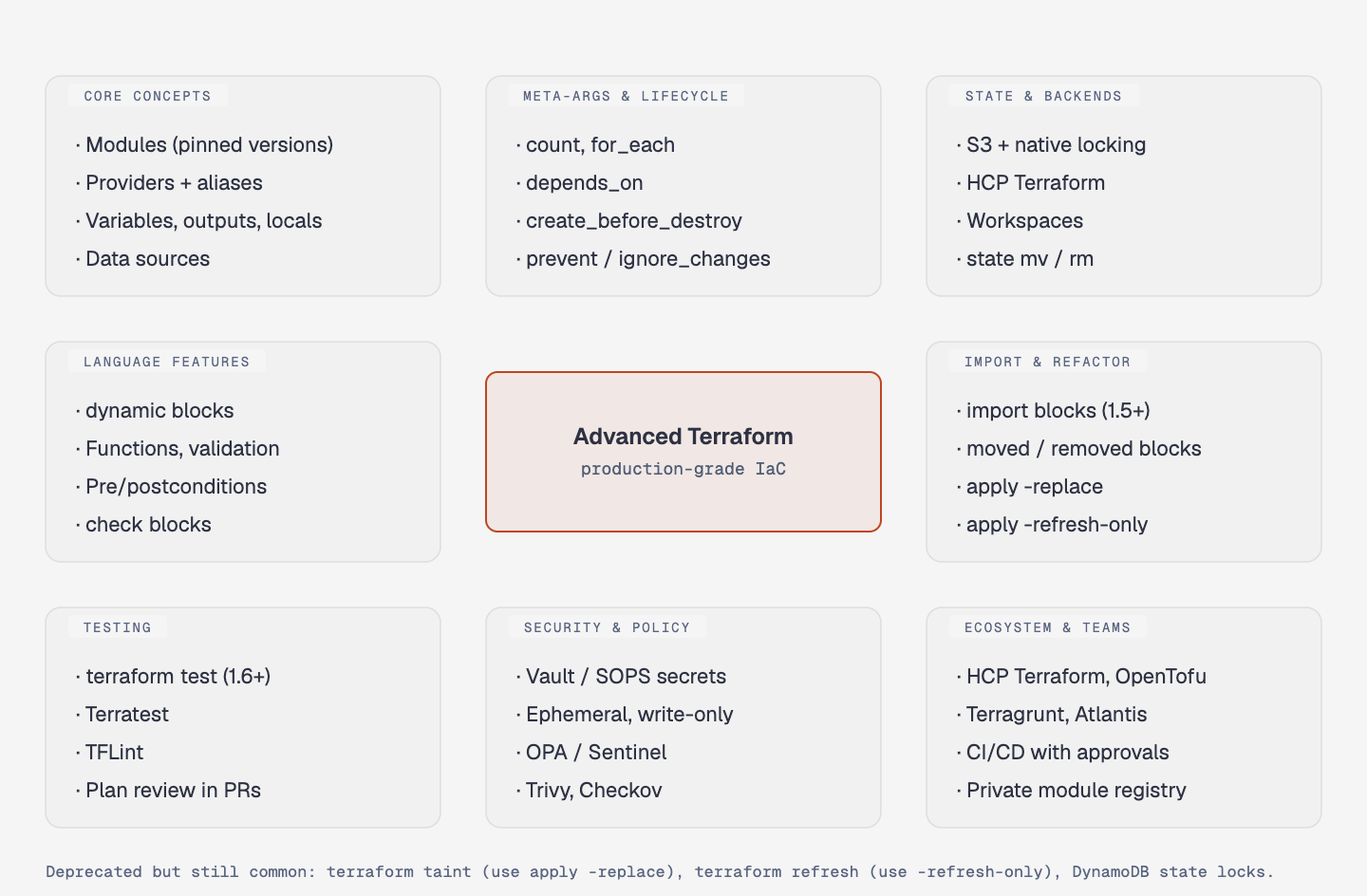
Download a high-resolution copy of this diagram here for future reference.
- A Kubernetes-Native Approach to Infrastructure as Code - Deploy, Scale, and Manage Multi-Cloud Resources Natively via Kubernetes
📚 Key Learnings
🔹 How to modularize Terraform for reuse and separation of concerns
🔹 Use Terraform Workspaces for managing multiple environments (dev/stage/prod)
🔹 Set up remote state backends (e.g., AWS S3 + Native s3 Locking / AWSs3 + DynamoDB) for team collaboration and state locking
🔹 Use data sources, locals, dependencies, and lifecycle rules effectively
🔹 Terraform CLI productivity features: taint, import, state, refresh
🔹 How to structure a production-grade Terraform repo
🔹 Security: .terraformignore, separating secrets with vault, SOPS, or ENV vars
🧠 Learn here
How to modularize Terraform for reuse and separation of concerns
What is Terraform Modularization?
Terraform modularization is the practice of breaking down large, complex Terraform configurations into smaller, reusable, and logically separated modules. This enhances maintainability, scalability, and collaboration.
📁 Recommended Folder Structure
terraform-project/
├── main.tf
├── variables.tf
├── outputs.tf
├── terraform.tfvars
├── modules/
│   ├── vpc/
│   │   ├── main.tf
│   │   ├── variables.tf
│   │   └── outputs.tf
│   ├── ec2/
│   │   ├── main.tf
│   │   ├── variables.tf
│   │   └── outputs.tf
│   └── rds/
│       ├── main.tf
│       ├── variables.tf
│       └── outputs.tf
└── environments/
    ├── dev/
    │   ├── main.tf
    │   └── terraform.tfvars
    └── prod/
        ├── main.tf
        └── terraform.tfvars
Steps to Modularize Terraform
1. Create a Module
Example: modules/vpc/main.tf
resource "aws_vpc" "main" {
  cidr_block = var.vpc_cidr
  tags = {
    Name = var.vpc_name
  }
}
modules/vpc/variables.tf
variable "vpc_cidr" {}
variable "vpc_name" {}
modules/vpc/outputs.tf
output "vpc_id" {
  value = aws_vpc.main.id
}
2. Use the Module in Root Config
Example: main.tf
module "vpc" {
  source    = "./modules/vpc"
  vpc_cidr  = "10.0.0.0/16"
  vpc_name  = "main-vpc"
}
3. Pass Outputs Between Modules
Example: Use vpc_id output in another module like ec2:
module "ec2" {
  source  = "./modules/ec2"
  vpc_id  = module.vpc.vpc_id
}
🧠 Benefits of Modularization
- 🔁 Reusability: Define once, use in multiple projects.
- 🔍 Separation of Concerns: Isolate logic per component.
- 🚀 Scalability: Easier to grow infrastructure.
- 🤝 Collaboration: Teams can work on isolated modules.
Best Practices
- Always use
variables.tf,outputs.tf, andmain.tfinside modules. - Keep module inputs/outputs minimal but sufficient.
- Use version control to manage and share modules.
- Store frequently used modules in private/public registries.
- Document module purpose and usage clearly in README.
Use Terraform Workspaces for managing multiple environments (dev/stage/prod)
What are Terraform Workspaces?
Terraform workspaces allow you to manage multiple instances of the same configuration — useful for handling dev, stage, and prod environments without duplicating code.
Each workspace has its own state file, enabling isolated infrastructure deployments from the same codebase.
🛠️ Initialize Workspaces
# Create a new workspace
terraform workspace new dev
terraform workspace new stage
terraform workspace new prod

# List available workspaces
terraform workspace list

# Switch to a workspace
terraform workspace select stage

# Show current workspace
terraform workspace show
📁 Folder Structure (Single Config, Multiple States)
terraform/
├── main.tf
├── variables.tf
├── outputs.tf
Use terraform.workspace to customize values:
resource "aws_s3_bucket" "app" {
  bucket = "myapp-${terraform.workspace}"
  # no acl: new buckets are private and have ACLs disabled by default
}
⚙️ Backend with Remote State Support (e.g., S3)
terraform {
  backend "s3" {
    bucket       = "my-terraform-state-bucket"
    key          = "terraform.tfstate"
    region       = "us-east-1"
    encrypt      = true
    use_lockfile = true   # S3 native locking (Terraform 1.10+); replaces dynamodb_table
  }
}
# non-default workspaces are stored at env:/<workspace>/terraform.tfstate
Note: Hardcoding${terraform.workspace}in backend doesn't work directly. Usebackend-configor separate backend blocks per environment.
📌 Commands for Remote State Initialization
terraform init \
  -backend-config="key=terraform.tfstate" \
  -backend-config="bucket=my-terraform-state-bucket" \
  -backend-config="region=us-east-1" \
  -backend-config="use_lockfile=true"
✅ Best Practices
- Use workspaces for environment separation only when environments are nearly identical.
- Prefer directory-based separation for drastically different environments.
- Automate workspace selection in CI/CD pipelines using:
terraform workspace select "$ENVIRONMENT"
📌 Summary
| Environment | Workspace | State File Path |
|---|---|---|
| Dev | dev |
env:/dev/terraform.tfstate |
| Staging | stage |
env:/stage/terraform.tfstate |
| Production | prod |
env:/prod/terraform.tfstate |
Use Terraform workspaces to re-use code across isolated environments with cleaner state management!
Set up remote state backends
#############################################
# Remote state bootstrap: S3 bucket (+ optional DynamoDB lock table)
# Create these once, from a separate config that keeps local state.
#############################################

resource "aws_s3_bucket" "tf_state" {
  bucket = "my-terraform-state-bucket"

  tags = {
    Name = "terraform-state"
  }
}

resource "aws_s3_bucket_versioning" "tf_state" {
  bucket = aws_s3_bucket.tf_state.id
  versioning_configuration {
    status = "Enabled"
  }
}

resource "aws_s3_bucket_server_side_encryption_configuration" "tf_state" {
  bucket = aws_s3_bucket.tf_state.id
  rule {
    apply_server_side_encryption_by_default {
      sse_algorithm = "AES256"
    }
  }
}

resource "aws_s3_bucket_public_access_block" "tf_state" {
  bucket                  = aws_s3_bucket.tf_state.id
  block_public_acls       = true
  block_public_policy     = true
  ignore_public_acls      = true
  restrict_public_buckets = true
}

# Only needed on Terraform < 1.10, or while you still use DynamoDB locking
# (deprecated since Terraform 1.11 in favour of use_lockfile)
resource "aws_dynamodb_table" "tf_locks" {
  name         = "terraform-state-locks"
  billing_mode = "PAY_PER_REQUEST"
  hash_key     = "LockID"

  attribute {
    name = "LockID"
    type = "S"
  }
}

# Then, in the configuration that USES the remote state:
# terraform {
#   backend "s3" {
#     bucket       = "my-terraform-state-bucket"
#     key          = "env/dev/terraform.tfstate"
#     region       = "us-east-1"
#     encrypt      = true
#     use_lockfile = true   # or dynamodb_table = "terraform-state-locks" on Terraform < 1.10
#   }
# }
# and run: terraform init
Without DynamoDB (with S3 native locking support)
terraform {
  backend "s3" {
    bucket       = "your-terraform-state-bucket"
    key          = "path/to/your/statefile.tfstate"
    region       = "us-east-1"
    encrypt      = true
    use_lockfile = true  #S3 native locking
  }
}
Note: needs Terraform 1.10 or later (generally available in 1.11, which also deprecated DynamoDB locking)
Use Data Sources, Locals, Dependencies, and Lifecycle Rules Effectively in Terraform
1. Data Sources
Data sources allow you to fetch read-only information from providers to use in your Terraform config without creating new resources.
Example: Get existing VPC ID from AWS
# Fetch existing VPC
data "aws_vpc" "default" {
  default = true
}

resource "aws_subnet" "example" {
  vpc_id            = data.aws_vpc.default.id
  cidr_block        = "172.31.96.0/20"   # must sit inside the default VPC's 172.31.0.0/16
  availability_zone = "us-east-1a"
}
2. Locals
Locals allow you to define named expressions or computed values that are reused across your configuration. Good for avoiding repetition.
Example: Reuse common tags
locals {
  common_tags = {
    environment = "production"
    team        = "devops"
  }
}

resource "aws_instance" "web" {
  ami           = "ami-123456"
  instance_type = "t2.micro"
  tags          = local.common_tags
}
3. Dependencies
Terraform automatically determines resource dependencies via references, but you can enforce manual dependencies with depends_on.
Example: Ensure IAM Role is created before Lambda Function
resource "aws_iam_role" "lambda_exec" {
  name = "lambda-exec-role"
  # ...
}

resource "aws_iam_role_policy_attachment" "lambda_logs" {
  role       = aws_iam_role.lambda_exec.name
  policy_arn = "arn:aws:iam::aws:policy/service-role/AWSLambdaBasicExecutionRole"
}

resource "aws_lambda_function" "my_lambda" {
  filename      = "lambda.zip"
  function_name = "my_lambda"
  role          = aws_iam_role.lambda_exec.arn   # implicit dependency on the role
  handler       = "index.handler"
  runtime       = "nodejs22.x"

  # explicit dependency: nothing above references the attachment, but the
  # function shouldn't run before it is allowed to write logs
  depends_on = [aws_iam_role_policy_attachment.lambda_logs]
}
4. Lifecycle Rules
The lifecycle block controls how Terraform handles create/update/delete actions.
ignore_changes
Prevents Terraform from changing certain attributes.
resource "aws_instance" "example" {
  ami           = "ami-123456"
  instance_type = "t3.micro"

  lifecycle {
    ignore_changes = [instance_type]  # Don’t change type if manually modified
  }
}
prevent_destroy
Prevents accidental deletion.
resource "aws_s3_bucket" "critical" {
  bucket = "my-important-bucket"

  lifecycle {
    prevent_destroy = true
  }
}
create_before_destroy
Used for replacement scenarios where the new resource must exist before the old one is destroyed.
resource "aws_security_group" "web" {
  name_prefix = "web-"   # unique names let the old and new group exist side by side
  vpc_id      = data.aws_vpc.default.id

  lifecycle {
    create_before_destroy = true
  }
}
💡 Pro Tips
- Use data sources to reference existing infra instead of hardcoding.
- Use locals to centralize configuration logic.
- Use depends_on for complex inter-resource coordination.
- Use lifecycle rules to prevent downtime or accidental deletion.
Terraform CLI Productivity Features
🔧 1. terraform taint
Marks a resource for recreation during the next apply. Deprecated since Terraform 0.15.2: use terraform apply -replace=ADDRESS instead, which shows the replacement in the plan.
# deprecated since Terraform 0.15.2
terraform taint aws_instance.web

# recommended: replace the resource as part of a reviewed plan/apply
terraform apply -replace="aws_instance.web"
📌 Use Case: When a resource is misbehaving or needs to be replaced without changing the configuration.
📥 2. terraform import
Brings an existing infrastructure resource under Terraform management.
terraform import aws_instance.web i-1234567890abcdef0

# Terraform 1.5+: declare the import in a .tf file and review it in a plan
# import {
#   to = aws_instance.web
#   id = "i-1234567890abcdef0"
# }
📌 Use Case: Useful for migrating manually created resources or those created by other tools into Terraform.
📂 3. terraform state
Manages and inspects Terraform state files. Supports actions like listing, moving, pulling, and removing resources.
terraform state list
terraform state show aws_instance.web
terraform state rm aws_instance.old
terraform state mv aws_instance.old aws_instance.new
📌 Use Case: For debugging, refactoring, or cleaning up Terraform state.
🔄 4. terraform refresh
Refreshes the state file with the real-world infrastructure. Deprecated: use terraform plan -refresh-only to review drift and apply -refresh-only to accept it.
# deprecated: updates state without showing you what changed
terraform refresh

# recommended: review the drift, then accept it into state
terraform plan -refresh-only
terraform apply -refresh-only
📌 Use Case: When infrastructure changes are made outside Terraform and you want to reconcile the state file.
📁 Production-Grade Terraform Repo Structure
terraform-project/
├── README.md                       # Project documentation
├── main.tf                         # Entry point (can be empty if using modules)
├── variables.tf                    # Input variables with descriptions & defaults
├── outputs.tf                      # Output values
├── versions.tf                     # Terraform and provider versions
├── backend.tf                      # Remote state configuration
├── terraform.tfvars                # Default variable values (never commit secrets!)
├── .terraform.lock.hcl             # Provider dependency lock file
├── .terraformignore                # Files/folders to ignore (e.g., credentials)
├── modules/                        # Reusable modules
│   └── <module_name>/              # e.g., vpc/, ec2/, eks/, rds/
│       ├── main.tf
│       ├── variables.tf
│       ├── outputs.tf
│       └── README.md
├── envs/                           # Separate environments
│   ├── dev/
│   │   ├── main.tf
│   │   ├── terraform.tfvars
│   │   └── backend.tf
│   ├── stage/
│   │   └── ...
│   └── prod/
│       └── ...
└── scripts/                        # Helper scripts (init, validate, plan, apply)
    └── deploy.sh
✅ Best Practices
- Use modules for reusability and isolation
- Environment-specific folders to separate concerns cleanly
- Remote state backend: S3 with native state locking (use_lockfile), or the GCS/Azure equivalent
- Explicit versions in
versions.tfto ensure reproducibility - Secure sensitive values using ENV vars, Vault, or SOPS
- Include a Makefile or scripts for automation (init, plan, apply, destroy)
- Enforce code quality using
tflint,trivy config,checkov,pre-commit
🛡️ Security Tips
- Don’t commit secrets or
.tfvarswith sensitive values - Add
.terraform.lock.hclto track exact provider versions - Use
.terraformignoreto keep local credentials out of uploads to HCP Terraform (it does not change what goes into state)
🚀 CI/CD Integration
Use GitHub Actions / GitLab CI / Jenkins to:
- Validate code format and structure
- Run
terraform planandterraform applyon pull requests or tags - Store state securely and enforce plan approvals in production
📚 Recommended Extras
- Add a
docs/folder with architecture diagrams - Use
terragruntoratmosfor managing large-scale configurations - Create
Makefiletargets for: init, validate, plan, apply, destroy
🔐 Terraform Security Best Practices
1. .terraformignore – Ignore Sensitive Files
Use the .terraformignore file (similar to .gitignore) to keep sensitive or unnecessary files out of the configuration Terraform uploads for remote runs in HCP Terraform (formerly Terraform Cloud).
# Example .terraformignore
*.pem
*.key
*.env
secrets.tfvars
.terraform/
- ✅ Keeps sensitive files out of HCP Terraform uploads (use .gitignore for version control)
- 🛑 Does not prevent local exposure — use it with Git secrets scanning
2. Separating Secrets
🔐 Option 1: Vault (HashiCorp Vault)
Use the Vault provider to securely fetch secrets.
provider "vault" {
  address = "https://vault.mycompany.com"
}

data "vault_kv_secret_v2" "db_creds" {
  mount = "secret"
  name  = "db"
}

resource "aws_db_instance" "example" {
  username = data.vault_kv_secret_v2.db_creds.data["username"]
  password = data.vault_kv_secret_v2.db_creds.data["password"]
  # values read this way end up in state: encrypt and restrict the state,
  # or on Terraform 1.11+ use write-only arguments such as password_wo
  # other config...
}
🔐 Option 2: SOPS (Secrets OPerationS)
Use sops with tools like terraform-provider-sops to decrypt secrets on-the-fly.
Encrypted secrets file:
mysecret: ENC[AES256_GCM,data:abcd...,type:str]
Terraform usage:
terraform {
  required_providers {
    sops = {
      source = "carlpett/sops"
    }
  }
}

provider "sops" {}

data "sops_file" "secrets" {
  source_file = "secrets.enc.yaml"
}

output "db_password" {
  value     = data.sops_file.secrets.data["mysecret"]
  sensitive = true   # required: the value comes from a sensitive source
}
🔐 Option 3: Environment Variables
For quick use or in CI/CD, pass secrets using environment variables.
variable "db_password" {
  type      = string
  sensitive = true
}

resource "aws_db_instance" "example" {
  password = var.db_password
}
Run Terraform with:
export TF_VAR_db_password="s3cr3t"
terraform apply
⚠️ Do not hardcode secrets in*.tfor*.tfvars. Always use one of the secure approaches above.
Summary
| Method | Use Case | Notes |
|---|---|---|
.terraformignore |
Prevent leaking sensitive files | Works with HCP Terraform uploads |
| Vault | Enterprise-grade secret storage | Integrates with IAM, policies |
| SOPS | GitOps-compatible secret encryption | Pairs well with Git workflows |
| ENV Vars | Quick CI/CD secret injection | Risk of leakage if mishandled |
🔥 Challenges
💡 Challenge 1: Convert your Day 48 S3 bucket code into a module
💡 Challenge 2: Use the module to create two buckets (one per workspace)
💡 Challenge 3: Enable remote state in S3 with state locking (use_lockfile, or DynamoDB on older Terraform) and verify the .tfstate file is stored in S3
💡 Challenge 4: Use terraform workspace to deploy resources to dev and prod
💡 Challenge 5: Write outputs that show the workspace, bucket name, and region
💡 Challenge 6: Use data sources to look up AMIs or existing resources
💡 Challenge 7: Use locals to build naming conventions or tags
💡 Challenge 8: Use lifecycle { prevent_destroy = true } on critical resources
💡 Challenge 9: Simulate a tainted resource and recover using terraform taint + apply
💡 Challenge 10: Import an existing S3 bucket or EC2 instance into your Terraform state using terraform import
🏁 Challenge 11: Modular, Remote State Infrastructure with Workspaces
📌 Structure your repo:├── main.tf
├── variables.tf
├── outputs.tf
├── terraform.tfvars
├── modules/
│ └── s3-bucket/└── backend.tf
📌 Must have:
- At least 1 module
- Remote backend
- 2 workspaces (
dev,prod) - Custom outputs and a variable file
- README.md with workflow (
init,plan,apply,workspace,destroy)
📌 Push it to GitHub (exclude .terraform/ and .tfstate)
Solutions
✅ Challenge 1: Convert Day 48 S3 Bucket Code into a Module
Structure:
modules/
s3_bucket/
main.tf
variables.tf
outputs.tf
modules/s3_bucket/main.tf
resource "aws_s3_bucket" "this" {
bucket = var.bucket_name
tags = var.tags
}
modules/s3_bucket/variables.tf
variable "bucket_name" {}
variable "tags" { default = {} }
modules/s3_bucket/outputs.tf
output "bucket_name" {
value = aws_s3_bucket.this.id
}
✅ Challenge 2: Use the Module to Create Two Buckets (Dev & Prod)
main.tf
module "s3" {
source = "./modules/s3_bucket"
bucket_name = "my-app-${terraform.workspace}-bucket"
tags = {
Environment = terraform.workspace
}
}
✅ Challenge 3: Enable Remote State in S3 with State Locking
backend.tf
terraform {
backend "s3" {
bucket = "my-tf-remote-state"
key = "state/terraform.tfstate" # no variables allowed in backend blocks
region = "us-east-1"
use_lockfile = true # S3 native locking (Terraform 1.10+)
encrypt = true
}
}
# each workspace gets its own state: env:/dev/state/terraform.tfstate, env:/prod/...Initialize backend:
terraform init
✅ Challenge 4: Use Workspaces
terraform workspace new dev
terraform apply
terraform workspace new prod
terraform apply
✅ Challenge 5: Output Workspace, Bucket Name, and Region
outputs.tf
output "workspace" {
value = terraform.workspace
}
output "bucket_name" {
value = module.s3.bucket_name
}
output "region" {
value = var.region
}
✅ Challenge 6: Use Data Source to Lookup AMIs
example:
data "aws_ami" "amazon_linux" {
most_recent = true
owners = ["amazon"]
filter {
name = "name"
values = ["al2023-ami-2023.*-x86_64"] # Amazon Linux 2023 (AL2 reached end of support in 2026)
}
}✅ Challenge 7: Use Locals for Naming Conventions
locals.tf
locals {
prefix = "${terraform.workspace}-myapp"
common_tags = {
Owner = "Sandip"
Environment = terraform.workspace
}
}
✅ Challenge 8: Prevent Destroy on Critical Resources
resource "aws_s3_bucket" "this" {
bucket = var.bucket_name
lifecycle {
prevent_destroy = true
}
}
✅ Challenge 9: Simulate Taint and Recover
terraform apply -replace="module.s3.aws_s3_bucket.this"
# older equivalent (deprecated): terraform taint module.s3.aws_s3_bucket.this && terraform apply✅ Challenge 10: Import Existing Resources
terraform import aws_s3_bucket.existing existing-bucket-name
resource block:
resource "aws_s3_bucket" "existing" {
bucket = "existing-bucket-name"
}
🏁 Challenge 11: Modular, Remote State Infrastructure with Workspaces
📁 Project Structure
.
├── main.tf
├── variables.tf
├── outputs.tf
├── terraform.tfvars
├── backend.tf
├── modules/
│ └── s3-bucket/
│ ├── main.tf
│ ├── variables.tf
│ └── outputs.tf
└── README.md
✅ Objectives
- Use at least one module to manage an AWS resource.
- Configure remote backend (S3 + DynamoDB for locking).
- Use Terraform Workspaces for
devandprodenvironments. - Define custom outputs and manage variables.
- Exclude
.terraform/and.tfstatefrom version control.
⚙️ Setup Instructions
1. 📦 Initialize Terraform
terraform init
2. 🏗️ Create Workspaces
terraform workspace new dev
terraform workspace new prod
3. 📐 Plan the Deployment
terraform workspace select dev
terraform plan -var-file=terraform.tfvars
4. 🚀 Apply the Deployment
terraform apply -var-file=terraform.tfvars
5. 🧾 View Outputs
terraform output
6. 🧹 Destroy Resources
terraform destroy -var-file=terraform.tfvars
🧱 Module: s3-bucket
Location: modules/s3-bucket/
Sample main.tf
resource "aws_s3_bucket" "this" {
bucket = var.bucket_name
}Sample variables.tf
variable "bucket_name" {
type = string
description = "The name of the S3 bucket"
}
Sample outputs.tf
output "bucket_name" {
  value = aws_s3_bucket.this.id
}
🌍 Remote State Backend: backend.tf
terraform {
  backend "s3" {
    bucket       = "my-remote-state-bucket"
    key          = "terraform/state/terraform.tfstate"   # no variables allowed here
    region       = "us-east-1"
    use_lockfile = true
    encrypt      = true
  }
}
📄 terraform.tfvars (example)
# .tfvars files hold literal values only (no ${...} expressions)
bucket_prefix = "my-bucket"
🧼 .gitignore
.terraform/
*.tfstate
*.tfstate.*
*.tfplan
crash.log
crash.*.log
# commit .terraform.lock.hcl: it pins provider versions
✅ Final Checks
- [x] Uses module for S3 bucket
- [x] Backend configured for remote state
- [x] Workspace-specific state management
- [x] Variable and output usage
- [x] README with clear instructions
📁 Sample main.tf at Root Level
module "s3_bucket" {
  source      = "./modules/s3-bucket"
  bucket_name = "${var.bucket_prefix}-${terraform.workspace}"
}
variables.tf
variable "bucket_prefix" {
  type        = string
  description = "Prefix for the S3 bucket name; the workspace name is appended"
}
outputs.tf
output "bucket_name" {
  value = module.s3_bucket.bucket_name
}
🤷🏻 How to Participate?
✅ Complete the tasks and challenges.
✅ Document your progress and key takeaways on GitHub ReadMe, Medium, or Hashnode.
✅ Share the above in a LinkedIn post tagging me (Sandip Das), and use #60DaysOfDevOps to engage with the community!
⚡ Quick Reference
Keep the momentum going — everything you need on LearnXOps in one place:
- 🎓 Courses — Video courses & AI-built courses
- 📚 Ebooks — Community ebooks & your own
- 🧪 All Labs & Challenges — DevOps, Cloud, SRE & more
- ☸️ Kubernetes Labs & Playground — kind clusters, playground & challenges
- 🤖 AI Agent & Bot Labs — OpenClaw · Hermes · CrewAI · LangGraph · MCP


Member discussion