


This workflow is the foundation of reproducible and production-ready machine learning, ensuring every experiment, dataset, model, and environment is fully versioned and traceable.
Mastering it eliminates "works on my machine" problems, accelerates collaboration, and creates a seamless path from experimentation to deployment.
⚡ Quick Reference
Keep the momentum going — everything you need on LearnXOps in one place:
- 🎓 Courses — Video courses & AI-built courses
- 📚 Ebooks — Community ebooks & your own
- 🧪 All Labs & Challenges — DevOps, Cloud, SRE & more
- ☸️ Kubernetes Labs & Playground — kind clusters, playground & challenges
- 🤖 AI Agent & Bot Labs — OpenClaw · Hermes · CrewAI · LangGraph · MCP
📚 Key Learnings
- Why integrate the three tools
- Week 2 concept recap (Days 8–13)
- Who owns what: tool responsibilities
- The unified workflow diagram
- Tracing one experiment end-to-end
- Building it: full project walkthrough
- Running and verifying the workflow
- Common pitfalls & fixes
🧠 Learn here
Three tools, one promise: reproducibility
Over the past week you learned each tool in isolation. That was deliberate — you can't orchestrate instruments you can't play. But in a real MLOps setup, these tools answer three different questions, and only together do they make an experiment fully reproducible by anyone, anywhere.
QUESTION 1: What data & code?
Git versions your code. DVC versions the datasets and models that are too big for Git. Together: an exact snapshot of inputs.
QUESTION 2: What happened?
MLflow records every run — parameters, metrics, artifacts. It answers "which config gave 0.97 accuracy, and can I get back to it?"
QUESTION 3: Where does it run?
Docker pins the OS, Python version, and every library. The experiment behaves identically on your laptop, a CI runner, or a colleague's machine.
Miss any one and reproducibility leaks: same code on different data, same data with a drifting library version, or a result nobody can trace back to its config. The integrated workflow closes all three gaps at once.
Everything you built in Days 8–13
Before assembling the pipeline, let's consolidate. Each day added one capability to the iris-mlops project. Here's the running ledger:
| Day | Topic | Capability added | Key command / object |
|---|---|---|---|
| 8 | MLflow Tracking | Log params, metrics & artifacts to a tracking server | mlflow.log_metric() |
| 9 | MLflow Projects & Registry | Package runs; register and promote models | MLproject · Model Registry |
| 10 | Hyperparameter tuning | Grid / Random search, each trial a logged run | GridSearchCV |
| 11 | Docker for ML | Containerize training code & environment | Dockerfile · docker build |
| 12 | Production Dockerfiles | Multi-stage builds, non-root user, slim images | FROM ... AS builder |
| 13 | Docker Compose | Run MLflow server + trainer as linked services | docker compose up |
And from Week 1, still in play today: Day 4 (Git for ML), Days 5–6 (DVC data versioning with dvc add / dvc.yaml pipelines), and the Day 7 capstone where you versioned the Iris dataset. Day 14 is the moment those Week 1 versioning habits meet Week 2's tracking and containerization.
Who owns what — no overlap, no gaps
A frequent source of confusion: "MLflow can log artifacts, so why do I need DVC?" The answer is about scope and source of truth. Each tool owns a clear slice, and respecting those boundaries keeps the system clean.
| Tool | Owns | Does NOT own | Source of truth for… |
|---|---|---|---|
| Git | Source code, configs, dvc.yaml, small text files | Large binaries, datasets, model weights | Code version (commit SHA) |
| DVC | Large data & model files, pipeline stages, remote storage pointers | Experiment metrics, code logic | Data version (.dvc hash) |
| MLflow | Run metadata: params, metrics, tags, logged artifacts, registry | The canonical dataset, the environment | Experiment results & lineage |
| Docker | OS, runtime, dependencies, service orchestration | What data flows through it, what gets logged | Execution environment |
Why not log data as an MLflow artifact?
You can log a small dataset to MLflow for convenience, but DVC remains the source of truth. DVC deduplicates across runs, integrates with Git history, and pushes to cheap remote storage. MLflow artifacts are best for outputs (the trained model, plots, confusion matrices) — not for versioning the inputs. Let each tool do its one job.
The unified workflow, in one picture
Here is the whole system. Notice the two planes: a versioning plane (Git + DVC, left) feeds reproducible inputs into a runtime plane (Docker Compose, right), and everything the run produces flows into MLflow.
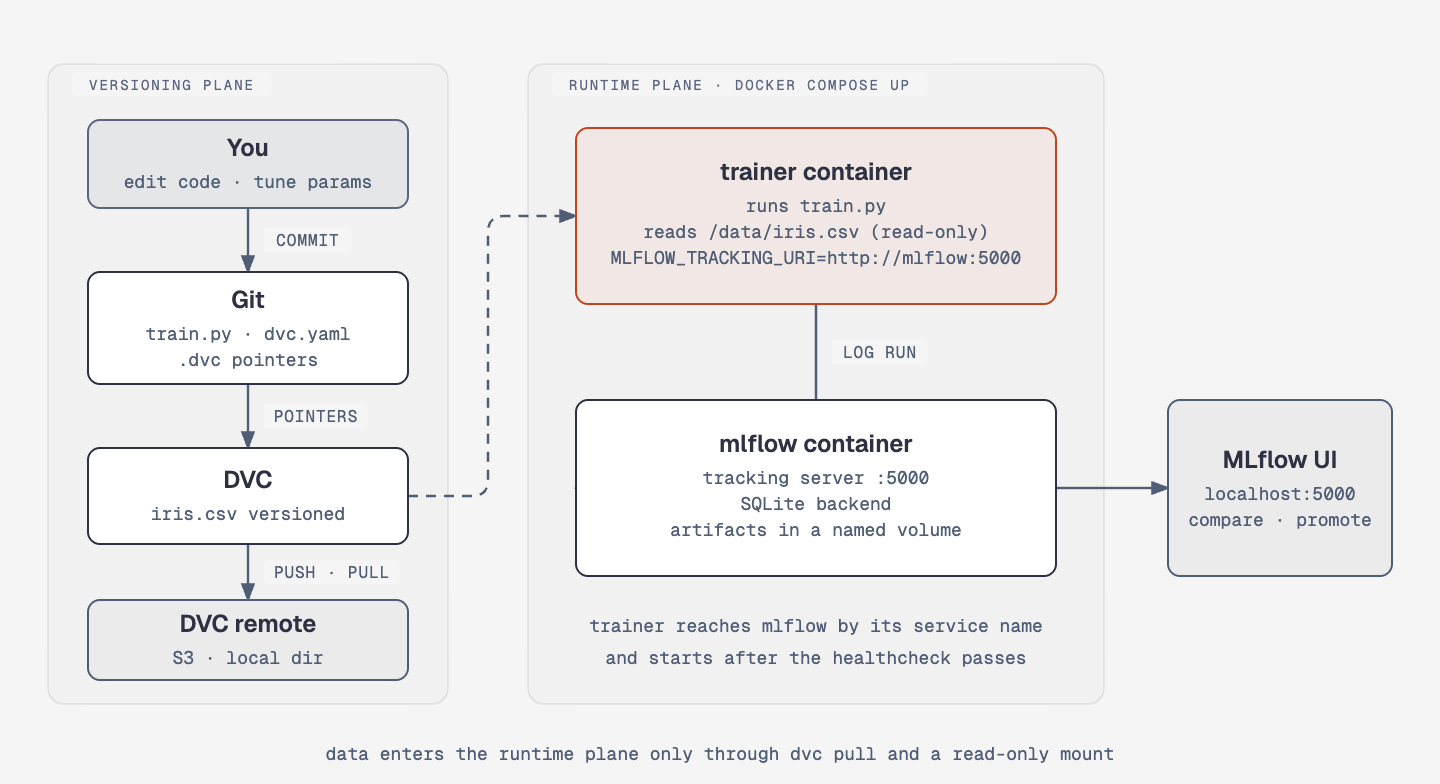
- Left: Git holds code and DVC pointers; DVC stores the actual dataset in a remote. The
.dvcfiles in Git mean a fresh clone +dvc pullreconstructs the exact dataset. - Center: Docker Compose runs two services on a shared network. The trainer reaches the mlflow server by its service name — no IP addresses, no hardcoding.
- Right: MLflow's UI at
localhost:5000is where you compare runs and promote the winner to the registry. - The runtime plane: the entire thing launches from one command. That single entry point is the integration.
Tracing one experiment, step by step
Diagrams show structure; sequences show behaviour. Here's exactly what happens, in order, when you run a single tuning experiment in this stack.
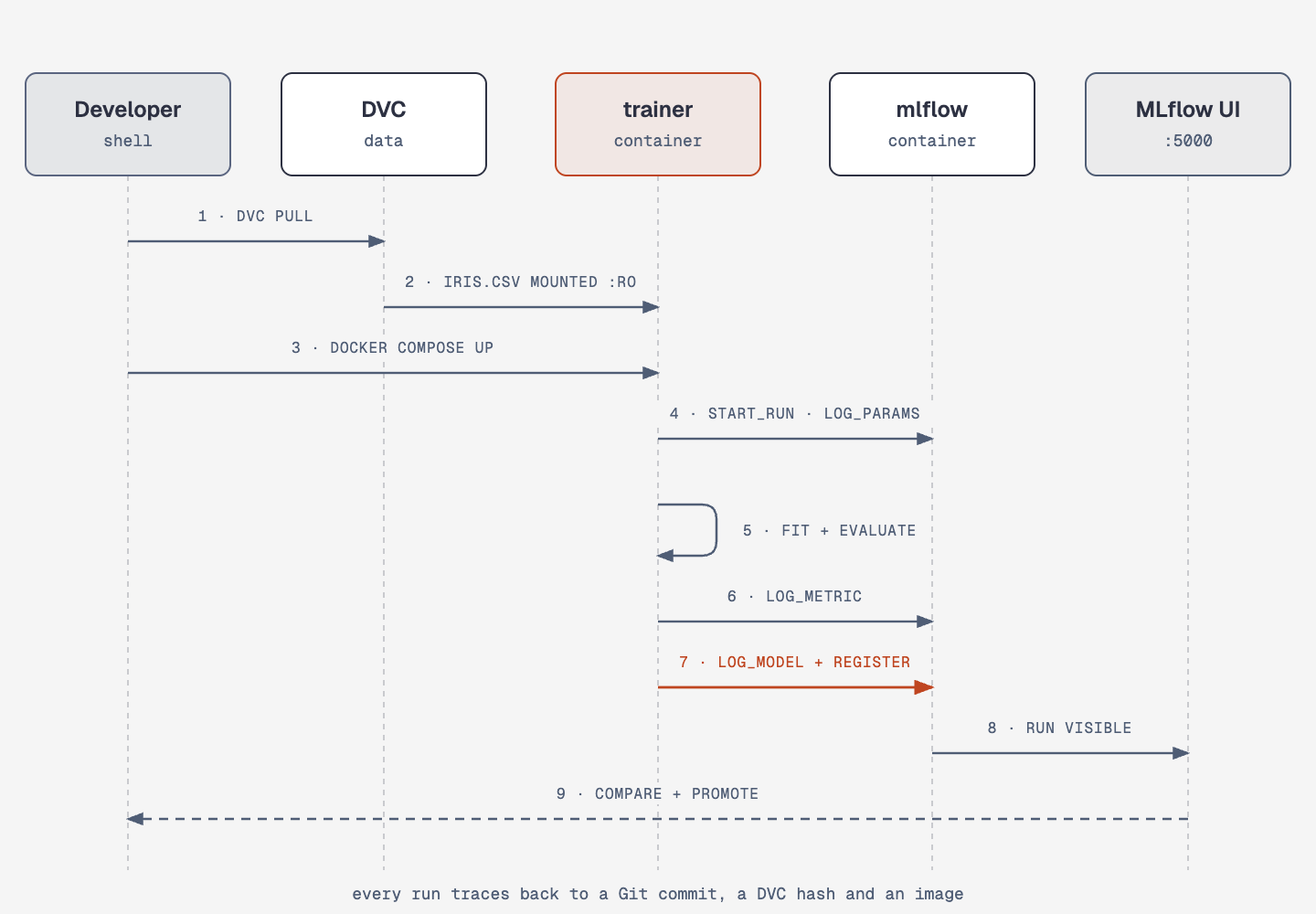
The payoff
Every run in the MLflow UI can be traced back to an exact Git commit (code), an exact DVC hash (data), and an exact image (environment). Log the Git SHA as an MLflow tag and the loop is fully closed — anyone can recreate any result.
The full project, file by file
Time to assemble. We'll build on the iris-mlops project you've grown all week. Here's the final layout:
project structure
iris-mlops/
├── data/
│   ├── iris.csv.dvc          # DVC pointer (in Git)
│   └── .gitignore           # keeps the real csv out of Git
├── trainer/
│   ├── train.py             # the experiment
│   ├── requirements.txt
│   └── Dockerfile           # multi-stage (Day 12)
├── mlflow/
│   └── Dockerfile           # tracking server image
├── docker-compose.yml       # orchestrates both (Day 13)
├── dvc.yaml                 # reproducible pipeline
├── .env                     # config, NOT in Git
├── .dvc/config              # DVC remote settings
└── README.md
Step 1 — Version the data with DVC
If you've followed Days 5–7, the dataset is already tracked. As a refresher, this is how the Iris data enters DVC's control:
# Track the dataset — DVC stores the file, Git stores the pointer
dvc add data/iris.csv

# Commit the lightweight .dvc pointer + .gitignore to Git
git add data/iris.csv.dvc data/.gitignore
git commit -m "Track Iris dataset v1 with DVC"

# Configure a remote and push the actual bytes there
dvc remote add -d storage s3://my-bucket/iris-mlops
dvc push
Now anyone who clones the repo runs dvc pull to materialize the exact dataset version that commit refers to. That is the input half of reproducibility.
Step 2 — Write the experiment (trainer/train.py)
The training script follows the 12-factor pattern from Day 11: hyperparameters and the tracking URI come from environment variables, so the same image runs any config without a rebuild. Notice the Git SHA tag — that's what closes the lineage loop.
trainer/train.py
import os
import subprocess
import mlflow
import mlflow.sklearn
import pandas as pd
from sklearn.ensemble import RandomForestClassifier
from sklearn.model_selection import train_test_split
from sklearn.metrics import accuracy_score, f1_score


def get_git_sha():
    """Return current commit so every run is traceable to code."""
    # Compose passes GIT_SHA in; the slim image has no git binary to ask
    if os.getenv("GIT_SHA"):
        return os.environ["GIT_SHA"]
    try:
        return subprocess.check_output(
            ["git", "rev-parse", "--short", "HEAD"]
        ).decode().strip()
    except Exception:
        return "unknown"


def main():
    # --- config from environment (12-factor) ---
    tracking_uri = os.getenv("MLFLOW_TRACKING_URI", "http://mlflow:5000")
    data_path    = os.getenv("DATA_PATH", "/data/iris.csv")
    n_estimators = int(os.getenv("N_ESTIMATORS", 100))
    max_depth    = int(os.getenv("MAX_DEPTH", 5))
    random_state = int(os.getenv("RANDOM_STATE", 42))

    mlflow.set_tracking_uri(tracking_uri)
    mlflow.set_experiment("iris-classifier")

    # --- load the DVC-versioned dataset ---
    df = pd.read_csv(data_path)
    X = df.drop(columns=["species"])
    y = df["species"]
    X_train, X_test, y_train, y_test = train_test_split(
        X, y, test_size=0.2, random_state=random_state, stratify=y
    )

    with mlflow.start_run() as run:
        # 1) log inputs: params + lineage tags
        mlflow.log_params({
            "n_estimators": n_estimators,
            "max_depth": max_depth,
            "random_state": random_state,
        })
        mlflow.set_tag("git_sha", get_git_sha())
        mlflow.set_tag("data_path", data_path)

        # 2) train
        model = RandomForestClassifier(
            n_estimators=n_estimators, max_depth=max_depth,
            random_state=random_state,
        )
        model.fit(X_train, y_train)

        # 3) evaluate
        preds = model.predict(X_test)
        acc = accuracy_score(y_test, preds)
        f1  = f1_score(y_test, preds, average="macro")

        # 4) log outputs: metrics + the model artifact
        mlflow.log_metric("accuracy", acc)
        mlflow.log_metric("f1_macro", f1)
        mlflow.sklearn.log_model(model, "model",
                                 registered_model_name="iris-rf")

        print(f"✓ run {run.info.run_id[:8]} | acc={acc:.4f} | f1={f1:.4f}")


if __name__ == "__main__":
    main()
Step 3 — The trainer image (trainer/Dockerfile)
A multi-stage build from Day 12 — fat builder, slim runtime, non-root user:
trainer/Dockerfile
# ---- stage 1: build wheels ----
FROM python:3.11-slim AS builder
WORKDIR /build
COPY requirements.txt .
RUN pip wheel --no-cache-dir --wheel-dir /wheels -r requirements.txt

# ---- stage 2: lean runtime ----
FROM python:3.11-slim
ENV PYTHONUNBUFFERED=1 PYTHONDONTWRITEBYTECODE=1
RUN useradd --create-home appuser
WORKDIR /app

COPY --from=builder /wheels /wheels
COPY requirements.txt .
RUN pip install --no-cache-dir --no-index --find-links=/wheels -r requirements.txt \
    && rm -rf /wheels

COPY train.py .
USER appuser
CMD ["python", "train.py"]
trainer/requirements.txt
mlflow==2.16.2
scikit-learn==1.5.2
pandas==2.2.3
Step 4 — The MLflow server image (mlflow/Dockerfile)
A tiny image whose only job is to serve the tracking server with a SQLite backend and a file-based artifact store:
mlflow/Dockerfile
FROM python:3.11-slim
RUN pip install --no-cache-dir mlflow==2.16.2
WORKDIR /mlflow
EXPOSE 5000
CMD ["mlflow", "server", \
     "--host", "0.0.0.0", \
     "--port", "5000", \
     "--backend-store-uri", "sqlite:////mlflow/mlflow.db", \
     "--artifacts-destination", "/mlflow/artifacts"]
Step 5 — Orchestrate with Compose (docker-compose.yml)
This is where Day 13 pays off. The depends_on healthcheck guarantees the trainer never starts logging before the server is ready — the classic race condition, solved declaratively:
docker-compose.yml
services:
  mlflow:
    build: ./mlflow
    ports:
      - "5000:5000"          # UI reachable at localhost:5000
    volumes:
      - mlflow-db:/mlflow    # persist db + artifacts across runs
    healthcheck:
      test: ["CMD", "python", "-c",
             "import urllib.request,sys; urllib.request.urlopen('http://localhost:5000/health'); sys.exit(0)"]
      interval: 5s
      timeout: 3s
      retries: 10

  trainer:
    build: ./trainer
    depends_on:
      mlflow:
        condition: service_healthy   # wait until server is UP
    environment:
      MLFLOW_TRACKING_URI: "http://mlflow:5000"  # DNS = service name
      DATA_PATH: "/data/iris.csv"
      N_ESTIMATORS: "${N_ESTIMATORS:-100}"
      MAX_DEPTH: "${MAX_DEPTH:-5}"
      GIT_SHA: "${GIT_SHA:-unknown}"   # export GIT_SHA=$(git rev-parse --short HEAD)
    volumes:
      - ./data:/data:ro     # DVC-pulled dataset, read-only

volumes:
  mlflow-db:
.env
# Tunable per experiment — Compose interpolates these.
# Keep out of Git (.gitignore it).
N_ESTIMATORS=200
MAX_DEPTH=8
From clone to logged run
The whole point of the integration is that a teammate reproduces your work with five commands. Here's the full sequence:
# 1. Get the code (and the DVC pointers)
git clone https://github.com/<you>/iris-mlops.git
cd iris-mlops

# 2. Materialize the exact dataset version
dvc pull

# 3. Build images and launch the whole stack (GIT_SHA tags every run)
export GIT_SHA=$(git rev-parse --short HEAD)
docker compose up --build

# ...trainer waits for mlflow to be healthy, runs, logs, exits.
# MLflow server keeps running so you can browse results.
Expected output as the stack comes up:
[+] Running 3/3
 ✔ Network iris-mlops_default      Created
 ✔ Container iris-mlops-mlflow-1   Healthy
 ✔ Container iris-mlops-trainer-1  Started
mlflow-1   | [INFO] Listening at: http://0.0.0.0:5000
trainer-1 | Successfully registered model 'iris-rf'.
trainer-1 | Created version '1' of model 'iris-rf'.
trainer-1 | ✓ run a1b2c3d4 | acc=0.9667 | f1=0.9665
iris-mlops-trainer-1 exited with code 0
Verify in the UI
- Open http://localhost:5000 in your browser.
- Click the iris-classifier experiment — your run is listed with its accuracy and F1.
- Open the run and confirm the
git_shaanddata_pathtags are present. That's your lineage. - Check the Models tab —
iris-rfversion 1 is registered, ready to promote.
Run another experiment without touching code
Because hyperparameters come from the environment, you sweep configs by changing .env (or inline vars) and re-running just the trainer:
# Server is still up — fire a fresh trial with new params
N_ESTIMATORS=300 MAX_DEPTH=12 docker compose run --rm trainer

# Each invocation = one more comparable run in the UI
Now the MLflow UI's compare view lets you select multiple runs and chart accuracy against max_depth — the Day 10 tuning workflow, now fully containerized and versioned.
Push everything to GitHub
git add .
git commit -m "Day 14: containerized DVC + MLflow experiment workflow"
git push origin main

# Data stays in the DVC remote, NOT in Git:
dvc push
Reminder
Your repo should contain code, Dockerfiles,docker-compose.yml,dvc.yaml, and.dvcpointers — never the raw dataset, the SQLite db, ormlruns/. Add those to.gitignore. Git tracks the recipe; DVC and volumes hold the bulk.
Where this breaks (and how to fix it)
| Symptom | Cause | Fix |
|---|---|---|
ConnectionError to mlflow:5000 | Trainer started before the server was ready | Use depends_on: condition: service_healthy with a healthcheck |
Could not connect to localhost:5000 inside trainer | Used localhost instead of the service name | Set MLFLOW_TRACKING_URI=http://mlflow:5000 — DNS is the service name, not localhost |
FileNotFoundError: /data/iris.csv | Forgot dvc pull, or wrong mount | Run dvc pull before compose up; verify the ./data:/data mount |
Runs vanish after compose down | No volume on the MLflow service | Mount a named volume for the db & artifacts (as shown) |
git_sha shows unknown | .git not readable: the slim image has no git binary | Export GIT_SHA=$(git rev-parse --short HEAD) before compose up; train.py reads it from the environment |
| Artifacts logged but won't download in UI | Artifact path differs between server and client view | Let the server own artifacts via --artifacts-destination (proxied artifacts) |
The #1 gotcha
Container-to-container networking trips up everyone once. Inside the trainer,localhostmeans the trainer itself, not the host and not the MLflow container. Containers on a Compose network find each other by service name. Burn that in now and you'll save hours later.
Build your own containerized experiment
Your Week 2 capstone: a fully containerized, versioned, tracked experiment pushed to GitHub. Work through these in order.
Initialize the project
Create the iris-mlops/ structure shown above (or extend your existing one). Init Git and DVC: git init & dvc init.
Version the dataset
Download the Iris CSV, run dvc add data/iris.csv, configure a remote (local dir is fine: dvc remote add -d local /tmp/dvcstore), and dvc push.
Write train.py
Read params and the tracking URI from environment variables. Log params, two metrics, the model, and a git_sha tag.
Containerize the trainer
Write a multi-stage Dockerfile with a non-root user. Confirm it builds: docker build -t iris-trainer ./trainer.
Build the MLflow service image
SQLite backend, file artifact store, exposes port 5000, includes a /health healthcheck.
Wire up Compose
Two services, a named volume for persistence, depends_on with a healthcheck, the data mounted read-only, and the tracking URI set via env.
Run the stack
docker compose up --build. Watch the trainer wait for health, run, and exit 0. Fix any networking errors using the pitfalls table.
Verify lineage in the UI
At localhost:5000, confirm the run shows your metrics, params, the git_sha tag, and a registered model.
Sweep three configs
Use docker compose run --rm trainer with different N_ESTIMATORS/MAX_DEPTH. Compare all runs in the UI's compare view.
Push to GitHub + DVC
Commit code & pointers, git push, then dvc push. Confirm the raw CSV, the db, and mlruns/ are git-ignored.
The foundation is now in place for building reproducible, collaborative, and production-ready ML workflows.
By combining Git, DVC, MLflow, Docker, and Docker Compose, you've transformed scattered experiments into a structured engineering process that scales with your team and projects.
These are the core practices used in modern MLOps to ensure every experiment is traceable, repeatable, and deployable. As you move into the next phase, you'll build on this workflow to automate training, testing, and deployment with confidence.
⚡ Quick Reference
Keep the momentum going — everything you need on LearnXOps in one place:
- 🎓 Courses — Video courses & AI-built courses
- 📚 Ebooks — Community ebooks & your own
- 🧪 All Labs & Challenges — DevOps, Cloud, SRE & more
- ☸️ Kubernetes Labs & Playground — kind clusters, playground & challenges
- 🤖 AI Agent & Bot Labs — OpenClaw · Hermes · CrewAI · LangGraph · MCP


Member discussion