


Model serving is what transforms a trained model into a production-ready service that real applications can consume through standard HTTP APIs.
Every MLOps engineer must master REST-based model serving to build scalable, language-agnostic AI systems that can be reliably deployed, integrated, and monitored in production.
⚡ Quick Reference
Keep the momentum going — everything you need on LearnXOps in one place:
- 🎓 Courses — Video courses & AI-built courses
- 📚 Ebooks — Community ebooks & your own
- 🧪 All Labs & Challenges — DevOps, Cloud, SRE & more
- ☸️ Kubernetes Labs & Playground — kind clusters, playground & challenges
- 🤖 AI Agent & Bot Labs — OpenClaw · Hermes · CrewAI · LangGraph · MCP
📚 Key Learnings
- Why model serving matters
- REST fundamentals for ML engineers
- Flask vs FastAPI
- Anatomy of a prediction request
- Build the iris prediction API
- Run, test & explore the docs
- Containerize the service
- Common pitfalls & debugging
LearnXOps Labs:
🧠 Learn here
Why model serving matters
For fourteen days you've been building the producer side of the ML lifecycle: versioned data with DVC, tracked experiments with MLflow, reproducible environments with Docker. The output of all that work is a model artifact — in our case an iris_model.pkl registered in MLflow. But an artifact is not a product. Nobody's mobile app, dashboard, or backend service can import your Python pickle directly.
Model serving is the practice of wrapping a trained model in a network interface so other software can request predictions. The most common interface, by a wide margin, is a REST API over HTTP: the client sends input features as JSON, the server runs inference, and returns the prediction as JSON. It's language-agnostic, firewall-friendly, and every developer on earth already knows how to call it.
There are two broad serving patterns you'll meet in production:
| Pattern | How it works | Typical use case | Latency profile |
|---|---|---|---|
| Online (real-time) serving | Model runs behind an always-on API. Each request gets a prediction in milliseconds. | Fraud checks at checkout, product recommendations, chatbots, our iris API | 10–200 ms per request |
| Batch (offline) serving | A scheduled job scores millions of rows at once and writes results to a database or file. | Nightly churn scores, weekly demand forecasts, email targeting lists | Minutes to hours per run |
Today is all about online serving — it's where REST APIs live, and it's the pattern that unlocks interactive products. Batch serving gets its own treatment later in the bootcamp when we cover scheduled pipelines.
REST fundamentals for ML engineers
REST (REpresentational State Transfer) is an architectural style for networked APIs built on top of plain HTTP. You don't need the full academic definition — you need the four working concepts below, because every serving framework, cloud endpoint, and inference server speaks this dialect.
Endpoints: the addresses of your service
An endpoint is a URL path that represents a resource or an action. A well-designed model server usually exposes a small, predictable set:
| Endpoint | Purpose | Who calls it |
|---|---|---|
POST /predict | Run inference on input features | Client applications |
GET /health | Report whether the service (and model) is alive | Load balancers, Kubernetes probes |
GET /model-info | Return model version, metrics, training date | Dashboards, debugging humans |
GET /docs | Interactive API documentation (FastAPI gives this free) | Developers integrating with you |
HTTP methods: the verbs
HTTP methods declare the intent of a request. The convention matters because infrastructure (caches, proxies, browsers) treats them differently:
- GET — read data, no side effects, no request body. Used for health checks and metadata. GET responses may be cached by intermediaries, which is exactly why predictions don't belong here.
- POST — send data to be processed. Has a request body. This is the verb for predictions: you're submitting features for computation, not fetching a stored resource.
- PUT / PATCH — replace or partially update a resource. In ML platforms you'll see these for updating model configs or deployment settings.
- DELETE — remove a resource, e.g. deleting a deployed model version from a registry API
JSON
Request and response bodies are almost always JSON — human-readable, supported natively by every language, and a natural fit for feature dictionaries. A prediction exchange for our iris model looks like this:
// Client sends: POST /predict
{
  "sepal_length": 5.1,
  "sepal_width":  3.5,
  "petal_length": 1.4,
  "petal_width":  0.2
}

// Server replies: 200 OK
{
  "prediction": "setosa",
  "class_id": 0,
  "probabilities": {
    "setosa": 0.97,
    "versicolor": 0.02,
    "virginica": 0.01
  },
  "model_version": "1"
}
Status codes: the outcome, at a glance
Every HTTP response carries a three-digit status code. Clients branch on these, so returning the right one is part of your API contract:
| Code | Meaning | When your model server returns it |
|---|---|---|
200 OK | Success | Prediction computed and returned |
422 Unprocessable Entity | Validation failed | Client sent "sepal_length": "hello" — FastAPI returns this automatically |
400 Bad Request | Malformed request | Broken JSON syntax in the body (Flask; FastAPI reports this as 422 too) |
404 Not Found | Unknown path | Client called /predictions instead of /predict |
500 Internal Server Error | Server crashed handling the request | Model raised an unexpected exception during inference |
503 Service Unavailable | Not ready to serve | Model file failed to load at startup — health check should surface this |
"Why POST and not GET for predictions?" is a genuinely common MLOps interview question. Three-part answer: predictions need a request body (GET has none by convention), feature payloads can exceed URL length limits, and GET responses risk being cached by intermediaries — serving a stale prediction to the wrong user.
Flask vs FastAPI
Both Flask and FastAPI are lightweight Python web frameworks, and both can serve a model. The difference is what you get for free — and in ML serving, the free stuff (validation, docs, async concurrency) is exactly what you'd otherwise hand-build.
The same endpoint, twice
Here's a minimal iris predictor in Flask. Notice how much defensive code the request handling needs:
flask_app.py
from flask import Flask, request, jsonify
import joblib

app = Flask(__name__)
model = joblib.load("models/iris_model.pkl")

@app.route("/predict", methods=["POST"])
def predict():
    data = request.get_json()

    # Manual validation — every field, every type, by hand
    required = ["sepal_length", "sepal_width", "petal_length", "petal_width"]
    for field in required:
        if field not in data:
            return jsonify({"error": f"missing field: {field}"}), 400
        if not isinstance(data[field], (int, float)):
            return jsonify({"error": f"{field} must be a number"}), 400

    features = [[data[f] for f in required]]
    pred = model.predict(features)[0]
    return jsonify({"prediction": int(pred)})

if __name__ == "__main__":
    app.run(port=5000)
Now the same endpoint in FastAPI. The Pydantic model is the validation, and the interactive docs come along automatically:
fastapi_min.py
from fastapi import FastAPI
from pydantic import BaseModel
import joblib

app = FastAPI()
model = joblib.load("models/iris_model.pkl")

class IrisFeatures(BaseModel):
    sepal_length: float
    sepal_width: float
    petal_length: float
    petal_width: float

@app.post("/predict")
def predict(features: IrisFeatures):
    # If we reach this line, the input is already valid. Guaranteed.
    X = [[features.sepal_length, features.sepal_width,
          features.petal_length, features.petal_width]]
    return {"prediction": int(model.predict(X)[0])}
Detailed Diff:
| Dimension | Flask | FastAPI |
|---|---|---|
| Input validation | Manual — you write it, you maintain it | Automatic via Pydantic type hints; invalid input → 422 with a precise error message |
| Interactive docs | Add-ons required (flasgger, flask-restx) | Built-in Swagger UI at /docs and ReDoc at /redoc |
| Concurrency model | WSGI — synchronous; one worker handles one request at a time | ASGI — async-native; a worker can juggle many I/O-bound requests concurrently |
| Performance | Fine for low traffic | Among the fastest Python frameworks in independent benchmarks (Starlette + uvloop under the hood) |
| Type safety | Optional, unenforced | Type hints are the API contract — editors autocomplete, schemas generate themselves |
| Maturity & ecosystem | Since 2010, enormous extension ecosystem | Since 2018, now the de-facto standard for new Python APIs; used by ML platforms everywhere |
| Learning curve | Slightly gentler for a first "hello world" | Slightly more concepts (Pydantic, async) — repaid within the first real project |
Verdict for ML serving
We use FastAPI for the rest of the bootcamp. Automatic validation protects the model from garbage input, the generated docs make your API self-explanatory to teammates, and the async runtime handles concurrent prediction traffic gracefully. Flask remains a fine choice (you'll meet it in older codebases constantly), but for new serving code, FastAPI is the industry's current answer.
Anatomy of a prediction request
Before writing the full service, fix this mental model: a prediction request passes through five distinct layers, and each one can reject or transform it. When something breaks in production, knowing which layer failed is 90% of the debugging.
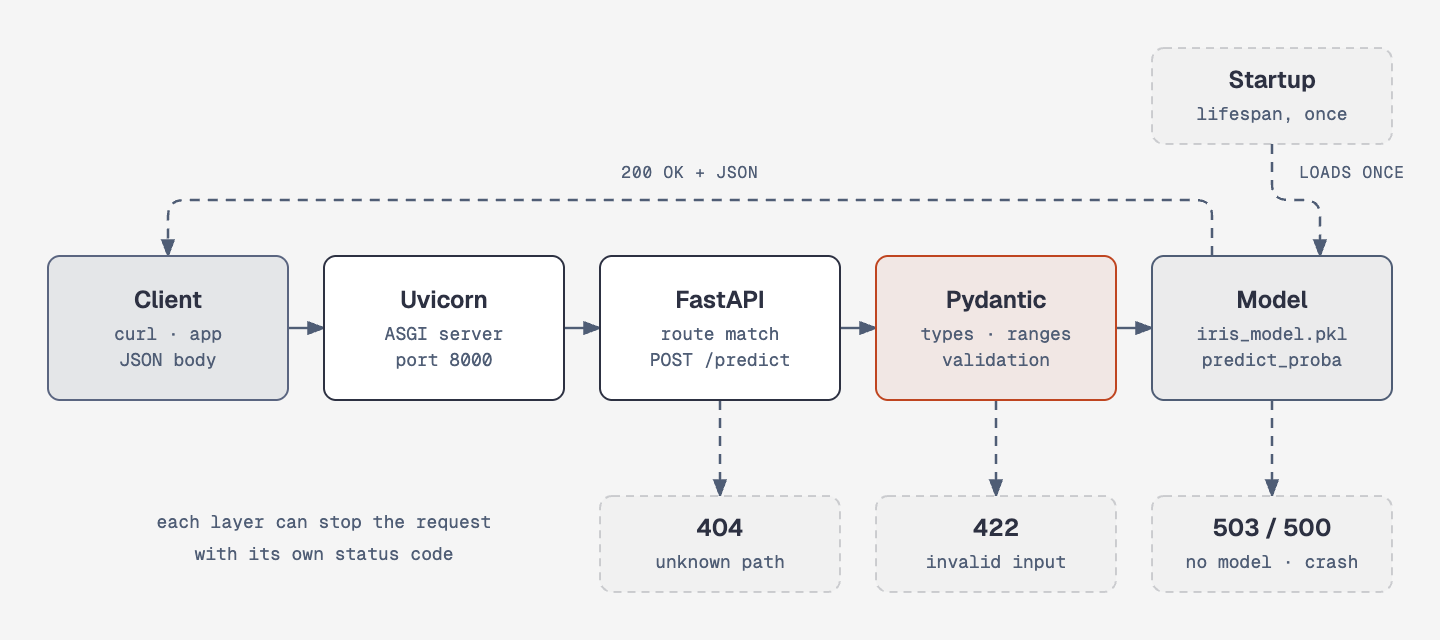
Two takeaways from the diagram that shape how we write the code:
- The model loads once, at startup — never per request. Deserializing a pickle takes tens to hundreds of milliseconds; doing it on every call would dominate your latency and hammer the disk. We'll use FastAPI's lifespan hook to load it exactly once.
- Validation happens before your code runs. By the time your
predict()function executes, Pydantic has already guaranteed the input shape. Bad input never reaches the model — it's rejected at the gate with a422and a machine-readable explanation.
Build the iris prediction API
We'll add a serving/ package to iris-mlops with a clean separation: schemas in one file, the app in another, training untouched. Here's where today's files land in the repo you've been building:
iris-mlops/
├── data/                      # DVC-managed (Day 5–6)
├── models/
│   └── iris_model.pkl         # trained artifact (Day 14 pipeline)
├── src/
│   └── train.py               # MLflow-tracked training (Day 8–10)
├── serving/                   # ★ NEW today
│   ├── __init__.py
│   ├── schemas.py             # Pydantic request/response models
│   └── app.py                 # FastAPI application
├── tests/
│   └── test_api.py            # ★ NEW today
├── Dockerfile.serve           # ★ NEW today
├── requirements.txt
├── dvc.yaml
└── docker-compose.yml         # Day 13–14
Step 1 — Install the serving dependencies
 cd iris-mlops
 source .venv/bin/activate
 pip install "fastapi[standard]" joblib scikit-learn requests pytest
 pip freeze | grep -E "fastapi|uvicorn|pydantic" >> requirements.txt
The [standard] extra pulls in Uvicorn (the ASGI server that actually listens on the port) plus the fastapi CLI. FastAPI is only the framework — it needs a server process to run inside, the same way your code needs Python itself.
Step 2 — Make sure you have a model to serve
If you completed Day 14, models/iris_model.pkl already exists from your DVC pipeline. If you're jumping in fresh, this ten-line script produces a compatible artifact:
# src/quick_train.py
"""Minimal trainer — use src/train.py from Day 14 for the full MLflow version."""
from pathlib import Path
import joblib
from sklearn.datasets import load_iris
from sklearn.ensemble import RandomForestClassifier

X, y = load_iris(return_X_y=True)
model = RandomForestClassifier(n_estimators=100, random_state=42).fit(X, y)

Path("models").mkdir(exist_ok=True)
joblib.dump(model, "models/iris_model.pkl")
print("✓ models/iris_model.pkl written")
Step 3 — Define the API contract with Pydantic
Schemas are the heart of a FastAPI service. They declare, in one place, what a valid request and response look like — and Pydantic enforces it at runtime while FastAPI turns it into documentation. Note the Field constraints: an iris sepal can't be negative or three meters long, so we encode physical plausibility right into the contract:
# serving/schemas.py
"""Request/response contracts for the iris prediction API."""
from pydantic import BaseModel, Field


class IrisFeatures(BaseModel):
    """Input features, in centimeters. Ranges guard against nonsense input."""
    sepal_length: float = Field(..., gt=0, lt=15, description="Sepal length (cm)")
    sepal_width:  float = Field(..., gt=0, lt=15, description="Sepal width (cm)")
    petal_length: float = Field(..., gt=0, lt=15, description="Petal length (cm)")
    petal_width:  float = Field(..., gt=0, lt=15, description="Petal width (cm)")

    model_config = {
        "json_schema_extra": {
            "examples": [{
                "sepal_length": 5.1,
                "sepal_width": 3.5,
                "petal_length": 1.4,
                "petal_width": 0.2,
            }]
        }
    }


class PredictionResponse(BaseModel):
    """What the client gets back from POST /predict."""
    prediction: str = Field(..., description="Predicted species name")
    class_id: int = Field(..., description="Integer class label (0/1/2)")
    probabilities: dict[str, float] = Field(..., description="Per-class probability")


class HealthResponse(BaseModel):
    status: str
    model_loaded: bool
serving/app.py
"""Iris model serving API — LearnXOps 30-Day MLOps Bootcamp, Day 15."""
from contextlib import asynccontextmanager
from pathlib import Path
import logging

import joblib
import numpy as np
from fastapi import FastAPI, HTTPException, Response

from serving.schemas import IrisFeatures, PredictionResponse, HealthResponse

logger = logging.getLogger("iris-api")
logging.basicConfig(level=logging.INFO)

MODEL_PATH = Path("models/iris_model.pkl")
CLASS_NAMES = ["setosa", "versicolor", "virginica"]

# Shared state populated at startup. Never load the model per request.
ml_assets: dict = {}


@asynccontextmanager
async def lifespan(app: FastAPI):
    # ---- startup: runs exactly once, before the first request ----
    if MODEL_PATH.exists():
        ml_assets["model"] = joblib.load(MODEL_PATH)
        logger.info("Model loaded from %s", MODEL_PATH)
    else:
        logger.error("Model file missing: %s", MODEL_PATH)
    yield
    # ---- shutdown: release resources ----
    ml_assets.clear()
    logger.info("Model unloaded, shutting down")


app = FastAPI(
    title="Iris Prediction API",
    description="Serves the iris-mlops RandomForest classifier over REST.",
    version="1.0.0",
    lifespan=lifespan,
)


@app.get("/health", response_model=HealthResponse, tags=["ops"])
def health(response: Response):
    """Liveness/readiness probe for load balancers and Kubernetes."""
    loaded = "model" in ml_assets
    if not loaded:
        response.status_code = 503  # probes act on the status code, not the body
    return HealthResponse(status="ok" if loaded else "degraded", model_loaded=loaded)


@app.post("/predict", response_model=PredictionResponse, tags=["inference"])
def predict(features: IrisFeatures):
    """Classify one iris flower from its four measurements."""
    model = ml_assets.get("model")
    if model is None:
        raise HTTPException(status_code=503, detail="Model not loaded")

    X = np.array([[
        features.sepal_length, features.sepal_width,
        features.petal_length, features.petal_width,
    ]])

    try:
        class_id = int(model.predict(X)[0])
        proba = model.predict_proba(X)[0]
    except Exception:
        logger.exception("Inference failed")
        raise HTTPException(status_code=500, detail="Inference error")

    return PredictionResponse(
        prediction=CLASS_NAMES[class_id],
        class_id=class_id,
        probabilities={
            name: round(float(p), 4) for name, p in zip(CLASS_NAMES, proba)
        },
    )


@app.get("/model-info", tags=["ops"])
def model_info():
    """Basic metadata about the loaded model."""
    model = ml_assets.get("model")
    if model is None:
        raise HTTPException(status_code=503, detail="Model not loaded")
    return {
        "model_type": type(model).__name__,
        "n_features": int(getattr(model, "n_features_in_", -1)),
        "classes": CLASS_NAMES,
        "artifact": str(MODEL_PATH),
    }
Run, test & explore the docs
Start the server
 uvicorn serving.app:app --reload --host 0.0.0.0 --port 8000
INFO:     Will watch for changes in these directories: ['/home/sandip/iris-mlops']
INFO:     Uvicorn running on http://0.0.0.0:8000 (Press CTRL+C to quit)
INFO:iris-api:Model loaded from models/iris_model.pkl
INFO:     Application startup complete.
The command reads asuvicorn <module.path>:<app object>. The--reloadflag restarts the server on code changes — perfect for development, never for production (it costs memory and a file-watcher per worker).
Test with curl
 curl -s -X POST http://localhost:8000/predict \
    -H "Content-Type: application/json" \
    -d '{"sepal_length": 5.1, "sepal_width": 3.5, "petal_length": 1.4, "petal_width": 0.2}'
{"prediction":"setosa","class_id":0,"probabilities":{"setosa":1.0,"versicolor":0.0,"virginica":0.0}}

 curl -s http://localhost:8000/health
{"status":"ok","model_loaded":true}
Now watch validation do its job — send a physically impossible petal:
 curl -s -X POST http://localhost:8000/predict \
    -H "Content-Type: application/json" \
    -d '{"sepal_length": 5.1, "sepal_width": 3.5, "petal_length": 999, "petal_width": 0.2}'
{"detail":[{"type":"less_than","loc":["body","petal_length"],
 "msg":"Input should be less than 15","input":999,"ctx":{"lt":15.0}}]}   ← HTTP 422
You wrote zero lines of validation logic, and the client gets a precise, machine-readable explanation of what to fix. That's the FastAPI trade paying off.
Test from Python
scripts/call_api.py
import requests

samples = [
    {"sepal_length": 5.1, "sepal_width": 3.5, "petal_length": 1.4, "petal_width": 0.2},  # setosa
    {"sepal_length": 6.7, "sepal_width": 3.1, "petal_length": 4.7, "petal_width": 1.5},  # versicolor
    {"sepal_length": 7.2, "sepal_width": 3.6, "petal_length": 6.1, "petal_width": 2.5},  # virginica
]

for s in samples:
    r = requests.post("http://localhost:8000/predict", json=s, timeout=5)
    r.raise_for_status()
    body = r.json()
    print(f"{body['prediction']:<12}", body["probabilities"])
Automated tests with TestClient
FastAPI ships a test client that calls your app in-process — no server, no ports, fast enough for CI. This is the seed of the test suite you'll grow in the CI/CD week:
tests/test_api.py
from fastapi.testclient import TestClient
from serving.app import app

VALID = {"sepal_length": 5.1, "sepal_width": 3.5,
         "petal_length": 1.4, "petal_width": 0.2}


def test_health():
    with TestClient(app) as client:          # context manager triggers lifespan
        r = client.get("/health")
        assert r.status_code == 200
        assert r.json()["model_loaded"] is True


def test_predict_valid():
    with TestClient(app) as client:
        r = client.post("/predict", json=VALID)
        assert r.status_code == 200
        body = r.json()
        assert body["prediction"] in {"setosa", "versicolor", "virginica"}
        assert abs(sum(body["probabilities"].values()) - 1.0) < 1e-6


def test_predict_rejects_missing_field():
    with TestClient(app) as client:
        bad = {k: v for k, v in VALID.items() if k != "petal_width"}
        r = client.post("/predict", json=bad)
        assert r.status_code == 422


def test_predict_rejects_absurd_values():
    with TestClient(app) as client:
        r = client.post("/predict", json={**VALID, "petal_length": 999})
        assert r.status_code == 422
Sample output:
python -m pytest tests/test_api.py -v   # "python -m" puts the repo root on sys.path
tests/test_api.py::test_health PASSED
tests/test_api.py::test_predict_valid PASSED
tests/test_api.py::test_predict_rejects_missing_field PASSED
tests/test_api.py::test_predict_rejects_absurd_values PASSED
======================== 4 passed in 1.42s =======================
The free documentation
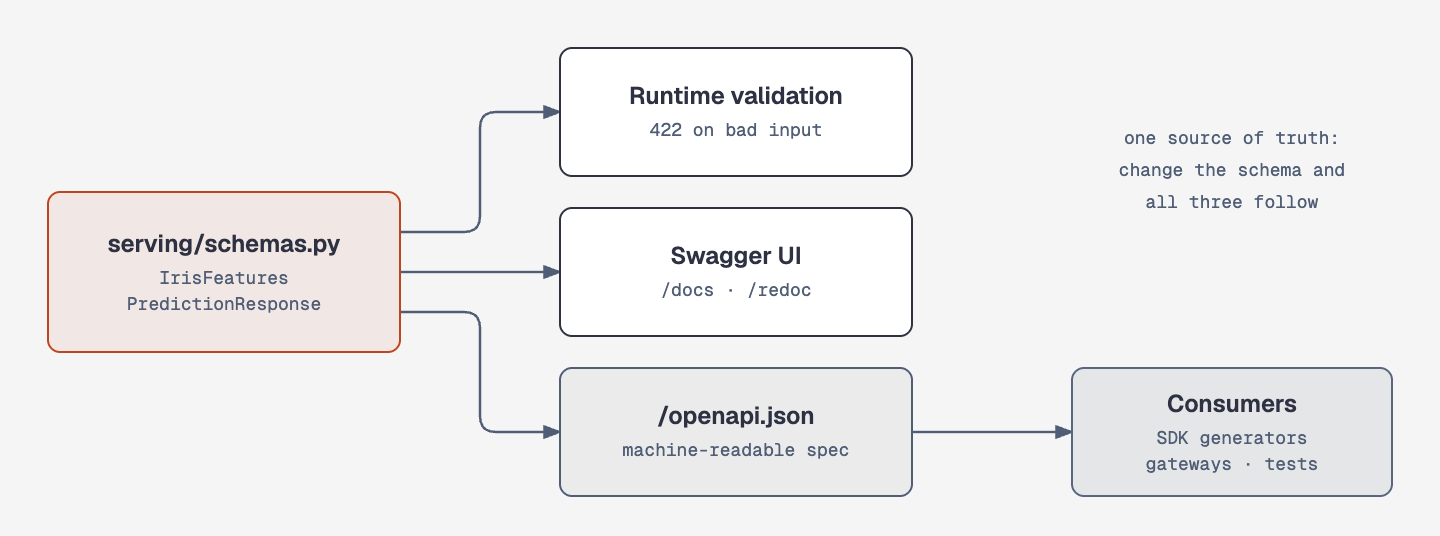
Open http://localhost:8000/docs in a browser. FastAPI generated a full Swagger UI from your type hints: every endpoint, every field with its constraints and example values, and a "Try it out" button that fires real requests. There's a second flavor at /redoc, and the raw machine-readable spec lives at /openapi.json — that spec is what client-SDK generators and API gateways consume.
Containerize the service
You already know Docker from Days 11–13, so this is a short application of existing skills. A serving container differs from a training container in one key way: it's a long-running process whose entrypoint is the ASGI server, not a script that runs and exits.
Dockerfile.serve
FROM python:3.11-slim

# Non-root user — same hardening habit as Day 12
RUN useradd --create-home appuser
WORKDIR /app

COPY requirements.txt .
RUN pip install --no-cache-dir -r requirements.txt

COPY serving/ ./serving/
COPY models/ ./models/

USER appuser
EXPOSE 8000

# Production: no --reload, explicit host binding
CMD ["uvicorn", "serving.app:app", "--host", "0.0.0.0", "--port", "8000"]
Sample output:
 docker build -f Dockerfile.serve -t iris-api:day15 .
 docker run -d --name iris-api -p 8000:8000 iris-api:day15
sleep 2   # give Uvicorn a moment to load the model
 curl -s http://localhost:8000/health
{"status":"ok","model_loaded":true}
Common pitfalls & debugging
| Symptom | Likely cause | Fix |
|---|---|---|
ModuleNotFoundError: serving | Running uvicorn from the wrong directory, or missing serving/__init__.py | Run from the repo root; make sure serving/__init__.py exists (empty file is fine) |
Every request returns 503 Model not loaded | models/iris_model.pkl missing relative to the working directory | Check startup logs; run python src/quick_train.py or dvc repro first |
422 on input you believe is valid | Field name typo (sepal_len), string instead of number, or missing Content-Type: application/json header | Read the detail array in the response — it names the exact field and rule that failed |
| Works locally, connection refused in Docker | Uvicorn bound to 127.0.0.1 inside the container | Bind to 0.0.0.0 in the CMD; map the port with -p 8000:8000 (Day 11 refresher) |
| Predictions differ from training-time evaluation | Feature order mismatch between training and the serving array | Keep one canonical feature order; the safest pattern is a shared constant imported by both train.py and app.py |
| Pickle load fails inside the container | scikit-learn version in the image differs from the training environment | Pin exact versions in requirements.txt — this is why Day 2's environment discipline matters |
| First request after startup is slow | Lazy initialization inside the model or numpy warm-up | Fire one dummy prediction at the end of lifespan() startup to warm the path |
Model serving is the bridge between machine learning and real-world applications. By exposing models through REST APIs, you make them accessible to web apps, mobile apps, and enterprise systems with a simple HTTP request.
This production-first approach ensures consistency, scalability, and seamless integration across different platforms.
As you progress in MLOps, API-based model serving becomes the foundation for monitoring, versioning, security, and continuous deployment.
⚡ Quick Reference
Keep the momentum going — everything you need on LearnXOps in one place:
- 🎓 Courses — Video courses & AI-built courses
- 📚 Ebooks — Community ebooks & your own
- 🧪 All Labs & Challenges — DevOps, Cloud, SRE & more
- ☸️ Kubernetes Labs & Playground — kind clusters, playground & challenges
- 🤖 AI Agent & Bot Labs — OpenClaw · Hermes · CrewAI · LangGraph · MCP


Member discussion