


Writing production-grade Dockerfiles is essential because reproducible, secure, and optimized containers ensure ML workloads behave consistently from development to production while minimizing deployment failures.
Mastering multi-stage builds, dependency pinning, layer caching, and
.dockerignore best practices leads to faster builds, smaller images, lower infrastructure costs, and more reliable AI deployments at scale.⚡ Quick Reference
Keep the momentum going — everything you need on LearnXOps in one place:
- 🎓 Courses — Video courses & AI-built courses
- 📚 Ebooks — Community ebooks & your own
- 🧪 All Labs & Challenges — DevOps, Cloud, SRE & more
- ☸️ Kubernetes Labs & Playground — kind clusters, playground & challenges
- 🤖 AI Agent & Bot Labs — OpenClaw · Hermes · CrewAI · LangGraph · MCP
📚 Key Learnings
- Why Production Dockerfiles Matter
- Anatomy of a Bad Dockerfile
- Layer Caching Deep-Dive
- Choosing the Right Base Image
- Multi-Stage Builds Explained
- .dockerignore — The Forgotten Hero
- Pinning Dependencies
- Security Hardening
- Refactoring the Day 11 Dockerfile
- Before vs. After: Size Comparison
🧠 Learn here
Why Production Dockerfiles Matter
On Day 11 you containerized the Iris classifier. The image worked. The container ran. You logged metrics to MLflow. That was the right first step.
But "it runs" and "it's ready for production" are very different bars. A naive Dockerfile for an ML project routinely produces images that are 3–6 GB, take minutes to pull, carry compiler toolchains that don't belong in runtime, and rebuild from scratch every time you change a single line of Python.
In a world where those images get pulled by CI pipelines, Kubernetes pods, and cloud training jobs dozens of times a day, that cost compounds fast.
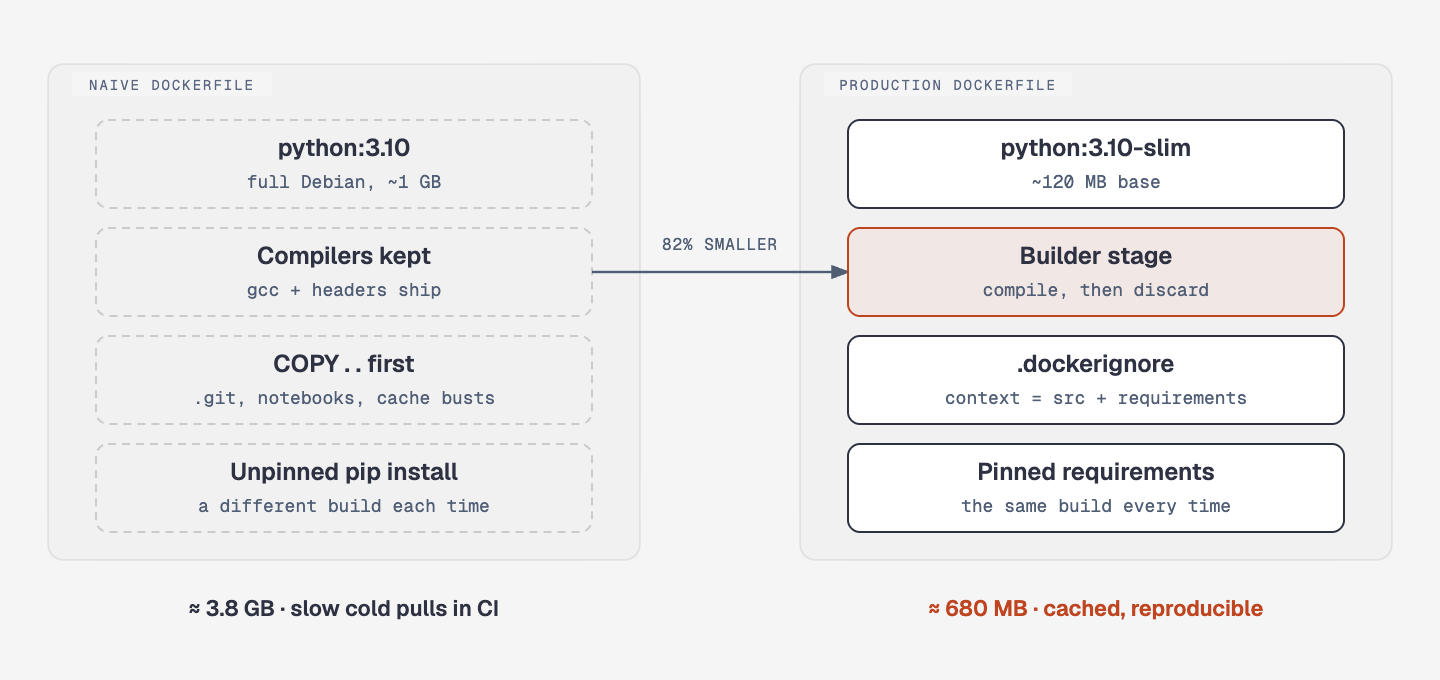
The five pillars of a production-grade ML Dockerfile:
🏗️ Multi-Stage Builds
Compile in one stage, run in another. Leave the toolchain behind.
📦 Slim Base Images
Start small. python:3.10-slim instead of python:3.10.
🔒 Pinned Dependencies
Every package at an exact version. No surprises in prod six months from now.
🙈 .dockerignore
Keep build context lean. Exclude .git, notebooks, data, test fixtures.
🔐 Non-Root User
Run processes as a dedicated mluser, not root. Defense in depth.
⚡ Layer Cache Strategy
Order instructions so the slowest steps cache best. Dependencies before source code.
What a Bad Dockerfile Looks Like
Before fixing things, let's understand exactly what makes a Dockerfile "bad" for production. Here is the kind of Dockerfile that works on a developer laptop but creates real pain in production:
Dockerfile.naive
# ❌ BAD: Everything you should NOT do

# ❌ Unpinned base — any rebuild might pull a different Python patch
FROM python:3.10

# ❌ No ENV vars for reproducibility, no PYTHONDONTWRITEBYTECODE
WORKDIR /app

# ❌ COPY the entire repo FIRST — busts cache on every code change
# Also copies .git, notebooks, test files, __pycache__, secrets...
COPY . .

# ❌ pip install AFTER code copy — rebuilds deps even for 1-line code edits
# ❌ No --no-cache-dir — wastes space storing pip's HTTP cache
# ❌ Unpinned versions — next build might get sklearn 1.5, not 1.3
RUN pip install numpy pandas scikit-learn mlflow

# ❌ Running as root — security risk
CMD ["python", "src/train.py"]
Every one of those anti-patterns has a concrete cost. Let's map them:
| Anti-Pattern | Consequence | Fix |
|---|---|---|
FROM python:3.10 (no digest/patch) | Non-deterministic builds | Pin to python:3.10.14-slim |
COPY . . before pip install | Every code change reinstalls all packages | Copy requirements.txt first, then install, then copy source |
No --no-cache-dir | ~100–300 MB of pip cache stored in image | Always pass --no-cache-dir |
No .dockerignore | Build context includes .git, data, notebooks | Add a comprehensive .dockerignore |
Running as root | Container breakout gives root on host | Add a non-root USER |
| Single build stage | Build tools and compilers end up in production image | Multi-stage: build in one stage, run in another |
No PYTHONDONTWRITEBYTECODE | Python writes .pyc files inside container | Set ENV PYTHONDONTWRITEBYTECODE=1 |
Layer Caching Deep-Dive
Every instruction in a Dockerfile creates a layer. Docker caches each layer using a hash of the instruction plus the state of the filesystem. If the hash matches what's cached, Docker reuses that layer instead of re-running the instruction. Understanding this changes how you order instructions.
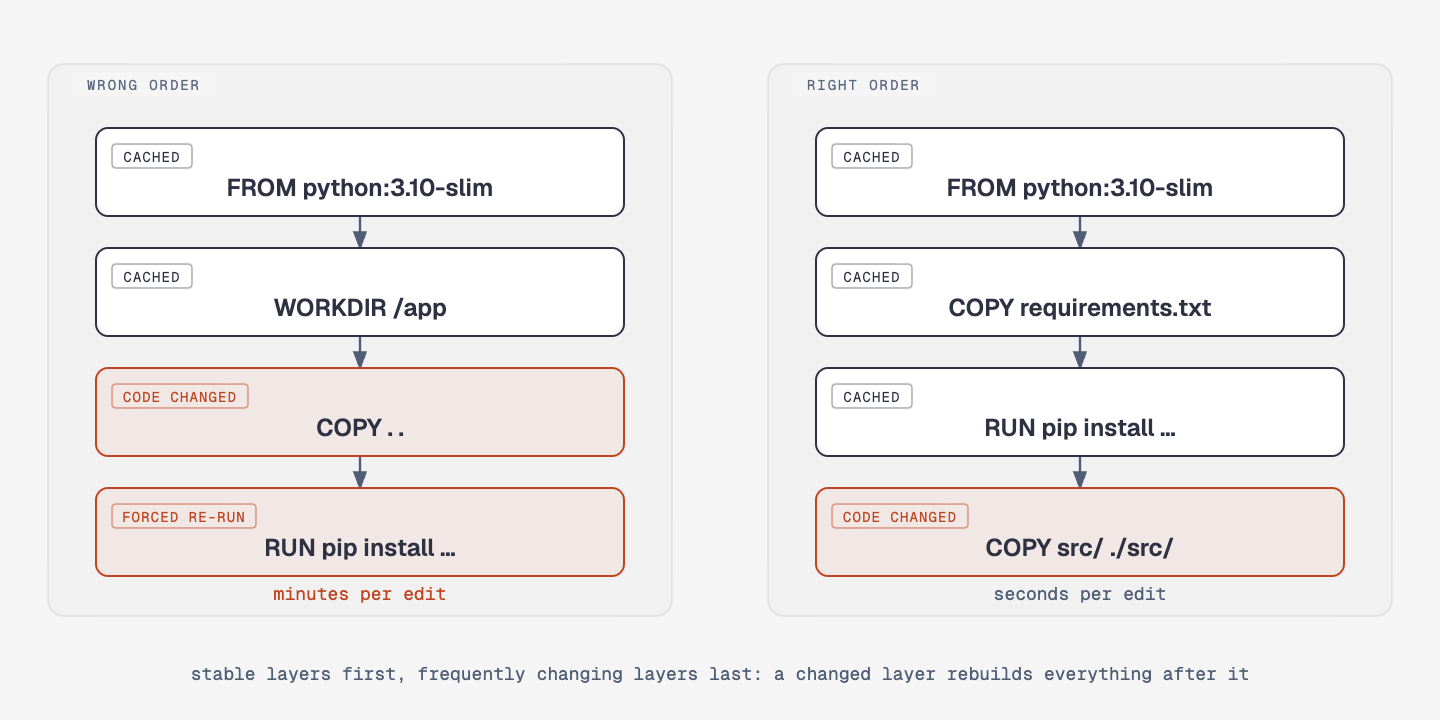
Copy and install things in order from least-frequently-changing to most-frequently-changing. Base image → system packages → Python requirements → source code. A layer change invalidates every layer below it.
Choosing the Right Base Image
The base image is the foundation. For ML workloads, you're balancing three things: size, compatibility, and the availability of compiled numerical libraries.
| Base Image | Compressed Size | Good For | Watch Out For |
|---|---|---|---|
python:3.10 | ~380 MB | Full Debian, all dev tools included | Much larger than needed for inference |
python:3.10-slim | ~45 MB | Training + serving. Best general-purpose choice. | Need to apt-get build tools for C-extensions |
python:3.10-alpine | ~20 MB | Tiny final stages, lightweight web servers | musl libc breaks many ML wheels — avoid for ML |
nvidia/cuda:12.x-runtime | ~2 GB | GPU training and inference | Must use -runtime not -devel in final stage |
Python 3.10 reached end of life in October 2026 and no longer receives security fixes. The examples on this page keep 3.10 to match Day 11, but for new images pick python:3.11-slim or newer (Days 13 and 14 use 3.11); everything else here works the same way.
Alpine uses musl libc. Most Python ML packages (NumPy, SciPy, scikit-learn) are distributed as binary wheels compiled against glibc. Attempting to use them on Alpine forces pip to build from source — which requires a C compiler — and often fails on complex dependencies like OpenBLAS. Stick with
-slim (Debian-based) for ML workloads.Why python:3.10-slim is the sweet spot for ML
It is Debian Bookworm stripped of documentation, locale data, and most dev tools — keeping just what Python needs to run. All binary wheels (scikit-learn, pandas, numpy) install fine because glibc is intact. You add only what you explicitly need via apt-get, keeping the image lean and auditable.
# ✅ Pinned to specific patch version for reproducibility
FROM python:3.10.14-slim

# Alternatively, pin to a digest for maximum reproducibility:
# FROM python@sha256:abc123def456...  ← immutable, never changes
Multi-Stage Builds Explained
Multi-stage builds are Docker's answer to a fundamental tension: you need build tools (compilers, headers, dev libraries) to install packages, but you don't want those tools in the final image that runs in production. With multi-stage builds, you use multiple FROM instructions in a single Dockerfile. Each FROM starts a fresh stage. You selectively copy artifacts from one stage to the next.
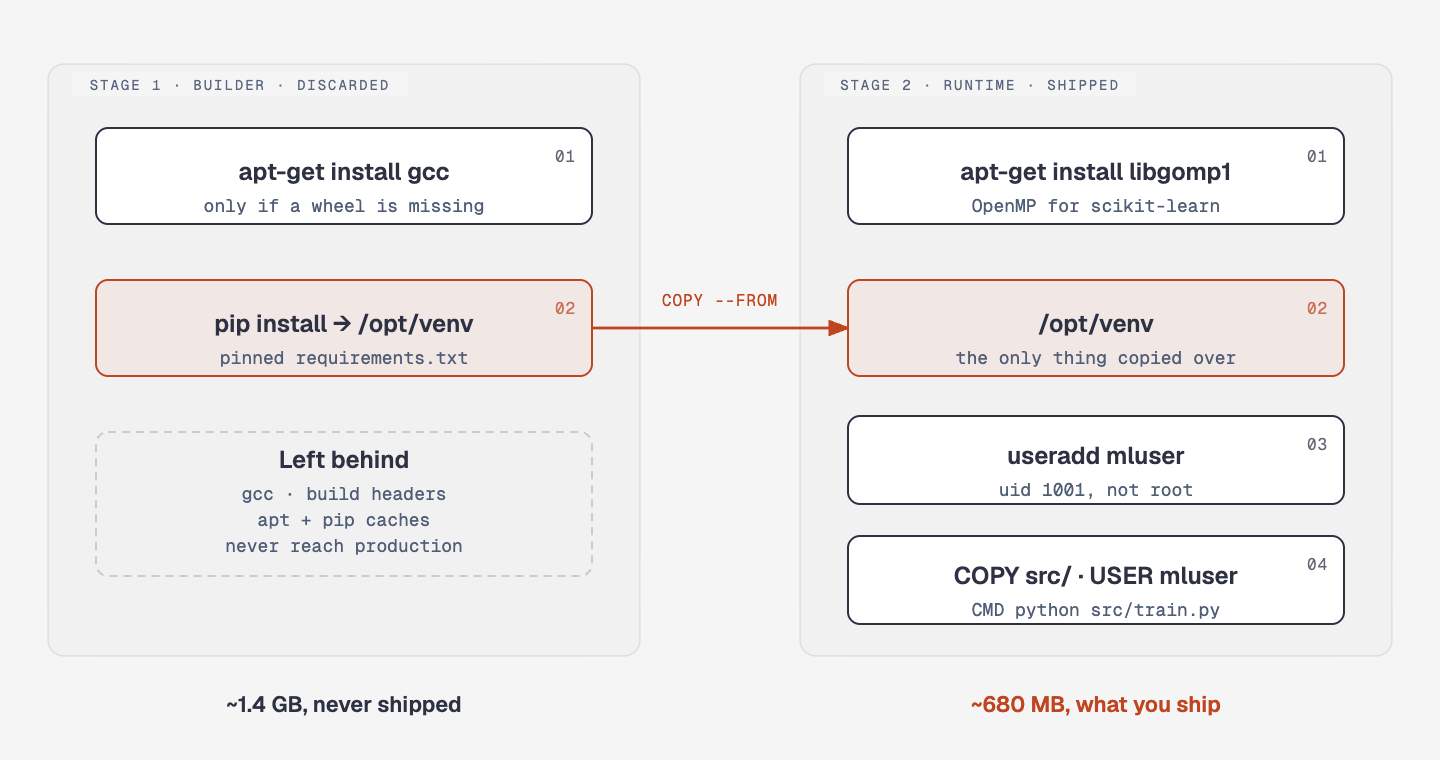
The Key Instruction: COPY --from
This is what makes multi-stage builds work. You cherry-pick only the artifacts you need from a prior stage:
# COPY --from=<stage_name_or_index> <src_in_that_stage> <dest_in_current_stage>

# Copy compiled Python packages from the builder stage
COPY --from=builder /usr/local/lib/python3.10/site-packages \
                    /usr/local/lib/python3.10/site-packages

# Copy installed CLI executables (mlflow, etc.)
COPY --from=builder /usr/local/bin /usr/local/bin

# You can also copy from official Docker images directly!
COPY --from=alpine:3.18 /bin/busybox /usr/local/bin/busyboxscikit-learn, NumPy, and pandas ship as pre-compiled binary wheels for
linux/amd64. pip install unpacks those wheels into site-packages. The compiled .so files are what matter at runtime. You don't need the compiler or pip itself — just the result of running pip..dockerignore — The Forgotten Hero
When you run docker build ., Docker sends the entire build context (the current directory) to the Docker daemon before executing a single instruction. A bloated build context means:
- Slower builds (uploading GBs of data files before anything starts)
- Risk of leaking secrets (
.env, SSH keys) into the image via an accidentalCOPY . . - Stale cache invalidations (anything in context that changes busts layers)
.dockerignore works exactly like .gitignore. It tells Docker what to exclude from the build context before the daemon even sees it.
.dockerignore
# ─── Version Control ───────────────────────────────────
.git
.gitignore
.github/

# ─── Python Artifacts ──────────────────────────────────
__pycache__/
*.py[cod]
*.egg-info/
dist/
build/
.eggs/
*.egg

# ─── Virtual Environments ──────────────────────────────
.venv/
venv/
env/
.env
.env.*

# ─── ML / Data Science Artifacts ───────────────────────
data/raw/
data/processed/
*.csv
*.parquet
*.feather
*.pkl
# Exception: keep the tiny Iris dataset if bundled
!data/iris.csv

# ─── DVC ───────────────────────────────────────────────
.dvc/cache/
.dvc/tmp/

# ─── MLflow ────────────────────────────────────────────
mlruns/
mlartifacts/

# ─── Jupyter / IDE ─────────────────────────────────────
*.ipynb
.ipynb_checkpoints/
.vscode/
.idea/
*.swp
*.swo

# ─── Testing ───────────────────────────────────────────
tests/
.pytest_cache/
.coverage
htmlcov/

# ─── Docker itself ─────────────────────────────────────
Dockerfile*
docker-compose*.yml
.dockerignore

# ─── Documentation ─────────────────────────────────────
docs/
*.md
LICENSE

# ─── OS Artifacts ──────────────────────────────────────
.DS_Store
Thumbs.dbRun
du -sh . --exclude=.git to see your raw directory size, then add a comprehensive .dockerignore and compare with docker build --no-cache . output which prints the context size. ML projects routinely go from 4 GB to 200 KB of build context after a good .dockerignore.Pinning Dependencies
An unpinned requirements.txt is a time bomb. It works today. Six months from now, a transitive dependency releases a breaking change and your CI starts failing — or worse, silently produces different model results.
Three Levels of Pinning:
❌ No Pinning
scikit-learn
Installs latest. May break at any time.
⚠️ Major Version
scikit-learn>=1.3,<2
Safer. Still allows minor updates.
✅ Full Pinning
scikit-learn==1.3.2
Fully reproducible. Best for production.
Two-File Strategy: requirements.in + requirements.txt
The best practice is to separate what you want from what you actually get. Use pip-tools to compile exact versions:
requirements.in
# Human-maintained: just the direct deps you care about
scikit-learn>=1.3,<2
pandas>=2.0,<3
mlflow>=2.10,<3
boto3>=1.34
compile with pip-compile
# Install pip-tools once
pip install pip-tools

# Compile requirements.in → requirements.txt (fully pinned)
pip-compile requirements.in --output-file requirements.txt

# Upgrade: regenerate with latest compatible versions
pip-compile --upgrade requirements.in
requirements.txt
# Machine-generated by pip-compile — commit this file
# Every transitive dep is pinned exactly (abridged here: the real file
# also pins boto3, botocore, flask, gunicorn, alembic and dozens more)
certifi==2024.2.2
charset-normalizer==3.3.2
cloudpickle==3.0.0
contourpy==1.2.0
cycler==0.12.1
filelock==3.13.1
fonttools==4.50.0
gitdb==4.0.11
gitpython==3.1.42
joblib==1.3.2
kiwisolver==1.4.5
markdown==3.6
mlflow==2.11.3
numpy==1.26.4
packaging==24.0
pandas==2.2.1
pillow==10.2.0
protobuf==4.25.3
pyarrow==15.0.2
python-dateutil==2.9.0
pytz==2024.1
pyyaml==6.0.1
scikit-learn==1.4.1.post1
scipy==1.12.0
six==1.16.0
smmap==5.0.1
sqlalchemy==2.0.29
threadpoolctl==3.3.0
tzdata==2024.1requirements.txt, not just requirements.inCommit the compiled
requirements.txt to git. This is your lockfile. Anyone who checks out the repo at any point in the future gets the exact same environment. The Docker image uses requirements.txt directly, so CI always installs the identical packages.Security Hardening Essentials
Production containers have a small but important set of security practices that are cheap to add and expensive to ignore:
- Non-root USER: Add a dedicated user in the Dockerfile. If the container process is ever compromised, the attacker gets a low-privilege user, not host root. This is the single highest-ROI security line you can add.
- Read-only root filesystem (where possible): Pass
--read-onlyat runtime, and mount/tmpas atmpfs. Prevents an attacker from writing executables to disk. For ML training containers that write to mounted volumes, scope the write permission to just those mount points. - No secrets in image layers: Never
ENV AWS_SECRET=...in a Dockerfile. Even if you delete the ENV in a later layer, it remains readable in the layer history viadocker history --no-trunc. Use Docker secrets, environment injection at runtime, or a secrets manager. - Pin the base image digest: For maximum security, pin to a SHA digest instead of a tag. Tags are mutable —
python:3.10-slimcan be updated any time. A digest is immutable:FROM python:3.10-slim@sha256:abc123... - Clean apt cache in the same layer: Always chain
apt-get installwith&& rm -rf /var/lib/apt/lists/*in the sameRUNinstruction. If you clean in a separate instruction, Docker has already committed the apt cache into the previous layer — it's still in the image.
# ✅ Install system deps and clean cache in ONE RUN layer
RUN apt-get update \
    && apt-get install -y --no-install-recommends \
        libgomp1 \
        curl \
    && rm -rf /var/lib/apt/lists/*

# ❌ WRONG — apt cache committed into a layer, cleaning does nothing
RUN apt-get update && apt-get install -y libgomp1
RUN rm -rf /var/lib/apt/lists/*  # too late, layer already exists

# ✅ Non-root user setup
RUN groupadd --gid 1001 mlgroup \
    && useradd --uid 1001 --gid mlgroup --no-log-init --create-home mluser

# Ensure the app dir is owned by mluser
RUN chown -R mluser:mlgroup /app

# Switch to non-root
USER mluser
Refactoring the Day 11 Dockerfile
Now let's apply everything. The Day 11 Dockerfile was functional — it ran the Iris classifier, logged to MLflow, and worked correctly on a local machine. Here's the complete refactor into a production-grade, multi-stage version.
# =============================================================================
# Day 12 — Production-Grade Multi-Stage Dockerfile
# Project: Iris MLOps Classifier (LearnXOps 30-Day Bootcamp)
# =============================================================================

# ─────────────────────────────────────────────────────
# STAGE 1: builder
# Purpose: Install Python dependencies.
# This stage is used ONLY during build — not shipped.
# ─────────────────────────────────────────────────────
FROM python:3.10.14-slim AS builder

# Prevent Python from writing .pyc to disk (no-op in builder, good habit)
ENV PYTHONDONTWRITEBYTECODE=1 \
    PYTHONUNBUFFERED=1 \
    # Keep pip's download cache out of the image layers
    PIP_NO_CACHE_DIR=1 \
    PIP_DISABLE_PIP_VERSION_CHECK=1

# Install build-time system dependencies
# gcc is only needed when a package has no prebuilt wheel; the python image
# already ships its own headers, so Debian's python3-dev is not needed
# libgomp1 is needed by scikit-learn (OpenMP for parallel jobs)
RUN apt-get update \
    && apt-get install -y --no-install-recommends \
        gcc \
        libgomp1 \
    && rm -rf /var/lib/apt/lists/*

# Create a virtual environment inside the builder stage
# Using a venv makes COPY --from trivially clean
RUN python -m venv /opt/venv
ENV PATH="/opt/venv/bin:$PATH"

# ── LAYER CACHE STRATEGY ──────────────────────────────
# Copy ONLY the requirements file first.
# pip install runs only when requirements.txt changes.
# Source code changes do NOT invalidate this layer.
COPY requirements.txt .

RUN pip install --no-cache-dir -r requirements.txt

# ─────────────────────────────────────────────────────
# STAGE 2: runtime
# Purpose: Lean production image with only what's
# needed to RUN the training/inference process.
# ─────────────────────────────────────────────────────
FROM python:3.10.14-slim AS runtime

ENV PYTHONDONTWRITEBYTECODE=1 \
    PYTHONUNBUFFERED=1 \
    PATH="/opt/venv/bin:$PATH"

# Install ONLY the runtime system library needed by scikit-learn
# gcc is NOT here — it served its purpose in the builder stage
RUN apt-get update \
    && apt-get install -y --no-install-recommends \
        libgomp1 \
    && rm -rf /var/lib/apt/lists/*

# ── COPY from builder — the only connection between stages ──
COPY --from=builder /opt/venv /opt/venv

# Create a non-root user for security
RUN groupadd --gid 1001 mlgroup \
    && useradd \
        --uid 1001 \
        --gid mlgroup \
        --no-log-init \
        --create-home \
        mluser

WORKDIR /app

# Copy source code LAST — most-frequently-changing layer
COPY src/ ./src/
COPY data/ ./data/

# Fix ownership — mluser needs to write model artifacts
RUN chown -R mluser:mlgroup /app

# Switch to non-root user
USER mluser

# Metadata labels (good practice for image registries)
LABEL maintainer="[email protected]"
LABEL org.opencontainers.image.title="iris-mlops-trainer"
LABEL org.opencontainers.image.description="Production Iris classifier — LearnXOps Day 12"
LABEL org.opencontainers.image.version="1.0.0"

# Runtime configuration via environment variables
# These can be overridden at docker run or in docker-compose
ENV MLFLOW_TRACKING_URI="http://mlflow:5000" \
    N_ESTIMATORS=100 \
    MAX_DEPTH=5 \
    TEST_SIZE=0.2 \
    RANDOM_STATE=42

CMD ["python", "src/train.py"]
Updated train.py — Compatible with Production Dockerfile
src/train.py
"""
Iris Classifier Training Script — Day 12 (Production-Grade Docker)
Reads all config from environment variables so the image is reusable
without rebuilding. Logs all parameters and metrics to MLflow.
"""
import os
import logging
import sys
from pathlib import Path

import mlflow
import mlflow.sklearn
import pandas as pd
from sklearn.ensemble import RandomForestClassifier
from sklearn.model_selection import train_test_split
from sklearn.metrics import accuracy_score, classification_report
from sklearn.preprocessing import LabelEncoder

# ─── Logging ─────────────────────────────────────────
logging.basicConfig(
    level=logging.INFO,
    format="%(asctime)s [%(levelname)s] %(message)s",
    handlers=[logging.StreamHandler(sys.stdout)]
)
log = logging.getLogger("iris_trainer")

# ─── Config from ENV ─────────────────────────────────
def get_config() -> dict:
    return {
        "data_path":    os.getenv("DATA_PATH",    "data/iris.csv"),
        "n_estimators": int(os.getenv("N_ESTIMATORS", 100)),
        "max_depth":    int(os.getenv("MAX_DEPTH",    5)),
        "test_size":    float(os.getenv("TEST_SIZE",    0.2)),
        "random_state": int(os.getenv("RANDOM_STATE", 42)),
        "experiment":   os.getenv("MLFLOW_EXPERIMENT", "iris_day12"),
    }

def load_data(path: str):
    """Load Iris CSV and return features + encoded target."""
    p = Path(path)
    if not p.exists():
        log.error(f"Data file not found: {path}")
        sys.exit(1)
    df = pd.read_csv(p)
    log.info(f"Loaded dataset: {df.shape[0]} rows, {df.shape[1]} columns")
    X = df.drop(columns=["species"])
    le = LabelEncoder()
    y = le.fit_transform(df["species"])
    return X, y, le.classes_

def train():
    cfg = get_config()
    log.info(f"Config: {cfg}")

    # MLflow experiment
    mlflow.set_experiment(cfg["experiment"])

    with mlflow.start_run():
        X, y, class_names = load_data(cfg["data_path"])
        X_train, X_test, y_train, y_test = train_test_split(
            X, y, test_size=cfg["test_size"], random_state=cfg["random_state"]
        )

        model = RandomForestClassifier(
            n_estimators=cfg["n_estimators"],
            max_depth=cfg["max_depth"],
            random_state=cfg["random_state"]
        )
        model.fit(X_train, y_train)

        y_pred = model.predict(X_test)
        acc = accuracy_score(y_test, y_pred)
        report = classification_report(y_test, y_pred, target_names=class_names)

        # Log everything to MLflow
        mlflow.log_params(cfg)
        mlflow.log_metric("accuracy", acc)
        mlflow.sklearn.log_model(model, "model")

        log.info(f"\nAccuracy: {acc:.4f}")
        log.info(f"\n{report}")
        log.info("Training complete. Model logged to MLflow.")

if __name__ == "__main__":
    train()
Updated docker-compose.yml
docker-compose.yml
services:

  # MLflow tracking server
  mlflow:
    image: python:3.10.14-slim
    command: >
      bash -c "pip install mlflow==2.11.3 --quiet --no-cache-dir
               && mlflow server
               --host 0.0.0.0
               --port 5000
               --backend-store-uri /mlruns
               --artifacts-destination /mlartifacts"
    ports:
      - "5000:5000"
    volumes:
      - mlflow_data:/mlruns
      - mlflow_artifacts:/mlartifacts
    healthcheck:
      test: ["CMD", "python", "-c", "import urllib.request; urllib.request.urlopen('http://localhost:5000/health')"]  # slim image has no curl
      interval: 10s
      timeout: 5s
      retries: 5
      start_period: 60s    # first start pip-installs mlflow

  # Iris trainer — built from production Dockerfile
  trainer:
    build:
      context: .
      dockerfile: Dockerfile
      target: runtime              # explicitly target the runtime stage
    environment:
      - MLFLOW_TRACKING_URI=http://mlflow:5000
      - MLFLOW_EXPERIMENT=iris_day12
      - N_ESTIMATORS=150
      - MAX_DEPTH=6
      - TEST_SIZE=0.2
      - RANDOM_STATE=42
    depends_on:
      mlflow:
        condition: service_healthy
    volumes:
      # Mount data read-only — trainer should not modify source data
      - ./data:/app/data:ro

volumes:
  mlflow_data:
  mlflow_artifacts:
Before vs. After: Size Comparison
The proof is in the numbers. Here's how to measure before and after, and the expected results for the Iris project:
Building and measuring
# 1. Build the naive Day 11 image (if you saved it)
docker build -f Dockerfile.naive -t iris-naive:v11 .

# 2. Build the production Day 12 image
docker build -t iris-prod:v12 .

# 3. Compare sizes side by side
docker images --filter reference=iris-naive \
              --filter reference=iris-prod \
              --format "table {{.Repository}}\t{{.Tag}}\t{{.Size}}"

# 4. Inspect layer breakdown (see what's eating space)
docker history iris-prod:v12 --no-trunc --format \
  "table {{.CreatedBy}}\t{{.Size}}"

# 5. Dive (a popular tool for layer-by-layer analysis)
# Install: brew install dive  OR  go install github.com/wagoodman/dive@latest
dive iris-prod:v12
Expected output
$ docker images --filter reference=iris-naive --filter reference=iris-prod \
         --format "table {{.Repository}}\t{{.Tag}}\t{{.Size}}"

REPOSITORY    TAG    SIZE
iris-prod     v12    683 MB
iris-naive    v11    3.82 GB
Layer-by-layer breakdown (production image)
$ docker history iris-prod:v12 --no-trunc \
    --format "table {{.CreatedBy}}\t{{.Size}}" | head -20

CREATED BY                                         SIZE
CMD ["python" "src/train.py"]                      0B
USER mluser                                        0B
RUN chown -R mluser:mlgroup /app                   0B
COPY src/ ./src/                                   12.4kB
COPY data/ ./data/                                 4.6kB
WORKDIR /app                                       0B
RUN groupadd --gid 1001 mlgroup ...               326kB
COPY --from=builder /opt/venv /opt/venv            551MB    ← ML packages
RUN apt-get install libgomp1                       7.82MB
ENV PYTHONDONTWRITEBYTECODE=1 ...                  0B
FROM python:3.10.14-slim 121MB ← clean baseThe production image carries exactly: the slim Python base (121 MB), the compiled ML packages (551 MB), libgomp1 (8 MB), and your source (17 KB). Every other layer is zero bytes. No compiler, no build headers, no pip cache, no git history, no notebooks. What used to be a 3.82 GB image is now 683 MB — and it's reproducible, secure, and cache-friendly.
⚡ Quick Reference
Keep the momentum going — everything you need on LearnXOps in one place:
- 🎓 Courses — Video courses & AI-built courses
- 📚 Ebooks — Community ebooks & your own
- 🧪 All Labs & Challenges — DevOps, Cloud, SRE & more
- ☸️ Kubernetes Labs & Playground — kind clusters, playground & challenges
- 🤖 AI Agent & Bot Labs — OpenClaw · Hermes · CrewAI · LangGraph · MCP


Member discussion