

Stop Paying to Practise Cloud.
Local Cloud Labs run a real cloud API on your laptop — no cloud account, no credentials, no surprise bill.
Learning AWS has always had the same tax: create an account, hand over a credit card, then spend the whole time worrying about what you forgot to delete. One left-running resource and a learning exercise turns into a real invoice.
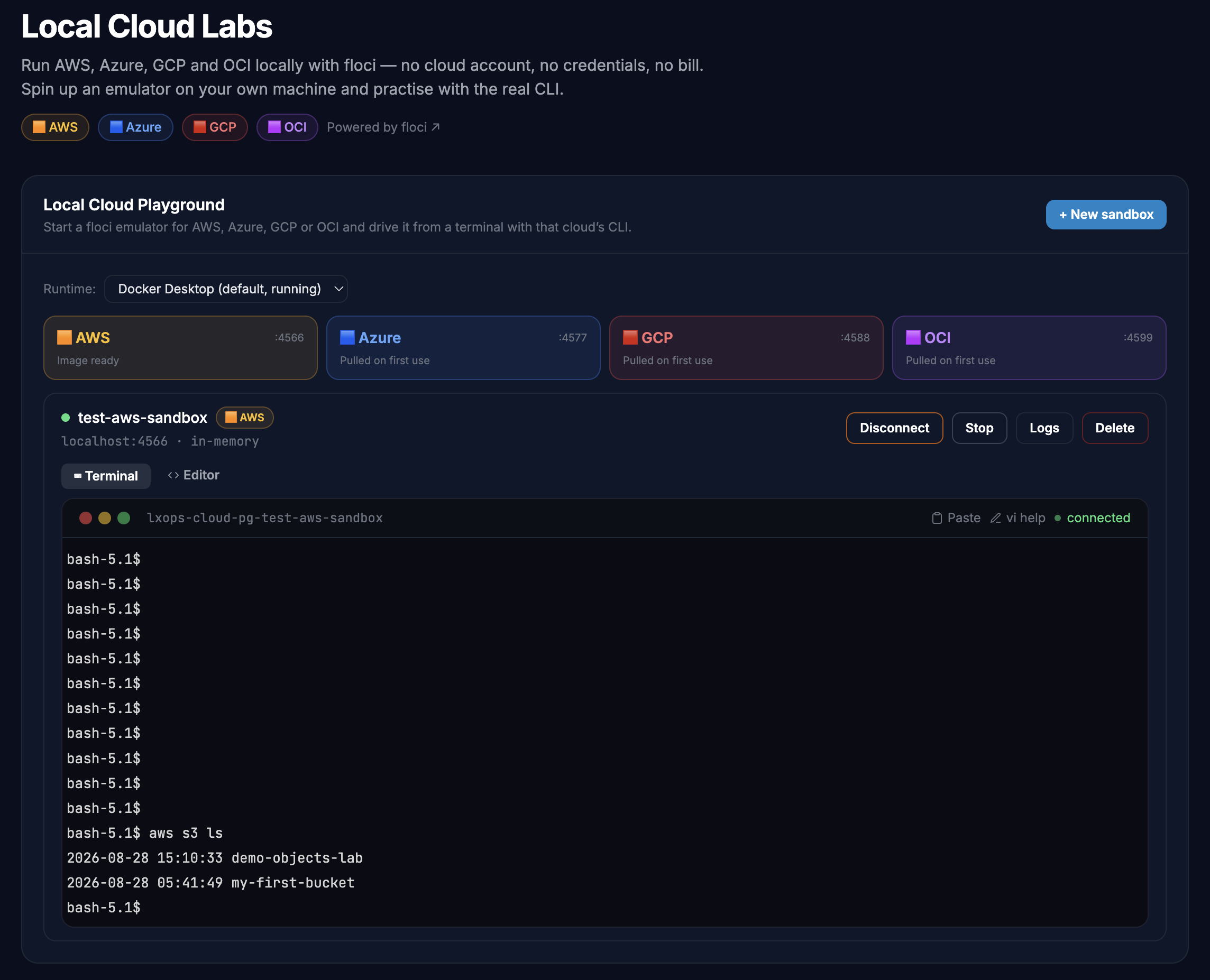
Local Cloud Labs removes that entirely. We spin up a local cloud emulator in a container on your own machine, hand you a terminal with the real aws CLI already pointed at it, and let you work exactly as you would against production — aws s3 mb, aws dynamodb put-item, aws lambda invoke. Same commands, same output, same muscle memory. Zero cost, and your data never leaves your laptop.
Powered by floci, the open-source local cloud emulator.
Four Clouds, One Playground
| Cloud | Emulated Services Included |
|---|---|
| AWS | S3, DynamoDB, Lambda, SQS, SNS, IAM, Secrets Manager, CloudFormation |
| Azure | Blob Storage, Table Storage, Queue Storage, Cosmos DB, Key Vault, Functions, Service Bus, Event Hubs |
| GCP | Cloud Storage, Firestore, Pub/Sub, Cloud Run, Cloud Functions, BigQuery, Secret Manager |
| OCI | Object Storage, Functions, OKE, Queue, Streaming, Identity, KMS, Vault |
Create a sandbox for any of the four in the Local Cloud Playground, and the app wires a toolbox container with that cloud's CLI straight to it — credentials and endpoints already configured.
🎓 All 10 beginner labs below are free for everyone — they don't touch your free-lab quota.
🟧 AWS Labs — Free (10)
Start here. Every one of these is free, forever, on any plan.
- Create Your First S3 Bucket and Upload an Object
S3 · 5 tasks · 30 min · 100 pts · 🆓 Free - Create a DynamoDB Table and Write Your First Item
DynamoDB · 4 tasks · 30 min · 100 pts · 🆓 Free - IAM Fundamentals: Create a User, Attach a Policy, and Inspect Permissions
IAM · 4 tasks · 30 min · 100 pts · 🆓 Free - List, Copy and Delete S3 Objects with the AWS CLI
S3 · 4 tasks · 30 min · 100 pts · 🆓 Free - Package and Invoke Your First Lambda Function
Lambda, IAM · 5 tasks · 30 min · 100 pts · 🆓 Free - Publish to an SNS Topic and Deliver to an SQS Queue
SNS, SQS · 5 tasks · 30 min · 100 pts · 🆓 Free - Read Data from DynamoDB with get-item and query
DynamoDB · 5 tasks · 30 min · 100 pts · 🆓 Free - Send and Receive Your First Message with an SQS Queue
SQS · 5 tasks · 30 min · 100 pts · 🆓 Free - Store a Database Password in Secrets Manager and Read It Back
Secrets Manager · 5 tasks · 30 min · 100 pts · 🆓 Free - Turn On S3 Versioning and Recover an Overwritten File
S3 · 5 tasks · 30 min · 100 pts · 🆓 Free
🟧 AWS Labs — Premium (8)
Where it gets real: indexes, dead-letter queues, event-driven wiring and infrastructure as code.
- Add a Global Secondary Index to a DynamoDB Table and Query It
DynamoDB · 5 tasks · 30 min · 100 pts · 🔒 Premium - Catch Failed Messages with an SQS Dead-Letter Queue and Redrive Policy
SQS · 5 tasks · 30 min · 100 pts · 🔒 Premium - Fire an S3 Event Notification into an SQS Queue on Object Upload
S3, SQS · 5 tasks · 30 min · 100 pts · 🔒 Premium - Give Lambda Least-Privilege Access with an IAM Execution Role
IAM, Lambda, S3, DynamoDB · 5 tasks · 30 min · 100 pts · 🔒 Premium - Prevent Lost Updates with DynamoDB Conditional Writes
DynamoDB · 5 tasks · 30 min · 100 pts · 🔒 Premium - Provision S3 and DynamoDB from a Single CloudFormation Stack
CloudFormation, S3, DynamoDB · 5 tasks · 30 min · 100 pts · 🔒 Premium - Ship a New Lambda Safely with Versions and an Alias
Lambda, IAM · 5 tasks · 30 min · 100 pts · 🔒 Premium - Trigger a Lambda from an SQS Queue with an Event Source Mapping
SQS, Lambda, IAM · 4 tasks · 30 min · 100 pts · 🔒 Premium
PS: More labs coming by this weekend!
How a Lab Works?
- Create a sandbox — pick a cloud, name it, and the emulator starts in seconds on a local port.
- Launch the lab — a toolbox container with that cloud's CLI attaches, already pointed at your sandbox.
- Work the tasks — click-to-copy commands, one task at a time.
- Verify — hit Verify Task and a real command runs against your sandbox to check your work.
Nothing is simulated. The commands are real, the responses are real — the cloud is just running on your desk.
Why you will Like It?
- No account, no card, no bill. Nothing to forget to delete.
- Offline-friendly. Once the images are pulled, the labs run with no internet.
- Real CLI skills. What you type here is what you type against production.
- Your data stays local. The emulator runs in a container on your machine and nowhere else.
- Break things freely. Delete the sandbox and start over in seconds.
Ready to try it?
🌩️ Open Local Cloud Labs →
Start with Create Your First S3 Bucket and Upload an Object — free, about 30 minutes.
💻 Get the LearnXops Desktop App
Local Cloud Labs run entirely on your own machine, so they need the desktop app. ⬇ Download LearnXops — macOS · Windows · Linux → Apple Silicon & Intel (DMG) · Windows 10/11 (EXE or ZIP) · Linux (AppImage or DEB)
Happy shipping,
Sandip Das
From The LearnXops Team
Member discussion