

We should learn Multi-Account Strategy and AWS Organizations to simplify governance, security, and cost management at scale.
These practices enable better isolation, guardrails, and flexibility for managing workloads across multiple environments.
⚡ Quick Reference
Keep the momentum going — everything you need on LearnXOps in one place:
- 🎓 Courses — Video courses & AI-built courses
- 📚 Ebooks — Community ebooks & your own
- 🧪 All Labs & Challenges — DevOps, Cloud, SRE & more
- ☸️ Kubernetes Labs & Playground — kind clusters, playground & challenges
- 🤖 AI Agent & Bot Labs — OpenClaw · Hermes · CrewAI · LangGraph · MCP
📚 Key Learnings
- Understand why organizations adopt a multi-account strategy instead of a single AWS account.
- Learn how AWS Organizations simplifies account management at scale.
- Explore Service Control Policies (SCPs) for central governance.
- Learn about Organizational Units (OUs) for grouping accounts (e.g., dev, test, prod).
- Understand consolidated billing and cost visibility.
🧠 Learn here
Multi-Account Strategy in AWS
Organizations often start with a single AWS account for simplicity. However, as teams, applications, and compliance requirements grow, managing everything in a single account becomes complex and risky. To address these challenges, organizations adopt a multi-account strategy.
This README explains why organizations prefer multiple accounts over a single AWS account.
Key Reasons for Multi-Account Strategy
1. Security Isolation
- Each account acts as a strong security boundary.
- Limits the blast radius: if one account is compromised, others remain unaffected.
- Enables granular IAM policies per account instead of one large, complex policy set.
2. Compliance & Governance
- Different workloads may have distinct compliance requirements (e.g., PCI, HIPAA).
- Separate accounts allow for dedicated auditing, logging, and monitoring.
- Easier to implement Service Control Policies (SCPs) in AWS Organizations.
3. Cost Allocation & Billing
- Each account can be mapped to a specific business unit, project, or environment.
- Simplifies cost tracking and chargeback/showback models.
- Centralized billing with AWS Organizations enables consolidated visibility.
4. Operational Isolation
- Reduces risk of accidental changes impacting production.
- Separate accounts for dev, staging, and prod environments.
- Independent service quotas and API limits prevent resource conflicts.
5. Scalability & Manageability
- Single accounts can hit soft/hard limits (e.g., IAM roles, VPCs per region).
- Distributing workloads across accounts avoids bottlenecks.
- Easier to delegate account ownership to different teams.
6. Mergers, Acquisitions & Separation of Concerns
- New business units or acquisitions can have isolated accounts.
- Easier integration and eventual consolidation.
- Helps enforce clear boundaries between teams.
Typical Multi-Account Patterns
- Environment-based: Separate accounts for Dev, Test, Staging, and Prod.
- Business-unit based: Each department or product line gets its own account.
- Compliance-based: Accounts dedicated for workloads requiring special compliance.
- Shared Services: Central account for networking, logging, monitoring, and IAM.
Tools for Multi-Account Management
- AWS Organizations – Centralized account management and consolidated billing.
- AWS Control Tower – Automated setup of multi-account environment with guardrails.
- Service Control Policies (SCPs) – Governance at organizational or account level.
- AWS IAM Identity Center (SSO) – Centralized authentication across accounts.
Let's deeply understand AWS Organizations:
What is AWS Organizations?
AWS Organizations is a service that allows you to centrally manage and govern multiple AWS accounts. It provides a unified way to apply policies, consolidate billing, and organize accounts to scale and secure workloads.
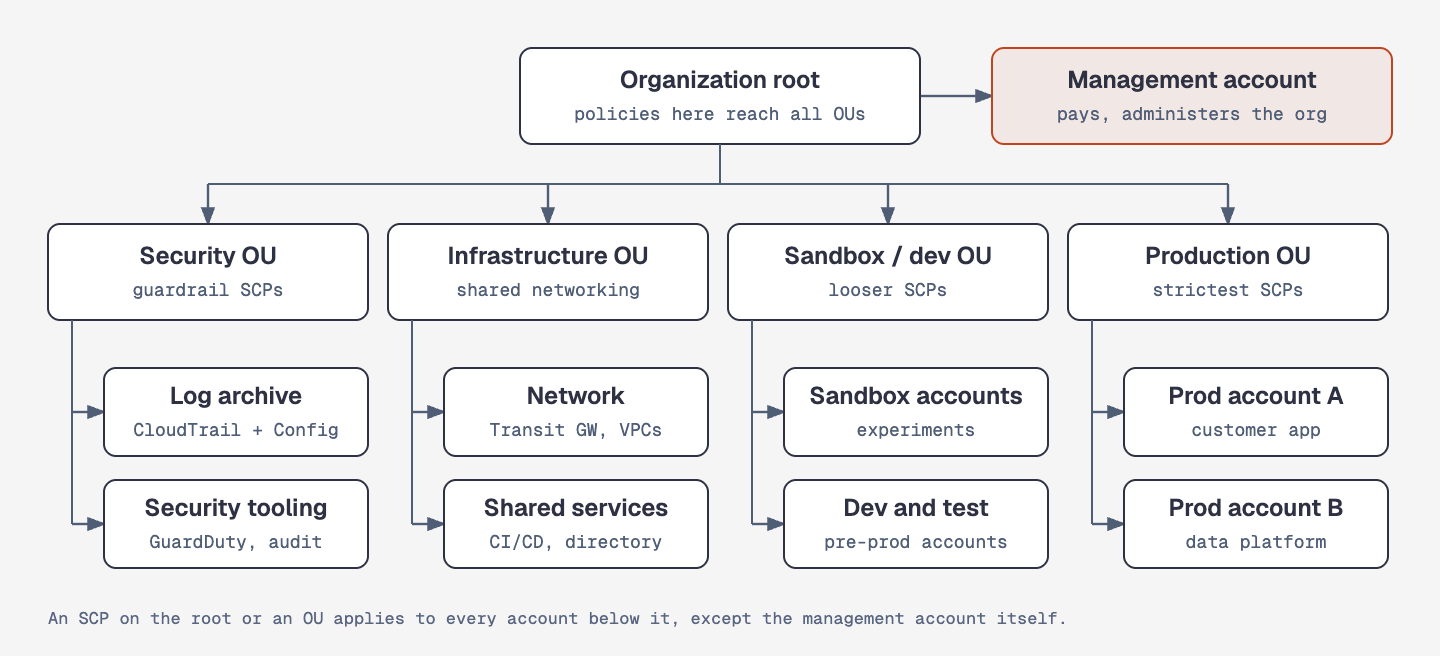
Key benefits:
- Centralized account management.
- Consolidated billing and cost control.
- Central policy-based management (service control policies, resource control policies, tag policies, backup policies, etc.).
- Account automation and scalability.
Creating and Managing Multiple AWS Accounts
- Account creation: You can create new accounts programmatically or via the AWS Management Console.
- Inviting existing accounts: Add existing AWS accounts into your organization.
- Centralized billing: All accounts can share a single payment method and view combined costs.
- Policy management: Apply Service Control Policies (SCPs) to control what services/accounts can do.
Organizational Units (OUs) Structure
Organizational Units (OUs) are logical groupings of accounts that help you apply policies consistently.
Common OU Patterns:
- Security OU: For accounts like log archive, security tooling, or compliance monitoring.
- Infrastructure OU: Shared services accounts (network, identity, etc.).
- Sandbox/Development OU: Non-production accounts for experimentation.
- Production OU: Mission-critical workloads and customer-facing apps.
Best Practices for OUs:
- Group accounts by environment (Prod, Dev, Test).
- Apply restrictive SCPs to sensitive OUs.
- Keep OUs flexible for scaling and future workloads.
Root Account Best Practices
The management account (formerly called the master account) is the account that creates the organization. Its root user has the highest privileges and should be secured carefully; SCPs never restrict the management account, so keep workloads out of it.
Security Best Practices:
- MFA (Multi-Factor Authentication): Always enable MFA for the root user.
- Strong password policy: Use a strong and unique password.
- Do not use root for daily operations: Use IAM Identity Center users or IAM roles with least privilege.
- Billing & compliance notifications: Configure alternate contacts for security, billing, and operations.
- Monitor access: Use AWS CloudTrail and AWS Config for auditing.
- Centralize root access: From the management account, remove root credentials from member accounts and run the few root-only tasks centrally (IAM centralized root access, since November 2024).
How It Simplifies Account Management
1. Centralized Governance
- Apply Service Control Policies (SCPs) across accounts to enforce compliance.
- Ensure security guardrails are consistent across all workloads.
2. Consolidated Billing
- Combine usage and costs from all accounts into a single bill.
- Benefit from volume discounts and Reserved Instance sharing.
- Gain clear visibility into account-level spending.
3. Account Lifecycle Management
- Create new accounts programmatically via API/CLI/Console.
- Invite existing AWS accounts to join your organization.
- Automate account setup with predefined configurations.
4. Organizational Units (OUs)
- Group accounts into OUs based on function, environment, or compliance.
- Apply policies at the OU level for consistent governance.
- Scale easily by replicating structures for new teams/projects.
5. Security & Compliance
- Centralize logging (CloudTrail, Config) into dedicated accounts.
- Apply least privilege by restricting high-risk services.
- Simplify audits with consistent policies.
Service Control Policies (SCPs)
SCPs are JSON-based policies in AWS Organizations that define maximum available permissions for accounts or Organizational Units (OUs). They do not grant permissions by themselves but instead set boundaries on what IAM users and roles can do.
Sample policy (one SCP with three common guardrails; the Region rule exempts global services, and the AWS docs keep the full exemption list):
{
  "Version": "2012-10-17",
  "Statement": [
    {
      "Sid": "DenyOutsideApprovedRegions",
      "Effect": "Deny",
      "NotAction": [
        "iam:*", "organizations:*", "sts:*", "account:*", "support:*",
        "budgets:*", "ce:*", "cur:*", "health:*", "trustedadvisor:*",
        "cloudfront:*", "route53:*", "route53domains:*", "waf:*", "wafv2:*",
        "shield:*", "globalaccelerator:*", "kms:*", "pricing:*"
      ],
      "Resource": "*",
      "Condition": {
        "StringNotEquals": {
          "aws:RequestedRegion": ["us-east-1", "us-west-2"]
        }
      }
    },
    {
      "Sid": "DenyRootUser",
      "Effect": "Deny",
      "Action": "*",
      "Resource": "*",
      "Condition": {
        "StringLike": {
          "aws:PrincipalArn": "arn:aws:iam::*:root"
        }
      }
    },
    {
      "Sid": "DenyLeavingTheOrganization",
      "Effect": "Deny",
      "Action": "organizations:LeaveOrganization",
      "Resource": "*"
    }
  ]
}
Key Characteristics:
- Applied at the account or OU level.
- Affect all IAM identities (users, roles, groups) in those accounts.
- Don’t apply to the management account or to service-linked roles.
- Deny by default if not explicitly allowed (the FullAWSAccess SCP is attached by default to allow everything).
- Used for governance and compliance.
IAM vs SCP vs Permission Boundaries
| Feature | IAM Policies | SCPs | Permission Boundaries |
|---|---|---|---|
| Scope | Individual IAM user/role/group | AWS account or OU | Individual IAM role/user |
| Purpose | Grants permissions to perform actions | Sets maximum allowed permissions | Restricts maximum permissions for IAM entities |
| Who Enforces | AWS IAM | AWS Organizations | AWS IAM |
| Grants Permissions? | ✅ Yes | ❌ No (only restricts) | ❌ No (only restricts) |
| Common Use Case | Assign permissions to developers | Ensure accounts cannot use disallowed services (e.g., block EC2 in Sandbox) | Limit developer-created roles from exceeding given permissions |
Example:
- IAM Policy: "Allow EC2 Start/Stop."
- SCP: "Deny EC2 Create/Delete in Sandbox OU."
- Permission Boundary: "User can only create roles that allow S3 read-only."
Guardrails using AWS Control Tower
AWS Control Tower builds on top of AWS Organizations and SCPs to provide predefined guardrails for governance.
What are Guardrails?
- High-level governance rules implemented via SCPs and AWS Config.
- Provide preventive and detective controls.
- Control Tower now calls guardrails controls, and adds proactive controls that check resources through CloudFormation hooks before they are created.
Types of Guardrails:
- Preventive Guardrails (via SCPs)
- Example: Disallow public S3 buckets in all accounts.
- Detective Guardrails (via AWS Config)
- Example: Detect if root user is used without MFA.
Benefits:
- Ready-to-use governance framework.
- Enforce compliance without manual policy writing.
- Scale governance across multiple accounts automatically.
In-short:
- IAM = grants permissions.
- SCPs = restrict account-level actions.
- Permission Boundaries = limit IAM identity scope.
When combined with AWS Control Tower guardrails, organizations gain a robust framework to enforce security, compliance, and operational best practices across accounts.
Consolidated Billing and Cost Visibility
Consolidated billing in AWS Organizations allows multiple accounts to share a single payment method while maintaining separate account-level visibility. This simplifies financial management, provides cost optimization opportunities, and enables governance at scale.
Key Features of Consolidated Billing:
1. Single Payment Method
- All member accounts share the payment method of the management account.
- No need for separate billing per account.
2. Combined Usage Discounts
- Usage from all accounts is aggregated to maximize volume discounts.
- Example: tiered pricing for S3 storage and data transfer is calculated on the organization’s combined usage.
3. Reserved Instance (RI) and Savings Plans Sharing
- RI and Savings Plan benefits are automatically shared across accounts.
- Maximizes cost efficiency by applying unused benefits to other accounts.
4. Detailed Cost Visibility
- Use AWS Cost Explorer and AWS Budgets to track costs by account, OU, or service.
- Tag-based cost allocation for granular visibility.
- Enable Cost and Usage Report 2.0 (CUR 2.0, via AWS Data Exports) for detailed analysis.
5. Separate Account Ownership
- Each account remains independent for resources and security.
- Billing is centralized, but costs are attributable at the account level.
Benefits:
- Cost Savings: Aggregated usage leads to better discounts.
- Simplified Billing: One bill for the entire organization.
- Transparency: Clear visibility of which account incurred which costs.
- Efficiency: Shared RI and Savings Plan benefits across accounts.
Best Practices:
- Enable CUR 2.0 exports at the management account level.
- Use tagging strategy for cost allocation.
- Apply budgets and alarms for each account/OU.
- Regularly review RI/Savings Plan utilization.
Challenges
- Read AWS docs: “What is AWS Organizations?”.
- Create an AWS Organization and invite an existing account.
- Create Organizational Units (OUs) for:DevelopmentProductionSecurity/Logging
- Apply a Service Control Policy (SCP) to restrict certain services (e.g., deny S3 bucket deletion).
- Enable Consolidated Billing and check cost reports across accounts.
🤷🏻 How to Participate?
✅ Complete the tasks and challenges.
✅ Document your progress and key takeaways on GitHub ReadMe, Medium, or Hashnode.
✅ Share the above in a LinkedIn post tagging me (Sandip Das), and use #90DaysOfCloud to engage with the community!
⚡ Quick Reference
Keep the momentum going — everything you need on LearnXOps in one place:
- 🎓 Courses — Video courses & AI-built courses
- 📚 Ebooks — Community ebooks & your own
- 🧪 All Labs & Challenges — DevOps, Cloud, SRE & more
- ☸️ Kubernetes Labs & Playground — kind clusters, playground & challenges
- 🤖 AI Agent & Bot Labs — OpenClaw · Hermes · CrewAI · LangGraph · MCP
Member discussion