


We should understand major cloud ML platforms to design scalable, secure, and production-ready machine learning infrastructure across AWS, GCP, and Azure.
This knowledge helps us choose the right services, automate ML workflows, optimize costs, and build reliable end-to-end MLOps platforms.
⚡ Quick Reference
Keep the momentum going — everything you need on LearnXOps in one place:
- 🎓 Courses — Video courses & AI-built courses
- 📚 Ebooks — Community ebooks & your own
- 🧪 All Labs & Challenges — DevOps, Cloud, SRE & more
- ☸️ Kubernetes Labs & Playground — kind clusters, playground & challenges
- 🤖 AI Agent & Bot Labs — OpenClaw · Hermes · CrewAI · LangGraph · MCP
📚 Key Learnings
- The Big Three, Side by Side
- SageMaker vs Vertex AI vs Azure ML
- How Each Platform Actually Works
- Steps to get started with AWS as your Cloud Provider
- Wiring iris-mlops Into AWS
🧠 Learn here
Right now, if your laptop dies, so does every training job, every MLflow run, every model endpoint you've built. That's fine for a bootcamp exercise — it's not fine for a model serving real traffic. Cloud ML platforms exist to solve five problems local development can't: elastic compute for training on data too big for your RAM, durable storage that outlives any single machine, managed serving infrastructure that autoscales and stays up while you sleep, access control so a whole team can collaborate safely, and observability that catches drift before your users do.
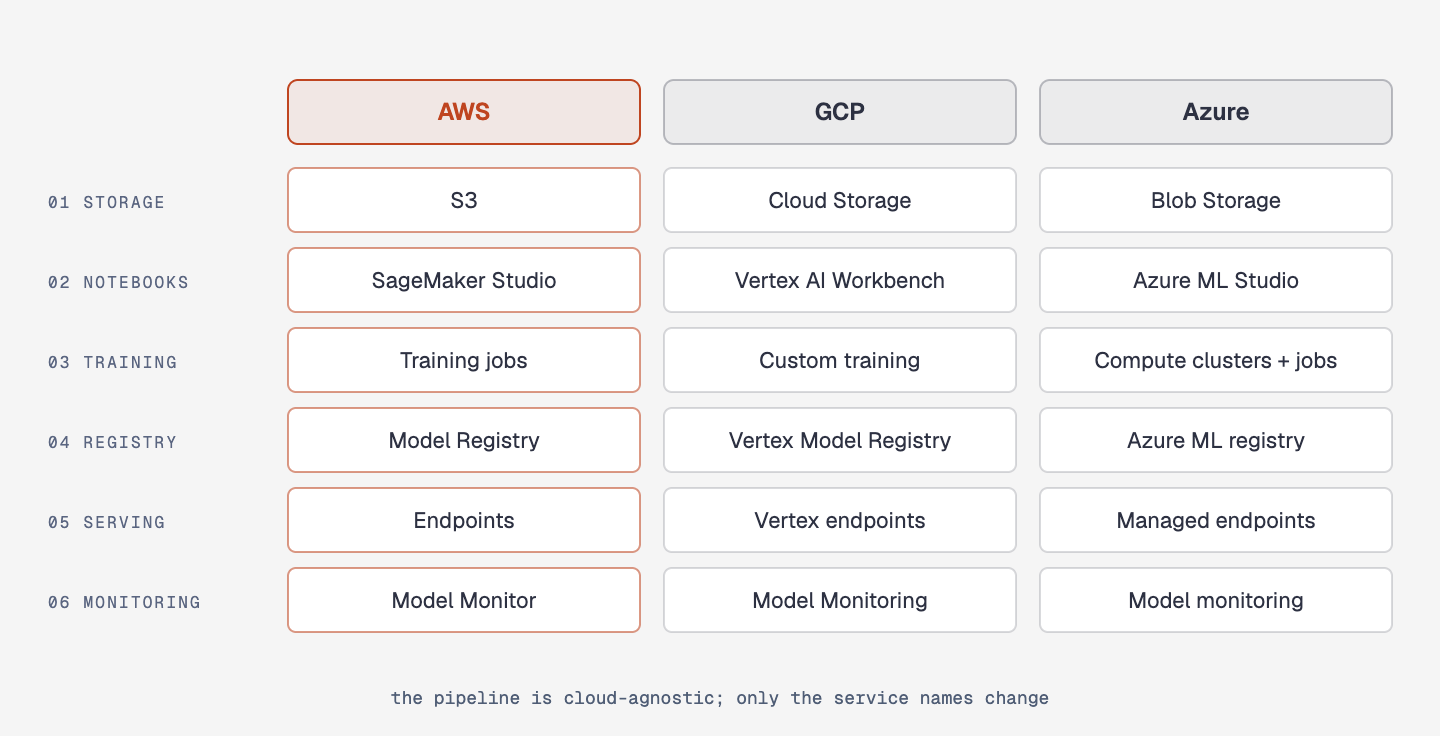
The good news: every major cloud reduces to the same six-stage pipeline you already understand. Only the service names change.
The Big Three, Side by Side
Same pipeline stages. Different logos, different vocabulary, different bills.
AWS SageMaker
Launched 2017 · part of AWS
- Deepest integration with S3, ECR, Lambda, EKS
- Widest instance-type selection for training
- Best fit if your infra already lives in AWS
GCP Vertex AI
Unified in 2021 · part of Google Cloud
- Strongest AutoML for vision, text, tabular
- Tight coupling with BigQuery for data
- Best fit for GCP-native data teams
Azure ML
GA 2018 · part of Microsoft Azure
- Native MLflow tracking backend, no shim needed
- Strong enterprise RBAC via Microsoft Entra ID (formerly Azure AD)
- Best fit for Microsoft-shop enterprises
SageMaker vs Vertex AI vs Azure ML
The full breakdown, service by service. Pricing details change often — treat the free-tier figures as a starting point and confirm on each provider's pricing page before you rely on them.
| Capability | AWS SageMaker | GCP Vertex AI | Azure ML |
|---|---|---|---|
| Managed notebooks | SageMaker Studio (JupyterLab) | Vertex AI Workbench | Azure ML Studio Notebooks |
| Data labeling | Ground Truth | Data Labeling Service | Data Labeling |
| AutoML | Autopilot | AutoML (vision/text/tabular) | Automated ML |
| Custom training | Training Jobs (built-in + BYOC) | Custom Training Jobs | Compute Clusters + Jobs |
| Hyperparameter tuning | Automatic Model Tuning | Vertex Vizier | Sweep jobs (formerly HyperDrive) |
| Pipelines / orchestration | SageMaker Pipelines | Vertex Pipelines (Kubeflow/TFX) | Azure ML Pipelines (YAML) |
| Model registry | SageMaker Model Registry | Vertex Model Registry | Azure ML Model Registry |
| Deployment | Endpoints — real-time / serverless / async / batch | Vertex Endpoints — online / batch | Managed Online / Batch Endpoints |
| Feature store | SageMaker Feature Store | Vertex AI Feature Store | Managed Feature Store (newer) |
| Drift monitoring | Model Monitor | Model Monitoring | Model monitoring |
| Container registry | ECR | Artifact Registry | Azure Container Registry |
| Object storage | S3 | Cloud Storage (GCS) | Blob Storage |
| Native experiment tracking | SageMaker Experiments, managed MLflow | Vertex AI Experiments | Native MLflow tracking server |
| IAM model | IAM roles & policies | Cloud IAM | Azure RBAC + Entra ID |
| Typical free tier | Up to $200 credits, 6-month free plan | $300 new-account credit (90 days) | $200 credit (30 days) |
| Best fit | Teams already on S3 / ECR / EKS | Teams on BigQuery, AutoML-heavy workloads | Microsoft/enterprise-governance shops |
Note:
All three platforms bill separately for the underlying compute, storage, and the managed-service layer on top of it. A running SageMaker Studio notebook or a Vertex Workbench instance still costs money even if you never submit a training job — the free tier covers a limited number of hours, not unlimited usage.
How Each Platform Actually Works
AWS SageMaker
SageMaker Studio is a hosted JupyterLab environment where notebooks, training, and debugging live side by side. Training Jobs run inside Docker containers — either one of AWS's built-in algorithm images, or your own image pushed to ECR, exactly like the iris-mlops-train image you built on Day 11. A finished job writes its model artifact to S3, and you register it as a versioned entry in the Model Registry, grouped under a "model package group." From there, an Endpoint config pulls the registered model and deploys it behind a REST API — with real-time, serverless, asynchronous, and offline batch-transform flavors depending on your latency and cost needs. Everything is wired together with IAM roles and shows up in CloudWatch Logs.
GCP Vertex AI
Vertex AI is Google's 2021 unification of the older AI Platform and AutoML products into one console. Vertex AI Workbench gives you managed JupyterLab notebooks tied to a GCP project. Custom Training Jobs, like SageMaker's, run containers pulled from Artifact Registry. Where Vertex genuinely pulls ahead is AutoML — point it at a labeled tabular, image, or text dataset in Cloud Storage or BigQuery and it will search architectures and hyperparameters with very little configuration. Vertex Pipelines are built on the open-source Kubeflow Pipelines SDK, so pipeline definitions you write are portable to other Kubeflow-based systems, not locked to Google's syntax.
Azure Machine Learning
Azure ML Studio offers both a no-code drag-and-drop Designer and a full SDK v2 / CLI v2 for code-first workflows. Compute Clusters autoscale from zero, which keeps idle costs near nothing. The detail worth remembering from this bootcamp: Azure ML's experiment tracking is MLflow — not "MLflow-compatible," but literally backed by an MLflow-protocol tracking server. Every mlflow.log_metric() and mlflow.log_artifact() call from Day 8 and Day 9 works unmodified once you pip install azureml-mlflow and point MLFLOW_TRACKING_URI at your Azure ML workspace. That makes Azure ML the lowest-friction migration path for a project whose tracking layer, like iris-mlops, is already built on MLflow.
Tip:
You don't have to pick a religion here. Plenty of real teams train on one cloud and serve on another, or self-host MLflow (as you did on Day 8–9) and point it at whichever cloud is cheapest for compute that week. The pipeline shape is what matters, not the vendor logo.
Decision Framework
Which One Should You Pick?
Choose AWS if
Your data already sits in S3, your images already live in ECR, or your team runs on EKS/ECS/Lambda. Given iris-mlops's Docker-first shape from Days 11–13, AWS is the path of least resistance — this is the cloud we'll use for the rest of the bootcamp.
Choose GCP if
Your data warehouse is BigQuery, or your project leans heavily on AutoML for vision/text where Vertex's tooling is genuinely ahead of the other two.
Choose Azure if
Your org already runs on Microsoft 365 / Entra ID, needs enterprise-grade governance, or you want your existing MLflow tracking code to work with zero changes.
Steps to get started with AWS as your Cloud Provider
Set Up Your AWS Free-Tier Account
We're standardizing on AWS for the rest of the bootcamp, so let's get an account provisioned properly — with billing guardrails in place before you touch a single service.
Create the account
Go to aws.amazon.com/free and click "Create a Free Account." You'll need an email, an account name, and a phone number for verification. Choose the Free plan: accounts created since July 15, 2025 get up to $200 in credits for six months instead of the old 12-month free tier.
Add a payment method
AWS requires a card even on the Free plan. It's used for identity verification, and the Free plan never charges it unless you upgrade to a Paid plan.
Choose the Basic support plan
It's free and covers everything you need for learning. Skip the paid tiers for now.
Pick a home region
Choose the AWS region closest to you (e.g. us-east-1, eu-west-1, ap-south-1). Region affects both latency and — for some services — pricing, and you'll reference this region in every CLI command going forward.
Set a billing alarm immediately
Before creating anything else: Billing and Cost Management → Budgets → create a monthly cost budget that emails you if estimated charges cross a small threshold like $5. Do this first, not after you've forgotten about a running notebook instance.
Create an IAM user for daily work
Never use the root account for day-to-day tasks. Create an IAM user with programmatic access and attach only the permissions you need — we'll cover least-privilege IAM policies in depth on Day 18.
Root account security:
Enable MFA on the root account the moment it's created, then set it aside. Root should only ever be used for account-level and billing tasks, never for running everyday commands.
iris-mlops, Mapped to AWS
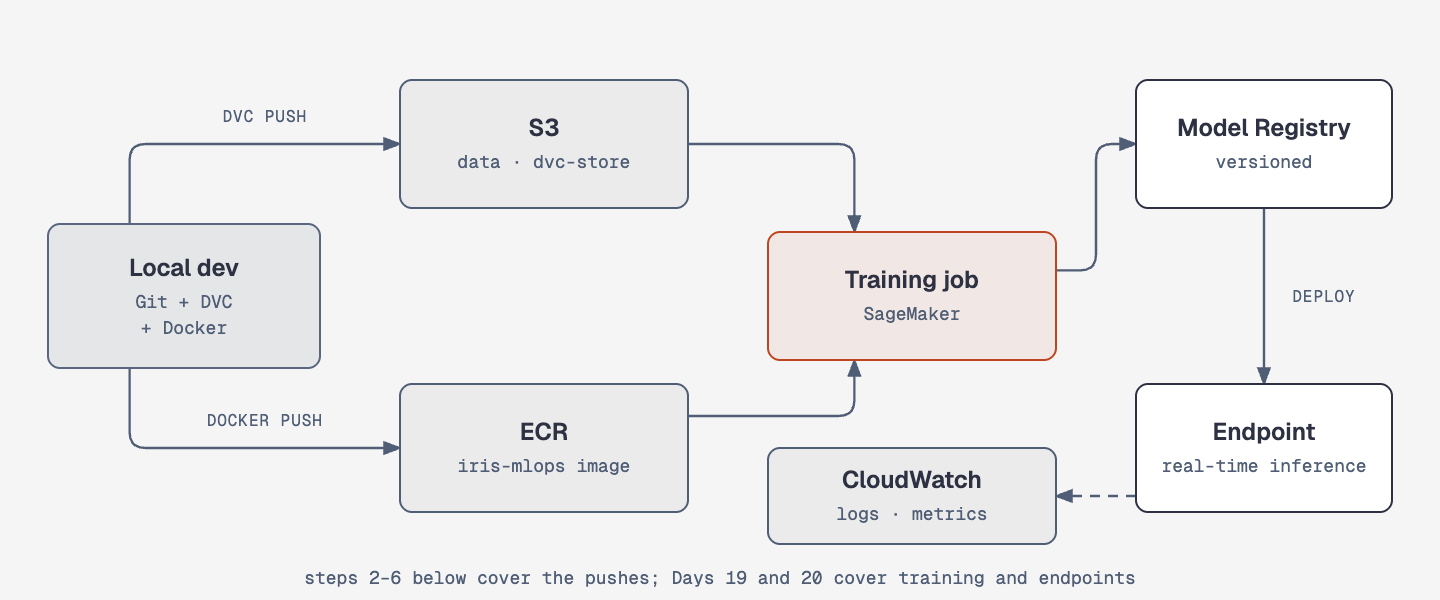
Everything you built locally in Days 4–16 has a direct cloud counterpart. Nothing about the pipeline shape changes — only where it executes.
Wiring iris-mlops Into AWS
Eight small, real steps — from installing the CLI to a training-job skeleton you'll flesh out in a future day.
1 · Install and configure the AWS CLI
# Install AWS CLI v2 (Linux)
curl "https://awscli.amazonaws.com/awscli-exe-linux-x86_64.zip" -o "awscliv2.zip"
unzip awscliv2.zip
sudo ./aws/install

# Verify
aws --version

# Configure using your IAM user's keys, never root
aws configure
# AWS Access Key ID:     ****************
# AWS Secret Access Key: ****************
# Default region name:   us-east-1
# Default output format: json
2 · Create the iris-mlops S3 bucket
# Bucket names must be globally unique across all of AWS
export BUCKET_NAME="iris-mlops-artifacts-$(date +%s)"

aws s3 mb s3://$BUCKET_NAME --region us-east-1

# Versioning protects against an overwritten dataset or model
aws s3api put-bucket-versioning \
  --bucket $BUCKET_NAME \
  --versioning-configuration Status=Enabled

echo "Bucket created: $BUCKET_NAME"
3 · Point your existing DVC remote at S3
This is the same DVC setup from Days 5–6 — you're only changing where the remote points, not how you use it.
dvc remote add -d s3remote s3://$BUCKET_NAME/dvc-store
dvc remote modify s3remote region us-east-1

# Push everything DVC is already tracking locally
dvc push
4 · Verify the upload with boto3
verify_upload.py
import boto3

s3 = boto3.client("s3")
bucket = "iris-mlops-artifacts-1234567890"  # replace with your bucket name

response = s3.list_objects_v2(Bucket=bucket, Prefix="dvc-store/")
for obj in response.get("Contents", []):
    print(f"{obj['Key']:<60} {obj['Size']:>8} bytes")
5 · Push the Day 11 training image to ECR
# Create the repository
aws ecr create-repository \
  --repository-name iris-mlops \
  --image-scanning-configuration scanOnPush=true

# Authenticate Docker against ECR
aws ecr get-login-password --region us-east-1 | \
  docker login --username AWS --password-stdin \
  <ACCOUNT_ID>.dkr.ecr.us-east-1.amazonaws.com

# Apple Silicon? ml.m5 instances are x86_64, so build the image
# with docker build --platform linux/amd64 before tagging

# Tag and push the image built back on Day 11
docker tag iris-mlops-train:latest \
  <ACCOUNT_ID>.dkr.ecr.us-east-1.amazonaws.com/iris-mlops:latest

docker push <ACCOUNT_ID>.dkr.ecr.us-east-1.amazonaws.com/iris-mlops:latest
6 · A SageMaker training-job skeleton
We won't run this end-to-end today: Day 19 covers SageMaker training jobs properly, including the /opt/ml contract your image has to follow. For now, notice the shape: this is docker run from Day 11 becoming estimator.fit() in the cloud.
train_on_sagemaker.py
import sagemaker
from sagemaker.estimator import Estimator

session = sagemaker.Session()
bucket = "iris-mlops-artifacts-1234567890"  # replace with your bucket name
role = "arn:aws:iam::<ACCOUNT_ID>:role/SageMakerExecutionRole"

estimator = Estimator(
    image_uri="<ACCOUNT_ID>.dkr.ecr.us-east-1.amazonaws.com/iris-mlops:latest",
    role=role,
    instance_count=1,
    instance_type="ml.m5.large",
    output_path=f"s3://{bucket}/sagemaker-output",
    sagemaker_session=session,
)

# the DVC remote holds content-addressed blobs, not named files, so give
# training a plain copy first: aws s3 cp data/raw/iris.csv s3://$BUCKET_NAME/data/train/
estimator.fit({"train": f"s3://{bucket}/data/train/"})
7 · The Vertex AI equivalent, for comparison
gcloud ai custom-jobs create \
  --region=us-central1 \
  --display-name=iris-mlops-training \
  --worker-pool-spec=machine-type=n1-standard-4,replica-count=1,container-image-uri=us-central1-docker.pkg.dev/PROJECT_ID/iris-mlops/iris-mlops:latest
8 · Set a billing alarm from the CLI
# billing metrics live only in us-east-1: first turn on "Receive CloudWatch
# billing alerts" in Billing preferences and create an SNS topic for the email
aws cloudwatch put-metric-alarm \
  --region us-east-1 \
  --alarm-name "billing-alarm-5-dollars" \
  --metric-name EstimatedCharges \
  --namespace AWS/Billing \
  --statistic Maximum \
  --period 21600 \
  --threshold 5 \
  --comparison-operator GreaterThanThreshold \
  --evaluation-periods 1 \
  --dimensions Name=Currency,Value=USD \
  --alarm-actions <SNS_TOPIC_ARN>
Cost hygiene:
S3 buckets and ECR repos cost pennies. Running SageMaker Studio notebooks, training instances, and deployed endpoints do not — they bill by the second while active. Stop or delete anything you spin up for practice, and check the AWS Billing dashboard after every hands-on session.
Never commit credentials.
Your AWS access keys should live in~/.aws/credentialsor environment variables — never in a file Git tracks. Add.envand any credentials file to.gitignore, the same discipline you set up for the repo back on Day 4.
Understanding AWS, GCP, and Azure ML platforms is an essential step toward becoming a well-rounded MLOps Engineer.
Each cloud provider offers powerful services for training, deploying, monitoring, and scaling machine learning models.
The goal is not to memorize every service, but to understand the common MLOps capabilities and how they map across cloud platforms.
With this foundation, you can confidently design scalable, automated, and production-ready ML systems on any major cloud.
Keep exploring, experimenting, and building—because modern MLOps is deeply connected with the power of cloud computing.
⚡ Quick Reference
Keep the momentum going — everything you need on LearnXOps in one place:
- 🎓 Courses — Video courses & AI-built courses
- 📚 Ebooks — Community ebooks & your own
- 🧪 All Labs & Challenges — DevOps, Cloud, SRE & more
- ☸️ Kubernetes Labs & Playground — kind clusters, playground & challenges
- 🤖 AI Agent & Bot Labs — OpenClaw · Hermes · CrewAI · LangGraph · MCP


Member discussion