


Learning AWS EKS empowers us to run, scale, and secure Kubernetes clusters natively on AWS—combining Kubernetes flexibility with AWS-managed reliability, deep service integrations, and production-grade automation for modern containerized workloads.
⚡ Quick Reference
Keep the momentum going — everything you need on LearnXOps in one place:
- 🎓 Courses — Video courses & AI-built courses
- 📚 Ebooks — Community ebooks & your own
- 🧪 All Labs & Challenges — DevOps, Cloud, SRE & more
- ☸️ Kubernetes Labs & Playground — kind clusters, playground & challenges
- 🤖 AI Agent & Bot Labs — OpenClaw · Hermes · CrewAI · LangGraph · MCP
📚 Key Learnings
- Understand what Amazon Elastic Kubernetes Service (EKS) is and how it simplifies Kubernetes management on AWS.
- Learn the core components of EKS: Control Plane, Worker Nodes, Node Groups, and Add-ons, and integration with IAM, VPC, and Load Balancers.
- Understand networking in EKS – CNI, Pod networking, and Security Groups for Pods.
- Learn to deploy, manage, and scale containerized applications using Kubernetes on AWS.
- EKS vs ECS.
🧠 Learn here
Amazon Elastic Kubernetes Service (EKS)
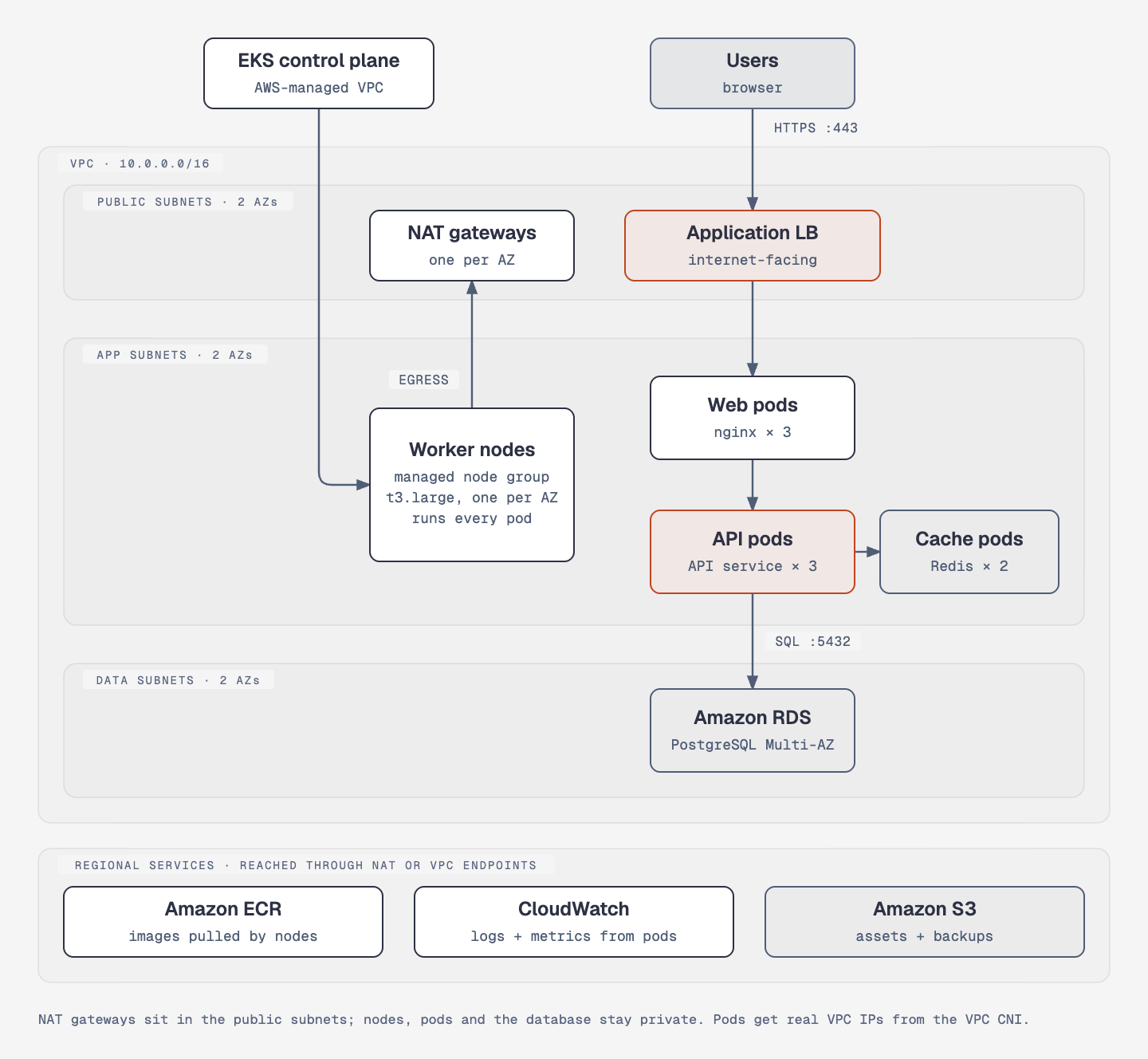
Amazon Elastic Kubernetes Service (EKS) is a fully managed Kubernetes service provided by AWS that simplifies the process of deploying, managing, and scaling containerized applications using Kubernetes. With EKS, you can run Kubernetes clusters without needing to install, operate, or maintain your own Kubernetes control plane (and, with EKS Auto Mode or Fargate, your nodes).
AWS manages the Kubernetes control plane for you, ensuring high availability, scalability, and security. This allows developers and DevOps teams to focus on building and running applications rather than managing cluster infrastructure.
Key Benefits
1. Simplified Kubernetes Management
EKS automates the setup, scaling, and maintenance of the Kubernetes control plane. It integrates seamlessly with AWS services such as IAM, VPC, and CloudWatch for authentication, networking, and monitoring.
2. High Availability and Scalability
EKS automatically runs and scales Kubernetes control plane instances across multiple AWS Availability Zones to ensure fault tolerance and resilience.
3. Secure and Integrated Environment
EKS integrates deeply with AWS security services — including IAM, AWS PrivateLink, and Security Groups — providing fine-grained access control and secure communication.
4. Flexibility with Compute Options
You can choose from different compute options to run workloads:
- Amazon EC2: Run worker nodes in managed node groups or as self-managed nodes.
- AWS Fargate: Run pods without managing servers (serverless mode).
- EKS Auto Mode: AWS runs the nodes, autoscaling, load balancing and storage for you.
5. Native AWS Integrations
EKS integrates with various AWS tools and services such as:
- Amazon ECR for container image storage
- AWS CloudWatch for monitoring
- AWS Load Balancer Controller for traffic management
- AWS IAM for authentication and authorization
Example: Creating an EKS Cluster
Using eksctl
# Create an EKS cluster with managed nodes
eksctl create cluster \
  --name dev-cluster \
  --region us-east-1 \
  --nodegroup-name dev-nodes \
  --node-type t3.medium \
  --nodes 3
Using Terraform
# Needs Terraform >= 1.5.7 and the AWS provider >= 6.0
module "eks" {
  source  = "terraform-aws-modules/eks/aws"
  version = "~> 21.0"

  name               = "prod-cluster"
  kubernetes_version = "1.36"

  vpc_id     = module.vpc.vpc_id
  subnet_ids = module.vpc.private_subnets

  # Lets kubectl reach the API from your laptop; limit it with endpoint_public_access_cidrs
  endpoint_public_access = true

  # Gives the identity running Terraform cluster-admin through an EKS access entry
  enable_cluster_creator_admin_permissions = true

  addons = {
    coredns                = {}
    kube-proxy             = {}
    vpc-cni                = { before_compute = true }
    eks-pod-identity-agent = { before_compute = true }
  }

  eks_managed_node_groups = {
    default = {
      ami_type       = "AL2023_x86_64_STANDARD"
      instance_types = ["t3.large"]
      min_size       = 1
      max_size       = 4
      desired_size   = 2
    }
  }
}
Core Components of Amazon EKS
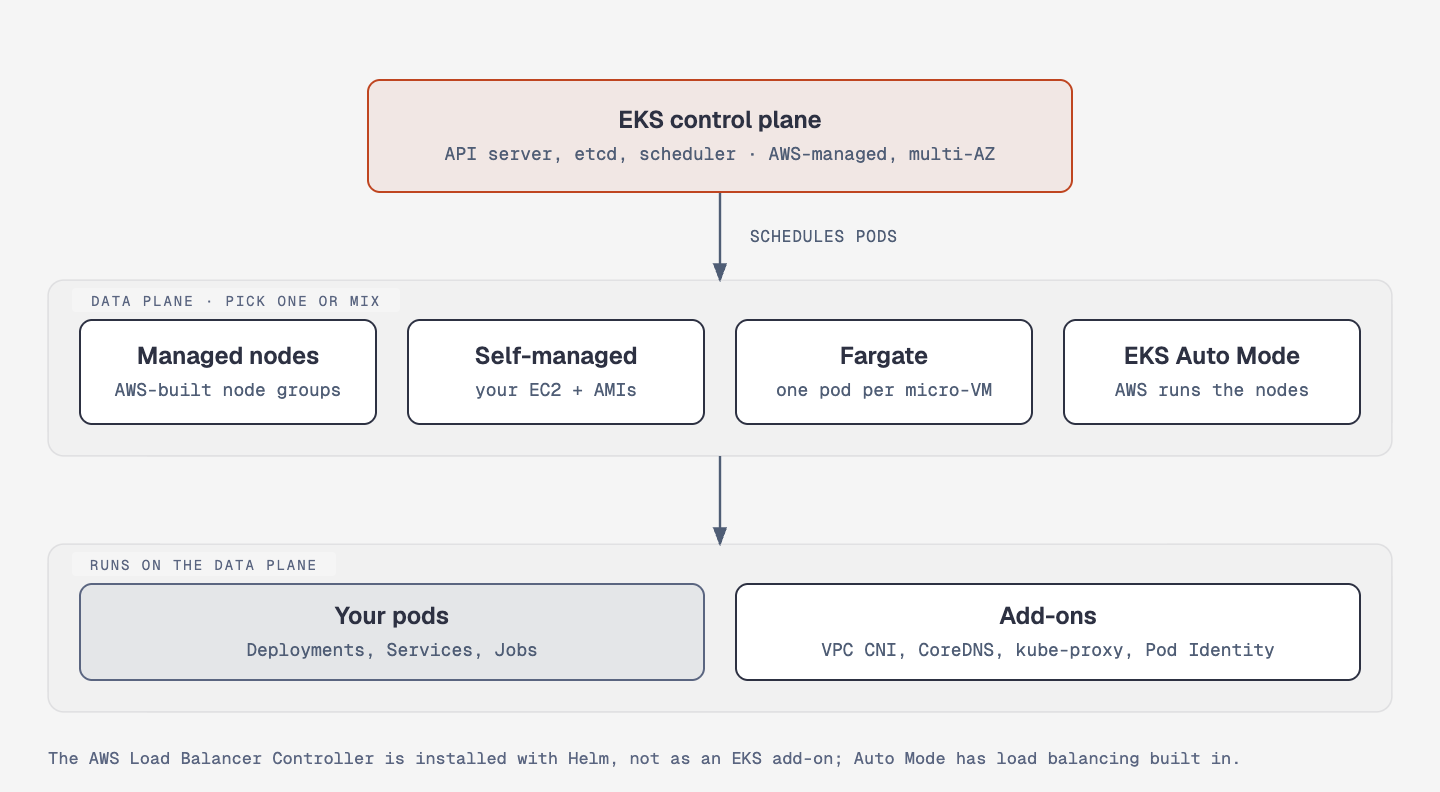
Amazon Elastic Kubernetes Service (EKS) is built around several key components that work together to manage and run containerized applications. These components include the Control Plane, Worker Nodes, Node Groups, and Add-ons. Understanding how each of these components functions helps you manage your Kubernetes workloads efficiently on AWS.
1. Control Plane
The Control Plane is the brain of your Kubernetes cluster. It manages the overall state of the cluster, including scheduling workloads, handling API requests, and monitoring nodes.
Key Components
- kube-apiserver: The main API server that handles communication between Kubernetes components and users.
- etcd: A distributed key-value store that maintains the cluster state and configuration data.
- kube-controller-manager: Ensures the desired cluster state is maintained (e.g., managing replicas and endpoints).
- kube-scheduler: Assigns pods to worker nodes based on available resources and constraints.
In EKS
AWS manages the entire Control Plane across multiple Availability Zones for high availability, scalability, and security, and patches it for you. You still choose when to move to a new Kubernetes version; a cluster left on a version past its support window is upgraded automatically.
2. Worker Nodes
Worker Nodes are the machines (EC2 instances or Fargate-managed compute) that run your containerized workloads.
Responsibilities
- Run application pods (containers)
- Maintain node-level networking and storage
- Communicate with the Control Plane using the kubelet and kube-proxy
Node Components
- kubelet: Ensures that containers are running as expected on the node.
- kube-proxy: Handles network traffic routing between pods and services.
- Container Runtime: Responsible for running containers (containerd on EKS; dockershim, the Docker Engine integration, was removed in Kubernetes 1.24).
Example: Viewing Worker Nodes
kubectl get nodes
3. Node Groups
A Node Group is a collection of worker nodes with similar configurations managed as a single entity.
Types of Node Groups
- Managed Node Groups: AWS automatically handles provisioning, scaling, and upgrading EC2 worker nodes.
- Self-Managed Node Groups: You manually manage node lifecycle using EC2 instances and Auto Scaling Groups.
Example: Creating a Managed Node Group
eksctl create nodegroup \
  --cluster dev-cluster \
  --region us-east-1 \
  --name dev-nodegroup \
  --node-type t3.medium \
  --nodes 3 \
  --nodes-min 2 \
  --nodes-max 5
4. Add-ons
EKS Add-ons provide extended functionality and operational tools to enhance your cluster.
Common Add-ons
- CoreDNS: Provides DNS-based service discovery for pods and services.
- kube-proxy: Manages network rules and routes for Kubernetes Services.
- Amazon VPC CNI Plugin: Integrates Kubernetes networking with AWS VPC networking, allowing pods to use native VPC IP addresses.
- Amazon EBS CSI Driver: Enables dynamic provisioning of EBS volumes for storage.
- AWS Load Balancer Controller: Manages AWS ALB/NLB resources for ingress and service exposure.
Example: Managing Add-ons
# List available add-ons
eksctl get addons --cluster dev-cluster

# Install CoreDNS add-on
eksctl create addon --name coredns --cluster dev-cluster
Integration with AWS Identity and Access Management (IAM)
EKS uses IAM to manage authentication and fine-grained access control.
Features
- IAM Roles for Service Accounts (IRSA): Assign IAM roles to specific Kubernetes service accounts, enabling pods to access AWS services securely without managing static credentials.
- EKS Pod Identity: The simpler successor to IRSA: link an IAM role to a service account with one EKS API call and no OIDC provider (needs the eks-pod-identity-agent add-on).
- Access entries: Grant IAM users and roles access to the cluster through the EKS API, using access policies or Kubernetes RBAC groups. They replace the deprecated aws-auth ConfigMap.
- Cluster Authentication: Uses AWS IAM tokens for secure kubectl and API access.
Example: IRSA Configuration
# Create an IAM policy
aws iam create-policy \
  --policy-name s3-access-policy \
  --policy-document file://s3-access-policy.json

# Create a Kubernetes service account linked to IAM role
eksctl create iamserviceaccount \
  --name s3-reader \
  --namespace default \
  --cluster dev-cluster \
  --attach-policy-arn arn:aws:iam::123456789012:policy/s3-access-policy \
  --approve
Integration with Amazon VPC
Each EKS cluster runs within a Virtual Private Cloud (VPC) to ensure secure networking.
Key Components
- Pod Networking: Managed by the Amazon VPC CNI plugin, which assigns VPC IP addresses directly to pods.
- Subnets: Clusters can use both private and public subnets for worker nodes.
- Security Groups: Control inbound/outbound traffic for nodes and services.
- PrivateLink: Allows private API server access without exposing endpoints to the public internet.
Example: VPC CNI Configuration
# View current CNI configuration
kubectl describe daemonset aws-node -n kube-system

# Update the VPC CNI add-on
eksctl update addon --name vpc-cni --cluster dev-cluster
Networking Modes
- Public: Cluster API accessible over the internet.
- Public and private: API reachable from the internet, while traffic from nodes stays inside the VPC.
- Private: Cluster API accessible only within the VPC or via Direct Connect/VPN.
Integration with Load Balancers
EKS integrates with AWS Elastic Load Balancing (ELB) to distribute traffic to Kubernetes workloads.
Supported Load Balancers
- Application Load Balancer (ALB): Layer 7 (HTTP/HTTPS) – ideal for Ingress resources.
- Network Load Balancer (NLB): Layer 4 (TCP/UDP) – suitable for high-performance services.
- Classic Load Balancer (CLB): Legacy option, generally replaced by ALB/NLB.
AWS Load Balancer Controller
The AWS Load Balancer Controller automatically creates and manages ALBs/NLBs for Kubernetes services and ingress resources.
Example: Deploying ALB Controller
# 1. IAM policy for the controller
curl -o iam_policy.json https://raw.githubusercontent.com/kubernetes-sigs/aws-load-balancer-controller/v2.14.1/docs/install/iam_policy.json
aws iam create-policy \
  --policy-name AWSLoadBalancerControllerIAMPolicy \
  --policy-document file://iam_policy.json

# 2. Service account with an IAM role (IRSA)
eksctl utils associate-iam-oidc-provider --cluster dev-cluster --approve
eksctl create iamserviceaccount \
  --cluster dev-cluster \
  --namespace kube-system \
  --name aws-load-balancer-controller \
  --attach-policy-arn arn:aws:iam::<ACCOUNT_ID>:policy/AWSLoadBalancerControllerIAMPolicy \
  --approve

# 3. Install the controller (helm install also applies its CRDs)
helm repo add eks https://aws.github.io/eks-charts
helm repo update eks
helm install aws-load-balancer-controller eks/aws-load-balancer-controller \
  -n kube-system \
  --set clusterName=dev-cluster \
  --set serviceAccount.create=false \
  --set serviceAccount.name=aws-load-balancer-controller
Networking in EKS
Networking in Amazon Elastic Kubernetes Service (EKS) is one of the most crucial components of cluster architecture. It determines how pods communicate internally and externally, how IP addresses are managed, and how security is enforced. EKS leverages the Amazon VPC Container Network Interface (CNI) plugin to enable Kubernetes pods to use native AWS VPC networking.
Amazon VPC CNI Plugin
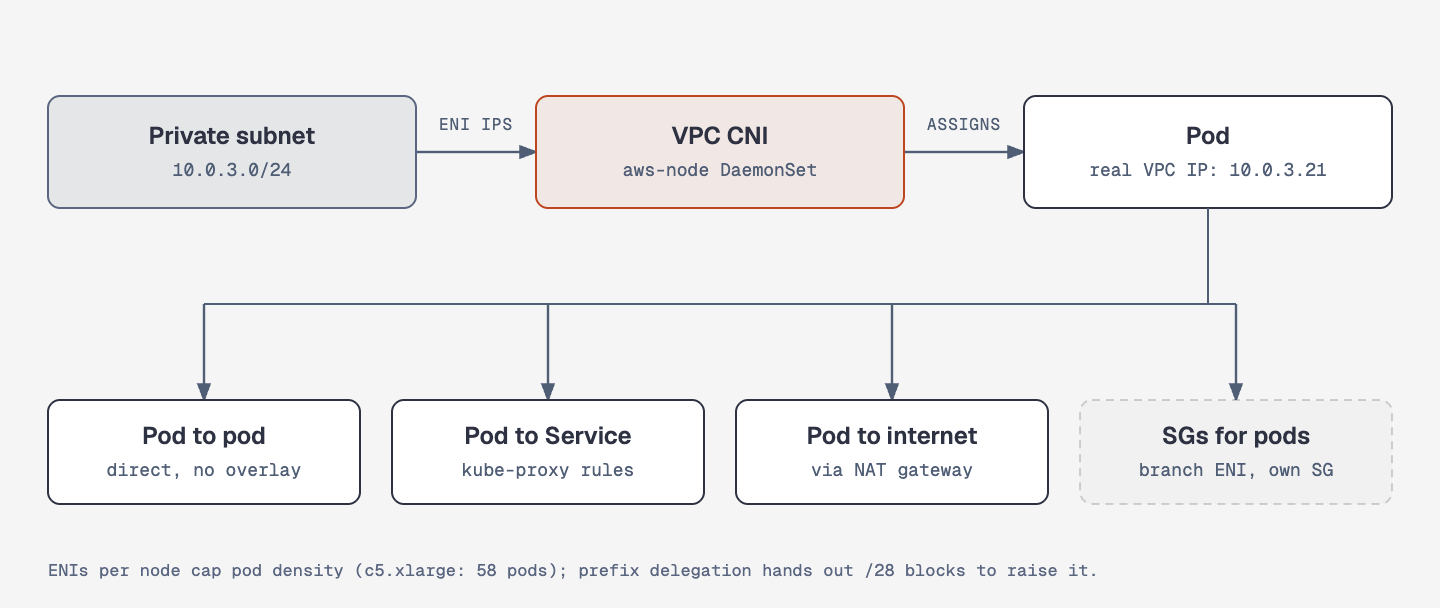
The Amazon VPC CNI plugin allows Kubernetes pods running on Amazon EC2 instances to have the same IP address inside the pod as they do on the VPC network. This provides native integration between Kubernetes and AWS networking.
Key Features
- Each pod receives an IP address from the VPC subnet.
- Supports high-performance networking with the AWS Elastic Network Adapter (ENA).
- Enables fine-grained security control using AWS Security Groups.
- Supports IPv4 and IPv6.
Benefits
- Simplifies network monitoring and traffic management using AWS tools.
- Eliminates the need for NAT translation for pod communication within the VPC.
- Provides consistent IP visibility in AWS CloudWatch, VPC Flow Logs, and security tools.
Example: Checking the CNI Version
kubectl describe daemonset aws-node -n kube-system | grep Image
Example: Updating the CNI Add-on
eksctl update addon --name vpc-cni --cluster prod-cluster
Pod Networking in EKS
Pod networking defines how pods communicate with each other, services, and external resources. EKS uses the VPC CNI plugin to manage pod-level networking.
Networking Model
- Pod-to-Pod Communication: Direct communication within the same VPC using native IPs.
- Pod-to-Service Communication: Handled via kube-proxy and AWS Load Balancer integration.
- Pod-to-External Communication: Outbound traffic flows through NAT Gateways or Internet Gateways.
IP Addressing
Each worker node (EC2 instance) receives a primary ENI and can attach multiple secondary ENIs. Each ENI provides multiple secondary IPs that can be assigned to pods.
| Instance Type | Max ENIs | IPs per ENI | Max Pods |
|---|---|---|---|
| t3.medium | 3 | 6 | 17 |
| m5.large | 3 | 10 | 29 |
| c5.xlarge | 4 | 15 | 58 |
Note: Max pods per node = ENIs × (IPs per ENI − 1) + 2. With prefix delegation turned on, each IP slot holds a /28 prefix of 16 addresses, so a node can run far more pods (EKS recommends capping max pods at 110, or 250 on larger instances).
Example: View Pod IPs
kubectl get pods -o wide
Security Groups for Pods (SGP)
Security Groups for Pods provide fine-grained network security control at the pod level rather than the node level.
How It Works
- Uses the Amazon VPC CNI plugin with the
SecurityGroupsForPodsfeature enabled. - Each pod is assigned to an ENI with specific security groups.
- This allows different pods on the same node to have different security rules.
Use Cases
- Isolate workloads in multi-tenant clusters.
- Apply least-privilege network policies per application.
- Improve compliance by separating public and private access pods.
Prerequisites
- A supported Nitro-based instance type (m5, c5, r5 and similar; t-family instances are not supported).
- CNI version ≥ 1.9.0.
- The
AmazonEKSVPCResourceControllermanaged policy attached to the cluster IAM role.
Example: Enabling Security Groups for Pods
# The cluster IAM role needs the AmazonEKSVPCResourceController managed policy
aws iam attach-role-policy \
  --role-name <cluster-role-name> \
  --policy-arn arn:aws:iam::aws:policy/AmazonEKSVPCResourceController

# Turn on pod ENIs in the VPC CNI
kubectl set env daemonset aws-node -n kube-system ENABLE_POD_ENI=true

# Supported nodes get a trunk ENI and this label set to true
kubectl get nodes -L vpc.amazonaws.com/has-trunk-attached
Example: Assigning a Security Group to a Pod
apiVersion: vpcresources.k8s.aws/v1beta1
kind: SecurityGroupPolicy
metadata:
  name: web-app-sgp
  namespace: default
spec:
  podSelector:
    matchLabels:
      app: web-app
  securityGroups:
    groupIds:
      - sg-0a12bc34def567890
---
apiVersion: v1
kind: Pod
metadata:
  name: web-app
  namespace: default
  labels:
    app: web-app
spec:
  containers:
  - name: web
    image: nginx
Deploying, Managing, and Scaling Applications on EKS
Amazon Elastic Kubernetes Service (EKS) enables you to deploy, manage, and scale containerized applications using Kubernetes on AWS. With EKS, you can leverage Kubernetes features like declarative configurations, automatic scaling, and rolling updates, while benefiting from AWS’s managed infrastructure and integrations.
1. Deploying Applications on EKS
Step 1: Create a Deployment
A Deployment in Kubernetes defines how to create and manage replicas of your application pods.
Example: NGINX Deployment
apiVersion: apps/v1
kind: Deployment
metadata:
  name: nginx-deployment
spec:
  replicas: 3
  selector:
    matchLabels:
      app: nginx
  template:
    metadata:
      labels:
        app: nginx
    spec:
      containers:
      - name: nginx
        image: nginx:1.25
        ports:
        - containerPort: 80
kubectl apply -f nginx-deployment.yaml
kubectl get pods
Step 2: Expose the Application
You can expose your application to other services or the internet using Services or Ingress.
Example: Service Using LoadBalancer
apiVersion: v1
kind: Service
metadata:
  name: nginx-service
  annotations:
    service.beta.kubernetes.io/aws-load-balancer-scheme: internet-facing
spec:
  type: LoadBalancer
  selector:
    app: nginx
  ports:
    - protocol: TCP
      port: 80
      targetPort: 80
kubectl apply -f nginx-service.yaml
kubectl get svc
With the AWS Load Balancer Controller (v2.5 or later) installed, this Service gets a Network Load Balancer; the scheme annotation makes it internet-facing, since the default is internal. For an ALB, use an Ingress. Without the controller, the built-in cloud provider creates a Classic Load Balancer.
2. Managing Applications
Rolling Updates and Rollbacks
Kubernetes provides rolling updates by default — updating pods gradually to avoid downtime.
# Update the deployment image
kubectl set image deployment/nginx-deployment nginx=nginx:1.26

# Check rollout status
kubectl rollout status deployment/nginx-deployment

# Rollback if necessary
kubectl rollout undo deployment/nginx-deployment
Namespace Management
Namespaces isolate workloads logically within a cluster.
kubectl create namespace staging
kubectl get ns
kubectl apply -f app.yaml -n staging
Monitoring and Logging
Use AWS integrations for observability:
- Amazon CloudWatch Container Insights for metrics
- Fluent Bit / Fluentd for log forwarding
- Prometheus + Grafana for custom dashboards
3. Scaling Applications
Horizontal Pod Autoscaler (HPA)
Automatically scale pods based on CPU/memory utilization or custom metrics.
Example: HPA Configuration
kubectl autoscale deployment nginx-deployment \
  --cpu-percent=70 \
  --min=3 \
  --max=10
kubectl get hpa
Cluster Autoscaler (CA)
Automatically adjusts the number of worker nodes in an EKS cluster based on pending pods.
Installation Example
helm repo add autoscaler https://kubernetes.github.io/autoscaler
helm install cluster-autoscaler autoscaler/cluster-autoscaler \
  --namespace kube-system \
  --set autoDiscovery.clusterName=prod-cluster \
  --set awsRegion=us-east-1
Karpenter (Next-Gen Autoscaler)
Karpenter automatically launches optimal compute resources based on pod scheduling needs, reducing cost and improving performance.
Example Manifest
apiVersion: karpenter.sh/v1
kind: NodePool
metadata:
  name: default
spec:
  template:
    spec:
      requirements:
        - key: node.kubernetes.io/instance-type
          operator: In
          values: ["t3.medium", "t3.large"]
      nodeClassRef:
        group: karpenter.k8s.aws
        kind: EC2NodeClass
        name: default
  limits:
    cpu: 1000
---
apiVersion: karpenter.k8s.aws/v1
kind: EC2NodeClass
metadata:
  name: default
spec:
  role: KarpenterNodeRole-prod-cluster
  amiSelectorTerms:
    - alias: al2023@latest
  subnetSelectorTerms:
    - tags:
        karpenter.sh/discovery: prod-cluster
  securityGroupSelectorTerms:
    - tags:
        karpenter.sh/discovery: prod-cluster
4. GitOps and CI/CD Integration
For continuous delivery, integrate EKS with automation tools:
- ArgoCD / FluxCD for GitOps workflows
- AWS CodePipeline + CodeBuild for native CI/CD pipelines
- Jenkins or GitHub Actions for custom automation
Example: GitOps with ArgoCD
kubectl create namespace argocd
helm repo add argo https://argoproj.github.io/argo-helm
helm install argocd argo/argo-cd -n argocd
kubectl apply -f application.yaml -n argocd
Amazon EKS vs Amazon ECS
| Feature / Aspect | Amazon EKS (Elastic Kubernetes Service) | Amazon ECS (Elastic Container Service) |
|---|---|---|
| Definition | Managed Kubernetes service that runs containerized applications using open-source Kubernetes. | Fully managed container orchestration service by AWS with deep AWS-native integration. |
| Control Plane | AWS manages Kubernetes control plane (API server, etcd, scheduler). | AWS manages the entire orchestration engine (no Kubernetes). |
| Orchestration Engine | Kubernetes (open source and CNCF-compliant). | AWS proprietary orchestration engine. |
| Complexity | Higher learning curve; requires Kubernetes knowledge. | Easier to use; integrates natively with AWS services. |
| Deployment Units | Pods (one or more containers per pod). | Tasks (one or more containers per task). |
| Compute Options | EC2 (managed, self-managed or Auto Mode nodes), Fargate, AWS Outposts, or on-premises Hybrid Nodes. | EC2, Fargate, or AWS Outposts. |
| Networking | Managed via Amazon VPC CNI plugin; pods get VPC IPs. | AWS VPC integration with ENI-per-task model. |
| Scaling | Uses Kubernetes tools (HPA, VPA, Cluster Autoscaler, Karpenter). | Uses ECS Service Auto Scaling integrated with CloudWatch. |
| Service Discovery | Kubernetes DNS (CoreDNS) and AWS Cloud Map integration. | AWS Cloud Map native integration. |
| Load Balancing | ALB/NLB integration via AWS Load Balancer Controller. | Native ALB/NLB support for ECS Services. |
| Observability | Kubernetes-native tools (Prometheus, Grafana, CloudWatch). | Deep AWS integration (CloudWatch, X-Ray, AWS OpenTelemetry). |
| Customization | Highly customizable with Kubernetes add-ons, CRDs, Helm, and operators. | Opinionated and simpler — AWS handles most orchestration logic. |
| Use Case | Ideal for organizations needing Kubernetes portability, hybrid/multi-cloud, or custom tooling. | Ideal for AWS-centric teams wanting simple, cost-effective orchestration. |
| Integration with Open Source Ecosystem | Full access to Kubernetes ecosystem (Helm, ArgoCD, Istio, etc.). | Limited; relies mostly on AWS-native features. |
| Management Responsibility | Shared — AWS manages control plane, you manage data plane. | Minimal — AWS handles most management tasks. |
| Pricing | $0.10/hour per cluster ($0.60/hour on extended support) + EC2/Fargate costs. | No cluster management fee; pay only for compute resources. |
| Portability | Runs standard Kubernetes — portable across any Kubernetes environment. | Proprietary to AWS — not portable to other clouds. |
| Best For | Teams familiar with Kubernetes, hybrid deployments, complex microservices. | Teams focused on AWS ecosystem and simplicity. |
🧠 In short:
- Choose EKS if you need Kubernetes compatibility, portability, or integration with open-source tools.
- Choose ECS if you want simplicity, faster setup, and deep AWS-native orchestration without managing Kubernetes.
Challenges
- Create an EKS cluster using
eksctlor Terraform. - Deploy and expose a web application using LoadBalancer service.
- Enable CloudWatch Container Insights to monitor your cluster.
- Configure IAM Roles for Service Accounts (IRSA) or EKS Pod Identity for secure S3 access from pods.
- Set up Cluster Autoscaler/Karpenter for automatic node scaling.
- Deploy a multi-tier app (frontend + backend) and test connectivity.
- Implement RBAC for read-only access to specific namespaces.
🤷🏻 How to Participate?
✅ Complete the tasks and challenges.
✅ Document your progress and key takeaways on GitHub ReadMe, Medium, or Hashnode.
✅ Share the above in a LinkedIn post tagging me (Sandip Das), and use #90DaysOfCloud to engage with the community!
⚡ Quick Reference
Keep the momentum going — everything you need on LearnXOps in one place:
- 🎓 Courses — Video courses & AI-built courses
- 📚 Ebooks — Community ebooks & your own
- 🧪 All Labs & Challenges — DevOps, Cloud, SRE & more
- ☸️ Kubernetes Labs & Playground — kind clusters, playground & challenges
- 🤖 AI Agent & Bot Labs — OpenClaw · Hermes · CrewAI · LangGraph · MCP


Member discussion